
Testimonial Advertising: How to Turn Customer Stories Into Sales
Testimonial advertising uses real customer stories and reviews to promote your brand. Discover popular types and how to put this content to work.
Updated June 8, 2026

AI prompt templates help with faster analysis, testing, and optimization without removing human judgment from the process.
PPC is measurable, competitive, and unforgiving.
A small mistake burns through the budget, while a small improvement compounds quickly.
Looking for a Advertising agency?
Compare our list of top Advertising companies near you
AI prompt templates don't change that math. They just help you work it better. Instead of guessing at structure, you give AI systems the right inputs and get recommendations grounded in data patterns that are easy to miss at scale.
This guide covers six prompt templates, from basic to advanced, that slot directly into a real PPC workflow.
No hype about what AI will do someday, just cleaner work, faster decisions, and outputs that are actually easy to review.
An AI prompt template is a reusable instruction set you give an AI model to ensure consistent, useful output.
The important word is reusable.
In PPC, one-off prompts usually create messy work. You get a decent keyword list once, then a weaker version the next time.
A proper prompt template tells the model what role to take, what data to use, what limits to follow, and what format to return.
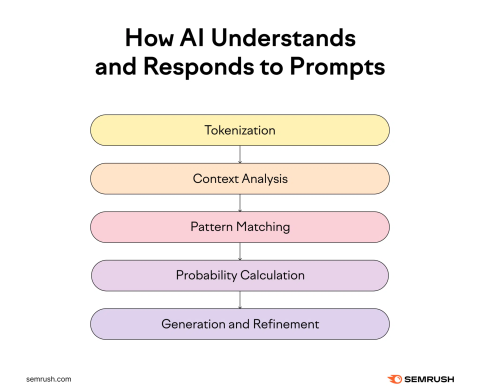
For a useful primer on where automation fits into paid search, Google’s Smart Bidding documentation explains how machine learning adjusts bids at each auction to hit campaign goals.
Before getting into advanced forecasting or automation, it helps to start with the parts of PPC where AI is easiest to use and easiest to check.
Do not ask AI for “good PPC keywords” and expect anything useful.
Feed it the actual materials: your sitemap, product categories, current winning queries, search term reports, and anything that shows what buyers actually type before converting.
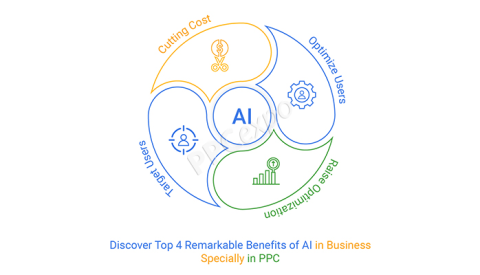
Use AI to find gaps, long-tail themes, near-duplicates, and obvious negatives that are easy to miss when you are scanning hundreds of rows manually.
Here are example prompts you can adapt:
You’re a PPC strategist. Using this search term report CSV from the last 90 days and this product/category list, cluster terms by intent: informational, commercial, and transactional. Recommend 25 high-intent keywords with match type suggestions and 20 negative keywords. Flag duplicates and near-duplicates.
Analyze these landing pages and current winning queries. Propose 10 long-tail variants for each primary theme that are likely lower CPC but still high intent. Include a rationale and a suggested landing page for each.
Based on the attached competitor SERP snapshots and auction insights, identify 15 gaps in our current keyword coverage and the ad groups they belong to.
The useful shift here is that you are not starting from a blank page or a keyword tool export. You are asking AI to connect search behavior, intent, landing page fit, and account structure.
If you are using Google’s automation, pair this with broad match and Smart Bidding for efficient coverage. Do not roll it everywhere at once. Test it in a controlled campaign first.
AI can write ad copy quickly.
The harder part is getting a copy that fits the keyword, the landing page, the offer, and the way people actually scan search ads.
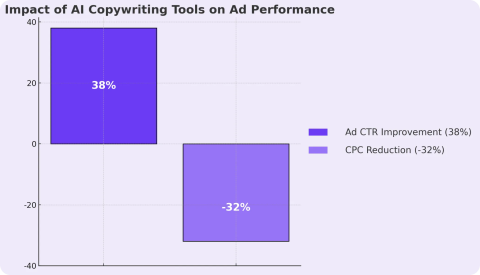
Without enough context, AI tends to produce polished but interchangeable lines. They sound fine. They do not always give you something worth testing.
So give it constraints.
You’re an ad copywriter optimizing for CTR and conversion rate. Write 10 responsive search ad headline/description combinations for this landing page and this keyword cluster. Follow character limits. Include at least one benefit, one feature, one social proof element, and two variations with the target keyword in H1. Return as a table with pinning suggestions.
Given these customer reviews and USP bullets, produce 8 ad angles: urgency, savings, risk reversal, social proof, product quality, convenience, speed, and sustainability. For each angle, write matching headlines and descriptions. Include two variants designed for mobile-first scanning.
The real value is not just more copy, but more angles to test without dragging the team through another slow brainstorm.
Then you still need to review it as a PPC person would.
Combine generative AI with platform guidance like Google’s Ad Strength signals for RSAs, then use experiments to test the strongest angles. Add your brand style guide directly into the prompt so the output does not drift into generic ad language.
Audience segmentation and budget strategy both depend on patterns across behavior, spend, lead quality, and timing, so the prompts need better data and tighter judgment.
Age, gender, and location can help, but they usually do not explain why one audience converts and another clicks around for two minutes before disappearing.
This is where AI can be useful.
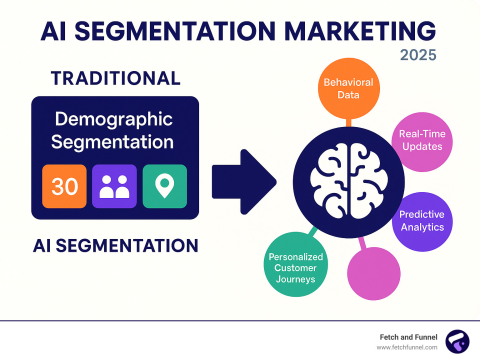
Start with CRM segments, analytics events, conversion paths, and search query data. Then ask the model to propose audience hypotheses you can actually test.
You’re a growth analyst. Using these anonymized conversion logs, including events, pages, time on site, and device, cluster users into 4–6 behavior-based segments. For each segment, summarize needs, objections, and buying triggers. Propose audience targeting options, including affinity, in-market, and custom segments, with matching ad messaging.
Review this list of search queries that led to high-LTV customers. Recommend lookalike seed audiences and custom segments for Search and Performance Max, with negative audience ideas to reduce waste.
Using this funnel breakdown by audience, from impressions to clicks to add-to-cart to purchases, identify which segments are saturated and which are underinvested. Propose budget reallocations.
The point is to get a cleaner read on behavior that is already sitting inside your data.
A user who reads comparison pages, visits pricing twice, and converts on mobile has a different problem than someone who lands from a broad query, scans a blog post, and never returns.
AI helps surface those patterns faster.
Budget is where bad PPC advice gets expensive.
Feed the model the messy reality: campaign budgets, CPA or ROAS targets, GEO performance, device splits, time-of-day trends, lead quality, call outcomes, and any constraints the business cares about.
Given these campaigns, daily budgets, target CPA/ROAS, and the last 60 days of performance by hour, geo, and device, simulate three budget reallocation plans to maximize conversions within these constraints. Include expected trade-offs and risk notes.
The lesson is simple: prompt the AI with business-quality signals, not just platform metrics.
Bryan Henry, President of PeterMD, works in a category where PPC performance cannot be judged on lead volume alone because patient quality, eligibility, and acquisition efficiency all affect profitability differently.
Henry says, “One of the biggest mistakes teams make with AI in paid search is optimizing around platform numbers without enough business context behind them.
A campaign can look efficient inside Google Ads and still create operational problems downstream if the lead quality is poor or the intent is off. The useful AI workflows are the ones that connect ad performance back to actual customer outcomes, not just cheaper clicks.”
That is usually the difference between an interesting recommendation and one you can actually defend.
Once you move into forecasting and automation, the margin for vague prompts gets smaller.
These use cases need stronger historical data, clearer guardrails, and closer human review because the recommendations can affect bids, budgets, and campaign pacing quickly.
You want to see campaign possibilities before they show up as a bad month-end report.
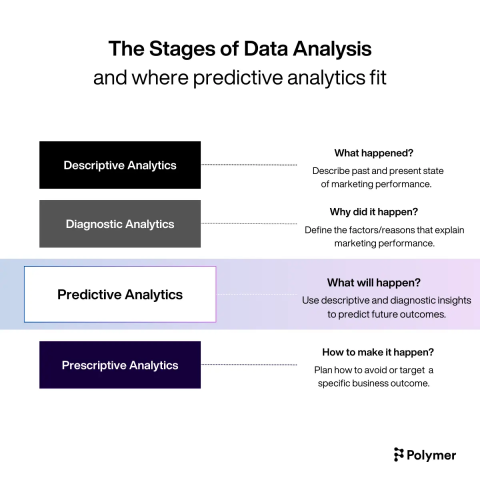
AI can help model seasonality, promo lifts, saturation, and performance risk, especially when you have sufficient historical data.
You’re a marketing data scientist. Using this 18-month time series with impressions, clicks, conversions, spend, promotions, price, and competitors’ share of voice, build a forecast for the next 8 weeks with confidence intervals. Identify leading indicators for CPA spikes and recommend guardrails.
Create a scenario plan: If CPC rises by 12% and conversion rate drops by 5% during peak season, where should we cap CPA/tROAS, and how should we redistribute budget across campaigns to preserve margin?
From this cohort LTV data, propose bidding and budget strategies that optimize for predicted LTV, not just immediate CPA. Summarize the risks of overfitting and how to monitor drift.
This is where AI becomes useful beyond daily account management. It helps you pressure-test decisions before the budget is already committed.
For context on AI’s broader potential in marketing and forecasting, McKinsey’s analysis of generative AI’s economic impact is a helpful read.
Real-time optimization sounds great until it starts changing things you did not mean to change.
That is why the prompt needs thresholds, time windows, action limits, and approval rules. AI can monitor performance and recommend adjustments, but the system should be built around safe, reversible moves.
Start with alerts before automation. Then move to pre-approved actions once you know the recommendations are reliable.
Monitor these KPIs in near real time: CPC, CVR, CPA, impression share, and click share. If metric deltas exceed these thresholds for 3 consecutive hours, recommend and justify adjustments to bids, budgets, and assets. Output actions as if-then rules with priorities.
Use Google Ads rules, scripts, or third-party platforms to implement changes that are safe and reversible. Performance Max can also help discover incremental inventory using a machine learning link.
The biggest gains from AI in PPC usually come from better processes, not full automation. Strong results still depend on clean data, clear goals, and consistent human review.
Phil Santoro, Co-founder of Wilbur Labs, has worked across multiple growth-stage companies where paid acquisition systems are carefully tested before scaling.
Santoro says, “AI speeds up execution, but it also speeds up bad decisions if teams are not validating what the system is recommending. We have seen campaigns look promising in small datasets and then break once real traffic volume hits.
The teams getting the most value from AI are usually the ones running disciplined testing processes around it instead of assuming automation automatically means accuracy.”
Adopting AI in PPC is really about tightening the way your team works.
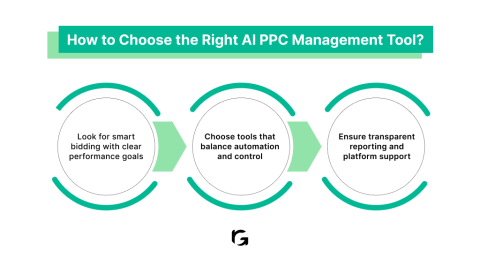
The goal is to build workflows that leverage AI to accelerate analysis and testing without removing human accountability.
Over time, these processes help teams test, learn, and adapt faster without losing control of performance or spending efficiency.
AI prompt templates help PPC teams move faster, but the advantage does not come solely from speed.
As platforms add more automation and privacy continues to reshape targeting, the teams that combine clean data, strong prompts, and human review will have a stronger process.