
How to Measure Your AI Visibility as a B2B Provider
Discover how to enhance your business's AI visibility. Learn to track mentions and measure your standing against competitors effectively.
Updated July 15, 2026

A well-designed chatbot can help customers get answers faster, reduce support costs, and improve the overall customer experience. This guide covers 7 chatbot best practices to help you create more effective conversations and deliver better customer support.
AI chatbots have quickly become a standard feature on business websites. If you have a question about an order or can't find a return policy, chances are one of these assistants can help. And it can probably do it faster than calling the support line.
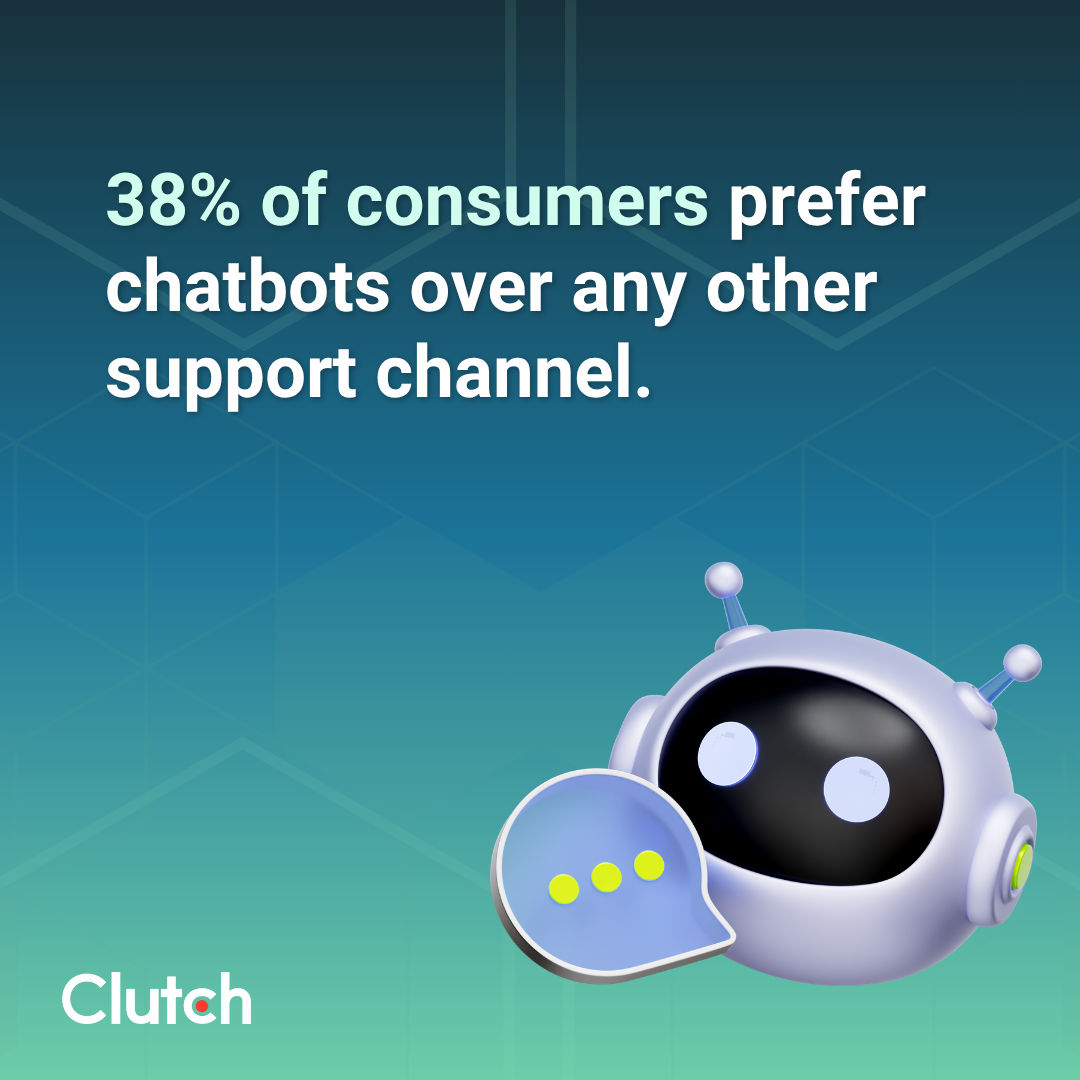
That's one of the reasons why many people appreciate chatbots. According to a new Clutch survey, 87% of consumers have used AI customer support, with more than a third (38%) preferring chatbots over any other support channel.
Looking for a Artificial Intelligence agency?
Compare our list of top Artificial Intelligence companies near you
However, when poorly implemented, chatbots can do more harm than good — leaving customers stuck in frustrating loops with an unhelpful AI or forcing them to give up altogether.
This guide breaks down what separates a chatbot that deflects tickets from one that actually closes them. With careful planning, you can create a bot that satisfies your customers and reduces your team's workload instead of adding to it.
Don't assume that a chatbot can (or should) tackle everything your support team does. Some issues will always require human creativity and empathy. More sophisticated chatbots also cost more to build.
Instead of trying to create a super bot, start by mapping your top support requests. Look for recurring yet easily resolved tickets that you can automate with a simple chatbot. For instance, an AI assistant could look up order statuses and answer product questions.
Once you've got a sense of the tasks your team handles, set the scope for your chatbot. Decide which tickets it can resolve autonomously and what it should escalate to a human. Maybe you want it to issue refunds under $100, but a human must sign off on amounts over $100.
Setting measurable goals helps you decide what to focus on. Do customers complain about long wait times? Aim to resolve tickets 20% faster within six months of launching your chatbot. If your support team feels overwhelmed, set a goal for your chatbot to handle 10% of routine tickets in the first month.
Use key performance indicators to confirm you're making progress. If your top priority is speedy service, track resolution time. To understand how customers feel about your assistant, monitor your customer satisfaction score (CSAT).
You should also track the containment rate, or the percentage of inquiries that your chatbot resolves without escalating to a human. A low containment rate suggests that your chatbot may need a more thorough knowledge base or more testing.
Like a human representative, your chatbot can't resolve tickets effectively without the right knowledge. Get it up to speed by providing accurate, up-to-date documentation.
This may include:
Review your knowledge base regularly, and make updates as needed. The last thing you want is your chatbot sharing inaccurate or outdated information, such as an old return policy your business no longer honors. That's a recipe for confused or disgruntled customers.
Of course, creating an effective knowledge base isn't as simple as giving your chatbot access to a jumble of files. You also need to structure the content to make it easy for it to retrieve information.
When possible, organize content using a question-and-answer format. For example, your troubleshooting guide might include something like this: "How do I change the filter in my coffee maker? To change the filter in your coffee maker, start by..." These direct responses enable the AI chatbot to quickly locate and share relevant information.
You should also organize your documentation with direct, descriptive headings and short sections. Use numbered lists for step-by-step instructions and bullet points for other information. Scannability helps both AI chatbots and humans find answers faster, reducing response times.
While your chatbot will probably draw on your internal documents to answer questions, it shouldn't parrot your jargon or use corporate speak. That will only alienate your true audience: customers.
As you create scripts for your chatbot, speak directly to consumers. Use plain language that anyone can understand, especially in a stressful situation. If someone asks for help installing a complex software package, the chatbot should provide clear, simple instructions.
That doesn't mean you should set aside your brand voice. After all, your chatbot is part of your business, just like your human team.
Program it to respond using the same tone and personality customers expect from your marketing and website. For example, Sephora's AI chatbot uses emojis and upbeat language. When it asks for a customer's email address, it reassures them, "I’ll use this to find your profile and past conversations. No spam, just glam. 💖"
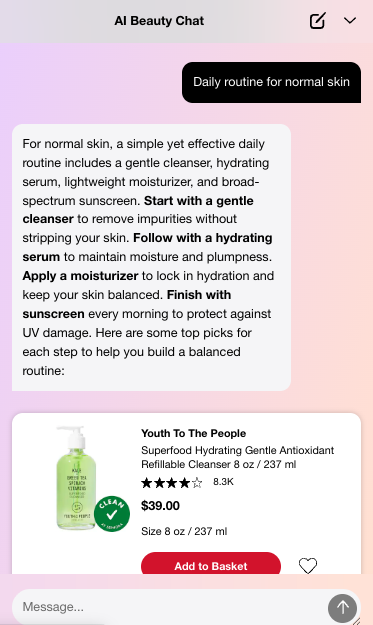
Keep responses short, too. Concise answers outperform exhaustive ones. Customers can always ask follow-up questions or escalate to a human if they need more details.
A smooth handoff is one of the most overlooked best practices for support chatbots. If customers can't figure out how to get help from a human, they might end up typing "representative... REPRESENTATIVE" while their blood pressure spikes.
In fact, 81% of users say AI support has made it harder to reach a human agent. Even when they do connect with one, many still face frustrating experiences, with nearly half (47%) having to repeat their issue, followed by long wait times (16%) and agents lacking context from the previous AI conversation (13%).
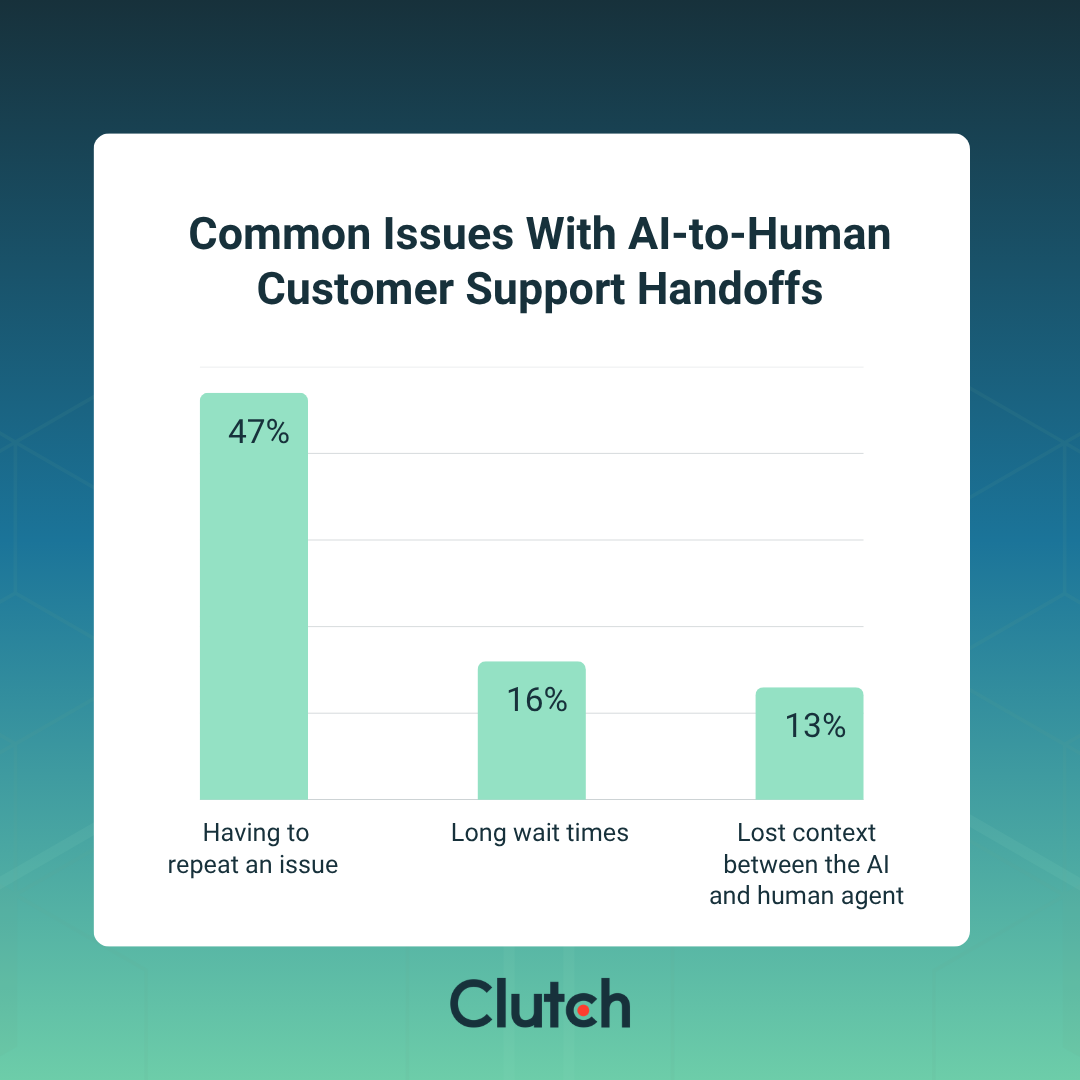
Your business can prevent customer frustration by defining clear triggers for handoffs, such as repeated failures to complete a task or difficulty interpreting a complex query. Negative sentiment, such as foul language or all-caps text, should also get escalated to a human.
Be sure to pass along the entire chatbot conversation to the human team, along with other relevant information, such as purchase history. When customers don't have to repeat themselves, they can get faster, more accurate answers. They may also calm down if the chatbot has frustrated them.
Track escalations to spot recurring issues. If certain inquiries are frequently handed off, you might need to retrain your chatbot or add more documentation to the knowledge base. Automatically routing those requests to a human could also improve customer satisfaction.
Resist the urge to test your chatbot with internal scripts. Your team might not use the same phrases as your customers, or could leave out key details.
Use actual customer queries to assess the quality of your chatbot's responses. You can gather these questions from support tickets or ask your reps to share unusual requests. If a customer makes an outlandish request or asks an unexpected question about your shipping policies, direct it to the chatbot.
Testing with real questions helps you see how your chatbot handles everyday conversations and where it gets stuck. If you only test it with grammatically correct input, for instance, you may not realize that it struggles to interpret typos and slang.
You should also test the chatbot's limits. Feed it deliberately ambiguous or hostile queries to assess how it handles challenging situations. This could be as simple as trying to manipulate the chatbot into sending you free products or issuing an incorrect refund.
See how it responds to edge cases, too. Ask it to ship a product to a country you don’t serve or refund an item purchased in 2011. If the chatbot can't handle unusual situations, it's not ready to go live yet.
Once your chatbot responds appropriately most of the time, soft-launch it to a small group of customers first. For example, you might show it to only 5% of website visitors or limit it to people who ask about your shipping policy.
The work isn't over once your chatbot goes live. It's a living product that needs continuous fine-tuning to ensure it continues to meet your customers' needs.
Monitor the bot closely by tracking how real users interact with it. Pay attention to where customers tend to drop off. If 10% of people quit when the chatbot asks a particular question, it may indicate they do not understand how to respond.
You should also audit conversation logs regularly for patterns in tickets that the AI fails to resolve. Maybe it doesn't have the knowledge to answer a question, or people are getting frustrated by too many steps. Spotting these trends early helps you step in and make improvements before they harm the customer experience.
While your chatbot should use your brand voice, the goal isn't to trick people into thinking they're talking to a human. That hurts trust. Instead, always disclose that they're speaking with a bot.
Protecting customer data is another essential best practice. Always store personal information in a secure location and delete it when you no longer need it.
Consider accessibility, too. Offer additional support for people who speak different languages, such as rapid escalation to a human from their country. A text-to-audio feature also allows people with vision impairments to converse with your bot.
Learn more about what you need to implement an AI chatbot in “Customer Expectations in AI Support: What Businesses Need to Run it Smoothly.”
With 38% of customers already preferring support chatbots, basic AI assistants no longer cut it. Customers expect functional and personable chatbots that actually resolve their issues.
Meet their expectations by following these chatbot best practices, including updating your knowledge base regularly and frequently monitoring conversation logs. These strategies will help you create a genuinely helpful chatbot that's always ready to assist customers.
Thoughtful chatbot design is key. When every part of your chatbot improves the customer experience, retention goes up, and frustration evaporates.