
How to Use Claude Code if You're Not a Developer
Learn how to use Claude Code to build your own AI agents without a coding background, including setup, first steps, and safety tips backed by Clutch data.
Updated June 10, 2026

This article explains the nine workflow problems that automation can help fix, from task routing and communication gaps to data errors, approval delays, duplicate work, customer follow-up, and compliance risk.
The core idea is simple. You identify the repetitive parts of a workflow, then remove as much manual handling as possible.
People are too expensive to waste on copy-paste work, inbox triage, and status chasing.
Looking for a Artificial Intelligence agency?
Compare our list of top Artificial Intelligence companies near you
McKinsey estimates that roughly half of work activities could be automated with existing technologies. But this delivers real cost reduction only when the underlying processes are properly designed in the first place.
This article breaks down nine workflow problems that slow teams down the most and how automation is being used to fix them in practical ways.
Manual task assignment looks manageable right up until volume increases.
Then managers start spending entire mornings figuring out who has capacity, who already owns similar work, who is overloaded, and who forgot to update their status.
Most of this coordination happens in Slack messages, meetings, or someone’s memory.
That creates uneven workloads fast. Lower-priority work gets finished simply because it landed in the right inbox first.
David Kolodny, Co-Founder of Wilbur Labs, works with early-stage companies where small workflow decisions can quickly affect hiring, product velocity, and customer response times.
Kolodny shares, “Task assignment becomes a real bottleneck once a company moves beyond a few people who know everything by memory. The goal is not to remove managers from the process, but to stop making them manually route every request, check every status, and remember every dependency.”
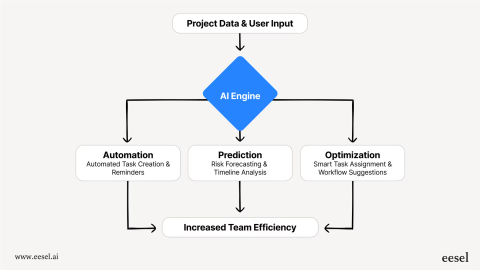
Automation helps because routing becomes rule-based rather than personality-based. Work can be routed based on availability, skill set, customer priority, region, escalation rules, or SLA requirements, without someone manually orchestrating every handoff.
McKinsey research has shown that knowledge workers already spend an enormous amount of time searching for information and managing communication overhead.
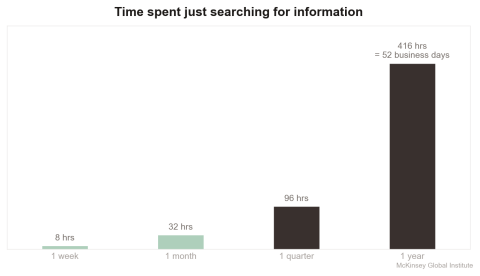
That gets worse when updates live across disconnected systems.
Real-time updates create a shared reality for everyone involved in a project.
When team members see changes as they happen, they can adapt immediately. This visibility keeps projects moving forward without the constant need for status meetings.
Most operational reporting problems start here.
Spreadsheets remain deeply embedded in business operations, but decades of research on spreadsheet errors have shown how fragile manual data handling really is.
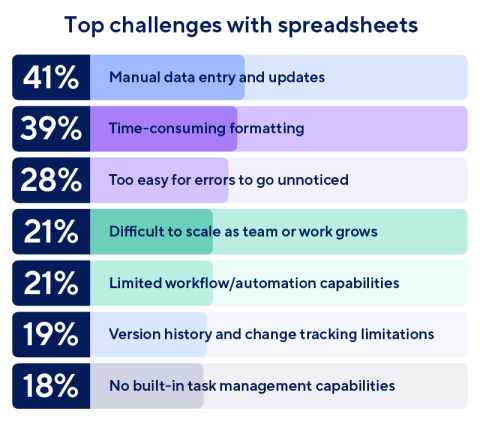
The issue is that humans eventually make mistakes when repeating mechanical work at scale.
Automation reduces those failure points:
The practical outcome is less rework, because one bad data point rarely stays contained for long.
Approvals, like purchase requests and contract reviews, tend to disappear into inboxes.
Usually, nobody notices until deadlines are already slipping.
Work should not stall simply because someone forgot to forward an email. Automated approval routing solves a very specific operational problem:
The biggest operational gain is predictability. People stop building contingency time into their schedules for administrative lag.
Most organizations are over-communicating in fragmented ways.
Because updates sometimes land in Slack or are relayed through email and project management tools, context can get buried.
Then teams compensate by repeating themselves constantly.
Automation helps by narrowing communication to what is actually relevant:
Zaheer Dodhia, CEO of Hummingbird International, works across global sourcing, manufacturing, and supply chain operations where small communication gaps can quickly create delays across teams, vendors, and buyers.
Dodhia notes, “The issue is that updates are spread across too many places, so people end up working from different versions of the same situation. Automation helps when it turns scattered communication into clear signals: who needs to act, what changed, and what has to move next.”
Instead of chasing updates through email threads, your system can automatically notify relevant team members when their input is needed. Everyone stays informed without information overload.
A surprising number of businesses cannot clearly explain where work slows down.
They know projects feel delayed and teams seem overloaded. But they cannot pinpoint where cycle time actually expands because the reporting layer is mostly stitched together manually.
Spreadsheets help up to a point. Then they stop reflecting reality.
Automation changes this because workflows become measurable by default.
You can see the time spent in each stage. You can identify handoff delays, approval bottlenecks, rework loops, missed SLAs, throughput differences between teams, and recurring operational choke points.
Process mining tools take this even further by reconstructing how work actually flows through systems rather than how managers assume it flows.
Once companies can see operational drag clearly, they usually discover the bottleneck is somewhere other than what was expected.
Duplicate work hides surprisingly well inside fast-moving organizations.
Two teams research the same issue. Multiple people begin solving the same customer problem without realizing someone else is already working on it.
Automation reduces this mostly through coordination:
Here’s an example of what this would look like:
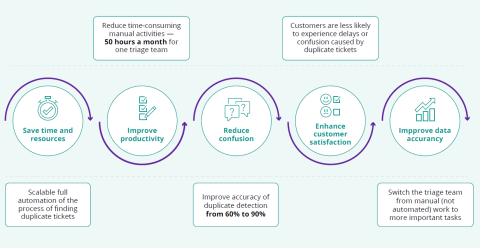
The point is not just that duplicate tickets are annoying. They pull people into low-value sorting work, make the customer experience less consistent, and weaken the accuracy of the data that teams rely on later. The same pattern shows up anywhere requests, records, or internal tasks enter the business from more than one place.
Samuel Charmetant, Founder of ArtMajeur, operates a global online art marketplace where artists, collectors, galleries, and internal teams all depend on clean operational coordination.
Charmetant explains, “Duplicate work is easy to miss when a business has many moving parts. One team may be solving a request that another team has already handled, or the same information may be entered twice in slightly different ways.
Automation is useful because it gives every request a clear path and reduces the chance that teams work in parallel without realizing it.”
That is the real cost of overlap. It does not just waste time. It makes teams slower, less confident, and more likely to miss the work that actually needs attention.
Customer relationships can deteriorate because of small issues. Maybe a follow-up never happens. Or renewal timing gets missed.
Automation helps absorb that administrative weight.
CRM systems can automatically log interactions, trigger onboarding sequences, schedule follow-ups, create internal tasks, surface risk signals, and maintain continuity across departments.
Bryan Henry, President of PeterMD, works in a healthcare setting where patient follow-up, documentation, and timing all affect the quality of care.
Henry says, “In healthcare, automation is most useful when it protects the human parts of the relationship. If the system can handle reminders, intake details, follow-up timing, and internal handoffs, the team has more room to focus on the patient instead of chasing administrative steps.”
Zendesk’s customer experience research has repeatedly shown how automation helps support teams respond faster without making interactions feel robotic.
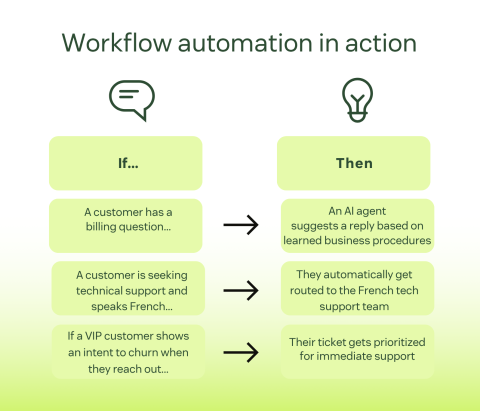
Your team can focus on building genuine relationships, while the system tracks interaction history, schedules follow-ups, and alerts them to important milestones.
Thomson Reuters’ annual Cost of Compliance reporting shows how quickly regulatory complexity continues to expand across industries.
Automation strengthens compliance because systems enforce consistency better than memory does.
Required approvals cannot be skipped accidentally. Policy updates apply consistently across workflows instead of relying on manual interpretation.
Your automated systems should create audit trails, flag potential issues, and consistently apply policies. This proactive approach has significantly reduced our compliance incidents and associated costs.
The companies that struggle most with automation try to redesign everything simultaneously before understanding how work actually flows today.
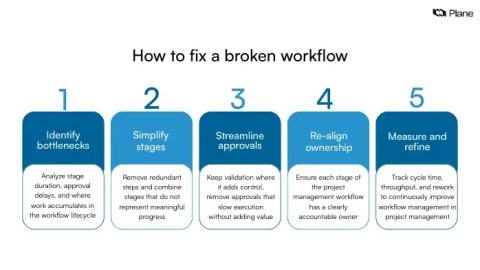
Pick one painful workflow. Measure before and after. Otherwise, nobody knows whether the process actually improved.
And clean the data first. Bad data moving faster is still bad data.
Automation is not a shortcut around broken operations. It is a way to expose them, tighten them, and stop making people absorb the cost of messy workflows every day.