Setting up a flashy new AI tool is exciting, but is this technology going to actually help your business? If you're not paying attention to the right data, you might be annoying or confusing customers instead of giving them a better experience.
You finally find the perfect shirt for that big event, but when it arrives in the mail, it's definitely the wrong size. Like any savvy consumer, you reach out to the company's customer service team to see if you can exchange it. Instead of a human representative, an AI chatbot greets you.
If everything goes well, you'll have a return label and a new shirt on the way in minutes. But if the chatbot doesn't help, you could get stuck in an endless loop of "I don't understand what you're asking" — while your blood pressure creeps up.
Looking for a User Experience agency?
Compare our list of top User Experience companies near you
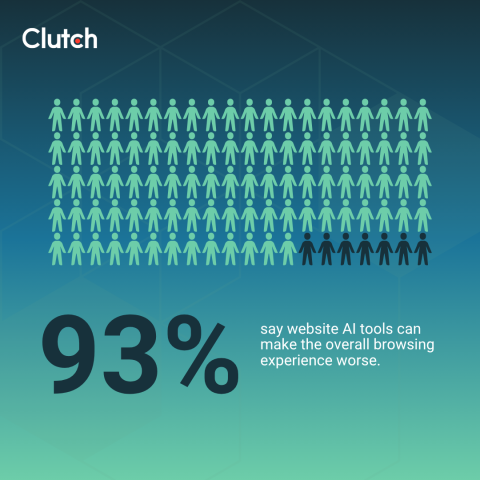
This familiar scenario shows some of the benefits and potential pitfalls of using AI tools for e-commerce. All too often, businesses assume that AI adoption will automatically lead to user improvement. But shoppers don't always agree. In fact, 93% of customers say AI tools can worsen their user experience (UX), according to a new Clutch survey.
So how do you know if that shiny new AI tool is helping or harming customer interactions? It starts with tracking the right AI performance metrics. This data will help you focus on optimizing for the right outcomes, so your AI solutions are worth the investment.
Why Traditional KPIs Fall Short for AI Experiences
You probably already watch at least a handful of UX and marketing metrics. However, conventional key performance indicators (KPIs) usually focus on how customers interact with your brand, not whether they get a resolution. If you're trying to see whether your AI tools actually work, that's a huge blind spot.
Say you add an AI chatbot to your website, and 25% of visitors click it. Success, right? Not necessarily.
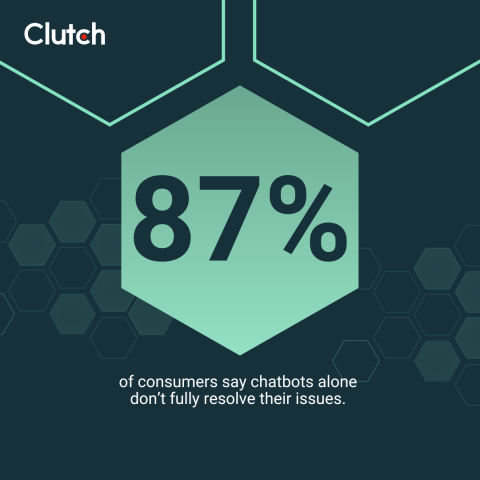
In the Clutch survey, 87% of customers reported that they couldn't fully solve their problems with AI chatbots. They needed human help. If your chatbot gets high engagement but doesn't successfully complete most interactions, it's failing.
Dwell time can also be deceptive. If visitors spend a long time browsing your product pages or reading blog posts, they're engaging with your brand. But if someone has a lengthy conversation with a chatbot, they might just be stuck or confused. Interacting with AI doesn't always mean getting help.
The AI Performance Metrics That Actually Measure Success
Open rates and other standard KPIs may not get you far in tracking your AI's success, but that doesn't mean you need to rely on your gut. These AI KPIs will help you see the full picture:
- Task completion rate: This is the percentage of users who achieve their goal with the AI tool. For an AI shopping assistant, this might mean buying a product, while a chatbot is successful if it resolves a support ticket.
- Bounce rate: What percentage of shoppers exit the AI software without completing the task? A high bounce rate could mean people feel confused or intimidated.
- User satisfaction: Track the customer satisfaction score (CSAT), or survey users about their experience. Did they feel supported or frustrated by the AI?
- Abandonment after AI interaction: Track how many users leave your website after they interact with your AI system. A high abandonment rate suggests the UX needs improvement.
- Time to resolution: How long does it take users to complete their goal with AI assistance? It's not a race, so don't assume that faster is better. Sometimes, a speedy tool isn't as accurate or clear as a slower system.
- Escalation rate for chatbots: If you've ever found yourself barking "Talk to representative!" at an automatic phone line, you know how frustrating it is when tools fail. Track how often users ask for human assistance with AI. If most people need help, your tool is likely more confusing or frustrating than it is helpful.
- Sentiment analysis: Look at the language your customers use when interacting with or reviewing AI tools. If they use a lot of negative words — like "stupid robot" or "useless" — it's clear that they're annoyed by the experience.
Irwin Hau, Director of Chromatix, summarizes it by saying, "Watch user frustration signals." He adds, "Frequent 'I need help' clicks, chat abandonment, or high session drop-offs after AI interaction are red flags."

Focus on the big picture instead of obsessing over any one metric. For example, you may feel nervous if an AI tool has a long average time to resolution, but if it has high user satisfaction and positive sentiment, don't worry about it. This data suggests that your customers like the system overall, even if it takes a while to finish their task.
Benchmarking: What “Good” Looks Like for AI UX
As you gather AI performance metrics, it's natural to wonder if your results are "good" or "bad." There's no universal benchmark, but a few critical KPIs can help you tell if you're moving in the right direction:
- Customer satisfaction and task completion rate are the clearest ways to measure success. After all, improving UX is one of the main reasons why brands use AI. Track these metrics every month to see if they're trending in a positive direction. If they decrease over time or stay low, it may be time to try a new tool.
- Abandonment is another useful AI metric. Some people will click AI tools accidentally or refuse to use them, so don't expect 0% abandonment. However, this score should gradually decrease over time as your customers get comfortable using the system.
- Sentiment analysis is also one of the top metrics for measuring success in AI-generated responses. Watch how customers speak about their experiences, and make adjustments if you see a lot of negative language.
- Performance gains also matter, but only if frustration decreases and trust increases at the same time. After all, there's no point in trying to complete tasks faster with AI if your customers feel annoyed or unhappy the entire time.
Using AI Performance Metrics To Design Better Experiences
Understanding how to measure AI performance is only half the battle. You also need to know how to use your new knowledge to give users a better experience. Here are a few strategies to get you started.
Use Behavioral Data for a Tone Check
AI tools should feel like a friendly companion, not a pushy salesperson desperate to make quota. However, from the business side, it's not always easy to tell if you're striking the right chord.
Analyzing customer behavior can help you determine if your AI tools are helpful or disruptive. Pay attention to how much time users spend on each step and where they drop off.
Let's say 75% of people who interact with your AI chatbot ask for product recommendations, but half of them leave when it asks, "Do you want to buy it now?" That suggests that shoppers may find the immediate sales pitch too aggressive or want to compare more products on their own.
Heatmapping is another helpful tactic. It shows how users move through your site. You may notice that customers click on friendlier AI prompts — like "Do you want me to show you similar items?" — more than less inviting ones, such as "Purchase" or "Check Out." Identifying these cues can reveal the types of language or even the font colors that appeal to users.
Tweak Prompts Based on Emotional Responses
AI can't replace human interactions, of course, but that doesn't mean it shouldn't be empathetic and warm. The last thing you want is for shoppers to feel like they're chatting with a cold or even rude robot.
Evaluate user sentiment to see how customers feel about their AI encounters. Hau suggests, "Use short post-interaction surveys to validate sentiment. Ask questions like, 'Was this helpful?' to validate sentiment." Customer reviews can also give you clues about how people respond to your tools.
If customers use positive language — such as "so helpful!" and "friendly" — you're on the right track. On the other hand, negative sentiment means it's time to revise your prompts and copy. Platforms like Jotform allow you to quickly personalize your AI chatbot's personality, like telling it to use emojis or more peppy language.
Focus on clarity, too. Survey users to find out if they felt confused by any part of their interaction, or pay attention to where people get "stuck." Try reframing AI prompts and copy at these stages to make them easier to understand. Short text like "Give me the receipt" might seem efficient, but users may need more detailed instructions to understand what the AI is asking.
As you fine-tune your AI performance, consider organizing focus groups or user testing. These approaches let you give real-time feedback about how people respond to your tools and ask follow-up questions.
Zoom Out by Combining Quantitative and Qualitative Data
Again, don't fixate on one or two AI metrics in your quest to elevate UX. A combination of metrics and qualitative user feedback will help you see the big picture and make smart decisions.
Without a balanced approach, you might come to the wrong conclusions. If more people use your AI chatbot this quarter, it may seem like a success. However, if 90% of users complain about the confusing prompts in their feedback, you'll know you need to rewrite them.
Above all, remember that the most valuable AI experiences always feel helpful, human, and intuitive. When customers make decisions, they want technology to support them, not pressure them into a transaction.
Final Thoughts: Measure What Matters
Simply adding AI to your website won't magically upgrade the UX. In fact, it may make it worse if you don't implement these systems thoughtfully.
Like any technology, AI only improves the customer experience when it helps users succeed. The right AI KPIs make that visible and measurable, so you can make sure you're on the right track.
"Monitor user feedback, and iterate fast and refine prompts," encourages Hau. "AI UX is never 'set it and forget it.'"
You don't need to figure it all out on your own. Partner with a top-rated UX/UI design agency to define the right AI performance metrics for your business. They'll also build professional and accessible interfaces that users actually trust. That way, customers are more likely to try your AI tools and keep coming back to support your business.
About the Author
Jeanette Godreau
Senior Content Marketing Specialist at Clutch
Jeanette Godreau crafts in-depth content on web design, graphic design, and branding to help B2B buyers make confident decisions on Clutch.
See full profile