In the world of online shopping, the line between usefulness and frustration is thinner than ever, and brands are still learning how to walk it.
You’re browsing a website, and a chat window pops up: “Hi! Can I help you find something?” A search bar suggests exactly what you were looking for before you even finish typing. An AI-powered recommendation engine nudges you toward a product that feels almost too perfect.
These AI tools for e-commerce are everywhere now, and with the rise of agentic commerce, you can even buy products directly through tools like ChatGPT. The future of e-commerce is here with ultimate convenience, ultimate personalization, and faster browsing.
Looking for a User Experience agency?
Compare our list of top User Experience companies near you
But here’s the catch: what’s meant to help can just as easily frustrate. Chatbots that give irrelevant answers, recommendations that feel pushy, or tools that interrupt your flow can turn an experience from effortless to aggravating in seconds.
A new Clutch survey finds that while 81% of consumers say AI website tools are useful, 93% say they can also worsen the experience.
In this article, we’ll explore how AI tools can be both helpful and frustrating, and what brands must do to get the balance right.
Key Findings
- Most consumers find AI tools useful: 81% of consumers find one or more AI tools for e-commerce helpful.
- AI tools can also frustrate: 80% of consumers find at least one tool frustrating, and 93% say AI can make their website experience worse.
- Chatbots often fall short: 87% of consumers say they don’t fully resolve their issues without human help.
- Personalized recommendations are useful but limited: 80% of consumers find AI product or service recommendations helpful in some way, but they find them less useful if they find them generic, pushy, or intrusive.
- Disclosure matters: 90% of consumers want websites to clearly indicate when AI is being used.
How Often Consumers Use AI Tools on E-Commerce Websites
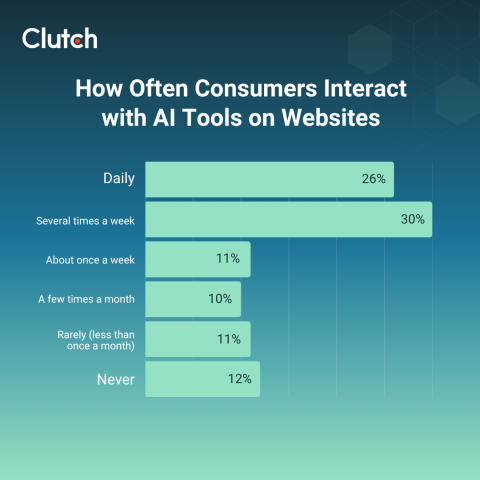
AI tools for e-commerce have become a routine part of online browsing. According to Clutch data, 67% of consumers say they at least one AI UX tool once a week. Their usage frequency is quite regular, with 26% reporting daily use, and 30% using them several times a week.
The most common AI tools that consumers encounter on websites in 2025 include:
- 56%: AI-powered search assistants
- 41%: Chatbots for customer support
- 37%: AI-powered content (e.g., automated descriptions, review summaries, FAQs)
- 37%: Voice assistants/voice search
- 29%: Image generation/visualization (e.g., personalized visuals, try-on tools)
- 20%: Interactive customization tools (virtual try-ons, personalized layouts)
- 19%: AI product/service recommenders
Ultimately, AI is embedded across the browsing experience, from searching and customer support to visualization and personalization, and its adoption is only accelerating. The “ChatGPT effect” is encouraging more consumers to experiment with AI. Since its launch, 33% of consumers report using AI tools more often, and 25% say they’re more willing to try them.
The takeaway is clear: AI tools are becoming a normal part of how people browse and shop online, and exposure is steadily increasing. But are these tools actually helpful?
When AI Tools Improve Website Experience
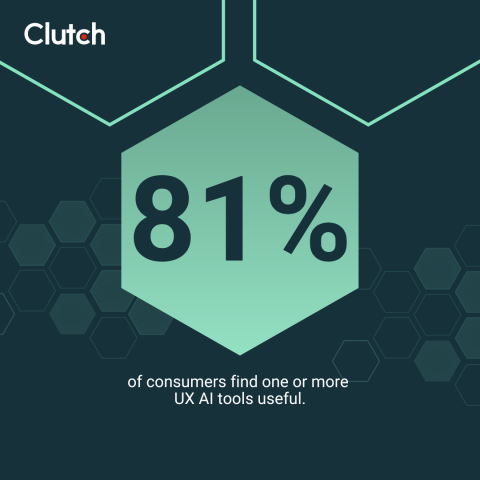
Consumers clearly see value in AI when it helps them solve real problems. In fact, 81% of consumers find one or more AI tools for e-commerce useful.
The AI tools they find most helpful on websites include:
- 37%: AI-powered search assistants
- 37%: AI-powered content (automated descriptions, review summaries, FAQs)
- 30%: Chatbots for support
- 27%: Interactive customization tools
- 26%: Product/service recommenders
- 21%: Voice assistants
- 20%: Image generation/visualization
Usefulness often aligns with speed, convenience, and clarity. Consumers find AI tools for e-commerce most helpful in scenarios where they save time or simplify tasks:
Most helpful use-cases:
- 40%: Getting quick answers
- 40%: Summarizing content
Somewhat helpful use-cases:
- 22%: Navigating complex sites
- 21%: Receiving personalized recommendations
- 21%: Checkout assistance
- 20%: Browsing large selections
- 19%: Visualizing products
Throughout the shopping journey, consumers say AI tools are most helpful during comparison (38%), discovery (34%), and decision-making (33%) processes, and less impactful for checkout (18%) or post-purchase support (17%).
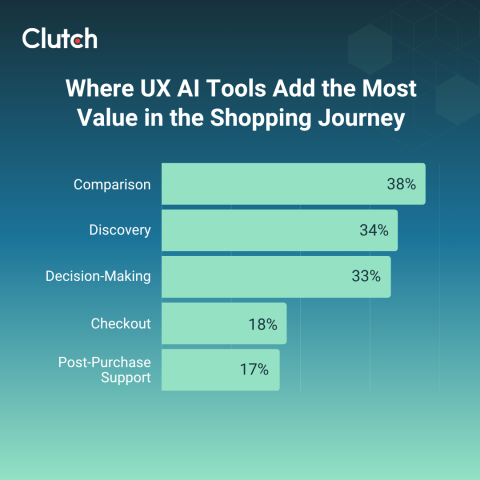
Simply put, website AI tools work best when they save time, organize information, or help with discovery.
When E-Commerce AI Tools Are Frustrating and Less Useful
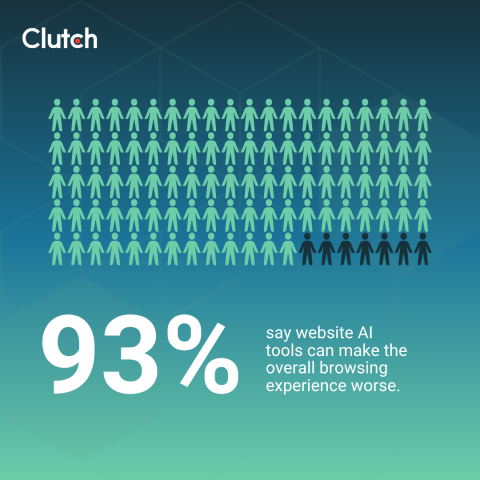
UX AI tools can be helpful, but they don’t always provide a smooth experience. In fact, 80% of consumers have been frustrated by at least one AI tool on a website, and 93% say website AI tools can make the overall browsing experience worse.
Nearly half of users (49%) find chatbots frustrating, while other AI tools also contribute to user dissatisfaction, such as:
- 28%: Product/service recommenders
- 26%: Interactive customization tools
- 21%: AI-powered content
- 18%: AI-powered search assistants
- 16%: Image generation/visualization
- 16%: Voice assistants
What makes these tools frustrating? Consumers point to experiences that delay, interrupt, confuse, or erode trust:
- 46%: Replacing human support
- 44%: Inaccurate or irrelevant answers
- 35%: Data privacy concerns
- 35%: Interrupting browsing (e.g., pop-ups, chat)
- 33%: Distrust in responses
- 30%: Confusing or complex processes
- 30%: Taking longer than expected
- 28%: Pushy or intrusive recommendations
- 26%: Impersonal interactions
When AI tools disrupt rather than assist, users act on their frustration by abandoning the tool or even leaving the website entirely. These actions inform what areas need improvement. As Irwin Hau, Director of Chromatix, explains, “Frequent ‘I need help’ clicks, chat abandonment, or high session drop-offs after interacting with AI are red flags that your tools are frustrating users.”

The Two Most Controversial AI Tools for E-Commerce
When it comes to AI website features, chatbots and recommendation engines dominate both usage and frustration.
AI Chatbots: Convenience vs. Conflict
Chatbots promise instant assistance, and consumers enjoy the fact that they are available 24/7 (45%) and equipped with quick answers (40%).
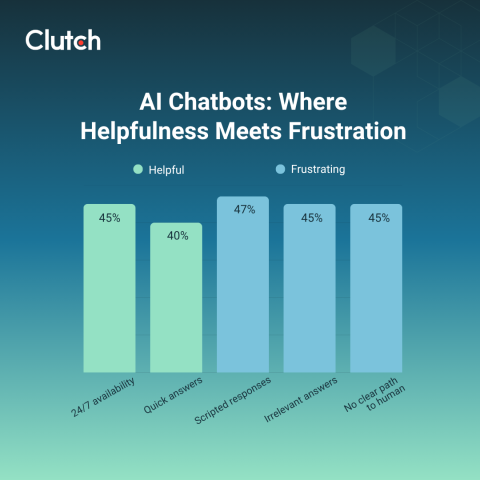
Unfortunately, however, those quick answers don’t always satisfy. Frustration spikes when the bot gives scripted responses (47%), irrelevant answers (45%), or doesn’t provide a clear path to a human (45%).
As a result, most users still rely on human support, with 87% saying chatbots alone don’t fully resolve their issues.

AI Chatbot Best Practices for Brands
These numbers show that while chatbots can prove helpful, poorly designed ones can cause users to hit dead ends, get frustrated, and even abandon the website altogether.
Uroš Mikić, CEO and Founder at Flow Ninja, says to be upfront with transparency, suggesting, “Tell users upfront what [the AI chatbot] can do and offer a couple of one-click starters. Ground answers in your real content and product data.”

If the bot is unable to help, don’t loop the consumer back to the beginning of the flow. As John Griffin, CEO of Spiral Scout, explains, “Always include a human path and forward the chat history so users don’t repeat themselves, which is so painful and annoying."
The Trust Problem with AI Recommendations and Personalization
AI-powered recommendation engines can either feel like a helpful guide or a pushy salesperson.
Consumers appreciate:
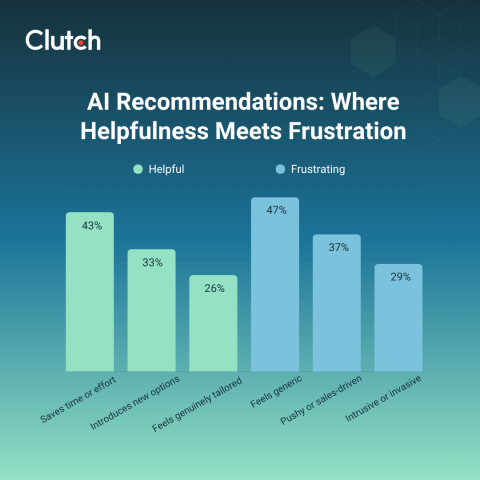
- 43%: Suggestions that save time
- 33%: Introduce new options
- 26%: Feel genuinely tailored
However, recommendations can quickly erode trust in a website when they feel, generic (47%), pushy (37%), intrusive (29%).
If they come across a poorly design recommendation tool, users may ignore them, second-guess the brand, or abandon their purchase entirely.
AI Recommendation Best Practices for Brands
Transparency and control are critical to keeping recommendations helpful rather than frustrating.
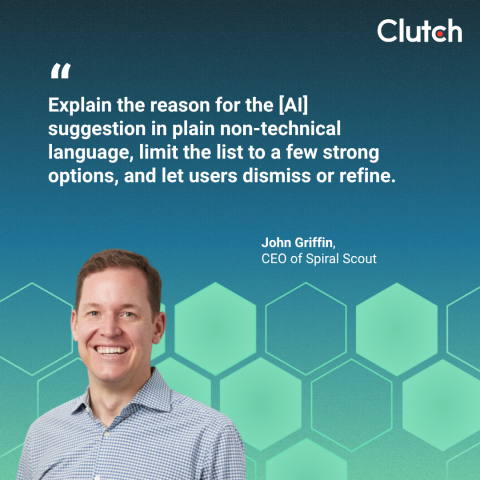
Griffin emphasizes, “Explain the reason for the [AI] suggestion in plain non-technical language, limit the list to a few strong options, and let users dismiss or refine.” Doing so gives more power to the user and limits frustrations.
Griffin also shares how his team improves their AI recommendation tools by adding, “We always log accepts, dismisses, and refines so the system learns from real user interaction/behavior.”
While users want the recommendations to be helpful, they don’t want to feel manipulated. Adam Jędrychowski, Head of Marketing at Satisfly, notes, “When it comes to product recommendations, users need to feel the tool is impartial. The point is to avoid any sense that the AI is steering them toward a pricier option or whatever the e-Commerce owner simply wants to push.” Make sure your tool is actually providing the user with the most helpful suggestions possible.
Why AI Disclosures Are Critical for UX and Trust
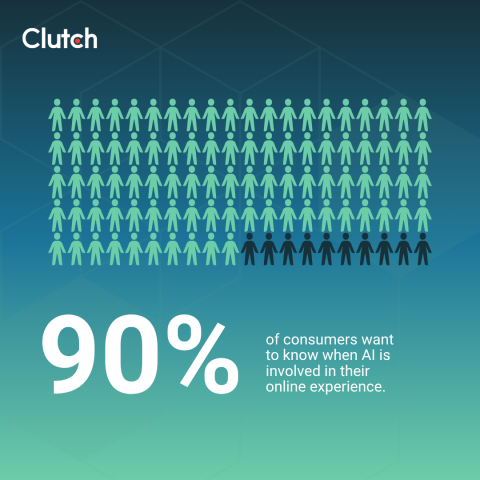
At the end of the day, no matter if a website’s AI tools for e-commerce are helpful or frustrating, one thing is clear: transparency matters. An outstanding 90% of consumers want to know when AI is involved in their online experience.
But what’s the best way to disclose? According to consumers, their preferred disclosure methods include:
- 53%: An option to opt out of AI interactions
- 50%: A label when content is AI-generated
- 35%: A note if a human reviews or oversees the AI’s output
- 33%: An explanation of why the AI made a recommendation/response
- 32%: An explanation of what the AI can and can’t do
Top trust-building approaches also include “ask a human” button (47%), source citations (34%), and data transparency (33%).
AI Disclosure Best Practices for Brands
With nine out of ten consumers demanding transparency, it is crucial for brands to disclose all AI usage.
Griffin suggests, “Label AI-generated content clearly and link to a short policy page explaining data use and human oversight.” That way, the label offers transparency, and the policy page can provide further details for those who want to learn more.
Mikić clarifies that the AI disclosure “must be visible where the feature lives, not buried in policy,” to ensure that it is clear and easily accessible to users.
UX Design Best Practices for AI Website Tools
Even the smartest AI tools can frustrate users if they’re poorly placed or timed. How AI is presented within the user experience matters just as much as what it does.
When asked which design approach makes them most likely to use an AI tool:
- 41% of consumers prefer reactive tools they can choose to open
- 20% like integrated tools that blend into the browsing experience
- 19% accept proactive pop-ups
- 20% have no preference
Reactive or opt-in tools, like search bars or chatbot icons, tend to feel supportive, giving users a sense of control. Integrated tools that quietly enhance browsing or search can also be helpful.
However, proactive pop-ups that interrupt the experience? Those often backfire, with 55% of consumers dismissing an AI tool if it interrupts their browsing.
Hau says that a common mistake in design is when “AI tools interrupt the user journey or feel suddenly bolted-on rather than integrated.” He suggests, “[ensuring the] AI aligns with the site’s natural flow—e.g., timing pop-ups to moments of intent instead of randomly.”
Ultimately, AI should be assistive, not disruptive, and solve real user problems.
4 Takeaways for Brands Using AI Tools for E-Commerce
Today’s consumers are quick to judge when an AI experience feels clunky or performative. With this context in mind, brands can move forward with these takeaways for implementing AI engines on their websites:
- Human support remains critical. AI should assist, not replace, genuine customer care.
- Transparency builds trust. Clear disclosure about when and how AI is used is now expected, not optional.
- Design matters. Reactive or opt-in tools (like search bars and chat windows) feel supportive, while intrusive pop-ups often erode trust.
- Use AI with intent. Every tool should solve a real user problem—not just check the “innovation” box. As Jędrychowsk advises, “Don’t chase hype for hype’s sake. Focus on where AI tangibly solves user problems.”

For further support with improving or adding AI tools to your website, connect with a top-rated UX/UI company to ensure your efforts help, not hurt, your relationship with your audience.
Final Thoughts: The Future of UX AI in Online Shopping
While the use of AI tools for e-commerce has become normalized, how they’re used determines whether they help you reach your business goals.
Brands that treat AI as a shortcut will frustrate users and lose not only credibility, but sales.
Those that design AI with transparency, human backup, and user-centered intent will earn loyalty in a landscape where trust is fragile yet deeply valuable.
If you want to ensure your website AI tools result in more sales and loyalty for your brand, partner with a top-rated web design agency. Explore expert designers who can guide your web strategy and help your brand maintain trust while experimenting with new tools.
Methodology
This report is based on a survey conducted on September 25, 2025, using the online polling platform SurveyMonkey. We surveyed 419 consumers in the United States between the ages 18-99 of all income levels. The respondents were 49% male and 51% female.
Participants were asked a series of multiple-choice and single-selection questions about their experiences and preference with AI tools on websites. Quotas were applied to ensure a balanced distribution across demographic segments. All respondents were required to complete the survey in full to be included in the final analysis.
About the Author
Jeanette Godreau
Senior Content Marketing Specialist at Clutch
Jeanette Godreau crafts in-depth content on web design, graphic design, and branding to help B2B buyers make confident decisions on Clutch.
See full profile