Several factors must be considered when enhancing your user experience. Content is one of the most important elements that makes user interactions seamless. However, writing UX content can be tricky. We have compiled a list of useful tips that may help.
Have you ever wondered what makes it a seamless experience for your users when they try to use your digital products to achieve their goals?
Several factors may come into play here. However, your content plays a key role. We’re not talking about the blogs, how-to guides, or any other type of content that you publish on your website or social media.
Looking for a User Experience agency?
Compare our list of top User Experience companies near you
The content we’re discussing here is the one you create to specifically guide your users while navigating digital products or applications. It’s called UX content, and you publish it to ensure that your users achieve their goals using your solutions without encountering any setbacks.
Creating effective UX content may be tricky. That’s why we have come up with a list of UX writing tips that may help you.
What is UX Writing?
Have you ever had a hitch-free experience exploring a website or using an app?
That's well-thought-out UX writing facilitating an enhanced user experience. It's all about helping users use digital products or solutions to their fullest.
UX writing encompasses the process of choosing the right words and structure to guide users through the different features of your digital products or applications.
Don’t confuse it with your typical landing page content. UX content serves a completely different purpose. You don’t create UX content to generate more traction or sales; instead, it’s to help your users leverage your solutions to the fullest.
As a UX writer, you facilitate interaction between a product and its users. You help users complete different tasks and achieve their goals with the content you create.
To be a successful UX writer, you need to understand user behavior, design principles, and business goals clearly.
You must know how people think, how they interact with different interfaces, and what they expect. These insights will help you create helpful content that elevates user satisfaction. As a result, they are more likely to continue using your solutions.
Creating an Effective UX Writing Process
Effective UX writing involves a series of steps. These steps may vary based on your industry's best practices or the scope of the project. However, we have compiled a list of standard steps to help you understand how UX writing works.
- Conducting Research
- Creating a Content Brief
- Compiling Different Drafts
- A/B Testing
- Documenting the Workflow
- Publishing UX Content
1. Conducting Research
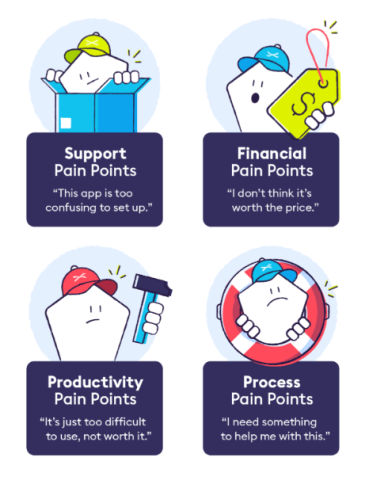
Effective UX writing requires thorough research. Before starting, you need to know who you are writing for and understand their pain points.
Source
Surveys, user testing data, user feedback, and other methods are the best sources for gathering such information about users.
Your goal as a UX writer is to help users easily perform their desired actions and achieve their goals using preferred products or services. How can you help them without knowing what their goals are?
2. Creating a Content Brief
When you have enough relevant data, start extracting valuable insights and discussing the findings with designers, product managers, and other key stakeholders. It's best to get everyone on board as soon as you can. This reduces the possibility of you having to change your content in the later phases.
Creating a content brief that showcases messaging goals, the brand's voice, and any technical limitations may be a useful strategy for you. You proactively identify your content's issues and fix them to offer a great user experience.
You can't just keep changing your UX content whenever you want. It may end up confusing the users. A detailed content style guide helps you bring uniformity to the process.
3. Compiling Different Drafts
Now, UX writing commences. However, you need to keep in mind that it's not a one-time thing. You need to constantly iterate UX content based on the feedback you get.
Let us share something that works brilliantly for us. We create multiple versions of the same message. The users may not find what sounds perfect in your head much appealing. So, having different versions of UX content helps you find what works for you quickly.
4. A/B Testing
Once you have created different versions of UX content, you should start testing them. As long as you're flexible and open to pivot, you will be able to pull off effective UX content.
Remember, your perceptions can be different from those of users. So, you can’t be one hundred percent sure that a particular draft of UX content will give you optimal results. Testing is the sure-shot way to know and pick a UX content draft that will likely enhance the user experience.
5. Documenting the Workflow
Remember to document the entire process. You do not want to forget about your mistakes and end up repeating them.
Documenting your UX writing workflow helps you remember what you did and how you did it, serving as a reference for anyone who will be producing UX content later down the road.
6. Publishing UX Content
Finally, you work with developers to ensure effective implementation of the UX content. Check to see if you missed any technical constraints and review the final product in context. You may have to do a little fine-tuning in this phase. However, if you were careful during the previous steps, you shouldn't expect any drastic changes.
UX Writing Tips for Success
UX writing isn’t an easy task. Your content may seem fine to you because you know the ins and outs of your product or service. However, it may be a completely different story for your users. Their perception may differ from yours significantly. Therefore, creating UX content can be tricky at times.
Using our years of experience refining UX content, we have compiled a list of writing tips that may help.
- Be Data-Driven
- Add Clarity to Your Content
- Leverage Front Loading
- Be Considerate
- Take Design Elements into Consideration
- Be Consistent
- Test UX Content
1. Be Data-Driven
UX writing should always be data-driven. The first thing we do is that we dive into existing user research. We analyze the data we collected through surveys, user testing, and support tickets.
User insights don't just allow you to identify their pain points. You can also be familiar with the way your users describe their problems or concerns. Using this information, you can use or avoid certain phrases and structure your content in a relatable way.
Adding competitor analysis to the mix may also be helpful. We spend considerable time exploring alternative solutions in our industry. We analyze their take on UX writing and assess their content patterns.
The goal is to identify what works and what doesn't. We don't just replicate their winning strategy; we test them out and do better.
We also involve the key stakeholders in the process, such as customer support teams and product managers. The role of the support team is critical here, as they provide us with key insights encompassing user pain points.
2. Add Clarity to Your Content
Embrace simplicity when writing UX content. Write as if you're conversing with a friend. There's no need to use technical terms or jargon. It will just complicate things and make it difficult for your users to perform the intended actions.
We also recommend that you prefer active voice when creating UX content. For example, "We've confirmed your order" sounds a lot better than "Your order has been confirmed." It looks more personal and direct.
You should understand how users interact with your solution. Many of them go through your content while juggling other tasks. So, they don't read the entire content; they just skim through it. So, keep your sentences short and impactful.
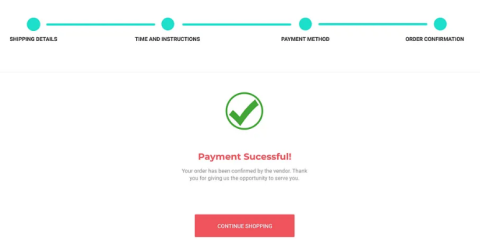
You have no idea how impactful simplicity can be. For example, you can replace "Please be advised that your transaction has been successful, and we've received the payment for the product" with just "Payment successful." You can see the difference, right?
Source
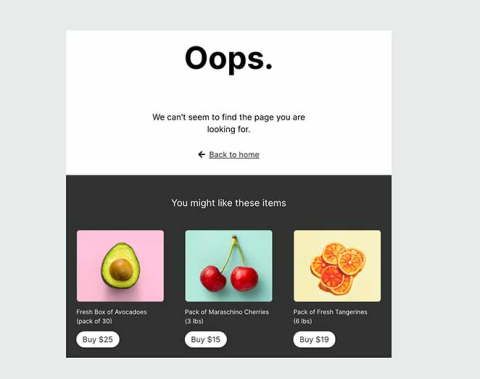
Let us share another example with you, this time about the use of technical terms. Don't you think it would be better if you could just replace "HTTP 404 Error: Page not found" with just "We can't find the page you're looking for"? You successfully conveyed your message without having to resort to technical terms.
Source
Making small changes like these in your content can significantly improve the user experience and boost retention.
3. Leverage Front Loading
Not all of your users read all of the content that you publish. They want your guidance on how they can perform a particular action or achieve their goals through your solution. So, it's wise to be on point.
You may argue and say, "What if your users demand details?" Well, that's where the content structure comes into play. It has a huge impact on the effectiveness of the message you convey.
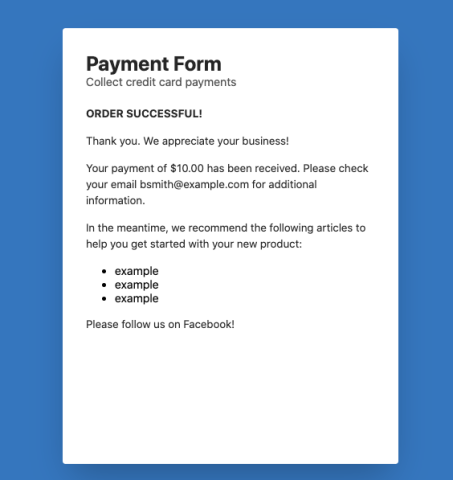
Let's take an e-commerce transaction as an example here. You're interacting with a user who completed a purchase through your platform. Normally, just saying "Payment successful" should suffice. However, if you want to provide more details, the way you structure the information matters.
Source
You can say, "Payment successful. Your order number is Test123. We will dispatch it in 2-3 working days. The estimated date of delivery is Friday, 14th.” This will give all the necessary details to the people who used your platform to make a purchase, but it conveys the most important information first.
You fulfill the needs of users who want details and the ones who simply want quick access to necessary details. It's how you improve your user experience. You care about the different preferences of your users.
4. Be Considerate
Allow us to explain how our approach to UX writing evolved over the years as a result of our growing understanding of user psychology and emotions.
Consider using a digital solution to experience emotions. Your users may encounter different feelings while completing their respective tasks.
For example, imagine you're an e-ticketing solution, and your users are planning a trip to their dream destination. They are enthusiastic about their vacation and a bit afraid. So, if they're unable to pay for their ticket through your platform and the message you display can't help them fix this problem, it may lead to an extremely frustrating experience.
We are not saying that they should lash out when interacting with you and inquiring about the problem. However, there's a strong likelihood that they will. They may even consider not using your platform again. Around 88% of users quit returning to the platforms if they offer subpar experiences.
The whole point of telling you all this is to help you understand that it may be a rollercoaster of emotions for your users when using your platform or digital solution. You are their guide when they use your products or services. So, be helpful as much as you can through your content.
Also, you need to consider that setbacks are inevitable no matter how much you refine your user experience. You need to think of the possible problems your users may encounter and see that your UX content points them in the right direction.
5. Take Design Elements into Consideration
Interface considerations are crucial when writing UX content because your perfectly crafted message needs to complement the actual design. It doesn't matter how beautifully crafted your UX content is if you don't optimize it for different screen sizes.
If it doesn't work within the design of your product, it may get cut off on various devices, which cripples the user experience.
Your spacing preference, line breaks, font style, and other factors significantly impact the user experience.

Source
One trick that has helped us and may come in handy is the use of expandable content. We start with the shortest version of UX content that conveys the important information. If there's more space, we expand it and add more details.
For example, when someone places an order through your e-commerce platform, you can start with a display message after a successful transaction that says, "Payment successful." If you have more room, you can add more details and say, "Payment successful. You will receive your order in 3 to 5 working days."
When your UX content aligns with your design, it becomes easier to offer a seamless user experience and give your audience a reason to choose you over other alternatives.
6. Be Consistent
Consistency is important when creating UX content. It may affect the user experience when you present the information in different ways. Some of your users may not notice it. Those who do may be annoyed by it. So, your safest bet is to be careful.
You maintain a conversation with your users through your UX content. Changing your tone in the middle of a conversation won't be appropriate, right? Staying consistent is the way to go and helps enhance the experience you offer.
Creating a style guide helps, as it acts like your trusted friend who guides you when you're about to make a wrong decision. It shouldn't be a sophisticated document that makes the UX content workflow even harder. The simpler it is, the better.
Creating a style guide ensures homogeneity and helps you develop a standard voice that aligns with your brand's personality.
7. Test UX Content
Creating effective UX content is an iterative process. It requires trial and error to figure out what's working. Your users' perceptions may be different from yours, so you can't be sure of what resonates with them unless you try different versions.
You can start by testing your UX content internally. You can ask your team to use your digital solution and provide you with feedback. However, that's just the beginning. There are other ways to test your UX content as well.

Source
We always run A/B tests on different versions of our UX content, which we also recommend to you. For example, when offering a free trial, you can go with different CTAs, such as "Start your free trial" or "Get your 7-day free trial." There's no right or wrong here. You just need to see what works for you.
You can also consider guerrilla testing, in which you show different versions of UX content to people around the office or use social media polls to collect feedback.
We organize workshops where we test UX content with real users. We give them scenarios and watch how they interact with different versions of the content. It helps us learn more about users' psyche. We don't just figure out what works but why it works.
Creating Effective UX Content is an Iterative Process
You should always create UX content by conducting thorough research. You need to be familiar with the intended audience's pain points, goals, and preferences.
Your message should be clear and concise. The information should be easily accessible and understandable. The content you create should be relatable and help users achieve their goals effortlessly.
Testing is the key to getting the desired results from your UX content. You may have to use different versions to find what works best for you.
If you’ve been looking for ways to create UX content that facilitates an enhanced user experience, the recommendations we provided may help.
About the Author
Syed Balkhi
Founder at WPBeginner
Syed Balkhi is the founder of WPBeginner, the largest free WordPress resource site. With over 10 years of experience, he’s the leading WordPress expert in the industry. You can learn more about Syed and his portfolio of companies by following him on his social media networks.
See full profile