What Are AI Influencers? A Guide to Virtual Creators
AI influencers abound on social media. Clutch explains what they are, why brands partner with them, and whether people can tell them apart from human...
Updated December 19, 2025

Modern work is full of repetitive, time-consuming tasks like drafting emails, scheduling appointments, and researching projects. Fortunately, AI-powered tools automate tasks and optimize workflows, helping workers reclaim time and meet high standards without risking burnout.
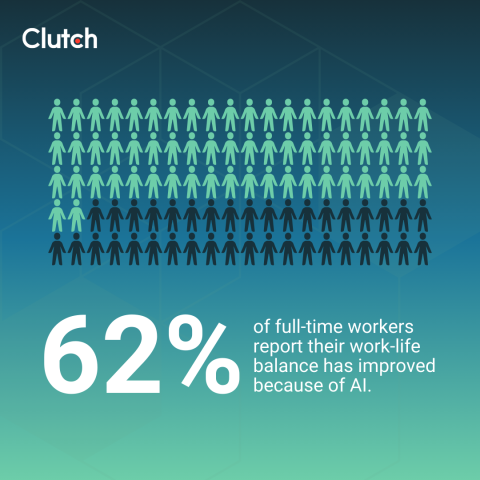
Among people working more than 40 hours a week, 55% use AI to reduce their workload and save time. And nearly two-thirds (62%) of full-time workers report their work-life balance has improved because of AI.
Looking for a Artificial Intelligence agency?
Compare our list of top Artificial Intelligence companies near you
After all, automating routine tasks frees employees to focus on work that aligns with business goals and creates new opportunities. With that reclaimed time, they can build new skills, take on higher-impact responsibilities, and explore paths that support long-term growth and career development.
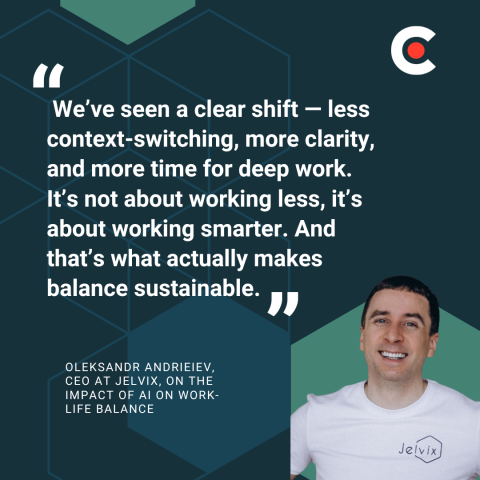
"AI handles the repetitive tasks: report summaries, data cleanup, and first-draft prep. That gives our people space to focus on meaningful work and wrap their day without burnout," says Oleksandr Andrieiev, CEO of Jelvix. "We’ve seen a clear shift — less context-switching, more clarity, and more time for deep work. It’s not about working less, it’s about working smarter. And that’s what actually makes balance sustainable."
Using AI isn’t as simple as switching on a program and letting it take over your work. The most effective professionals know how to identify which tasks AI can handle best, adapt the tools to fit their workflow, and use them to elevate the quality and efficiency of their output. Crucially, they recognize that human oversight is still essential for managing AI’s limitations and ensuring reliable results.
Let’s explore how to lighten your workload by leveraging AI tools. We’ll examine the tasks AI can handle and effective strategies for incorporating AI into your workflows. And we’ll show why human professionals still play a vital role in the workplace despite concerns about an AI-dominated future.
To start using AI at work, you first need to pinpoint where it can help. AI excels at handling time-consuming or repetitive tasks that quietly consume hours and create hidden inefficiencies, such as:
To figure out which of your responsibilities would be a good fit for automation, ask yourself:
By automating these tasks, you can focus on more critical projects and higher-value work.
AI-powered tools can streamline your workflows in many different areas. Let’s examine the types of AI assistants most used for repetitive tasks.
Manually sorting, filing, and deleting hundreds of emails drains cognitive energy and reduces productivity. AI email assistants use machine learning (ML) and natural language processing (NLP) to identify important messages from stakeholders and filter out duplicates and promotions. AI can even review past behavior and build a “personal importance profile” for certain messages.
Email AI assistants can use large language models (LLMs) to distill key points in lengthy emails, summarizing content and saving you time. You can also use AI to draft replies, drawing from relevant content in your previous replies and meeting notes.
To maintain the proper tone when using AI to compose emails, set clear tone instructions (e.g., “Write in a professional but warm tone”). The AI can reference prior emails to mimic your sentence patterns, and you can offer corrections (e.g., “more confident”), allowing your AI assistant to learn your preferred level of formality.
Smart scheduling AI assistants automatically insert tasks into your calendar and generate an ideal schedule based on task urgency, your preferred work hours, and personal commitments.
When new meetings or priorities come up, AI can adapt your schedule in real time by moving tasks to available slots, rebalancing your workload while making sure deadlines are met. This helps eliminate scheduling conflicts, saves you time, and prevents burnout from manual scheduling.
To really improve workflows, integrate AI into project management platforms like Notion or Asana where they can automatically adjust tasks around meetings and break large tasks into manageable chunks. You’ll boost productivity while reducing administrative overhead.
AI can shorten the time it takes to brainstorm ideas and gather information. The right tools can pull from multiple knowledge bases and generate novel combinations to help spark marketing campaign concepts, taglines, social media ideas, content angles, and more.
Once you establish your project’s direction, AI can accelerate the research phase by:
While the final product should be guided by human professionals, using AI to gather and organize data helps employees turn research into client or manager-ready deliverables more quickly and efficiently.
Systems with advanced language models can compose first drafts of everything from business reports to executive summaries to slide decks. Because many business documents follow a standard structure (e.g., problem, analysis, recommendation), AI tools can create structured documents using data from raw notes, emails, and existing reports.
Generative AI tools are also useful for auto-generating meeting summaries, action lists, and next steps, eliminating the need for manual drafts. Even if you need to rewrite or refine AI-generated documents, building reports from existing materials is easier than starting from a blank page.
AI slide-building tools can turn raw input from notes and meeting transcripts into a full presentation outline or slide deck. Using standard formats that apply best practices to business communication, they can auto-generate clear, logical slide structures and build visually appealing slides from templates. You can even create tables, infographics, and charts by providing AI with a dataset or metrics. All this helps workers deliver faster, clearer presentations with less cognitive strain.
Keep in mind that AI is not just a task robot. It's a thought partner meant to handle repetitive tasks so you and your employees can focus on more critical work.
This work includes providing AI systems with precise prompts to generate better outputs. Rather than giving vague instructions (e.g., “Write an email,” “Create a project report”), you need to be specific about what you want (e.g., “Generate a one-page project report with a 3-4 sentence Executive Summary, Risk Assessment, and Next Steps section”).
Train your AI tools to understand your preferences. Communicate who your audience is, the purpose of your reports, and the tone you want to convey in your work through your prompts. Alternatively, let the AI know what it should avoid (cliché statements, generic information), so your work remains high-quality.
As you grow accustomed to using AI tools, identify parts of your workflow that should be automated vs. areas that could be elevated with AI but still need the human touch. These tools are great for categorizing emails and generating recurring reports, but human professionals are better suited to building relationships with stakeholders and motivating teams. Even so, AI can provide useful support by generating performance review drafts and preparing meeting agendas.
While many people are worried that AI will replace their jobs, it still has limitations that require human oversight. For instance, if sensitive client data or proprietary information is uploaded for drafting summaries, emails, or reports, it could be stored on third-party servers and viewed by unauthorized parties.
Likewise, when an AI tool is integrated into your email system or work management platform, it may be granted permission to read, retrieve, or analyze sensitive data in those systems. The wrong permissions can create privacy issues, hurt client trust, and cause legal problems.
Understanding these limits makes it clear why human judgment is still critical for accurate, secure, and high-stakes work.
Companies need to provide AI guidelines that restrict the use of AI assistants that “read everything” and risk exposure. It's important to set strict limits on AI training on your data and use “no data retention” or other privacy modes when handling sensitive content.
In addition, professionals must avoid over-relying on AI. Although these tools can generate first drafts of reports and presentations, human employees must still review and edit the copy to make sure the information is accurate and compliant with industry standards.
Subject-matter experts should review and approve any high-risk content partly written by AI. And complex or sensitive topics like evaluating employee performance or drafting financial recommendations should be assigned to human professionals, not AI.
At the end of the day, implementing AI tools into your workflows simply isn’t about doing more — it’s about doing less of what drains you so you can reclaim energy and focus for more meaningful, strategic work.
Knowing how to intentionally use AI to automate repetitive tasks keeps you from dividing your attention among multiple time-draining chores. At the same time, you need to develop new skills and follow best practices, including providing AI systems with better prompts to create stronger outputs and establishing automated workflows that enhance workplace productivity and quality without adding more work.
By adopting smart AI policies and using this technology to reduce busywork and increase efficiency, you can create a more sustainable work-life balance for yourself and your employees.
Looking to connect with an AI development company? Check out Clutch’s directory of top artificial intelligence companies.