
Podcast SEO in 2027: How to Make Business Episodes Findable
Learn how transcripts, question-led titles, structured data, and guest links help business podcasts get found on YouTube, Apple Podcasts, and Google.
Updated September 29, 2026

Most B2B teams treat a spam problem as a copywriting problem and rewrite subject lines for months. This is how to find out where your outbound is actually landing, which four fixes move the needle, and what each one is worth before you spend a day on it.
You can rewrite a cold email fifty times, and it won't help if the message is being filed in spam before anyone reads it.
That's the part nobody warns you about when you start doing outbound. Spam placement is invisible to the sender. Your sending tool reports the message as delivered because a server on the other end accepted it. Whether a human ever laid eyes on it is a completely separate question, and your dashboard has no idea.
Looking for a Content Marketing agency?
Compare our list of top Content Marketing companies near you
So teams do the logical thing. They assume the message is the problem. They rewrite the pitch, test a new subject line, shorten the whole thing, try a different angle, and months go by.
I want to save you those months. Below is how to check where your outbound is landing, the four things that actually move placement for a small sender, and what each fix is worth so you can decide what to do first.
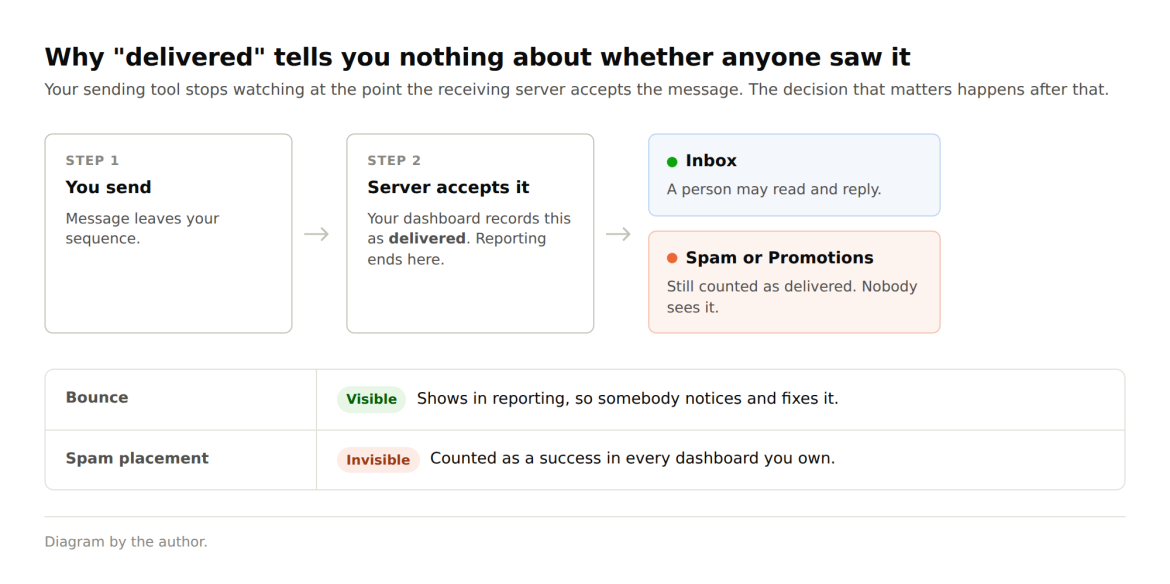
Most sending tools stop reporting at step two. What happens after it is the whole problem, and the first thing worth doing is putting a number on it.
The arithmetic changes how urgent this feels.
Say you send 200 outbound emails a week. At the 4.5% average reply rate Hunter measured across 31 million cold emails sent in 2025, that's nine replies. If a quarter of those become a call and a quarter of those calls close, you're looking at roughly one new client every two months from outbound alone. For a ten-person B2B firm, that's not a rounding error. That's a hire.
Now put a placement problem into that chain. It does not politely halve your reply rate. It removes the top of the funnel entirely for whatever share of your list is being filtered, and because you can't see which share that is, you can't correct for it. You just get quiet weeks and no explanation.
A bounce problem is at least loud. It shows up in your reporting, somebody notices, somebody fixes it. Spam placement is silent and counts as a success on every dashboard you own.
Marketers hit the same blind spot with AI search. A brand can be recommended inside ChatGPT all week and see nothing in its own analytics, the gap Algomizer and other AI visibility firms fill.
This is also why plenty of teams quietly give up on cold email and move everything to LinkedIn. That can be the right call, and the trade-offs between cold email and LinkedIn outreach are worth weighing properly. But abandoning a channel because of a fixable infrastructure fault is an expensive way to make that decision.
So treat it as a distribution problem rather than a messaging one. Distribution problems are cheaper to fix because there are only about four.
Don't touch a DNS record until you've confirmed you have one. I've watched a team spend an afternoon rewriting SPF records when the real problem was a list they'd bought eighteen months earlier.
Three checks, in ascending order of effort.
Send to yourself properly. Set up accounts at Gmail and Outlook, and ask a client for permission to send to their address. Send a real email from your real sequence, not a test message that says "test". Note the folder and the tab. Gmail's Promotions tab isn't the spam folder, but for cold outreach, it's close enough to matter.
Run a header check. Mail-Tester and MXToolbox both read your authentication and report whether SPF, DKIM, and DMARC pass. Hunter's email deliverability checker covers the same records and adds a blacklist and an MX lookup, which is worth having because a domain can authenticate perfectly and still be on a blocklist. Any of them takes about four minutes, and the answer tells you whether your problem is the setup or something further down this list.
The third check is the one I'd run first if I only had time for one: split your reply rate by recipient domain. Export your last campaign, group the replies by the recipient's email provider, and compare. If Gmail recipients reply at 6% and Outlook recipients reply at 0.5%, you don't have a copy problem. Copy doesn't discriminate by mail provider.
As a benchmark, Hunter's data puts the average bounce rate at 3.6%, alongside a 4.5% reply rate. If you're well below the first number or well above the second, something structural is wrong.
SPF, DKIM, and DMARC, one sentence each.
SPF says which servers are allowed to send mail using your domain. DKIM signs each message so that a receiver can tell it was not altered in transit. DMARC tells receivers what to do when the first two fail, and sends you a report about it.
The reason this isn't optional anymore: Gmail began requiring authentication from bulk senders in February 2024, and Microsoft followed for Outlook, Hotmail, and Live addresses on 5 May 2025, with non-compliant mail going to Junk and eventually being rejected outright.
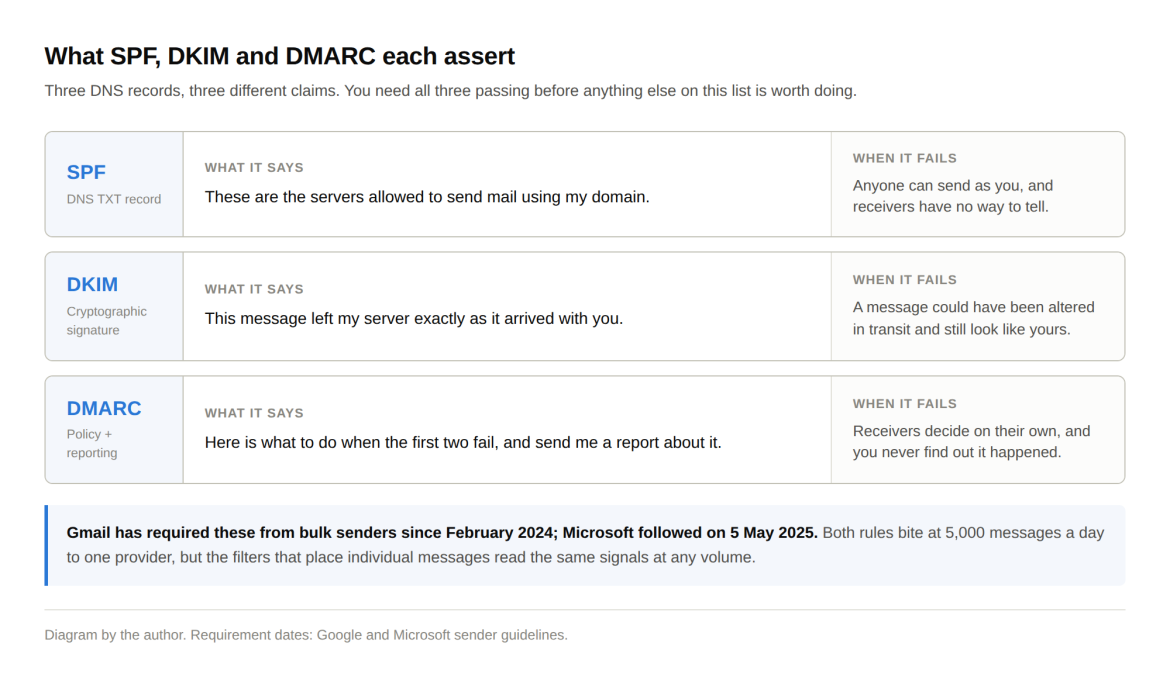
Both of those rules technically apply to a single provider at 5,000 messages a day, which is worth knowing before you panic. If you send 200 emails a week, you're nowhere near that, and nobody's going to reject your mail for a missing DMARC record. But the filtering models that decide where an individual message lands read the same authentication signals, and an unauthenticated domain looks worse than an authenticated one at any volume. So it still matters, just as a ranking input rather than a hard gate.
Practically: this is a thirty-minute job for whoever manages your domain's DNS, which in most small firms is whoever set up the website, or the team who built your custom software if you outsourced that, not the person doing marketing. If you don't know who that is, that's the first thing to find out. I'm not going to walk you through SPF syntax here, because you're not going to hand-write a record from a blog post, and pretending otherwise wastes your time and mine.
Two structural choices outperform everything most teams spend their optimization effort on, and both come out of the same dataset.
The address you send from. Custom domain against a free provider has a reply rate of 5.2% versus 2.5%, a 108% difference. If you're running outbound from a gmail.com address to look approachable, you're paying for it. It's a same-day fix and the highest-return thing on this page. If you're moving off freemail, the email provider you pick is worth comparing on deliverability and authentication support rather than on mailbox price.
Then there's batch size. Sequences of 21 to 50 recipients reply at 6.2%, against 2.4% for batches of 500 or more. That's a 158% gap, and it runs against instinct, because when outbound isn't working, the natural reaction is to send more of it. Receiving servers read a large simultaneous send as a bulk pattern and treat you accordingly.
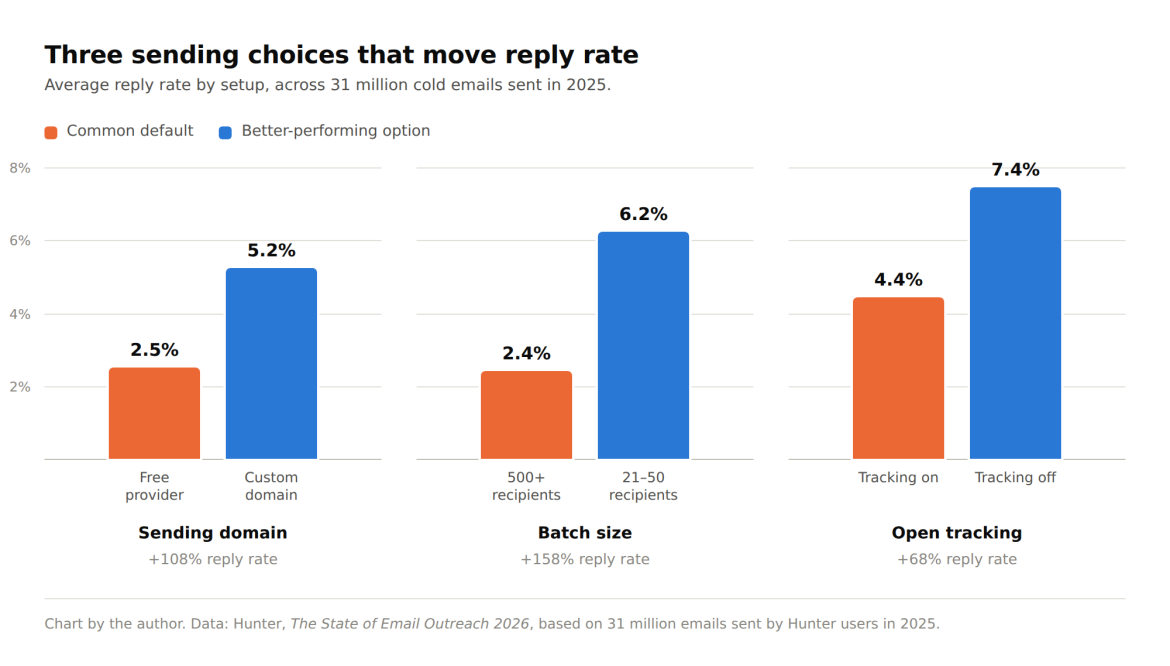
There's a third finding here that I expect you to argue with. Campaigns with open tracking switched off see a 68% higher reply rate, 7.4% against 4.4%. The tracking pixel adds a redirect and a third-party image load, and filters read both as marketing rather than correspondence.
I'll be straight about the trade-off: turning off open tracking means losing open data, and if you report opens to a client or a board, that's a genuine cost. My view is that open rates were never a reliable metric anyway, and Apple's Mail Privacy Protection finished off whatever accuracy was left. But it's your call, not mine, and anyone who tells you the decision is obvious is selling something.
List cleaning gets treated as damage control, something you do once a campaign has already gone badly. It works far better as a scheduled job. Your bounce rate next month is already sitting in your spreadsheet today, and you can measure it before you send anything.
B2B contact data goes stale for boring reasons. People change jobs, companies get acquired, and addresses get retired. The decay isn't even across a list, either. A segment you last emailed in March carries a different risk than one you touched on Friday, and treating them the same is how a re-engagement campaign turns into a bounce spike.
The asymmetry is worse when you're small. A large company sending from 10 subdomains can absorb one bad campaign because the damage stays within one stream. You have one domain. The reputation hit from a single bounce-heavy send follows every email you send afterward, including invoices and project updates to clients who are already paying you. I've seen a five-person agency lose a fortnight of client email reliability to one enthusiastic import from a conference attendee list.
The rule is simple enough to put on your calendar: verify before sending to any list you haven't touched in 60 days, and always before reactivating a dormant one. If you're building lists faster than you can email them, that's worth fixing at the source, too, and most lead-generation strategies work better with a smaller current list than with a large old one.
Verification is also where accept-all addresses catch people out. An accept-all domain is configured to accept mail for any username, so no tool can tell you whether a specific address there belongs to a real person. The honest answer is that nobody knows.
What matters is whether your tool admits that. Some report accept-all as its own status; others fold it into valid, and that's the version that costs you, because you send to the segment believing it's clean. An email verifier can assist with the process and help decide deliberately what to do with those addresses rather than meeting them in a bounce report.
| Order | Fix | Effort | What it's worth |
| 1 | Move outbound to a custom domain | Same day | +108% reply rate |
| 2 | Get SPF, DKIM, and DMARC passing | ~30 min, needs DNS access | Entry cost at any volume |
| 3 | Cut batch sizes to under 50 | Immediate | +158% reply rate |
| 4 | Verify any list older than 60 days | Ongoing, monthly | Protects every email you send |
| 5 | Turn off open tracking, measure replies instead | Immediate, real trade-off | +68% reply rate |
| 6 | Then rewrite the copy | Weeks | Genuine, but unmeasurable until 1 to 5 are done |
Everything above line six is infrastructure, and infrastructure compounds. Copy improvements don't, and you can't even measure them while placement is broken. Most teams start at line six and never make it up the list.
Send one message from your real sequence to a Gmail address, an Outlook address, and a client's inbox, and note where each one lands. Then pull your last campaign and split the reply rate by recipient domain.
If one provider is quiet and the others aren't, you've found your problem, and it was never the subject line.