
Micro SaaS: How Solo Developers Build Profitable Products
Solo developers now make up 35% of startups. Discover how micro SaaS lets individuals build and launch profitable products without a big team.
Updated September 17, 2026

Nearly 9 in 10 app users (88%) will abandon an app because of bugs and glitches. And while bugs are an inevitable part of software development, most teams don't have a clear framework for categorizing, prioritizing, or fixing them.
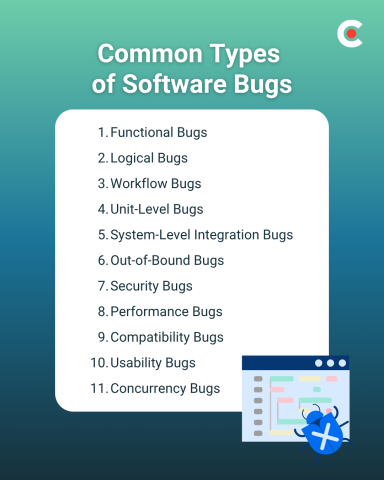
The 11 most common types of software bugs are:
Looking for a Software Development agency?
Compare our list of top Software Development companies near you
Each type has a different root cause, risk level, and fix. Here's what you need to know about each one.
The first step is to understand the types of bugs you may encounter when rolling out new products and features.
Before diving into each type, it helps to know how teams classify bugs by severity. Most engineering teams use a four-tier system:
| SEVERITY | DESCRIPTION | EXAMPLE |
| Critical | System crash or data loss; blocks all use | App fails to launch after update |
| Major | Core feature broken; workaround is difficult | Checkout flow fails; users can't pay |
| Minor | Feature partially broken; workaround exists | Date picker shows wrong month |
| Trivial | Cosmetic or low-impact issue | Misaligned button on settings page |
Assigning severity early guides QA prioritization and helps teams avoid spending sprint capacity on trivial issues while major bugs go unresolved.
A functional bug occurs when software doesn't perform according to its specifications. For example, a login button that doesn't trigger authentication, or a form that submits without validating required fields.
How To Fix: Developers typically review documentation requirements, reproduce the issue in a test environment, and trace execution to where behavior deviates from spec. Unit and integration tests help prevent regression.
Logical bugs feature code that executes successfully but produces incorrect outcomes — typically due to a flawed condition, operator error, or misunderstood requirement. A discount calculation that applies 20% off instead of 10% is a classic example.
You can find these bugs by looking for instances where calculations or outputs appear inconsistent with expected results. They're often invisible until a specific edge case triggers them.
How To Fix: Review logic flow, test edge cases explicitly, and use pair programming. Static analysis tools like SonarQube can flag conditional logic errors before they reach production.
Workflow bugs happen when there's an unintended sequence of actions or operations. For example, a user who skips a required step in a multi-stage form and ends up at the confirmation screen without completing a payment.
How To Fix: Trace the full path of user interactions and correct any missing state validations or broken transitions. End-to-end testing tools like Selenium or Playwright can automate workflow verification across user paths.
Unit-level bugs exist within isolated parts of your codebase — a single function, method, or class. They often don't surface until the unit is integrated with other components.
How To Fix: Write stronger, more comprehensive test cases using a framework like Jest (JavaScript) or pytest (Python). You may also need to refactor the isolated module to make it more testable.
System-level bugs happen when separate modules or services interact incorrectly. For example, your CRM and billing platform fail to sync customer data after an API update, leading to duplicate records or missed invoices.
How To Fix: Synchronize environments and conduct contract testing — a method that verifies each service meets the interface expectations of its dependents. Tools like Pact automate this for microservices architectures.
Out-of-bound bugs occur when a program tries to access data outside a valid range. A form that accepts "February 30" as a valid date is one example. Arrays are especially vulnerable — writing to an index beyond the array's declared size can corrupt memory or crash an application.
How To Fix: Add stricter boundary validations and input sanitization. Tools like AddressSanitizer (for C/C++) and Valgrind can detect memory boundary violations during development. For higher-level languages, schema validation libraries like Zod (TypeScript) or Pydantic (Python) prevent invalid inputs from reaching your logic layer.
Security bugs create vulnerabilities that allow unauthorized access, leaked data, or malicious exploitation. SQL injection and cross-site scripting (XSS) are two of the most common. Even a single unpatched security bug can expose thousands of user records.
How To Fix: Apply stricter input sanitization, enforce proper authentication and access controls, and encrypt sensitive data at rest and in transit. Run regular scans with tools like Snyk (dependency vulnerabilities) or OWASP ZAP (web application vulnerabilities) as part of your CI/CD pipeline.
Performance bugs impact the speed or efficiency of your systems without breaking core functionality. A page that takes 8 seconds to load on mobile, or a database query running full table scans instead of using indexes, qualifies.
How To Fix: Re-optimize code, add caching where appropriate, and introduce load balancing for high-traffic endpoints. Use profiling tools like New Relic, Datadog, or Apache JMeter to identify bottlenecks before users do.
Compatibility bugs occur when software behaves differently across devices, browsers, or operating systems. A UI that renders correctly in Chrome but breaks in Safari, or a mobile app that crashes on Android 12 but not 13.
How To Fix: Prioritize cross-platform testing early in the development cycle. Tools like BrowserStack and Sauce Labs let you test across hundreds of real device and OS configurations. You may also need environment-specific builds or polyfills for older browser support.
Usability bugs make software harder to use or less intuitive for your audience. They often stem from unclear labeling, confusing navigation, or accessibility failures — like a color contrast ratio that fails WCAG standards for users with visual impairments.
How To Fix: Refine the front-end UI based on usability testing feedback. Tools like Hotjar or FullStory reveal where users drop off or struggle. Accessibility audits using axe or Lighthouse can surface WCAG violations before launch.
Concurrency bugs happen when multiple processes access shared resources simultaneously. Race conditions — where two threads read and modify the same variable at the same time — are a common example. They're notoriously difficult to reproduce because the bug only appears under specific timing conditions.
How To Fix: Stress-test systems under concurrent workloads using tools like Gatling or Apache JMeter. Apply synchronization primitives (mutexes, semaphores) and implement locking strategies to prevent unsafe shared-state access.
Software bugs can cause an array of problems for your company. For instance, one review found that software defects cost U.S. companies more than $2.4 trillion annually.
In the end, buggy code may lead to many different risks that can harm your company's reputation in the long term and sour customer trust.
Given the stakes, it's worth making sure your team is following proven prevention practices — not just reacting to bugs when they surface.
Prevention starts at the code level. Write clean, modular, well-documented code from the start. Enforce standard naming conventions and style guides across your entire codebase to reduce the confusion that leads to logical and workflow bugs.
Automate what you can. AI coding assistants like GitHub Copilot and static analysis tools like SonarQube can catch syntax errors and code smells before they reach review. Automated test suites — unit, integration, and end-to-end — provide a safety net for every deployment.
Don't skip the human layer. Automated tools aren't a substitute for peer reviews and collaborative code walk-throughs. Research has found significant variability in performance among AI-assisted bug detection tools, which is why human review remains essential.
Practice defensive programming. Anticipate potential failure states as you build — validate inputs, handle exceptions explicitly, and don't assume external dependencies will behave as expected.
Even careful developers run into bugs. The goal is to find the root cause quickly — distractions from a single bug can take over 25 minutes to recover from.
To debug, follow this sequence:
Functional bugs are the most commonly reported type. They occur when a feature doesn't work as specified — a button that doesn't trigger the right action, a form that submits incomplete data. They're also the easiest to identify because the failure is visible to end users.
The terms are often used interchangeably, but technically a defect is a flaw found during development (before release), while a bug is a flaw found after release. In practice, most teams use "bug" for both.
The most common causes are logic errors, insufficient testing, unclear requirements, and integration failures between components. Human error accounts for the vast majority — which is why code reviews and automated testing are so important.
Most teams use a severity/priority matrix. Severity is how bad the impact is (Critical to Trivial); priority is how urgently it needs to be fixed. A critical bug in a rarely-used feature may have lower priority than a minor bug in a core user flow.
In software development, bugs are inevitable, but their impact doesn't have to be. Your method of response matters as much as the bug itself.
Remember, the best developers do more than react when problems arise. They proactively build testing frameworks, enforce clean code practices, and treat every bug as a signal — not just noise to clear from the backlog.