
How App Companies Can Build Trust with Customers
Learn how app companies can build customer trust through better privacy practices, transparent communication, and stronger security to improve retention and...
Updated October 16, 2026

Desktop application development is a good fit when users need reliable offline access, deep integration with device hardware, or performance that a browser-based experience cannot provide. It also brings decisions about operating systems, installation, updates, security, and ongoing support.
Before choosing a technology or hiring a development team, answer these seven questions. Your answers will help define the product’s scope and reveal tradeoffs that are expensive to change later.
The most obvious question is whether you actually need a desktop application, and that depends on user need. A web app may be easier to access and update, while a desktop app may be better when the product needs to work offline, use local hardware, process demanding workloads, or fit into a desktop-centered workflow.
Looking for a Mobile App Development agency?
Compare our list of top Mobile App Development companies near you
Some of the clear indicators that you do need a desktop solution are:
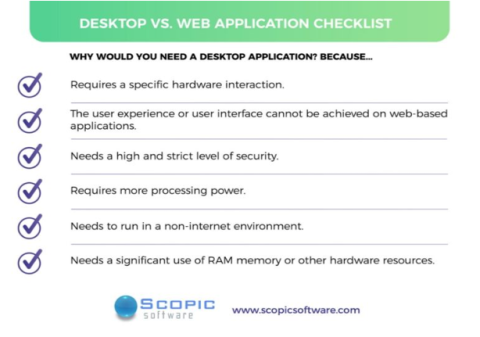
Once you decide to build a desktop application, move onto the next six questions to define its structure.
If you developed a big idea, then it was probably in response to a need you saw. After all, products and services are designed based on the demands or necessities of a specific niche. Unfortunately, these needs can become secondary concerns in some development projects. Before you jump into actually developing your solution, make sure that it fulfills your target audience’s needs.
First, get to know your audience. They’re the ones who will determine whether your desktop app is worth using. Learning about their preferences and analyzing the market and your competition are key.
Document:
Use interviews, workflow observation, prototypes, or other appropriate research to check assumptions. Translate the findings into prioritized requirements and measurable acceptance criteria so the development team can make informed design decisions.
This will help you bring a user-focused approach to the development process. It’s also more likely the resulting app will be crisp and innovative for your users.
Choose platforms based on where users work and what the app needs to access. Supporting Windows, macOS, and Linux can increase reach, but it also means planning for platform-specific behavior, testing, packaging, and support.
Decide whether the first release will support one operating system or several. Then identify the minimum supported OS versions, device capabilities, screen sizes, and any hardware dependencies. If you are considering a cross-platform approach, test the most important user workflows on each target platform early; a shared codebase does not remove the need to account for differences in permissions, file access, notifications, installation, and user interface conventions.
If your software solution is going to fill a specific need (for internal use or for only one type of customers), then find the platform that you or your customer are already familiar with. However, if your desktop application is going to be sold for massive use or to the general public, it’s best to create a cross-platform solution so you don’t limit your audience.
Many great desktop app frameworks work for all platforms, and others that just work with a specific operating system. Each has its own advantages and limitations, so the choice depends on what you want. If you are focusing on only one operating system or codebase, then you can use their specific platform and frameworks:
The framework and tools you use to build your app will define such things as the speed of development, the performance of the application, scale of app–system interactions, and screen resolutions supported. Performing your own research, looking at tutorials, or asking a subject-matter expert for advice are the best ways to choose your solution’s platform.
Describe the work the app must perform and the data it will handle before choosing its architecture. “Complex operations” alone do not determine whether an app needs multiple threads or a particular design. The team should measure likely workloads and define acceptable response times, memory use, and behavior under load.
Ask the development team:
For an app that stores or transmits sensitive information, ask for a clear account of data flows, storage, credentials, and communications. The UK National Cyber Security Centre’s questions for application developers provide a useful security-review model for Windows applications, including data storage and transmission. Adapt the questions to the app’s actual platform and risk profile.
Choose a distribution method that matches how users obtain software and how the organization manages devices. Options may include an app store, direct download, or managed enterprise deployment. Each route affects packaging, signing, review, installation permissions, release timing, and support.
Plan for the full lifecycle, not just the first download:
Platform requirements differ. Microsoft documents Windows packaging and deployment options alongside publishing guidance. For direct distribution of macOS software, Apple explains signing and notarization. Confirm the current requirements for every target operating system and channel before committing to a release plan.
Before beginning the development process, the final question you should ask yourself is: “Is my app covered on all legal points?” Meaning, are all the licenses for third-party libraries, development tools, and frameworks?
Using an unlicensed library can cause a lot of problems down the line. Imagine you completed the project only to learn that the core library is not open source. You may either buy an expensive license or replace the library with another (or build a custom solution). This requires a time investment and is unpleasant to do in the final stage.
When starting an application development project, you must first decide whether to build a web app, mobile app, or a desktop app. If you are looking for a powerful app with better processing capabilities, then a desktop app is the way to go.
There are several other important characteristics of all desktops you must determine before beginning the development process, including:
Once you have asked yourself these questions, you must put together the frontend and backend development specs, a maintenance plan for debugging, and a strategic promotional plan for app launch, or consult an app modernization company. At this point, being honest with yourself during the development process is very important.
Desktop apps can be more accessible for users and tend to be more readily available. Here are key questions businesses should ask before deciding to build a desktop app.
Diana is a marketing specialist at Scopic Software where she helps craft and execute marketing strategies for companies in over 10 different industries.