Mobile Apps vs. Web Apps vs. Websites: What Does Your Business Need?
Should you build a mobile app, web app, or website? Learn the key differences, costs, and use cases to choose the right platform for your product and users.
Updated May 27, 2026

Mobile apps are a great way for businesses to strengthen client relationships, boost sales, and grow brand awareness. But how can you develop an app for your business? This guide will walk you through each step of the process so you can get started on your upcoming project.
In 2008, Apple quietly introduced the App Store, which offered 500 apps designed for use on its iPhones. Consumers took notice, and the mobile app industry gained steam. Today, there are over two million mobile apps available across the Apple App Store and Google Play Store.
Mobile apps are a key component for all smartphones. They enhance device functionality and serve user needs. You'll find apps designed to replace your alarm clock, stream music and videos, and read the news. Need driving directions or want to know what the weather is for the next week? There's an app for that.
Looking for a Mobile App Development agency?
Compare our list of top Mobile App Development companies near you
For businesses of all sizes, an app can help your organization reach more customers. It can also strengthen client relationships, boost sales, and increase brand awareness.
While the mobile app market is more competitive than it was 15 years ago, it's still growing. Understanding the app development process, from idea incubation to coding, testing, and release, can set you up for success.
Making an app can take anywhere from a few months to a year. It all depends on the app's complexity and available resources. A simple app with less than five screens and limited functionality might take two months to develop. While more complex builds with social media integrations, database connections, and interactive elements require much more time.
Often, businesses or individuals work with experienced mobile app developers to streamline the process and shorten the time to launch. A developer's expertise can be very beneficial, especially if the app requires complex coding and logic.
Another factor that affects the development timeline is platform selection. You can opt for a native app that works only on iOS devices or create one for Android users. Native apps generally take longer to develop but may offer greater customization and features. If you prefer a hybrid app that works with both operating systems, it shortens the development time since you'll work with a single codebase.
Testing and quality assurance are big parts of app development. It's an extensive process used to debug and check app performance across different devices. By some estimates, testing can take up to 30% of development time.
How do you create an app? Breaking down the process into steps can help you understand the complexities and lay the groundwork for your plans. While some steps may require more effort than others, each plays a role in a mobile app's success.
Successful apps solve a problem for their users. If the app doesn't provide a useful benefit, people won't download it. Of course, success isn't always a numbers game — highly targeted apps can flourish, even if they serve a small population segment.
"We always recommend our clients start with clear goals," says Olha Bezai of Onix Systems. "We mean the app's purpose and who it's for. The right approach to this lays the foundation for everything else."
Think about who your target audience is and what they'll use your app for. Understanding your audience's demographics, behaviors, interests, and pain points allows you to tailor the app's features to meet their needs. Creating multiple user personas of your target audience can help you understand their motivations and what they're looking for in an app solution.
Consider your objectives, too. Will the app serve as an extension of your business? Or is it a standalone endeavor meant to address a market need? For instance, a retailer might develop an app to facilitate more sales of its products. But a calorie-tracking app serves a general need, helping users track their food intake for dietary purposes. Each app will require different features and functionality, which can impact your scope of work and the rest of the development process.
Be clear about the app's objectives, whether it provides entertainment, encourages social interaction, increases productivity, or something else.
Market research can help you understand your niche in the market. In addition to understanding your competitors' strengths and weaknesses, you can use the information to your advantage so the app you create stands out — even in a crowded marketplace.
A simple search on the Apple App Store or Google Play Store can uncover similar apps to the one you want to create. Download competitor apps and try them out for yourself. Consider making a list of the things you like and dislike about each one. If others are involved in the development process, ask them to do the same.
Carefully read each competitor's app description and customer reviews. The app description explains its features and capabilities. It may include keywords that the developer is targeting to reach a specific audience. Reviews tell you what users think about the app — the features they love and where it's lacking. If particular concerns come up repeatedly in reviews, brainstorm ways your app could overcome those issues.
Informed market research can also include user feedback. Conduct surveys or talk to individuals who fit your target audience. Ask them what features they'd find useful or problems they have that an app could address. Their answers can highlight issues you hadn't considered.
You should also consider whether you will monetize your app. Will your app be free to all users, or will it serve as an income source? Some apps charge customers an upfront or subscription fee, while others earn money through in-app purchases or display ads. Decide which option best fits your goals.
After clarifying the app's intended audience and purpose, use this information to outline the core features to include in the app. List each one and outline why it's essential to the app. You can start with a general framework and get more detailed as the app progresses.
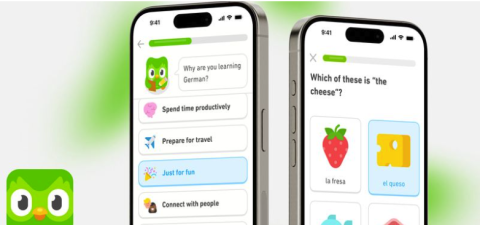
Let's take the Duolingo language-learning app as an example. Just 14 years ago, a college professor and graduate student built the app with the aim of improving language education. As it evolved over the years, it expanded its features to include:
Duolingo's growth from an unassuming endeavor to a global education phenomenon highlights what's possible for small businesses with a great idea and a strategy.
The feature list informs your next step: design. Incorporate the features into a general mockup or wireframe of what you want the app to look like. Several tools are available, especially for wireframing and design. Two of the most user-friendly are Figma and Sketch.
Figma is a web-based graphic design tool for wireframing mobile apps, websites, and many other products. It's free for small projects, but you can access more tools with a paid plan. Sketch is a similar graphic design tool that's catered to Mac users. However, non-Mac designers can access its features through its web-based app.
You don't have to be an experienced graphic designer to use mockup tools. Most are very user-friendly, and they offer lots of handy tutorials and guides to walk you through the process.
At this point, decide whether you'll create a native or cross-platform app. Going native means designing the app specifically for use with either Android or iOS — not both. If you prefer not to limit yourself to a single app store, choose a cross-platform framework that supports both operating systems. Examples of cross-platform frameworks include React Native and Flutter.
When learning how to create a mobile app, you might wonder why a developer would choose iOS over Android or vice versa.
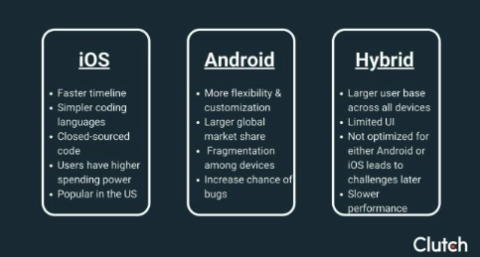
On the iOS side, creating a native app allows you to integrate with Apple's ecosystem. That includes Apple Wallet, Watch, Face ID, and Maps. Since iOS runs only on Apple products, less testing is required across multiple devices and manufacturers. As a high-end smartphone, iPhone users may have more disposable income — which may mean a higher monetary return for your app.
Android has its advantages, too. It offers a quicker app approval process than Apple. Some apps go live in the Google Play Store within hours of submission. Android apps also reach a larger audience worldwide, so you may see more downloads outside the US. There are also fewer privacy restrictions on Android apps than on iOS.
iOS-native apps adhere to strict guidelines. Apple encourages developers to stick to minimalistic design principles. It also limits integrations with third-party tools, which may be a hurdle for developers eager to test new features or functions.
Among Android's drawbacks is costly maintenance. Because Android apps run on so many types of phones, staying on top of updates across all devices can be incredibly difficult. If you decide to introduce new features to an Android app later on, you may face obstacles in leveling up the app to meet all device requirements.
If you can't decide which platform is right for your app, a cross-platform solution is an alternative choice. That way, you get the benefits of both systems!
There are different types of apps: native, hybrid, and web.
Once you decide on the type of app that fits your objectives, you can move on to backend development. This is where you'll code the logic that runs the app behind the scenes. Your development team will start in a development environment that allows you to write, debug, and test the code before bringing the app live.
Android and iOS have their own development environments. Android Studio supports apps made for Android devices, while Xcode provides a similar resource for iOS-based apps.
If you're unfamiliar with coding, you have a few options. Hiring developers allows you to leverage their skill set. Their know-how can enhance the app's features and customizations.
Another option is using an app builder, which requires little to no coding knowledge. Most app builders are budget-friendly and don't require a significant investment. However, with an app builder, you're limited to its available templates. Most don't offer much customization. It's also harder to scale if you expand your app's features later.
As you're exploring how to get an app made, consider hiring an app development company. These organizations specialize in getting apps off the ground. They have trained staff on board who understand the complexities of creating an app from start to finish. Their experience expedites development time and avoids costly mistakes that can derail the entire project.
Hiring an outside team makes sense for apps with many features or unique capabilities. Such projects usually require extensive coding and testing before they can launch. Even if you have an internal development team, they may not have the bandwidth to take on a major app development project.
How do you select the right app development company for your needs? "Choose an app development partner with not only a high standard of design and development, but also strong business and strategic thinking," suggests Brice Gramm of CMBR. "Pick a team who thinks beyond the pixels and code to help you build the right thing, in the right way, at the right time.”
Bezai has similar advice. "What matters most when choosing an app development partner is their ability to combine expertise, comprehension, and collaboration,” she says. “We recommend looking for a development team that not only has proven experience in your industry. Yes, related experience is highly important. But also focus on finding a tech partner who understands your unique needs and challenges."
Clutch connects businesses with app development companies. Use our directory to locate developers that fit your needs and budget.
When designing an app, aim for a simple design that's easy to navigate. Since mobile apps run on small screens, there's not much room for clutter. Too many visuals can overwhelm the eye and lead to disengagement among your user base.
Other important considerations are navigational tools, such as buttons and menus, and app layout. Map the app's different screens and journeys based on a user's actions. A clear layout helps developers understand the app's flow, making it easier to code on the backend.
Developers commonly use Figma, Sketch, or Adobe XD to prototype app visuals. These tools include design functions, allowing you to easily create graphics, choose typography, and more. You can also use them to test the app's basic interactivity before full development.
There are four main phases an app goes through during development. Each phase contributes vital aspects that support the app's final functionalities.
Frontend development involves creating the user interface and navigation tools. It's what a user sees when they open the app. Small apps with only a few screens may require just a few weeks in frontend development, while more complex apps with animations and graphics can take two months or longer to complete.
Apps use a dedicated server, database, or other cloud-based storage source to manage functionality. Examples include Firebase, a Google product that facilitates data synchronization, and Amazon Web Services (AWS), a cloud computing platform that scales IT resources. Backend development can take between five and 10 weeks for the average app.
Some apps leverage third-party services to enhance functionality. Connecting to a third-party service provider's database, library, or other tools can take several weeks to a month.
Testing is a major part of app development that can take significant time. App developers use a broad range of tests to fix bugs, enhance performance, and increase usability. Examples include unit tests, user acceptance testing, and beta testing. Expect to spend up to two months or longer on the testing process.
Anyone can download an app from the chosen app store once it is released. You want users to have a great experience, which is why testing and quality assurance are so critical.
There are several types of tests you can deploy during the QA process.
Some developers use beta testing, too. During a beta test, a small group of users receives early access to the app. They spend time using it and provide feedback on their experience. Their insights can catch problems a developer didn't consider. Beta testing is especially important for medium and complex apps that involve lots of screens and different user journeys.
Marketing is a big part of mobile app development. Through marketing, you'll share the app's benefits and urge your target audience to download it.
Start by drafting a compelling description that highlights the app's features. Follow the principles of app store optimization (ASO) to improve visibility in search and encourage downloads. The principles include:
pple and Google have a review process that your app must undergo before it can go live. Both companies provide guidelines that explain how they review apps and what may cause a denial. Before submitting your app, read the guidelines to know what to expect. Generally, Apple completes the review process within two business days, while Google is usually a bit faster. You'll receive a notification of the results. If the app fails the review, Google or Apple will let you know why so you can fix it.
Once you have a live app, put your marketing strategy to work. Encourage downloads through digital channels, such as social media, email, and websites. Running paid ads or collaborating with influencers may provide quick results that kickstart your campaign.
Apps require ongoing maintenance to stay compatible with iOS and Android. When Apple and Google release operating system updates, it can affect app performance. Your development team should stay on top of updates so the app continues to run properly on user devices.
Developers track app performance using tools such as Google Analytics, Firebase, and Mixpanel. These tools track app events and crashes, user downloads, and engagement. They're helpful for locating bugs and identifying opportunities for app improvement.
When someone downloads your app, encourage them to leave a review after they've engaged with it. Most apps collect reviews via automated popups that appear when a user is in the app. Android and Apple both support in-app review collection.
No matter what type of reviews you receive — positive, negative, or mixed — take time to read and politely respond to comments. Replying shows you care about the user's experience and appreciate their insights, which can alert you to app issues and opportunities.
Based on Clutch research, app development usually costs between $10,000 and $50,000. However, this largely depends on the scope of your project, the functionality you're looking for, the timeline of your project, and the experience of your development team. To get a better understanding of the total price of your project, create a detailed scope of work that you can discuss with your app development team or create a request for proposal (RFP).
There are a lot of developers available who can make your app vision a reality. Look for a company that understands your needs and has the resources to devote to your project. A few highly-rated app development companies include Naked Development, Goji Labs, and Mercury Development.
Find a company with a history of developing apps similar to the one you want to create. One of the best ways to find potential app developers and assess their skillset is by reading client ratings and reviews. Company reviews on Clutch provide detailed information about each project, what it was like working with each service provider, and the results of the project. This information can help you make informed decisions when creating a shortlist of potential app development partners. When interviewing potential developers, ask about their skill set, platform experience, and ability to support ongoing updates. App development costs can range widely, so pick a company that fits within your budgetary constraints.
Hourly rates for app developers usually range from $25 to $49. However, some may charge more or less based on their location and experience. Many businesses hire app developers in different regions in order to save on development costs. For instance, app developers in India often charge less than $25 an hour, while those in the US can charge up to $150 per hour for their services. Additionally, app developers with more experience will charge higher rates for their services, especially if you have a complex project.
While building an app can help your business reach new audiences and streamline internal business processes, it can be a costly and difficult project. By scoping your project and identifying key objectives at the outset of your project, you can ensure that the final product you create is exactly what you're looking for.
While it is possible to build your app yourself, an app development company can help bring your vision to life. They will work with you to determine the functionality of your app, design the app, and then create the code that makes it work. They can even support your business through the launch of the app and can help maintain it going forward.