
Mobile Apps vs. Web Apps vs. Websites: What Does Your Business Need?
Should you build a mobile app, web app, or website? Learn the key differences, costs, and use cases to choose the right platform for your product and users.
Updated April 23, 2026

A great mobile app design provides a great user experience, increases your user base, and strengthens your brand image. Here are six mobile app design examples that have built a loyal user base to inspire your app design.
Today, individuals dedicate a greater portion of their time to mobile phones compared to any other gadget. This shift in behavior necessitates a more meticulous approach from designers when it comes to crafting user interface designs for applications.
The significance of this task has increased as it plays a pivotal role in enhancing usability and ensuring user engagement. Merely possessing an app concept falls short in today's competitive landscape.
Looking for a Mobile App Development agency?
Compare our list of top Mobile App Development companies near you
Regardless of the uniqueness and trendsetting nature of your idea, your app must be brimming with features, highly functional, and effortlessly navigable, with a particular emphasis on an intuitive user interface.
If your app fails to captivate your intended audience, all the hard work and effort you put into it will be futile. It will be unable to achieve success, as users will swiftly install and uninstall it, leaving no lasting impact.
In this article, we will look at six of the best mobile app design examples to inspire your app design.
Looking to hire a mobile app designer? Search leading service providers on Clutch. Then filter based on client ratings, location, and company size to find the perfect partner for your project.
Mobile app design is about more than making a “cool-looking” app. Yes, it needs to be visually appealing, but it also needs to be easy and enjoyable for users. Great mobile app design seamlessly combines these key elements:
Tumblr is a prominent social media platform widely embraced by young individuals and students, ranking among the largest platforms of its kind globally.
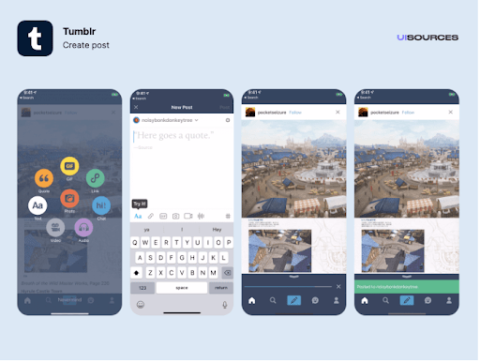
Tumblr serves as an exceptional platform for exploring art and staying up-to-date with the latest pop culture trends among young individuals. It's a hub where you can discover some of the internet's most captivating memes and GIFs.
The designers of Tumblr have skillfully crafted a mobile app experience that reflects the platform's dynamic content and thriving community. By employing a vibrant color palette, intuitive buttons, and seamless navigation, they have created an engaging and immersive user experience that radiates enjoyment.
Venmo offers a digital wallet app for making and requesting payments. Sporting a clean and user-friendly interface primarily in blue and white, Venmo conveys a sense of reliability.
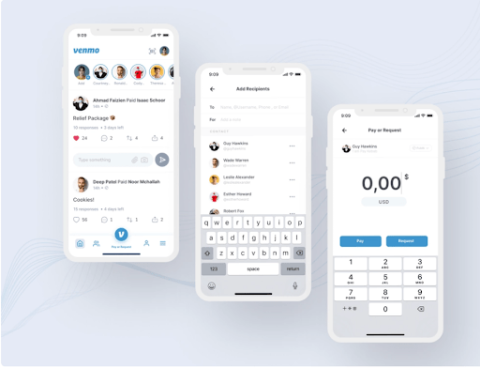
With Venmo revenue up 20% in the first quarter of 2025, the app continues to gain in popularity.
Venmo adopts an agile approach to product development, focusing on serving one client at a time rather than taking on multiple projects.
Venmo offers a delightful and lighthearted experience for users to interact with their friends and family.
The app effortlessly guides users through a quick and efficient setup process. Completing transactions and requesting money is a breeze, with just a few clicks, and users can add a touch of fun by using emojis.
Furthermore, users have the option to make their transactions public, appearing in the feed for friends to see and respond to.
With its clean, minimal, and vibrant design, Venmo has become an indispensable tool for young people, propelling us into the future. Its sleek aesthetics perfectly complement its functionality, making it a must-have app that users simply can't do without.
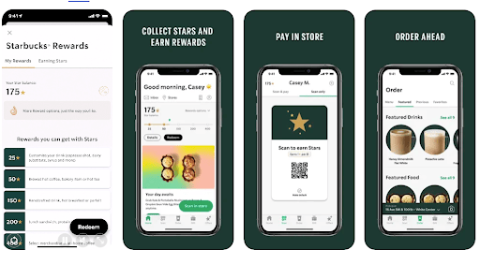
Starbucks is one of the most popular apps in the world because of its simple interface. Every day, millions of users use the app to order their favorite drinks on the go.
The app’s navigation is simple; when a user opens the app, they are able to choose from five menu options. The options include a home page, scanning function, ordering, gifting, and offers. With just a few clicks, users can order their drinks ahead or earn rewards if they’re ordering in-store.
The convenience of ordering ahead combined with the ease of use has helped the coffee chain build a loyal user base.
Additional reading, ‘The Success of Starbucks’ App: A Case Study’
What many people don’t realize is that small businesses can benefit from building a mobile app too. Like larger businesses, having an app allows them to connect with customers more effectively, provide a better customer experience, and increase sales.
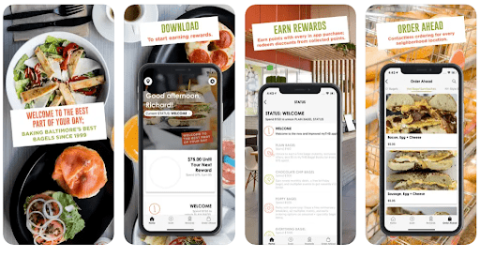
Towson Hot Bagels, a Baltimore-based bagel chain and deli, built a user-friendly iOS mobile app that allows customers to order ahead. The app is easy to navigate thanks to navigation at the bottom of the screen. This makes it easy for users to reach important pages like the menu and rewards pages.
To make it easy to order, users can quickly find a location near them using the geo-location feature. Then they can easily find what they want on the menu thanks to navigation features at the top of the screen, allowing them to find different categories. If they order frequently, they can view previous orders and order them again.
Similar to the Starbucks app, users with the THB app are able to enroll in a rewards system. They can receive points with qualifying purchases that can be redeemed for some purchases, which helps the shop build customer loyalty.
Sleepiest, a meditation and sleep app, is specifically designed to assist individuals with insomnia in achieving restful sleep, making it an ideal solution for those seeking tranquility at bedtime.
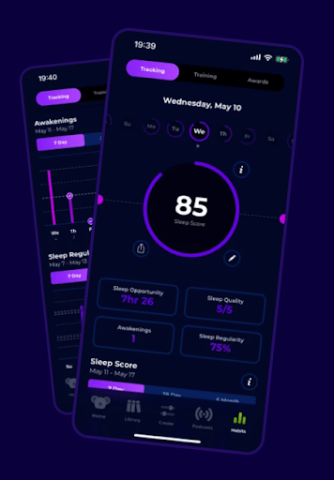
Sleepiest offers a variety of options to facilitate relaxation and improve the quality of your sleep. You can select from a collection of bedtime stories, soothing soundtracks, or calming meditations to unwind and prepare for a restful night's rest.
To improve your sleep, the designers have opted for a dark theme UI design, minimizing the impact of blue light that can disrupt sleep. Vibrant orange call-to-action buttons enable users to quickly access the desired features, reducing overall screen time.
Additionally, users have the convenience of setting a timer within the app to automate their bedtime routine, eliminating the need to interact with their phone again before drifting off to sleep.
With a vast user base spanning the globe, Evernote reigns as the largest note-taking and productivity platform, catering to hundreds of millions of individuals worldwide.
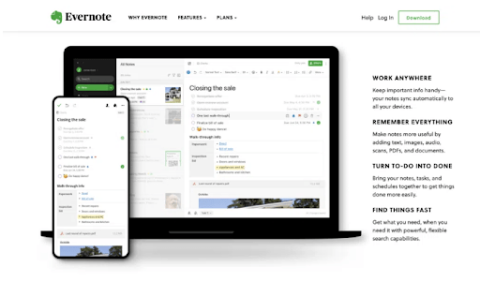
Evernote has successfully streamlined the process of capturing, organizing, storing, and sharing notes, delivering maximum productivity to its users.
Notably recognized by Apple as an "Editor's Choice" and a regular recipient of Webby Awards in the Work & Productivity Apps and Software category, Evernote has established itself as a leading platform.
The mobile application design of Evernote matches the comprehensiveness and user-friendliness of its desktop counterpart. Despite offering numerous features and options, UX designers have skillfully ensured that users are just a tap or two away from creating notes or organizing tasks.
The Scratch Pad feature on the home screen allows users to effortlessly jot down notes without the need for any additional clicks. The distinctive "Evernote green" color accentuates important call-to-action buttons, ensuring easy identification in both light and dark modes.
Designing a successful mobile app is a challenging endeavor. To produce a well-crafted app that achieves your goals, whether that be facilitating transactions, providing information, and/or enabling communication with your business, keep these best practices of mobile app design in mind:
Consistency in design creates a familiar and consistent user experience, helping users to navigate through your app with ease, and, most importantly, keep coming back! Applying consistency in app design fosters a loyal user base that consistently returns to your app and engages with your business for further interactions.
Incorporating consistency in design means elements like buttons, navigation, colors, and fonts behave and appear the same way across all screens and features of the app. This uniformity reduces confusion, minimizes errors, and helps users accomplish their goals more efficiently. They can quickly understand and interact with your app without frustration, leading to higher user satisfaction and long-term engagement with your app and brand.
Consistency in design is guaranteed to enhance the user experience and consequently achieve immediate success.
You’ve designed your app for your users. Make sure you’re prioritizing their feedback in your mobile app design. This is the best way to ensure your app meets user needs and continuously improves and evolves with user expectations. Prioritizing user feedback helps identify pain points, uncover bugs, and discover opportunities for improvement that might not be obvious during development.
To prioritize and apply user feedback effectively, collect feedback regularly through the app — think surveys, support tickets, and analytics tools, as well as watching app store reviews. Then, organize and categorize the feedback, distinguishing between critical issues, feature requests, and minor suggestions. Finally, act on these insights based on priority and alignment with your business goals.
This feedback loop improves customer retention and trust by showing users their voices are heard and valued, while keeping your app competitive by always delivering on what users want!
One of the best ways to deliver a quality app that users want is to ensure it is functional, reliable, intuitive, and meets user expectations BEFORE it hits the app stores. This is where testing and iteration comes in.
Testing and iteration helps to catch and resolve usability issues, design flaws, and technical bugs in the early design stages, preventing costly fixes after launch and improving the overall quality of the product you do launch. It also allows you to validate design choices with real users, ensuring the app is meeting, and even surpassing, the needs and expectations of your target audience.
To apply testing and iteration effectively, start by creating prototypes or beta versions and conduct usability tests with target users where you can observe user behavior and gather actionable feedback and analytics. Based on this data, refine the design in small, focused iterations—making incremental changes to layout, navigation, or features. Repeating this testing and iteration process throughout development helps ensure the app evolves in a user-centered way, leading to better engagement, higher satisfaction, and long-term success.
A great mobile app design relies on essential principles that guide the user interface (UI) and user experience (UX), which are crucial for achieving user retention and overall success.
Of course, these design principles are most effective when complemented by other necessary factors and when the app genuinely addresses a specific need. App developers must strive to stay ahead of the competition by adopting cutting-edge techniques, as the market has become increasingly discerning and demanding.
As always, those who can deliver what the market desires will reap the greatest rewards in terms of success. Mobile app design is important for the success of your app primarily because it profoundly impacts the user experience.
The visual appearance and fluidity of your app play a pivotal role in shaping the user's emotions and overall satisfaction while interacting with it.
The user's perception of your app significantly influences their usage behavior and their likelihood to share it with others. The size and engagement of your user base directly impact the value and success of your app.
The impact of your mobile app design on the user experience directly influences the rate at which your user base can grow and the efficiency with which you can monetize it.
Additional Reading: