
How App Companies Can Build Trust with Customers
Learn how app companies can build customer trust through better privacy practices, transparent communication, and stronger security to improve retention and...
Updated November 17, 2025

The wireframing process is crucial to any mobile app development project. Businesses should consider using a mobile app developer that invests in annotated wireframes. Learn more about the benefits of annotated wireframes for mobile applications.
A successful app build involves a series of stages for mobile app development companies. For large projects, having a proper plan in place is key for an organized development journey. Wireframes are one element that aid developers and designers in their processes.
Looking for a mobile app developer? Explore our list of the best mobile application development packages.
Looking for a Mobile App Development agency?
Compare our list of top Mobile App Development companies near you
Wireframes are designs that serve as the blueprint or basis of a website or application, but annotated wireframes add more context and clarity to original wireframe designs by having points for comments or notes.
For instance, an annotated wireframe may have a note next to a “Login” button saying, “redirects to dashboard after successful authentication.” While regular wireframes would just include the “Login” button.
According to Tiller Digital, “Annotating wireframes is an efficient and effective way to add context and clarity to wireframes. Notes around user flow, functionality, and the purpose of certain design elements help collaborators and stakeholders understand the wireframes more comprehensively. This clear understanding also enables people to provide constructive feedback to improve the wireframes.”
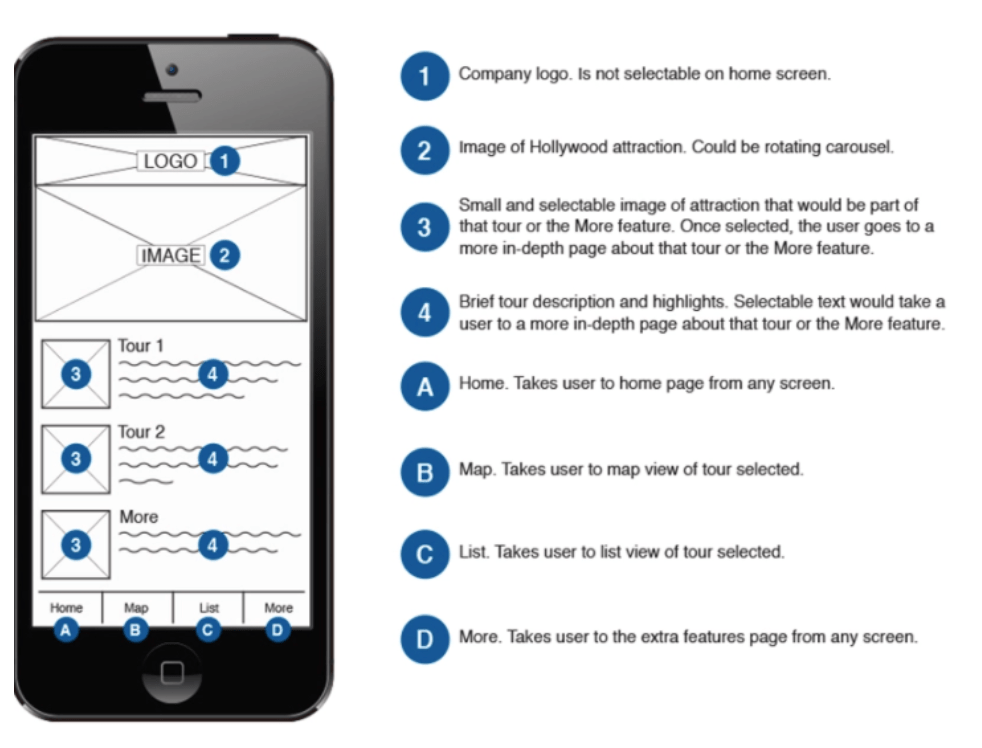
Users of annotated wireframes can be thoughtful by annotating:
It isn’t necessary to annotate every single piece of your company’s app’s wireframe, but highlighting key items can lend to more discussion about the app’s goal and potential improvements for the overall product.
Both regular wireframes and annotated wireframes outline the user journey by highlighting navigational elements, design features, and other areas of website functionality. But annotated wireframes take it a step further by combining visuals and documentation to help designers, developers, and stakeholders understand not just what the design looks like, but how it’s supposed to function.
Suggested reading, ‘How to Create a Wireframe Map.’
Like many steps in a development or design process, annotated wireframes require an audience.
Annotated wireframes are typically for five different audiences that all have a stake in the final product.
Annotated wireframes help to clarify important information and instructions for all parties involved.
Show and tell your entire development and design process by using annotated wireframes.
Annotations provide context regarding how something will work and look, and how users might interact with the design. Going beyond typical wireframe design, annotated wireframes show the extra context one might need when viewing a design for the first time.
When designing wireframes, you need to show how the elements will work in a more dynamic setting.
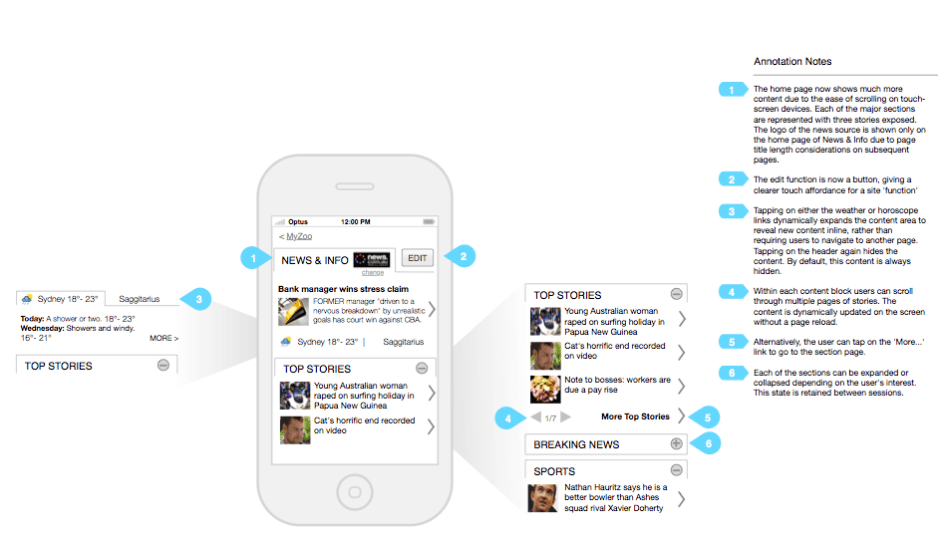
The interactive models within an annotated wireframe should provide the how and why for each feature.
These are just some of the questions that can be answered by annotated wireframes.
All of this additional context with annotated wireframes will help in later aspects of your mobile app development process.
It is important that all stakeholders within the mobile app development process are considered in the wireframing process.
Creating annotated wireframes makes it easier to communicate responsibilities effectively by detailing out expectations and guidelines for each member of the team. It is also important to lay out all aspects of the wireframe through these annotations to present the opportunity for feedback.
For example, a developer might have an idea for content after seeing a note made for that team. It’s always a good idea to receive that type of information before presenting to a larger team or an external party.
If all parties involved in the creation of the mobile app are included in all aspects of the process, the opportunity for error and miscommunication diminishes.
The rationale behind any design decisions must be clear to a variety of parties:
With annotated wireframes, it becomes easier to communicate responsibilities to each person involved in the overall mobile app build. A successful collaboration is a key factor.
As you work out your annotations, it is important to remain organized while writing out your annotated wireframes.
It is helpful to be as detailed as possible with the annotations because that will make the process even more organized. With detailed notes, the process will be even more transparent.
Your notes can vary – depending on the aspect of the wireframe.
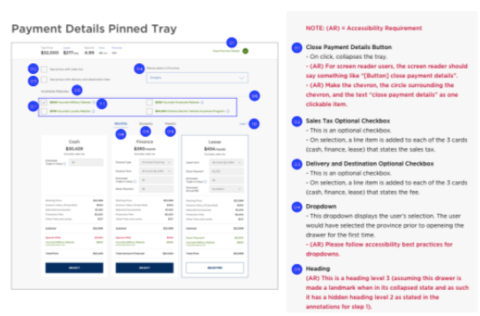
For design elements, you might want to comment on designs or different scenarios. For functionality aspects like navigation, you might want to be more detailed – stating how you want the feature to move, where do you want it to go, any technical details.
These annotations are a good way to learn more about what’s needed or what is even feasible with your mobile app.
Being organized with how your annotations are laid out will lead to an organized app development process.
Annotated wireframes provide information on different features and functionalities. Outside of delivering small notes with key details, they provide clarity.
Within an annotated wireframe, all elements and sections of the mobile app should be clearly defined, all CTAs should be accurately labeled, all links and buttons should be explained, and all potential error messages should be stated.
Creating annotated wireframes is a very detail-oriented process, but in the end, your company will be provided with the best results – a highly functional mobile application.
For any successful product or app development project, the right set of tools should be in place. Consider some of these popular interface tools for your next product design effort.
Regardless of the tool your company or team chooses, annotated wireframes can benefit your overall business.
Before you add annotations, begin by creating a clean, well-structured wireframe that maps out the key components of your page or screen. It should show the layout, hierarchy, and flow of your content without getting into detailed design choices like colors or fonts.
Then you can build your wireframe using digital tools such as Figma, Adobe XD, Sketch, or Balsamiq, which make it easy to move elements around and add notes later. If you prefer a hands-on approach, you can also start with a simple sketch on paper or a whiteboard to visualize ideas quickly.
Focus on placing the main elements, like headers, navigation menus, images, buttons, forms, and content sections.
Then go through your wireframe to determine where users interact, like buttons, links, forms, and drop downs.
You should think about what might need explanation, like where those links will go, how the app will react, and the user experience. This is what you will be taking notes on once you get to the annotation part. The goal is that anybody who views your wireframe should know how you intend for it to work.
One way to add annotations is to simply jot notes on the side of each visual, however you can organize it better with numbered labels or callouts next to elements that need explanation. Then you can create a corresponding list or sidebar so viewers can reference your notes easily.
These notes should explain in detail the action that would occur if a user would interact with that element.
All of your annotations should be concise and easy to read. You should also be consistent with how you label everything so it’s easy to follow. Ultimately, any app designer or developers should be able to follow your notes.
Once you are done annotating the wireframes, you should read through it to ensure that all critical elements are annotated. If something is not super clear or there are redundancies, be sure to add a few notes. Finally, you can share the annotated wireframes with the rest of your team.
The start of an app development journey is a difficult and challenging aspect for all parties. Once your company knows where to begin, it is time to hit the drawing board. Annotated wireframes add a benefit to any mobile app development project.
No matter the size, annotated wireframes provide valuable insights through:
As a mobile app developer works on your company’s app idea, the use of annotated wireframes can help them deliver a high-quality final product that meets your standards.
Looking for a reputable mobile app developer? You’ve come to the right place. Browse our vetted list of mobile app developers in your area.
Additional Reading