
How to Hire Salesforce Developers in 2026: Assess Decision-Making, Not Just Technical Skills
Hiring a Salesforce developer in 2026? Learn how to assess decision-making, not just Apex skills, to find talent who builds sustainable solutions.
Updated November 12, 2025

If your company is looking to build an iOS application, it might be difficult to distinguish the differences between Swift and Xcode. While the two programming frameworks can complement each other, understanding their differences and benefits will help your business optimize your next iOS app project.
Business apps are among the top two most popular categories within the Apple App Store. This trend is likely to continue over 2022, so more companies are likely to invest in iOS for their next app development project.
For companies looking to learn more about how iOS works within the app development realm, it’s important to discern any differences and similarities between two key elements within the iOS space.
Swift vs xcode might be a part of that thought process when it comes to Apple platforms. This article will review both Swift and Xcode while analyzing its key features, benefits, and differences that will impact any company looking to build an iOS app.
| Pros of Swift | Cons of Swift | Pros of Xcode | Cons of Xcode |
|---|---|---|---|
| Flexible | Lack of early iOS support | Range of functionalities | Outdated |
| Compatible with Apple OS | Little cross-platform support | Testing capabilities across architectures | Issues with support for work environments |
| Modern & Fast language | Poor interaction with third-party tools | Great for collaboration | Difficult to export |
Apple first released Swift in 2014 as an open source and robust programming language for iOS services like MacOS, tvOS, and watchOS.
For development teams, the Swift programming language is fast and efficient, and it can be seamlessly integrated into existing applications that use Objective-C code. It also allows for real-time feedback and delivers a dynamic runtime within the source code.
Developers find Swift to be a safe, interactive, and organized coding language. Since it is a new programming language, it is more modern than other similar languages in the app development or even software development space. But, since it is newer, there is a lack of skilled Swift developers or individuals knowledgeable of the developer tools in the field.
Anyone with an idea for a development project can use Swift to create. Some popular applications that use Swift code include Lyft, Eventbrite, and LinkedIn.
VSCO is a popular photography app that uses Swift code for its iOS version. It allows users to create rich experiences using their own photography.

The flexibility of Swift allows users to flex their creativity with a variety of VSCO’s features.
Released in 2003, Xcode is an IDE or integrated development environment that provides a unified workflow for UI design, coding, testing, and debugging work. Like Swift, Xcode is also compatible with all iOS technologies and includes a suite of tools like a source code editor, interface builder, and simulators, to streamline the app development process.
Swift and Xcode go hand-in-hand. While Swift provides the programming language that allows you to build app logic, Xcode gives you the ecosystem to build, test, and ship them.
In fact, Xcode’s editor is specifically designed for Swift, offering real-time error checking, intelligent code completion, refactoring support, and live previews that make writing and testing faster and more intuitive than if you were to build an app without it.
Using Swift as your app’s main coding language can provide benefits to your app’s overall performance and user interface.
Along with its flexibility and expansive memory management, Swift codes are scalable, easy to maintain and read, and concise. Fast, powerful, and open source, Swift is a modern language many universities are investing significant resources into teaching with tutorials and programs.
Despite being in demand, Swift is still far from being a perfect programming language. There is a lack of support for earlier iOS versions, very little cross-platform support, and instances of poor interoperability with third-party tools.
As Swift becomes a maturer language in the mobile app development field, the advantages might begin to outweigh any disadvantages or hurdles.
Helpful Resource: Swift Playgrounds is an app for iPad and Mac that makes learning Swift interactive and fun.
Using Swift doesn’t force you to use a Mac, like Xcode. Swift can be accessed through an online IDE.
Helpful Resource: ‘Your First Swift Application’.
In addition to coding features that support a variety of languages and output sizes, Xcode offers developers a range of functionalities that improve workflows and streamline development processes.
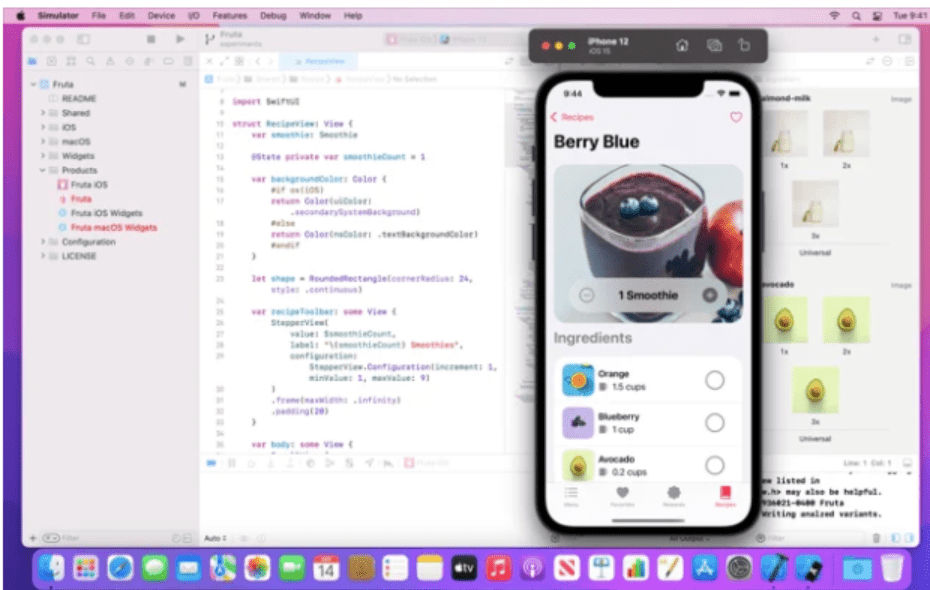
The platform offers features that allows developers to alter and enhance their code. It enables them to test a single code base across multiple architectures. It also allows for collaboration across larger teams, which is key in a remote working environment.
While Xcode provides a large quantity of pros that make significant improvements to any mobile app development project, it is also important to note that some of the functionality is a bit outdated, which could lead to more roadblocks.
There are also challenges with educational materials, lack of support for work environments, and difficulties with exporting, which can make a challenging process even more difficult.
As an integrated solution, Xcode can be a user-friendly tool for development teams of all sizes and programmers if used correctly.
Being both Apple technologies, Swift vs Xcode isn’t necessarily a competition – they complement each other, especially during an app development project focusing on iOS efforts.
Swift is a programming language that is used for building iOS and Mac applications, while Xcode is not a programming language – it is a comprehensive IDE. Xcode is the canvas to write and program the code, while Swift is the actual code that your team is writing.
While Swift is an open source programming language, Xcode delivers products that use programming languages to your inbox or App Store.
Xcode only has compatibility with Apple technologies, while despite challenges, Swift provides the opportunity for cross-platform interoperability.
Since Swift is a programming language, it does not provide any tools for development, but Xcode relies on tools and functionalities to build iOS and Mac applications.
If your company is torn between Swift vs Xcode, it might mean that your business needs different assets. Is your company looking for a platform to host their next app development project or are they looking for a new code base? Or is it both?
While factoring in these considerations, a mobile app build in a new avenue might be a challenging project for your business. Partnering with an experienced iPhone or iOS app developer may help make the decision process a lot easier.
Swift and Xcode complement each other, so it might be worth it to add both into your project planning. Rather than just one, the question might be whether to include both or just one into your iOS app development process.
Swift is a programming language that provides flexibility and organization, but as a newer technology, a lack of resources, support and integration opportunities could delay a project’s success.
Xcode works well with Apple operating systems, Swift, and provides a fast UI and workflow that benefits any project. While it is a well-designed system, it is outdated, which can lead to a lot of troubleshooting for companies.
Take the first step in kicking off your project and browse our list of vetted app developers.