
Why Salesforce Staff Augmentation Is Becoming a Strategic Choice
Salesforce staff augmentation is no longer a stop-gap. Learn why more businesses now use external specialists to access expertise, move faster, and scale...
Updated May 28, 2026

Your IT budget is your financial allotment covering all technology-related business operations, including hardware, software, cloud services, cybersecurity, and IT staffing.
Just as important as funding the budget is the IT budget planning, the process of mapping out all these technology-related expenses so you can manage costs while supporting business growth and innovation.
If your organization struggles with unexpected IT expenses, outdated systems, or rising cloud bills, it’s time to formalize your IT budget planning process. This article explains how to build an effective IT budget from the ground up, the key services and resources to account for, and step-by-step strategies to align IT spending with business goals.
Looking for a IT Services agency?
Compare our list of top IT Services companies near you
An IT budget is both your financial cost-tracking of technology expenses and a strategic framework ensuring your technology investments directly support business outcomes. By aligning spending with company goals, an IT budget helps prioritize critical initiatives and prevents waste on low-value tools.
Account for personnel costs with the appropriate staffing cost models. Full-time employees (FTEs) have higher fixed costs (salaries, benefits, and training) but with in-house control and expertise. Managed services are more variable, billed monthly or per project, for flexible costs without long-term commitments. Many organizations have hybrid models, blending in-house FTEs with outsourced services.
Disaster Recovery and Business Continuity Planning (DR/BCP) are essential budget items that safeguard operations against outages, cyberattacks, or natural disasters. Costs typically include backup infrastructure, redundant systems, and recovery services, all of which scale with your Recovery Point Objective (RPO) and Recovery Time Objective (RTO). The tighter your recovery goals, the higher the spend on storage, bandwidth, and standby systems. Beyond infrastructure, organizations must also budget for ongoing maintenance and regular testing exercises to validate recovery processes, which can represent 10%–20% of the total DR/BCP investment each year.
Capital expenditures (CapEx) cover long-term investments that are capitalized rather than expensed. In an IT budget, these kinds of expenditures can include servers, networking equipment, data centers, and large-scale software purchases. To forecast your CapEx, look at replacement cycles, vendor pricing trends, and scaling needs over three to five years, often using depreciation schedules to spread costs across their useful life. Typically, CapEx accounts for 20%–40% of total IT spend in asset-heavy industries, while cloud-first organizations may allocate less than 15% as more costs shift to operating expenses (OpEx).
Operating expenditures (OpEx) cover the recurring costs of keeping technology running day-to-day, like maintenance, onboarding materials, cloud subscriptions, software licenses, security controls, telecom charges, and vendor support agreements. These ongoing expenses scale with usage, making them easier to adjust but also more volatile if left unmanaged. Optimize OpEx by applying FinOps practices, like rightsizing cloud resources, purchasing reserved instances, and monitoring usage patterns. This ensures service costs remain predictable while maximizing efficiency and value.
Industry benchmarks provide a baseline for setting IT spend. To guide the IT budget, look to the “70/20/10 rule,” allocating 70% to ongoing operations and maintenance, 20% to growth and upgrades, and 10% to innovation and strategic initiatives. Adjust to your needs based on industry, company size, regulatory requirements, and growth plans.
Learn more about the world of IT services with Clutch's IT Services Glossary.
Building a budget for an ongoing process involves finalizing company goals, selecting key priorities, and then combining them to factor in specific costs.
Companies can create a strong IT services budget by following these steps:
These steps will help your IT budget come together seamlessly.
Before crafting your budget, plan out what IT initiatives your company needs to take on. A good way to start is reviewing any IT support-related tasks from the last year.
If you spent money on a new router last year, your business won’t need to do it again this year.
Businesses can also see where there are gaps in their current IT strategy to see if they can make progress on them during this year.
These are popular IT services that are used for businesses of all sizes:
Along with selecting the IT services your organization needs, stakeholders must consider which type of partnership they want.
There are two well-known IT support models:
Select the IT support model that will benefit your company overall.
Deciding between in-house IT services and an MSP provider? Let us help you choose the right option for your needs.
A big aspect of any technology spend is figuring out who will complete the work.
Should you focus all of the work on your current IT department or find an outside agency of IT professionals to get the job done?
There is no right answer, but depending on how dependent your company is on technology, it might help to have a small IT team in-house that leans on an outside agency for larger projects and support. Your internal team of IT professionals can focus on strategy and allocation, while your outsourced partner can provide the heavy lifting.
There will always be a time when you need to update your equipment.
Make a list of what your company currently has and how old the items are. Once you have a completed list, your IT team can use their discretion when it comes to upgrading the materials.
Here are some popular pieces of technology and their general timeline for upgrades:
If you’ve found that it is time to upgrade your IT equipment, then it will be pertinent to include it in your IT budget planning.
Be sure to keep an open dialogue with employees that are frequently using the materials to get an idea of what’s working or what can be improved. It’s possible that their feedback can lead your company to choose a different model or system.
The whole goal of a budget is to access the right resources to execute your business strategy and goals. It is important to be clear on what you want to accomplish and how IT services can impact that overall goal.
IT managers will know firsthand what’s working well and what can be improved to streamline processes. They should collaborate with business owners to see how these priorities can factor into the year’s budget.
Performing an IT audit can benefit the selection progress to give an idea of what is actually needed.
It might make more sense to upgrade the team’s laptops to help with remote work over the entire networking system at this time. It is important to think critically about how priorities align with company goals.
To form your budget –and ensure that you’re not under or overspending– think about how your competitors use their money for IT services.
This is easier said than done, considering a lot of IT needs are internal and not shown to the public eye.
Do some research on how much businesses on your side are spending on IT services and how much they’re allocating for IT services as well - this can be done by contacting IT service providers that work with companies of your size.
Again, not every company has the same IT needs, so your team will require different expectations of their IT department.
In your budget, be sure to highlight differences while also working on universal IT support strategies that all companies need to run smoothly.
Researching future needs can make it easier for your team to predict IT expenditures,making next year’s budget even easier to plan.
Budget for your future by following this forecasting process:
Historical spend review: By analyzing past expenses across hardware, software, staffing, and cloud services, you can identify patterns, recurring costs, and areas where spending consistently exceeded projections. This data creates a baseline that highlights both fixed and variable costs for a clearer picture of what to expect in the coming year and where adjustments may be needed.
Future needs estimation: Future needs are based on upcoming business priorities, like technology upgrades, new hires, expansion plans, or major initiatives like digital transformation and cybersecurity improvements. Cross-department collaboration can reveal hidden IT needs (e.g., new software for sales teams or expanded storage for operations) that may otherwise be overlooked. Building this forward-looking view ensures your IT budget supports both current operations and strategic growth.
Scenario planning: Creating best-case, worst-case, and most-likely forecasts (or “scenarios”) helps prepare for uncertainty in vendor pricing, cloud usage, or project timelines. Incorporate a risk buffer of 5%–15% of total project costs into these scenarios to absorb unexpected overruns. Also account for inflation, which can significantly affect hardware, licensing, and labor costs year over year.
Combine all these insights into a formal forecast model that is reviewed and updated regularly.
Your budget cadence and review cycle ensure planning stability and agility. The most common cycle models are annual, quarterly, and rolling budgets.
Transitioning your budget cadence between these cycles requires careful change management to prevent operational disruption. The key to a smooth shift is establishing a "shadow" budgeting period where you run the new cycle (e.g., a rolling forecast) in parallel with the old model until stakeholders are comfortable and the data proves reliable. Tie the new review cycles to any existing business events, such as quarterly business reviews or major product roadmapping milestones, to integrate the new cadence seamlessly into established operations.
Now that your company knows what goes into building an IT services budget, it is time to create one that’s unique to your company.
Follow the below tools and templates to create your budget:
Budget presentation outline: Structure your IT budget in a way that’s clear for both technical and non-technical stakeholders. Organizing your plan into sections (e.g., objectives, cost breakdowns, ROI projections, and risk buffers) makes it easier for executives to understand how IT spending ties directly to business outcomes. Use the outline as a communication tool during leadership reviews or board meetings to secure buy-in.
Expense tracker: This is your day-to-day monitoring tool for IT costs. Use the template to log recurring expenses like subscriptions, cloud usage, and vendor fees alongside variable project spend. Update the tracker monthly for real-time visibility into how closely you are adhering to budget targets and flags potential overspending before it becomes a year-end problem.
CapEx/OpEx worksheet: Use this to separate long-term investments from recurring operational costs. By clearly categorizing expenditures, you can forecast depreciation on capital assets while also monitoring variable service-based costs. This worksheet is especially useful for companies shifting from hardware-heavy models toward cloud-first strategies, where OpEx dominates.
Variance dashboard: Allows you to “see” the gap between your projected budget and actual spend. Visualizing these variances highlights where assumptions were accurate and where adjustments are needed. Using this dashboard improves forecasting accuracy and strengthens financial accountability within the IT function. Make it part of your quarterly review cycle to ensure the budget remains a living, adaptable tool rather than a static document.
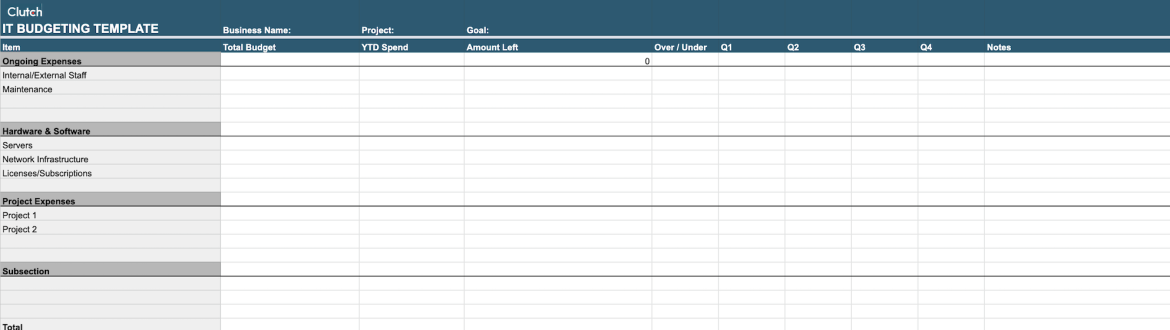
Download the template to help with your IT services budget planning
Managing and tracking IT costs is not a one-time task but an ongoing process.
Effective cost management starts with establishing a cost baseline. This means documenting your expected expenses across categories like hardware, software, staffing, and cloud services at the beginning of the budget cycle. This baseline serves as the reference point for evaluating financial performance, helping you distinguish between planned growth in spending and unexpected overruns.
Once a baseline is set, implement a variance tracking process to compare projected costs with actual expenditures. Variance analysis highlights where spending is running above or below plan, whether due to vendor price changes, usage spikes, or project delays. By categorizing variances as favorable or unfavorable, IT leaders can investigate root causes and decide whether corrective action or budget reallocation is needed.
Establishing a review cycle is essential for keeping your IT budget on track. These reviews should involve IT, finance, and department stakeholders to ensure that spending aligns with business goals and to approve any mid-cycle adjustments. Regular checkpoints also allow teams to update forecasts based on new data, reducing surprises at year-end.
Your cost management should include a strategy for continuous optimization. Instead of reactively tracking dollars spent, these are proactive actions, like rightsizing cloud resources, renegotiating vendor contracts, and/or eliminating unused software licenses. You’ll maximize the value of technology investments while maintaining financial discipline.
Several factors impact IT costs, including:
All of this information will help your organization think about what goes into your company’s IT strategy and budget.
Learn how much your project will cost with our IT services pricing guide.
If your company doesn’t have a secure IT services plan or system, your organization is unprotected.
When creating an IT budget, all team members must be strategic about what IT initiatives are critical to your business's success.
To craft a comprehensive IT budget, consider all of your technical needs, where reductions can occur, and what your business can optimize internally.
Plan an IT services budget using our template to help your business get started.
Most organizations set their IT budgets annually, but quarterly reviews are recommended to ensure spending stays aligned with business priorities. Mid-cycle adjustments may be necessary if major events occur (e.g., a merger, system upgrade, or cyber incident). Tracking key performance metrics, like cloud usage, software licensing, and support costs, can also impact when to do a budget realignment.
Industry benchmarks suggest IT spending ranges from 2%–7% of revenue, with higher allocations for tech-driven companies. A simple way to set your target is:
This provides a baseline that you can then adjust based on strategic goals, regulatory needs, and growth plans.
Target a buffer of 5%–15% of total project costs, depending on complexity and uncertainty. Projects involving new technologies, vendors, or integrations may require a higher buffer. Be sure to adjust for inflation, which can impact hardware and licensing costs. Running “what if” sensitivity scenarios in your forecasts (like a 10% increase in cloud fees or vendor delays) helps you determine if your buffer is sufficient.