Lead Quality vs. Lead Quantity: Why B2B Teams Are Rethinking Their Funnel in 2026
Bigger buying committees and tighter budgets are forcing B2B teams to rethink lead quality vs. quantity. Here's how top teams rebalance the tradeoff in 2026.
Updated June 23, 2026

Customer onboarding emails are automated messages sent to new users after signup, designed to drive activation, reduce churn, and turn first-time users into loyal customers.
Done well, customer onboarding emails increase customer lifetime value — and welcome emails alone achieve open rates of up to 63%, making them the highest-performing email type a company can send.
When we first started to send onboarding emails welcoming early users of our Chanty team chat (chanty.com), we had no idea what we were doing. And it's no surprise that our open rates and click-through rates (CTR) were far from successful.
Looking for a Digital Marketing agency?
Compare our list of top Digital Marketing companies near you
At the same time, we realized the way we onboarded our new users set the tone for an ongoing relationship with them.
Successful onboarding emails can increase customer lifetime value, reduce churn, and turn new users into loyal, paying customers. In other words, we were missing many opportunities.
Consider these figures:
Considering the above, it is no surprise that companies put a lot of effort into the customer onboarding process. The result? Consumers are bombarded with endless "onboarding" (read: salesy and useless) emails every day. I bet your inbox is full of them, too.
With our growing list of users, we knew we needed a good onboarding email marketing strategy. Our marketing team has gone through many optimization tricks, and today I'll discuss which of them have actually paid off.
Customer onboarding emails are a series of automated messages sent after a user signs up, starts a free trial, or makes their first purchase. Unlike a single welcome email, an onboarding sequence unfolds over days or weeks — guiding users toward activation, teaching them to get value from the product, and building habits that lead to retention.
The goal isn't to sell. It's to help users succeed. A well-designed sequence answers questions before customers think to ask them, celebrates early wins, and keeps your product top of mind during the critical first two weeks.
You must understand the short-term milestones, or micro goals, as well as long-term objectives of your onboarding email campaigns. Otherwise, your efforts will be worthless.
For Chanty, micro goals may be the number of teammates invited to the chat or messages sent. For Trello (trello.com), it may be the number of boards users create or cards they add to a board.
Then, analyze the bottlenecks for each micro goal and long-term objective.
This information is a starting point for creating an onboarding email sequence. But remember that each user type will have specific behavior and, as a result, a unique onboarding flow.
There is so much noise attacking our inboxes. You probably already know how not to onboard users with emails simply by looking through your inbox. People receive many irrelevant, impersonal emails from companies every day, and it can be irritating.
Use the following tips to write onboarding emails that your prospects and customers will appreciate receiving:
Now, let's take a look at how you can implement the above-listed tips in your own onboarding flow.
We recommend 5 types of onboarding emails, which will help you set a friendly tone and build productive relationships with your prospects and customers.
Welcome emails are probably the most important ones in your customer onboarding process.
First, welcome emails have the highest open rate compared to any other emails you send. In addition, they have on average 5x the click-through rate than a standard email marketing campaign.
A good welcome email should be brief and must have:
Here is the welcome email every new Chanty user gets within 10 minutes of signing up:
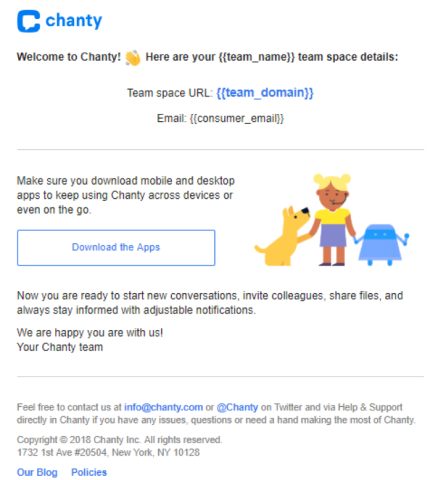
This welcome email is short, to the point, and includes a clear call-to-action.
Universe offers another example of a successful welcome email:
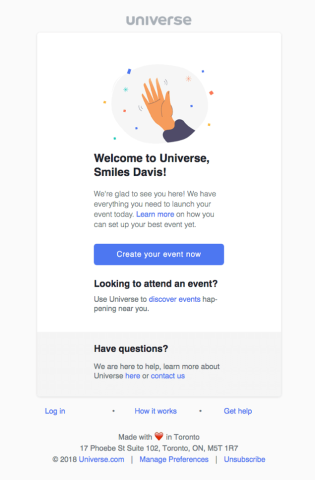
Universe’s email has a clean look and bold call-to-action.
The odds a customer will open your welcome email are much higher than other types of emails, so you need to make yours successful.
Your interaction with customers doesn't stop when they've made a purchase or used your service. You must keep them engaged.
Let's say you have a new user who downloads your app. That still doesn't mean the user will become loyal. Unfortunately, 21–25% of users will open an app once and never log in again.
Why? They may lose interest, not find value in the product, or simply not understand something. However, sometimes new users need a little motivation to explore your product, and you can minimize this churn.
It's ideal to customize your email sequence according to user behavior. Every person using your product has unique needs — your re-engagement emails should reflect that.
For instance, when new Chanty users successfully create a team space but have not invited any colleagues to the chat, we send the following email to foster their engagement:
Re-engagement emails should be personalized and tailored to each step of the customer journey.
People will likely have questions about your product or service; it’s up to you to answer these questions so customers don’t lose interest.
As an SaaS startup that offers a tech product, we often get the following support requests:
Some users can become overwhelmed by a new product. And that’s exactly where educational emails come into play. They are the best way to proactively engage with your users by addressing common questions and concerns.
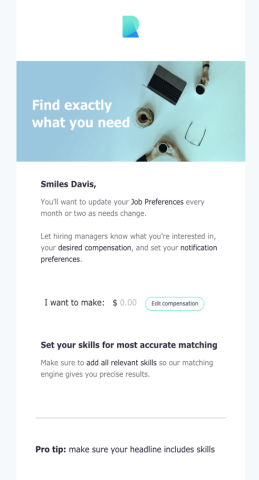
For example, Remote’s educational email provides users with clear tips on how to make the most of its services.
People trust other people more than they trust brands. A social proof email shares a customer success story, testimonial, or case study to show new users that others — like them — are already getting real value from your product.
The best time to send a social proof email is around days 3–5 of onboarding, after the initial welcome sequence but before any upgrade ask. At this stage, users have explored the product but haven't yet committed long-term.
A strong social proof email:
Has a single CTA that links to the relevant feature or case study page, not a generic homepage.
By now, your users have likely had enough time to test your product and hopefully benefit from it.
The next step in your relationship with users is to send them an evaluation email that motivates them to upgrade their plan or purchase additional services.
You can also ask users to invite a friend to sign up or visit your website.
For example, Medium’s evaluation email specifies the benefits that users will gain once they upgrade, includes the pricing details, and makes its call-to-action stand out.
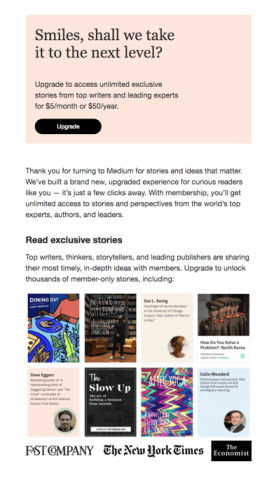
This encourages users to keep using the product and upgrade to its premium version.
While crafting and polishing your onboarding emails, don’t forget to measure and analyze their effectiveness.
Email marketing analytics systems show how many recipients opened the email, where in the world they are located, which links they clicked on most, etc.
MailChimp can show how your campaigns compare with other MailChimp users in your industry. So, don’t hesitate to employ analytics tools, analyze the data, and implement these insights into further onboarding activities.
Timing is one of the most underestimated factors in onboarding email performance. Send too many emails too quickly and you'll get unsubscribes. Too few, and users drift away before reaching their aha moment.
A good starting framework for a 14-day free trial or post-signup sequence:
| Day | Purpose | |
| Day 0 | Welcome email | Greet the user, set expectations, one CTA |
| Day 1–2 | Getting started guide | Walk through one key action to complete |
| Day 3–5 | Social proof email | One customer success story with a CTA |
| Day 5–6 | Educational email | Address a common question or feature |
| Day 7–1 | Re-engagement email | Check in with users who haven't activated |
| Day 10–14 | Evaluation / upgrade email | Present upgrade value to engaged users |
For simpler products, 4–5 emails over 10 days is enough. For complex SaaS tools, 6–8 emails over 14 days is appropriate.
Send behavior-triggered emails where possible. If a user completes setup step 1 but not step 2, your Day 3 email should address that specific gap — not fire generically because three days have passed.
Getting people to sign up is half the battle; nurturing your relationships takes time and effort. Onboarding emails demonstrate the value your services deliver to your clients and smoothly walk them through the customer journey.
Whether it’s a welcome, re-engagement, educational, or evaluation email, a great onboarding process helps your clients receive maximum benefits from your services.
Successful email onboarding optimization will help prevent interested users from turning away and will keep current customers happy.
A welcome email is a single message sent immediately after signup to greet the user. A customer onboarding email sequence is a series of 5–8 messages sent over 10–14 days, designed to guide users toward activation and long-term product adoption.
Start with 5–8 emails over 10–14 days. Simpler products need fewer emails; complex SaaS platforms benefit from longer sequences.
Send the welcome email immediately after signup — ideally within minutes. Delayed welcome emails perform significantly worse than real-time messages.
The most effective onboarding emails are behavior-triggered (sent based on what the user has or hasn't done), focused on a single action, and written to demonstrate value rather than list features.
Common choices include Klaviyo, HubSpot, ActiveCampaign, and Mailchimp. Each supports automation, behavioral triggers, and A/B testing for onboarding workflows.
 Olga Mykhoparkina is a Chief Marketing Officer at Chanty, a simple AI-powered business messenger and a single notification center. Having 9 years of experience in the digital marketing field, Olga is responsible for Chanty’s online presence strategy, managing an amazing team of marketing experts and getting things done to change the way teams communicate and collaborate. Follow Olga on Twitter @olmykh or feel free to connect on LinkedIn.
Olga Mykhoparkina is a Chief Marketing Officer at Chanty, a simple AI-powered business messenger and a single notification center. Having a 9-year experience in digital marketing field, Olga is responsible for Chanty’s online presence strategy, managing an amazing team of marketing experts and getting things done to change the way teams communicate and collaborate. Follow Olga on Twitter @olmykh or feel free to connect on LinkedIn.
Chanty See full profile