Cloud Cost Optimization: How to Prioritize Spending Without Sacrificing Performance
The article overviews the main cloud waste drivers and proven cloud cost optimization strategies to help companies manage cloud expenses.
Updated April 7, 2026

More and more businesses are relying on cloud infrastructure, making cloud-native security more important than ever. Here are some cloud-native security best practices that everyone should be following.
Cloud infrastructure spending will reach $723.4 billion in 2025. That's a 21.5% jump from last year.
The rise of serverless computing and microservices has fundamentally changed how we build software. You can now deploy globally distributed applications in minutes. But this speed comes with a price. Each new container and application programming interface (API) endpoint creates another potential entry point for attackers.
That's why cloud-native security practices are more important than ever.
Cloud-native security practices are designed to protect infrastructure that's distributed across regions and providers, scales on demand, and changes with every deployment.
Traditional security was built for environments that rarely changed. Old-school security worked like a castle — build tall walls and keep threats outside.
However, cloud infrastructure is distributed across regions and providers, creating unique challenges that traditional security practices don’t address. Your application might run on AWS Lambda in Virginia, pull data from Google Cloud Storage in Belgium, and serve users through Cloudflare's global network. All this demands a different approach.
Security is now a part of your DevOps workflow. Every code commit needs scanning, and every runtime behavior gets monitored. This "shift-left" mindset catches problems before they reach production.
It's because the challenges multiply fast, too:
Cloud adoption is accelerating, and so are the risks that come with it. According to Orca Security's 2025 State of Cloud Security Report, 95% of organizations have at least one cloud asset that enables lateral movement, making it easier for cybercriminals to navigate cloud environments undetected. Another cloud-native security report found that 97% of organizations reported at least one cloud-native security incident over the previous 12 months, with misconfigured infrastructure being the most common cause at 78%.
Meanwhile, AI is introducing a new layer of complexity. 96% of respondents expressed concerns about generative AI in cloud environments, with top fears including exposure of sensitive data, shadow AI tools used without approval, and the integration of insecure third-party AI services.
All of this reinforces a simple point: cloud-native security practices aren't optional. They're the foundation for operating safely in environments that never stop changing.
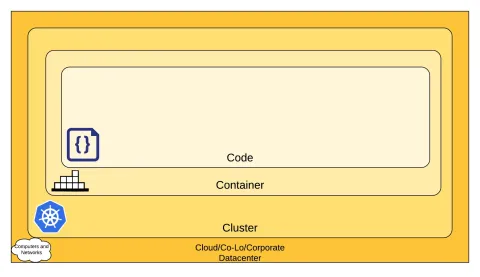
One of the most widely used frameworks for thinking about cloud-native security practices is the 4Cs model, which breaks down security into four layers.
The innermost layer, Code, benefits from strong security at the outer layers, but you can't compensate for weaknesses in one layer by securing another.
The value of the 4Cs framework is that it gives teams a structured way to audit their cloud-native security practices layer by layer, rather than treating security as a single, monolithic problem.
This is the foundation. It covers the security of the infrastructure itself, whether that's AWS, Azure, GCP, or a private data center. Under the shared responsibility model, cloud providers secure the underlying platform, but businesses are responsible for configuring services correctly and safeguarding their own data. Misconfigured services, overly permissive IAM roles, and open ports are some of the most common risks at this layer.
If your applications run on Kubernetes, the cluster layer is where orchestration security lives. This includes controlling access to the Kubernetes API, encrypting communication between components, enforcing role-based access control (RBAC), and applying network policies to limit how pods communicate with each other. A misconfigured cluster can expose your entire application stack.
Containers package your applications and their dependencies, but they can also package vulnerabilities. Security at this layer means scanning images for known CVEs before deployment, using minimal base images to reduce the attack surface, signing images to prevent tampering, and restricting container privileges at runtime so compromised processes can't escalate to the host.
This is the layer developers have the most control over, and it's where many attacks ultimately land. Secure coding practices, input sanitization, encryption of data in transit and at rest, and automated static and dynamic analysis all apply here. Hard-coded secrets and unvalidated API inputs remain common entry points for attackers.
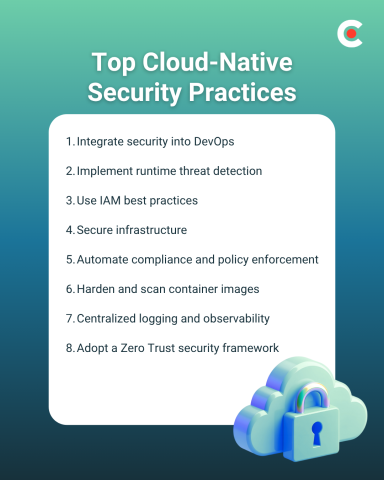
Security in cloud-native environments requires changes to your entire approach. Mere quarterly security reviews and annual penetration tests aren't enough. You need continuous, automated security that moves at the speed of your deployments.
Stop treating security as a final checkpoint. Make it part of every stage of development.
Many start with threat modeling during design. Even before writing code, they map potential attack vectors. If you're building a payment processing service, identify where card data flows, who can access it, and what happens if each component fails. This exercise takes hours but saves weeks of remediation later.
Your continuous integration and continuous delivery/deployment (CI/CD) pipeline becomes your first line of defense. Every code commit should trigger automated scans. Static application security testing (SAST) tools like Semgrep or CodeQL analyze source code for vulnerabilities. They catch SQL injection risks and insecure configurations before code merges.
Container images need scanning, too. Tools like Trivy or Snyk Container inspect your Docker images for known vulnerabilities. They check base images, installed packages, and application dependencies. A typical Node.js container might have hundreds of packages; each could be a potential risk.
Finally, dynamic testing completes the picture. Dynamic application security testing (DAST) tools test running applications, finding issues that static analysis misses. They simulate attacks, probe APIs, and verify security headers. ZAP or Burp Suite Enterprise can run automatically against staging environments.
Production environments need constant surveillance, too. Deploy runtime security tools that understand normal behavior and flag anomalies. For instance, Falco monitors kernel events in real-time. It detects when containers spawn unexpected processes, access sensitive files, or make unusual network connections. When a container suddenly starts cryptocurrency mining, Falco alerts immediately.
Many cloud providers offer native solutions. For instance, AWS GuardDuty analyzes VPC Flow Logs, CloudTrail events, and DNS queries. It identifies compromised instances, unauthorized access attempts, and data exfiltration.
Google Cloud's Security Command Center provides similar capabilities across GCP services.
IAM failures cause more breaches than sophisticated hacks. One overly permissive role can expose your entire infrastructure.
To tackle it, start with least privilege. Every service, user, and application gets only the permissions it absolutely needs.
Review permissions quarterly and remove anything unused. Also, never use long-lived credentials. AWS access keys sitting in code for years? That's asking for trouble. Use temporary credentials that expire within hours. AWS STS, Google Cloud's Workload Identity, and Azure Managed Identities provide short-lived tokens automatically.
Rotate secrets more often. Even temporary credentials need rotation. HashiCorp Vault or AWS Secrets Manager can rotate database passwords and certificates automatically. Set rotation periods based on sensitivity. It could be daily for production databases, weekly for development environments.
Your infrastructure-as-code templates contain your security posture. One misconfigured Terraform file can expose entire environments.
Scan templates before deployment. Tools like Checkov or tfsec analyze Terraform, CloudFormation, and Kubernetes for security issues. They catch unencrypted storage, public access permissions, and missing security groups.
Manual compliance checks don't scale. By the time auditors review your infrastructure, it's already changed.
Implement continuous compliance monitoring. Cloud Custodian or AWS Config Rules constantly verify your infrastructure meets requirements. They check encryption settings, access controls, and network configurations. Non-compliant resources get flagged or automatically remediated.
Also, create guardrails that prevent violations. For example, Service Control Policies in AWS Organizations block entire categories of risky actions. Developers can't accidentally create public S3 buckets or disable CloudTrail logging.
Meanwhile, policy-as-code enforces standards automatically. Open Policy Agent lets you define rules like "all databases must use encryption" or "public internet access requires approval." These policies block non-compliant deployments automatically.
Containers often have more vulnerabilities than the applications they run. For instance, base images accumulate years of packages, many of which are unnecessary.
So, use minimal base images. Alpine Linux or distroless images contain only essential components. Fewer packages mean fewer vulnerabilities. A typical Ubuntu image has hundreds of packages; Alpine has dozens.
Also, scan images continuously. Images that were safe yesterday might be vulnerable today. Harbor or Amazon ECR can scan images on push and periodically afterward.
Most importantly, sign and verify images. Only deploy images signed by your CI/CD pipeline. This prevents supply chain attacks where attackers replace legitimate images.
You can't secure what you can't see. Distributed systems generate massive amounts of telemetry across multiple platforms.
Aggregate everything, such as application logs or infrastructure metrics. The ELK stack (Elasticsearch, Logstash, Kibana) or cloud-native platforms like Datadog provide unified visibility.
Correlation reveals attacks that single data sources miss. A failed login might be nothing. But combined with unusual API calls, data access spikes, and geographic anomalies? That's an incident. Modern observability platforms use machine learning to identify these patterns automatically.
The right tools make cloud-native security practices manageable at scale.
| Type of Security | Tool | Feature |
| Kubernetes Security |
|
|
| Container Scanning |
|
|
| CI/CD Security |
|
|
| IAM & Secrets |
|
|
You can find a list of over 280,000 leading tools and platforms suited to your needs at Clutch.
A zero trust framework assumes that no user, device, or network segment should be inherently trusted. Every access request must be verified, validated, and authorized regardless of its origin.
This is particularly important in cloud-native environments, where workloads are distributed across providers and regions. Because there is no meaningful perimeter to defend, trust has to be earned continuously, not granted by default.
In practice, that means that security means:
Authentication doesn't happen once at login and then get forgotten. Users, services, and workloads are re-verified continuously based on identity, device posture, behavior, and context. A service account that behaved normally yesterday still needs to prove itself today.
Rather than allowing broad communication across your environment, break the network into small, isolated segments. In Kubernetes, this means applying network policies that restrict which pods can talk to each other. If an attacker compromises one service, microsegmentation limits how far they can move laterally.
In a microservices architecture, services are constantly communicating with each other. Mutual TLS (mTLS) ensures that both sides of every service-to-service connection verify each other's identity before exchanging data. Service meshes like Istio can enforce this automatically across your cluster.
Zero Trust operates on the principle that attackers may already be inside the network. Instead of focusing only on keeping threats out, the model prioritizes limiting blast radius, detecting anomalies quickly, and responding automatically.
Cloud-native security isn't about adding more tools. It's about fundamentally rethinking protection for environments that never stop changing.
Your infrastructure moves too fast for manual security. The companies succeeding with cloud-native security practices share one trait: they stopped treating security as a "perimeter gate" and started treating it as a "foundation".
Make that shift, and you'll build systems that scale without fear.