Mobile Apps vs. Web Apps vs. Websites: What Does Your Business Need?
Should you build a mobile app, web app, or website? Learn the key differences, costs, and use cases to choose the right platform for your product and users.
Updated April 22, 2026

Getting users to download your app is hard enough. Getting them to keep it is even harder. In this guide, we'll break down the pillars of an effective mobile app strategy and look at how brands like Starbucks, Duolingo, and Spotify put them into practice.
In 2009, Apple famously coined its App Store marketing slogan, "There's an app for that."
Almost 20 years later, the phrase feels more like a prophecy than a marketing slogan. Developers have created over 400 million mobile apps for iOS and Android.
Looking for a Mobile App Development agency?
Compare our list of top Mobile App Development companies near you
With endless options, users have little patience for buggy or confusing apps. Meeting their high standards takes more than flawless code.
You need a mobile app strategy: a clear roadmap that connects app development to your overall business goals. That involves everything from building a user-friendly interface to what you count as success.
A thoughtful plan matters, because most people don't want to clutter their devices. According to a recent Clutch survey, 45% of smartphone owners say they only install apps they truly need, and 18% resist downloading apps altogether. Additionally, 54% will uninstall an app once they're done using it, but they're less likely to delete one they use frequently.
With so much at stake, you've got to be intentional. Top brands treat their mobile app strategy as a core part of the business, not an afterthought.
Every app has a different purpose, from gaming to selling products or teaching about star constellations. However, the most successful apps share a common foundation built on five key pillars:
It starts with design. If your audience can't quickly figure out how to use your app, they won't stay. Top apps have simple onboarding and an intuitive user interface (UI). For example, Instagram's minimalist main menu makes it easy to post content and send messages.
Personalization and relevance matter, too. Adjusting content for each user makes the experience more meaningful and rewarding. It also helps your app stand out from all the other options in your category. Try customizing content based on user traits like behavior and preferences.
Once you attract users, engagement and retention mechanisms keep them coming back. For instance, Habitica gamifies habit-building to help users stay productive — and, of course, motivate them to open the app each day. Players earn in-game rewards like pets and armor as they check off tasks. Loyalty badges and notifications also encourage users to stick around.
Performance and reliability are other foundational pillars. Fast loading screens and glitch-free features are the bare minimum. Users expect screens to load in under a second and interactions to respond without hesitation. A single freeze, a lost save, or an unexpected crash doesn't just frustrate people; it erodes the trust that keeps them coming back. And once that trust breaks, the uninstall follows fast.
Finally, no app gets everything right all the time. Developers frequently run A/B tests and track engagement metrics to understand what features are working well and what isn't. This data reveals how users actually behave, where they engage, where they drop off, and what they ignore, giving teams the insight they need to iterate with precision rather than guesswork. Even small tweaks like shuffling the menu buttons can have a huge impact on the user experience.
Additional reading, “How to Develop an App.”
Before you start mapping out your mobile app strategy, check out some of the top apps in your category and beyond. These case studies will help you nail down what works and brainstorm ideas for your own app.
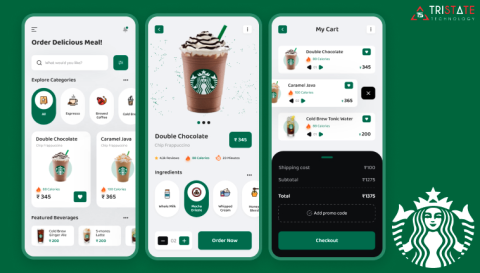
Die-hard coffee lovers don't need much incentive to order a morning brew, but the Starbucks app sweetens the deal. It builds loyalty by giving customers points for every purchase, which they can redeem for free drinks and other rewards. Plus, users get a free birthday treat. It might seem small, but these kinds of rewards keep people coming back.
The app also offers mobile ordering and payments. These convenient features make it easier for customers to buy drinks and food. Instead of standing in line on a hectic Saturday morning, they can just pick up their order at the counter.
Takeaway: Connect your app directly to a loyalty ecosystem so it becomes part of your audience's routine.
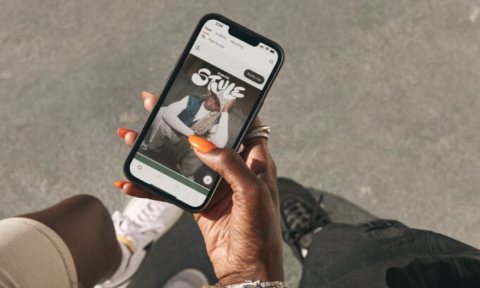
The Nike app turns fitness into an experience that goes beyond buying gear. It shares daily lifestyle content, including feel-good stories about Nike athletes and training advice from professional coaches.
Exclusive product drops are another benefit. If a customer has been eyeing a trendy sneaker design, they could snag it through the app. Or they could shop Nike's latest streetwear collection before it hits stores. With free shipping on orders over $50, it's easy to splurge.
For customers who want more guidance, NikeAI offers personalized product recommendations. Users can describe their preferences or problems in natural language. For example: "I'm looking for a pair of trail running shoes for a distance event. Can you suggest something lightweight?" The AI will respond with relevant products. That takes the guesswork out of online shopping.
Takeaway: Use your app to build an entire brand experience, not just a tool for quick transactions.
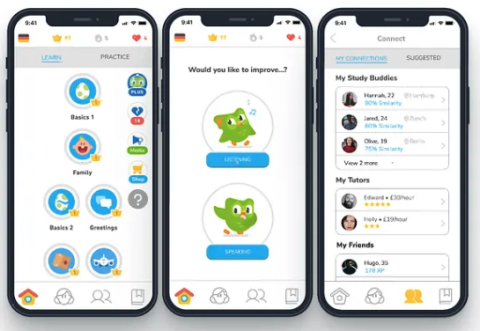
With lessons in over 40 languages, Duolingo is one of the most popular language learning apps. Users complete daily challenges and short lessons on vocabulary and grammar. They earn points for correct answers and unlock new lessons as their knowledge grows.
Duolingo encourages daily use with leader boards and streaks. It also sends smart push notifications to nudge people to return. Some people describe these messages as dramatic, while others view them as cheeky. For instance, one notification says, "You came back just to ghost me again? Do a Spanish lesson now!" These emotional appeals encourage users to open the app and make Duolingo part of their daily routines.
Takeaway: Use behavioral psychology to engage users and make returning feel rewarding.
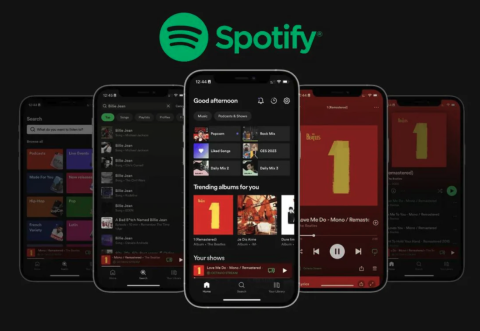
Spotify makes music deeply personal for millions of users. It uses advanced algorithms to create custom playlists based on each user's tastes. Someone who listens obsessively to Noah Kahan may see folksy playlists, while a pop lover jams to Taylor Swift. When users are craving something new, they can check out their custom Discover Weekly and Release Radar playlists.
One of the app's most notable features is Spotify Wrapped. Every December, it summarizes each user's listening stats for the year, including everything from their top artists to how many minutes they listened to content. It also generates social media graphics, turning Spotify Wrapped into a community event.
The app works across devices for interruption-free listening. Someone could start listening to a playlist on their work computer, then switch to their smartphone for their lunch break. No wonder so many people rack up tens of thousands of listening hours every year.
Takeaway: Let data create satisfying experiences that users can't get anywhere else.
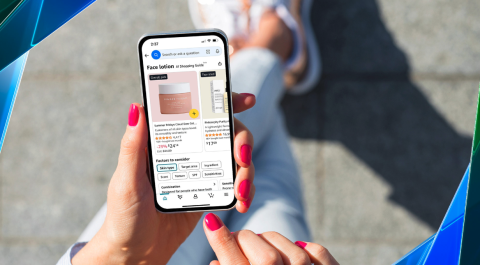
The Amazon app is an all-in-one hub for online shopping. It's designed to turn impulses into purchases as quickly as possible.
Predictive search is one standout feature. The app uses machine learning and user data to suggest relevant keywords. It also anticipates what shoppers will search for next. For example, if a pet owner types the letter "d," the search bar may suggest keywords such as "dog food" and "deals for dog treats."
Amazon also offers one-click purchasing. Shoppers can spot a product and order it to their home in less than 5 seconds, without having to type in credit card numbers. Then they can track their order's progress in real-time as it travels to their front door. These features virtually eliminate friction in the shopping process, encouraging users to spend more.
Takeaway: As you design your app, remove as many barriers as possible between intent and action.
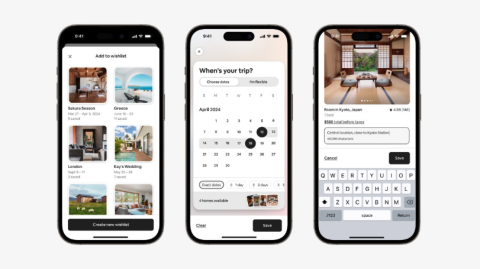
Trust is everything in the hospitality industry. Airbnb wins over guests by prioritizing transparency in every aspect of its design. The visual-first search lets users see exactly what they're getting before they make a reservation. They can scroll through photos of every indoor and outdoor space.
The platform encourages guests to leave honest reviews, so other users can book with confidence. For example, someone traveling with a dog might check the reviews to double-check that the yard is actually securely fenced. They can also message hosts directly to ask questions and express any concerns.
Takeaway: If your app involves high-stakes decisions, design it for trust.
As you study these examples from leading brands, you'll start to notice a few similarities. These tips will help you follow in their footsteps as you build your own mobile app strategy.
Customers expect mobile apps to work right out of the box. While some people might be willing to watch a short video, most don't have the patience for extensive training.
Keep their attention by minimizing the number of onboarding steps. Only ask for absolutely necessary information upfront, such as a username and password. Save personal details like addresses and phone numbers for later, if possible. That way, users can jump right in.
You should also highlight your app's value immediately. Point out key features with a quick walk-through, or use in-app prompts to show users what to do. Then give them the freedom to explore.
Push notifications are a great way to re-engage lapsed users. However, sending too many can have the opposite effect. In fact, a Reuters Institute survey found that 43% of users have actively disabled news app alerts because they found them annoying or not useful.
Strike the right balance by only sending notifications that truly provide value. For instance, users may appreciate a reminder that their rewards points will expire in a few days. On the other hand, daily reminders to log in will likely just frustrate your audience. Before you hit send, ask yourself, "Will the user be genuinely interested in this notification?"
Take the time to personalize notifications, too. Refer to the user by name, and mention relevant updates or actions. A message for a habit app might say, "Don't break your 10-day streak, Rebecca! Check off something on your to-do and keep the momentum going."
Be smart about the timing. Don't send a notification at 3 a.m., especially if the user has never logged on at that hour. Use behavioral data to understand when they're most likely to interact. You should also limit notifications to one or two per week to avoid overwhelming them. No one enjoys feeling badgered.
Mobile users have very little patience when it comes to app performance. A 2026 Luciq survey found that over half of users abandon apps after only two or three crashes, and 15% uninstall after a single crash. That leaves practically no room for error.
Reduce the risk of abandonment by prioritizing fast load times. This may involve:
Even with the best precautions, apps can sometimes overload or glitch. Catch these issues early by investing in a crash monitoring tool, such as Firebase Crashlytics or Sentry. The software alerts you when your app crashes and automatically logs the reason. You can jump right into damage control mode without wasting time searching for the bug.
Users are more likely to come back when an app checks more than one box. Start by building features that are genuinely useful. For example, an educational app might include flashcards or study games. Meanwhile, a shopping app could offer augmented reality tools that let users "see" products before buying.
Add habit triggers to nudge users to return. These could be simple notifications, such as, "Don't forget about the dress you left in your cart!" Or offer rewards for streaks and meeting goals.
Don't forget about the emotional connection. People tend to use apps that make them feel good. Use cute graphics or sprinkle in encouraging messages.
Your app should build on your website and in-store experience, not repeat them. Otherwise, customers won't have much reason to download it.
Encourage people to use your app by offering exclusive features. For instance, Starbucks customers can only participate in the loyalty program through the app. They still need to go to a store to pick up their Venti lattes, though. You could also add in-app games, special discounts, contests, or social features like forums.
As you build your app, you probably spend a lot of time imagining how users might interact with it. Without data, though, you won't truly know how they're using it.
These success metrics will help you understand your audience's behavior:
For the deepest insights, analyze this data by cohort, not across all your users. Sort people into groups based on shared traits, such as:
Let's say a yoga app has an overall retention rate of 15%, but 45% of women over 30 years old stay. If you only look at the overall rate, you may assume the app isn't performing well. However, one cohort is highly engaged. Based on this finding, you could invest more in marketing the app to that audience.
Top brands also use these metrics to improve the app itself. Look for signs of UX issues and try to pinpoint the cause. If the average session length is three times longer for new users, your onboarding process may be confusing. Simplifying it could convince more people to stay.
Ignore vanity metrics, such as number of downloads and social media followers. These numbers may seem impressive, but they don't tell you much about how (or even if) people actually use your app.
As you develop your mobile app, look out for these common obstacles:
Avoid these issues by setting strategic goals and prioritizing the user experience.
Designing an app can be incredibly rewarding, especially if you experiment with fun features and graphics. However, don't lose sight of your business goals. Everything you add to your app should fit your strategic objectives and the user's needs. To check both boxes, you'll need a thoughtful design, personalization, and constant improvement.
Top companies like Airbnb and Starbucks succeed because they treat their apps as living products. They're constantly gathering data and tinkering with the user experience. That keeps their apps fresh and performing well.
Looking to build a mobile app that will help you engage with your users? Search for industry-leading mobile app developers on Clutch.