7 Tips For Designing Web Forms
Clutch surveyed 502 web users about what they actually want from form design. Here are 7 data-backed UX principles that reduce abandonment and improve...
Updated April 8, 2026

Every cart left abandoned due to poor accessibility is a missed sale, and at scale, that adds up fast.
According to a recent Clutch survey, nearly half (48%) of the top e-commerce sites fail basic accessibility standards, meaning millions of shoppers can’t make purchases, even when intent is high. That gap results in an estimated $13 trillion in lost sales for the global disability community, as quantified in a 2024 white paper by The Valuable 500 and Yale University.
Accessibility is not just a box to tick. It drives revenue, reputation, and defensible advantage. This article shows where revenue leaks occur and how to close the gap with a pragmatic plan.
Looking for a Web Design agency?
Compare our list of top Web Design companies near you
WCAG sets the technical standard for accessible digital experiences. Most brands target Level AA conformance across WCAG 2.1 or 2.2. Regulators and courts increasingly look to those levels as the baseline.
In the U.S., obligations under the ADA (Americans with Disabilities Act) apply to websites as places of public accommodation, and courts have treated digital storefronts like physical ones for access. That means e-commerce ADA compliance is not optional.
In fact, legal exposure moved from theory to precedent years ago. Here are a few major examples:
The Department of Justice sets civil penalties for ADA Title III violations:
The business impact from these litigations often extends well beyond fines. As Heral, Managing Director at a WooCommerce Agency, explains, “ADA lawsuits targeting e-commerce sites are on the rise. Getting ahead of accessibility now means future-proofing your business while improving the overall shopping experience.”
Demographics add further pressure. “In many developed markets, populations are aging, so age-related vision, hearing, motor, and cognitive needs represent a growing share of your audience, making accessible design even more critical,” says Lukasz Kacmarek, CEO of Osom Studio.

Moreover, these accessibility upgrades remove friction for everyone, not just those who identify as disabled, saving your brand from litigation costs, reputational risks, and market share loss.
Clutch’s audit highlights the scale of the problem. In the sample, 56% of e-commerce sites failed basic accessibility standards.
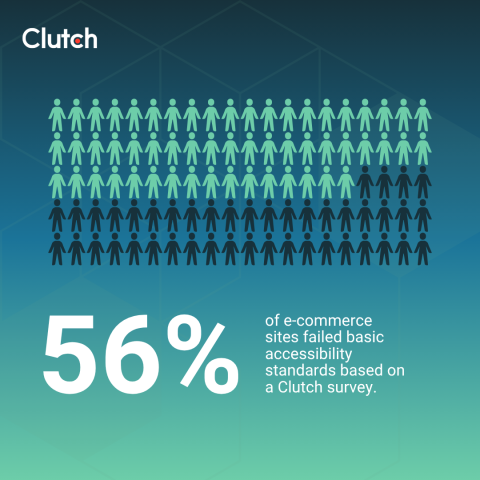
The audit was based on Google’s Accessibility Test, where a passing score sits between 90 and 100:
If these resource-rich teams still have accessibility gaps, the broader market likely has more. The result is lost revenue, user frustration, and legal exposure that is entirely avoidable.
Some brands have made accessibility a discipline. Target, Apple, and IKEA each scored 100 in the Clutch research, earning them all the benefits that come with having an accessible e-commerce experience.
Alex Vilmur of Marcel Digital sums up why accessibility strategy belongs in your brand plan by emphasizing, “Brands that prioritize inclusivity demonstrate social responsibility, build customer loyalty, and tap into a broader audience that might otherwise be excluded.”

Target went from a cautionary tale to a proof point. After its lawsuit, the company has since woven accessibility into its product and store operations, earning a nonvisual web accessibility certification from the NFB (National Federation of the Blind).
Beyond the site, Target recently announced accessible self-checkout experiences in partnership with Elo that include a tactile controller, headphone jack with audio prompts, and physical navigation buttons. That same mindset translates to its e-commerce UX (User Experience) too.
Apple treats accessibility as a core design input. Its developer guidelines and platform features operationalize it across hardware and software.
They are built-in capabilities with standards that product teams must meet. When an ecosystem sets that bar, commerce experiences built on top of it benefit.
For e-commerce teams, this is a reminder to bake accessibility into design systems, patterns, and QA. By doing so, every new feature is built upon that high standard.
IKEA demonstrates consistency on a global scale. The company publishes a clear accessibility statement and targets WCAG 2.1 AA across markets. These design principles are reflected in page structure and predictable navigation across the site. Ultimately, all this improves search and product discovery for every customer.
Accessibility improvements pay off for every shopper. As Vilmur notes, “When a website is built with accessibility in mind, it ensures that all users, regardless of ability, can navigate, interact, and engage with the content seamlessly.” That's the performance case and the right thing to do.
The data Clutch collected points to immediate website accessibility fixes that could move both compliance and conversion.
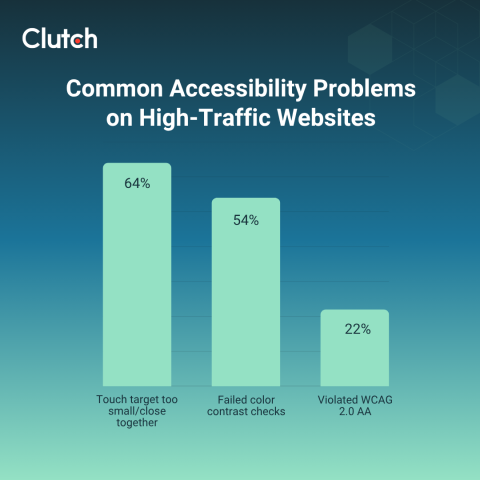
However, each of these problems has a clear fix, and these improvements can raise conversion by lowering friction at the exact moments shoppers need clarity.
Here's an actionable framework to accelerate progress.
Start with shopping tasks that drive revenue. Product discovery, configuration, cart, checkout, and account flows need clean, consistent patterns. Universal design requires flexibility by default, which supports diverse input methods without jarring experiences. Focus on:
Treat your design system as the baseline for these rules. When one button component meets WCAG 2.1 AA for color contrast and focus indicators, every screen that uses it benefits. That approach reduces one-off fixes and improves consistency, speeding up teams while improving e-commerce accessibility.
Tie your compliance goals to concrete standards and markets. “Aim for WCAG 2.1 AA minimum aligned with EAA and track toward WCAG 2.2 going forward,” says Kacmarek. Use that as policy for new features and for remediation scope, so you are not chasing scattered tickets.
Also, keep a concise record of decisions. Capture exceptions and mitigation so legal and procurement teams have answers during vendor reviews. If your brand sells in the U.S., remember that ADA penalties can stack when violations persist, and accessibility lawsuits add legal fees and quick timelines on top.
Automated scanners catch structural issues at scale. Google's Lighthouse and similar tools help you spot issues quickly and set quantitative sprint targets. Use the 90 to 100 band as a working benchmark, then verify that real shoppers can complete core tasks without barriers.
As Kacmarek recommends, “Schedule recurring [accessibility] audits (automated and manual) and include users with disabilities in usability testing to validate real-world outcomes.” Build a small panel of shoppers who use screen readers, keyboard navigation, magnification, and voice input. Then, prioritize the gaps they encountered during product discovery and checkout, as those touch revenue first.
That single practice forces teams to prioritize what matters and builds empathy with direct feedback. For retail, encode checks into release pipelines and add spot audits before high-traffic periods, such as holidays or product drops.
Accessibility fails when it becomes a one-time remediation project. Instead, treat it like performance goals or security.
Also, train your content and merchandising teams. Accessible product descriptions, size guides, and promo modules keep buyers moving through the funnel. Pair brief training with templates that force the right structure so content scales without drift.
In this way, every update you make will further reinforce e-commerce website accessibility in the right direction.
Accessibility is profitable, reputationally smart, and legally required. Moreover, the spending power tied to inclusive experiences is too large to ignore. The good news is that the operational steps to capture it are well within reach. Here are the simple next steps you can take:
Companies that lead today will set the standard for the market tomorrow. Want to work with the right partner for your business needs? Hire from the vetted list of top-rated web design agencies at Clutch.