
Website ROI: How to Measure, Calculate, and Improve Your Return
Website ROI measures the value your site generates relative to what you spend. Learn how to calculate it, track the right KPIs, and improve your return.
Updated May 29, 2026

An outstanding offer can be ignored if your landing page is not loading quickly. Not having a low bounce rate increases your website's reputation in the eyes of Google. But if your website is not fast enough to load under 3 seconds, your website is in danger.
Let’s see this scenario: your website is listed in the 5th place in the SERPs as the best dermatologist in NYC. People open your website more because the above 4 are slow in performance, and do not mention their services properly. As a result, people open your website and spend more time on it than others.
This event indicates your website is more authoritative than others in search engine algorithms. As a result, your website gets a higher ranking on the above and many other relevant query result pages. That’s why having a high-performance WordPress website is important.

In this blog, you will find out the following:
Let’s begin…
Here are the 7 crucial reasons that you cannot ignore in your website if you want a better ranking on any search engine result page.
Focused on speed, responsiveness, and visual stability, Core Web Vitals are part of Google's Page Experience signals and assess a webpage's actual performance. Google employs them directly in ranking systems and regards them as absolutely necessary for a good user experience.
LCP measures the loading time of the largest visible content element (like an image, video, or large block of text) within the viewport. It tells Google how quickly the main content becomes visible to users.
Ideal benchmark:
Under 2.5 seconds from when the page starts loading.
This is the image of the Ideal score of LCP from the official community of the Chrome team and expert members published on web.dev.
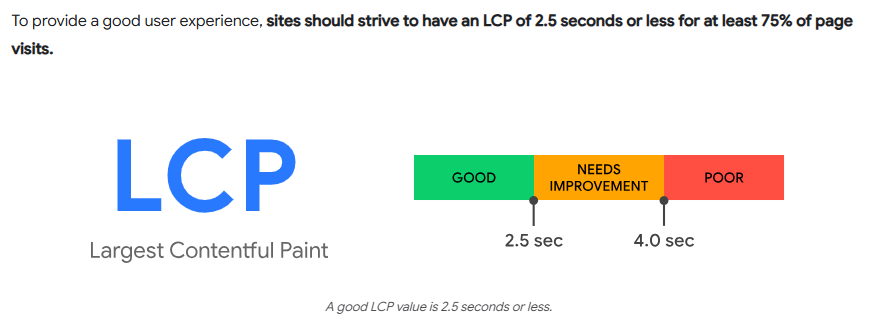
That image represents the scale score of LCP. Now, let’s find out the core reasons behind the poor LCP Score.
Common issues that slow LCP:
How to improve it:
INP, aka Interaction to Next Paint, is a new Core Web Vitals introduced by Google to measure a webpage’s responsiveness better. It tracks how quickly a page responds to user interactions like clicking a button, tapping a link, or using a form, and how fast the next visual update appears after that action.
INP (Interaction to Next Paint) observes all interactions on a page and reports the longest interaction delay (not just the first, as FID did). It reflects how consistently responsive your page is, even during complex tasks.
EMBEDDED VIDEO HERE
What’s a Good INP Score?
According to the web.dev, here is the score for calculating the Good INP for better performance of the website.
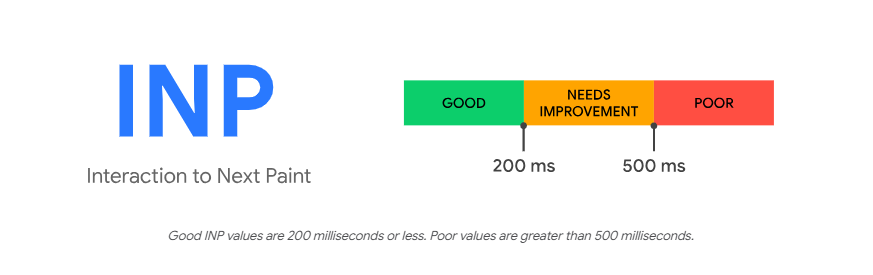
How to Improve INP:
CLS tracks the visual stability of a page. It checks how many elements on a page unexpectedly shift during load, causing users to misclick or get frustrated.
Ideal benchmark:
Less than 0.1 is an ideal score for the CLS calculation. This is the reference of CLS measurement by the Chrome team published on web.dev.
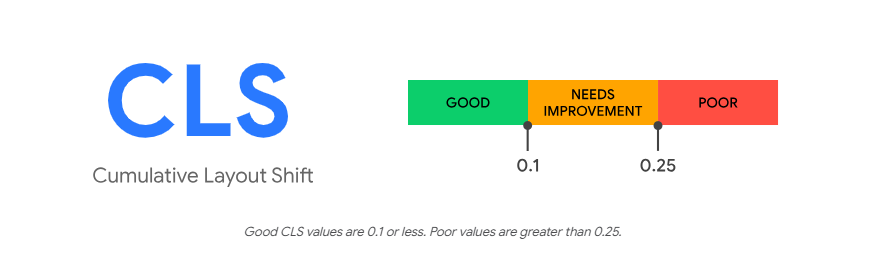
What causes layout shifts?
How to reduce CLS:
Sites meeting these standards offer a better, more seamless experience. Google wants websites that are quick, responsive, and visually consistent, so maintaining SEO competitiveness depends on strengthening Core Web Vitals.
In Google's Page Experience upgrade, Core Web Vitals are combined with additional elements, including mobile-friendliness, HTTPS, and no obtrusive interstitials. A fast-loading, fluid site guarantees a good user experience, so it is more likely to rank well.
Faster-loading websites most certainly show up higher in search results. Speed increases search engine assessment and user pleasure; Google prizes performance since it keeps users involved.
Users leave slow sites before the page loads. We say this about "bouncing." High bounce rates indicate a bad user experience for Google, which could affect rankings negatively.
Fast sites prolong user involvement. Google notes that people who stay to review more pages or read your material indicate that your material is relevant and worth reading.
Google sets a crawl budget—that is, the page count it will visit. By using more server time, slow sites cut the number of pages Googlebot can index, therefore preventing the appearance of fresh or updated material in search results.
Google initially searches your site's mobile version. Your rankings will suffer if your site runs slowly on mobile devices. Optimizing speed guarantees a better mobile experience and helps to preserve high exposure in mobile search results.
These are some essential causes that are related directly to the website ranking factor. Apart from these, some factors of the website also impact your website ranking indirectly.
Converting rates, user experience, and SEO depend on website speed. Sadly, a few typical problems cause many PowerShell sites to operate poorly:
Some themes are loaded with outdated code, slowing down load times, bulky scripts, or pointless elements.
High-resolution photos without compression can significantly slow down website load times.
Excessive plugins—or even a few badly written ones—can cause conflicts, database bloat, and slower loading times.
Every page request without caching calls a fresh server, therefore slowing down performance.
Install a dependable caching plugin like W3 Total Cache, LiteSpeed Cache, or WP Rocket.
Usually, poor server response times accompany cheap hosting.
Switch to a performance-oriented host, such as SiteGround, Kinsta, or Cloudways, for quicker load times and improved uptime.
These web tools can help you find the reason your site is slow:
Regularly reviewing your site performance and tackling these frequent offenders will help to greatly increase speed, boost SEO results, and keep visitors pleased. Would you like a checklist for fast fixes?
With an emphasis on both performance and SEO impact, these 17 practical lists of actions make your WordPress website brisk.
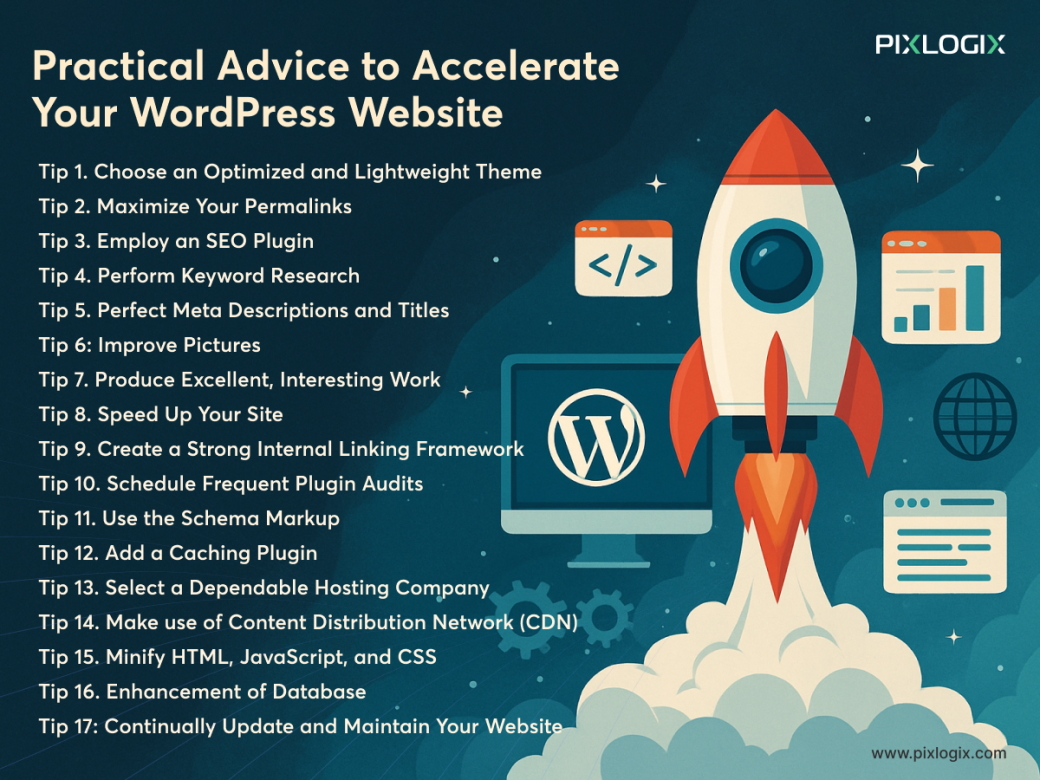
Here is a detailed analysis of some actionable tips to speed up your WordPress site, presented in understandable language:
Your site may slow down depending on heavy themes with built-in sliders, animations, or features you never use. Select a basic, fast-loading theme such as Neve, Generate Press, or Astra. These fit page builders and are made for performance.
The URLs on your site are permalinks. That should be clean and keyword-rich, like "www.example.com/blog/seo-tips," but they are also SEO-friendly URL structures that are faster to crawl. Keep it basic and clear; avoid complicated frameworks with dates or figures.
Install plugins that maximize your content, meta tags, and sitemaps, like Yoast SEO or Rank Math. These plugins also automatically handle important technical chores to increase visibility and structure and offer on-page SEO suggestions.
Aiming for the correct keywords will attract the correct traffic. Search phrases your audience searches for using tools such as Google Keyword Planner, Ubersuggest, or Ahrefs. Write based on low-competition, highly valuable keywords.
Create interesting titles using your goal keyword, then craft succinct, striking meta descriptions. Search results show these influencing click-through rates (CTR), which indirectly influence SEO.
Big picture files mostly cause slow load times. Using tools like TinyPNG, convert photos to WebP format, and enable lazy loading so images load only when necessary. Use alt text for access and SEO.
Content should be easy to read, answer customer issues, and offer actual value. Invest in headers, bullet points, images, and CTAs. Good content increases dwell time and lowers bounce rate by keeping people on your page longer.
Audit your speed with GTmetrix or Google PageSpeed Insights. To increase load speed and SEO, address identified problems such as picture size, server response time, or render-blocking resources.
Link relevant blog entries and pages to one another. This will enhance SEO by dispersing link equity, increasing crawlability, enabling people to better traverse your site, and lowering bounce rates.
You often experiment by adding various plugins. Having too many plugins can also reduce the website's speed. That is why you either turn off or remove the ones you don't need frequently.
Add structured data—that is, Schema—to your website so search engines may better understand your content. This increases your likelihood of displaying rich snippets, like star ratings and FAQs, in Google search results.
Caching lessens the demand on your server by storing a static copy of your pages. With plugins such as WP Rocket, W3 Total Cache, or LiteSpeed Cache, you can dramatically speed up repeat visits and lower server requests.
Your site host is mostly responsible for speed. Avoid cheap shared hosting. Choose managed WordPress hosting—such as SiteGround, Kinsta, and Cloudways—that provides security, improved uptime, and performance optimization.
Your site content is distributed by a CDN over worldwide servers so that users may view it from the closest location. Particularly with foreign traffic, this greatly reduces load times. Among excellent choices are Cloudflare and BunnyCDN.
Reducing extraneous code, such as whitespace and comments, from your website's files helps accelerate load times by cutting their size. Most caching plugins employ Autoptimize or Asset CleanUp plugins, or provide this capability.
Your WordPress database keeps all posts, pages, comments, settings, etc. It may swell with time. Eliminate extraneous data and boost site performance with plugins such as WP-Optimize or Advanced Database Cleaner.
Older versions of WordPress, plugins, or themes could expose weaknesses and delay your website. To cut code bloat and enhance security, keep everything current and remove unneeded plugins.
Combining these speed and SEO strategies will produce a top-notch WordPress site that loads quicker, ranks higher on Google, and provides a better experience to your visitors.
Google's Core Web Vitals, which are fundamental ranking indicators, directly relate to website speed. A faster-loading site offers a better experience by lowering wait times, especially on mobile. Google gives such websites top priority as they keep visitors interested, which sends favorable behavioral signals, including reduced bounce rates and longer session lengths.
Read more: 'Weebly vs. WordPress: Which is Right for You?'
It is not a fantasy to have a speedy website. Many tech giants have published articles and posts showing the transformation you can expect with a fast-loading website.
Let’s discuss the bonus advantages that you will get after working on website performance to make it as fast as possible.
Faster sites cut friction during checkout or sign-up and keep consumers interested. Studies indicate that a one-second delay can cut conversions by up to seven percent.
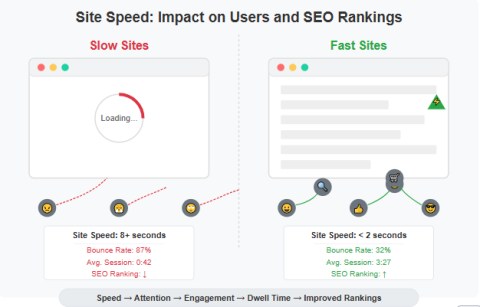
Users of slow sites find them frustrating and leave. Faster sites attract attention, promote engagement, and increase dwell time—all of which help to favorably influence rankings.
Users connect speed with professionalism. A flawless experience fosters brand loyalty, referrals, repeat business, and trust.
Efforts at speed optimization usually result in improved SEO performance, higher ad Quality Scores (for PPC), and lower client acquisition costs—all of which increase the general return on investment.
Increasing your site speed is a deliberate business action that improves usability, generates more traffic, and converts users into devoted consumers, not only for higher rankings.
For the best user experience and SEO, an ideal loading time runs around three seconds.
Although speed is important, it is only one of several considerations, including user experience, content quality, and backlinks.
Often, every month or following significant changes.
Speed optimization is a renowned strength of themes such as Astra, GeneratePress, and OceanWP.
While free caching plugins are a good beginning, paid plugins usually have higher performance and optimization capability.
SEO, user experience, and business development all depend critically on website performance in the competitive digital environment of today. Faster loading sites improve customer happiness, decrease bounce rates, and help you rank higher on Google.
It's time to act now that you know what slows down your site and how to solve it.