
How to Measure SEO Success When Traffic Declines
Organic traffic is down, but is your SEO failing? Learn which metrics show real SEO success when AI Overviews and zero-click searches are reducing clicks.
Updated September 8, 2026

Site schema is structured data you add to your website's HTML so search engines can read and represent your content more accurately in search results. It won't transform your rankings overnight, but it makes your pages eligible for rich results, knowledge panels, and sitelinks search boxes — all of which improve visibility and click-through rates.
According to Moz, schema is “a semantic vocabulary of tags (or microdata) that you can add to your HTML to improve the way search engines read and represent your page in SERPs.”
By adding structured data tags to your site, you signal to crawlers what your content actually means — not just what it says. That helps search engines index your pages more accurately and surface them in the right results.
Looking for a SEO agency?
Compare our list of top SEO companies near you
Site schema increases the likelihood of ranking organically in search engine results pages. John Mueller, the Webmaster Trends Analyst at Google, recently admitted that schema markups are a slight ranking factor.
Structured data helps search engines comprehend page content better, improving ranking potential. Certain site schema types can also enhance brand visibility in knowledge graphs, rich snippets, and "People Also Ask" sections — depending on the schema type used.
Schema is also becoming relevant for AI-generated search results. While Google has stated there's no special schema requirement for AI visibility, well-structured site schema makes your content easier for AI engines to parse and cite.
Luckily, SEOs don’t need to learn any additional coding in order to add schema markups to a webpage. For example all you need to do is visit Schema.org — a website that provides a collection of structured markup tags that SEOs and developers can use to specify the type of content on their website. — to find the proper HTML tags.
Moz provides tools and features that analyze schema implementation on a site, helping website managers detect the presence of structured data, identify missing or incomplete fields, and flag errors that might prevent rich results from appearing in search.
Specifically, Moz’s Site Crawl feature scans a website and identifies pages that are missing schema markup or have errors in their structured data. For example, it can detect:
While Moz doesn’t automatically insert schema for you, it can provide guidance on which types of schema to implement based on page content and SEO goals.
Alternatively, you can use Google’s Structured Data Markup Helper to generate the HTML for your pages. In this instance, all you need to do is:
This will generate the HTML that you can copy and paste onto your web page.
Looking to add structured data to your website? Here are a few ways to add schema markup to your website.
WebSite schema lets you create a sitelinks search box in your search result listing. When implemented correctly, Google can function as a search engine directly from your result.
For example, if you have a search feature on your website, you can add structured data so a sitelinks search box appears SERPS. In other words, you could make Google your own search engine.
Kellyco, for example, effectively added structured data to create a sitelinks search box.
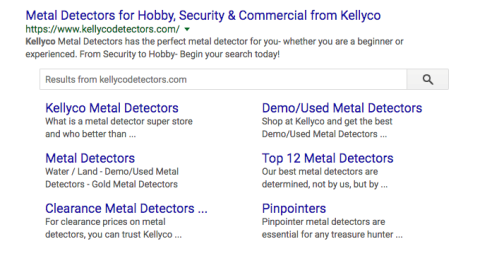
Kellyco was rewarded with a search box in Google’s search results.
To implement a website structured data, you'll need the URL for your homepage. This works better if you have a search feature on your site. You can also add the URL to your site search within this Schema. Simply post this code on your homepage, not every page of your site.
Another way to do this is, for example, is to add a sitelinks search box to your snippet. If your site is example.com and your internal search queries run from your /search page and use a q to designate the query:
If you're using WordPress, you already have site search. In this case, you'd add your domain name followed by /?s={query} as the "target" in the above example.
Organization schema tells Google about the organization that owns a site, allowing them to populate the Knowledge Graph about your company.
The Knowledge Graph appears in the search engine result when someone searches for a topic in Google. The Graph contains extra information, which appears in the right-column of the search results.
If Google considers your company important enough to be a topic, you can appear in the Knowledge Graph, too.
For example, W. W. Grainger successfully implemented organization schema on its website.
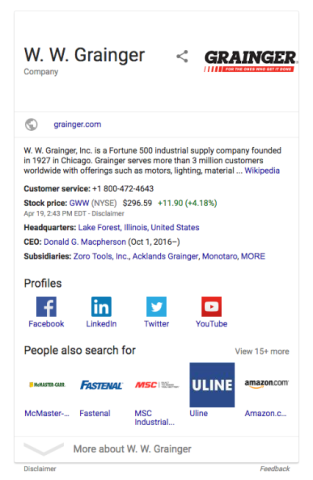
Google’s Knowledge Graph of W. W. Grainger includes a list of the company’s social media profiles. This allows users to go straight to those social media pages.
Use this to help people looking for your company so that they can find all the information they need in one place.
For example, the Organization Schema (as JSON) for Reliable Acorn would include:
{
"@context": "http://Schema.org",
"@type": "Organization",
"url": "https://reliableacorn.com",
"sameAs": ["https://www.facebook.com/reliableacorn","https://www.linkedin.com/company/reliable-acorn-llc","https://plus.google.com/b/115003476777420375752/115003476777420375752","https://twitter.com/reliableacorn"],
"logo": "https://reliableacorn.com/wp-content/uploads/reliable-acorn-square-sm.png",
"contactPoint": [{
"@type": "ContactPoint",
"telephone": "+1-704-931-8801",
"contactType": "sales"
}]
}
Like your Website Schema, your organization's data won't change often. Simply add it as JSON to every page of your site or use GTM to do it for you.
Local Business Schema tells Google about your brick-and-mortar location. The Local Business Schema provides basic information about the place where you do business, such as:
Some local SEO experts suggest that local Schema is a ranking signal in the local pack. This may or may not be true, but it’s undeniable that the Local Business Schema provides key information about your business in an easy-to-access format.
Make sure to include your NAP:
Also ensure that your NAP is consistent across the web.
You can provide many other pieces of information, including:
All this information ensures that potential customers can find you.
Many websites already display this information on every page of their site (in the footer, for instance).
Simply update the HTML to include the relevant microdata. If you don't have your location's information on your footer, or can't change it, then add it as JSON through Google Tag Manager.
There are a couple free tools that are indispensable for correct Schema implementation.
Use Google's Rich Results Test to check your pages for properly implemented site schema. You can also test schema code snippets independently before publishing.
This lets you modify schema from Schema.org, validate it, then add it to your site.
Search Console displays all site pages containing schema markup and highlights errors or warnings. It confirms whether Google has detected your site schema implementation.
Implementing schema markup correctly is essential for your pages to be eligible for rich results, but even small mistakes can prevent search engines from reading your structured data.
Some of the most common schema errors include:
Unlike most SEO projects that take weeks or months, adding site schema is straightforward. Even minimal implementation contributes to ranking improvements while making your company information easier for both search engines and AI tools to access and cite.
Schema helps search engines interpret your content more accurately, increasing the chances of appearing in rich results, featured snippets, and knowledge panels. It can boost visibility, CTR, and ultimately drive more qualified traffic.
No. While schema helps Google understand your content and makes your pages eligible for rich results, it doesn’t guarantee they will appear. Google considers many factors, including content quality, relevance, and site authority.
Structured data can improve how content appears on mobile search results and voice assistants. Schema types like HowTo, FAQPage, and Recipe can enhance the chances that Google Assistant or other voice platforms use your content for spoken answers.
JSON-LD (JavaScript Object Notation for Linked Data) is a structured data format recommended by Google. It’s preferred because it can be added directly to the HTML head without altering visible content, making it easier to implement and maintain