![How to Make a Budget for Print Design [With Template]](https://img.shgstatic.com/clutch-static-prod/image/resize/715x400/s3fs-public/article/d593c4d0f16292c1f26270424626b50f.png)
How to Make a Budget for Print Design [With Template]
Discover how to prepare an effective budget for your print design needs through this piece.
Updated September 29, 2026

AI-generated photos now slip into everyday campaigns and news feeds. But a few key signs can help separate real images from the AI fake.
To spot an AI-generated image, start with the things models still struggle to fake — hands and fingers, text and logos, lighting and shadows, faces, skin texture, backgrounds, and repeating patterns — and then confirm your hunch with a reverse image search, a metadata or provenance check, or an AI detection tool. No single sign is proof on its own, and the visual giveaways are fading fast as models improve. The most reliable approach in 2026 pairs a trained eye with a quick verification step.
That combination matters more than most people think. Most of us believe we can tell real from AI — but few actually can. In a Clutch survey, two out of three consumers felt confident they could identify AI-generated photos, yet slightly more than half (57%) failed to spot the fakes when tested. Awareness isn’t the problem: in a separate Clutch survey of 601 consumers, nearly 90% (88%) said they’re aware of AI-generated images. The gap is between knowing AI images exist and actually catching one — and a lot slips through. Nearly a third of consumers (30%) say they saw an unlabeled piece of AI-generated content more than 20 times in just the past month.
Looking for a Graphic Design agency?
Compare our list of top Graphic Design companies near you
The advice to “just look at the hands” is aging quickly. Early giveaways — six-fingered hands, garbled text on signs — are exactly the flaws the newest models have been trained to fix. Journalism and fact-checking guides now warn that hands and text are no longer dependable tells, and that anyone relying on a single artifact will be fooled. That’s why the checklist below is a starting point, not a verdict: treat any one sign as a reason to look closer, not proof. When it matters, back it up with one of the verification methods further down.
How can you tell if an image is AI-generated? It all comes down to "where" and "how" to look for the telltale signs. Here are the top seven traits of AI images:
AI struggles with human anatomy, so if your photo has hands in it, start there. Even the most advanced AI models still make mistakes with finger counts, joint structure, or nail detail across every pose. You'll often see extra knuckles, fused fingers, or rings that blend into the skin.
Why models struggle here comes down to messy training data and anatomical complexity. Hands occupy a small portion of many photos and appear in countless poses and occlusions. That combination leads to gaps in spatial understanding, so AI generators repeat surface patterns without a full grasp of bone and tendon geometry.
How To Tell
Why It Matters
If a lifestyle shot nails the vibe, but a hand looks fake, your audience will notice. Once they spot the flaw, they may question the rest of the assets associated with your brand. Catching these signs early can save revisions and avoid potential brand reputation risk.
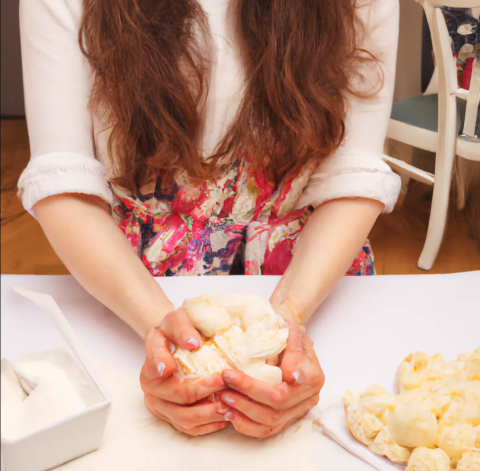
Look beyond the image's subject — AI image generators often cut corners in the background. This can take the form of blurry or oversimplified areas, or it can look like patterns that don't follow the rules of how things work in real life.
How To Tell
Why It Matters
Background mistakes undermine your brand's credibility. Even if your subject looks perfect, a warped lamp or cloned plant undermines the entire frame, and your audience might pick up on the perceived carelessness.
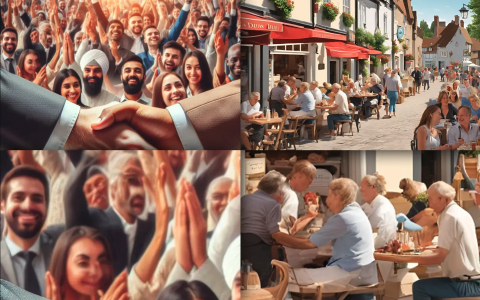
Lighting inconsistencies are dead giveaways for AI-generated images. In real photos, light comes from one or two consistent sources, but AI scenes often mix soft and hard shadows, flip the direction of shadows between objects, or drop cast shadows entirely. That mismatch breaks realism even if viewers can't put their finger on why.
How To Tell
Why It Matters
Inconsistent lighting makes your visuals feel fake, which can hurt conversions and erode customer trust. In some cases, it can even create legal risk if the image misrepresents your product.
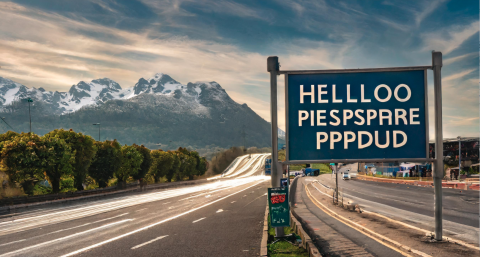
AI image generators still struggle to render crisp, coherent typography inside complex scenes. For instance, store signage may bend into gibberish, logo letters may become unrecognizable, and book cover designs may have spelling mistakes.
How To Tell
Why It Matters
Jumbled letters or gibberish text on packaging, products, or signage immediately raises questions about your brand's credibility and your product's authenticity. Text errors are easy to catch, which makes the oversight feel careless rather than accidental or stylistic.
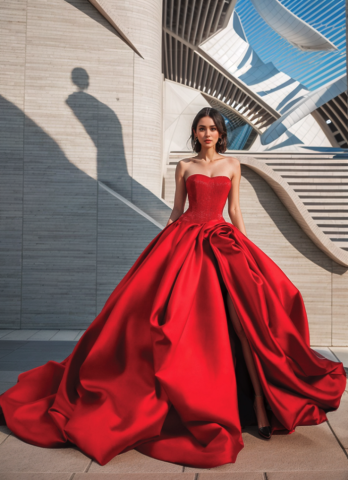
Faces carry most of the emotional load in a photo. A face also attracts the most attention, and even small mistakes stand out. These flaws often show up more in busy scenes where the AI generator has to create multiple components within a single image.
How To Tell
Why It Matters
Viewers fixate on faces, so any distortion — no matter how small — feels wrong and pulls focus from your message. That discomfort can break trust instantly.
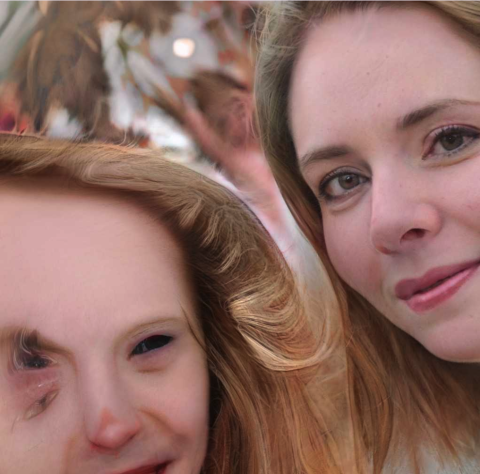
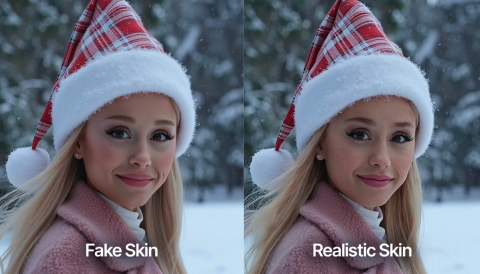
AI often makes skin look too perfect. Real skin has subtle natural imperfections. Most cameras capture those micro-variations that make photos feel authentic. However, AI output can erase all of that and leave a plastic, airbrushed finish.
How To Tell
Why It Matters
Audiences value honest images, especially ones that are used for healthcare, fitness, and beauty content. If your products or people are too perfect, customers will be suspicious. This deception undermines ad campaigns that depend on human warmth and credibility.
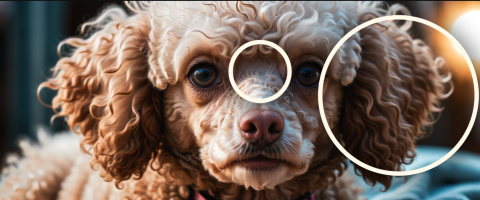
Generative AI models love repeating brush-like artifacts and copy-paste textures. You may also notice blurred trails that ignore depth.
How To Tell
Why It Matters
Texture glitches may pass early reviews and then jump out on big screens or print. It creates costly late-stage fixes and can damage a flagship launch if noticeable AI signs slip through.
| Sign | What to Check |
| Hands & fingers | Extra/fused digits, twisted joints, rings blending into skin |
| Backgrounds | Warped lines, cloned objects, broken reflections |
| Light & shadow | Shadows disagreeing on direction or missing entirely |
| Text & logos | Garbled letters, misspellings, baseline wobble |
| Faces | Misaligned eyes, painted irises, blurred facial hair |
| Skin texture | Waxy, poreless, unnaturally symmetrical |
| Textures | Repeated "brushstrokes," smudged fabric/hair/grass |
When the visual signs are ambiguous — or the image is high-stakes — move from eyeballing to verification. Four methods, roughly in order of speed:
Drop the image into TinEye or Google Lens. If it appears widely on social media but nowhere on trusted, original sources, that’s a red flag. A reverse search also surfaces the earliest known appearance, which often reveals the real origin (or confirms there isn’t one).
Real photos usually carry EXIF metadata (camera, resolution, timestamp); many AI images don’t. Increasingly, legitimate tools also attach C2PA “Content Credentials” — a tamper-evident provenance label. The catch: metadata and credentials are frequently stripped when images are uploaded to social platforms, so their absence isn’t proof, but their presence is informative.
Some generators now embed invisible watermarks — Google’s SynthID is the most widely deployed — that dedicated checkers can read even after resizing or light editing. Coverage is far from universal, but it’s growing.
Detectors such as DeepAI, Sightengine, and Hive score the pixels themselves rather than relying on metadata. Accuracy varies by generator and image quality, and no detector is 100% reliable — treat the score as one input alongside your own judgment, not a final answer.
| Method | Try | Best For | Limitation |
| Reverse image search | TinEye, Google Lens | Finding the real source or first appearance | Misses images that never circulated |
| Metadata / provenance | EXIF viewer, C2PA Content Creditions | Confirming a legitimate origin | Often stripped on social platforms |
| Watermark check | SynthID detector | Content from major AI tools | Only works where a watermark exists |
| AI detector | DeepAI, Singengine, Hive | A fast second opinion on the pixels | Not 100% accurate; varies by generator |
AI boosts the speed and creative range of content pipelines — but it also adds risk. Low-grade AI images make ad campaigns feel cheap and inauthentic, and they can create legal or reputational problems when images mislead the viewer.
As Tamara Hofer, Copywriter and Marketing Assistant at The Branx, puts it: “Signs [of AI images] can evoke distrust or discomfort as they break the user’s expectation of authenticity, especially when it’s people or nature that are depicted in an image.”
The public response to viral fakes shows how quickly trust erodes. The “Pope in a puffer jacket” image fooled millions before the creator admitted it was AI-generated. That kind of incident becomes a brand problem the moment your company’s name is attached to it.
The stakes are quantifiable. Nearly 90% of consumers say it’s important for brands and creators to disclose AI-generated content, so a transparent AI disclosure policy is fast becoming an expectation rather than a nicety.
Use AI where it adds clear value — filling gaps in mood boards, concept art, or background designs — but don’t fake something you could easily shoot. “A useful rule to use when it comes to AI imagery in marketing: Never use AI to fake what you could photograph but won’t,” says Adam Bird, director of strategy at Deksia. Treat AI as a support act; let photographers and art directors own the look and narrative.
Specialists catch the signs fast and know how to fix them. A seasoned graphic designer can review faces, hands, and text before you commit major media spend, and can produce stronger outputs through structured prompting, iterative passes, and surgical retouching. As Hofer notes, “Like other design tasks, it takes a lot of practice and expertise to create AI images that actually look authentic.”
Disclosure avoids confusion and shows respect for viewers — a short label in captions or credits is often enough. Consider disclosing how AI was used, too. As Hofer notes, “A tag saying ‘edited’ or ‘generated’ instills more trust than a blanket ‘made by AI.’” She suggests framing it as part of the creative process — “We used AI to help visualize this future scenario” — which “feels collaborative, not deceptive.”
The visual signs still exist — but they’re fading, and no single one is proof. The reliable move in 2026 is a two-step habit: scan for the seven tells, then confirm anything that matters with a reverse image search, a provenance check, or a detector. For brands, add a third step — publish with transparency where it counts. That combination protects your credibility and still gives you the creative speed AI promises. And if you want the shortest path to reliable output, bring in a seasoned graphic designer; you can find a vetted list of top graphic designers on Clutch.
They help, but none is 100% accurate. Detectors like DeepAI, Sightengine, and Hive analyze the pixels and return a probability, which varies by generator and image quality. Use a detector as a second opinion alongside visual checks and a reverse image search — not as the final word.
Less than they used to be. Extra or fused fingers were a classic giveaway, but newer models have largely fixed obvious hand errors. Hands are still worth checking, but a clean pair of hands no longer means an image is real.
Scan for the seven signs above, then do a quick reverse image search to see whether it traces back to a credible source. Be extra skeptical of images that are emotionally charged, “too perfect,” or appear only on social feeds with no original source — that’s where unlabeled AI content tends to spread.
Many of the same tells apply — faces, hands, lighting, and physics — and 81% of consumers say they’re aware of AI-generated video. But video (and deepfakes specifically) has its own detection cues worth a dedicated look; we cover those separately in our deepfakes guide.