
How to Measure SEO Success When Traffic Declines
Organic traffic is down, but is your SEO failing? Learn which metrics show real SEO success when AI Overviews and zero-click searches are reducing clicks.
Updated June 11, 2026

Optimizing your site for local search is important in order to be found online by a local audience. Ranking for "near me" searches will become more attainable after following the nine steps explained below.
To rank for "near me" searches, you need to send Google three signals it uses to choose local results — relevance, distance, and prominence — and you do that primarily through a complete, active Google Business Profile, consistent business information across the web, strong reviews, and location-specific pages on your site. Most "near me" queries trigger the Map Pack (the three-business block at the top of local results), so winning that space is where the highest-intent local traffic is won. The nine steps below walk through exactly how to do it.
"Near me" searches — like "doctor's office near me" or "coffee shop near me" — are some of the highest-intent queries in search: the person typing them usually wants to act now. And the behavior is bigger than the literal phrase. On mobile, Google increasingly treats an unqualified query like "best pizza" as if it said "best pizza near me," so optimizing for "near me" actually captures a much broader set of local queries.
Looking for a SEO agency?
Compare our list of top SEO companies near you
Interested in learning more about how your business appears on Google? Check out our directory of verified SEO firms.
Google has publicly stated that local results are ranked on three factors: relevance, distance, and prominence (per Google's own local ranking documentation).
You can't change your distance from a given searcher, but you have a lot of control over relevance and prominence — and that's what the rest of this guide focuses on.
Showing up in the Map Pack starts with your Google Business Profile (GBP) — the listing formerly known as Google My Business. If a user searches "coffee shop near me" in the DC area, a list of nearby locations appears at the top of Google, each pulled from a Business Profile.
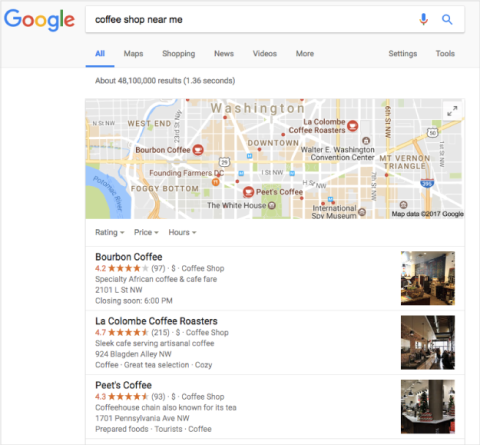
If you click on the first option, “Bourbon Coffee,” a pop-out box that includes information about business hours, phone numbers, and directions appears.
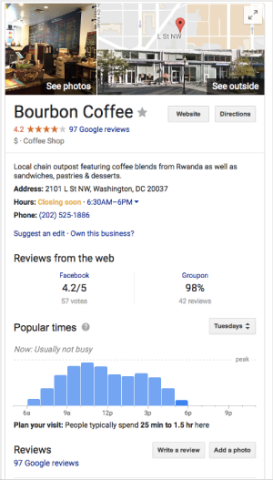
As the Bourbon Coffee example shows, a Google local business listing gives a searcher additional information about your business.
GeGetting started or updating your profile is free at google.com/business. Google will ask for the information a searcher needs: name, address, city, state, ZIP, phone number, and category.

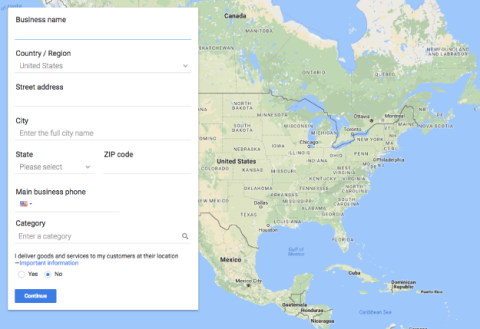
Take the time to fill in everything and to upload original information. Use this checklist to avoid common mistakes:
Google has deprecated the old profile Q&A section, and customer questions are increasingly answered by AI that pulls from your profile, website, and reviews. Keeping your GBP complete and your site's information clear directly shapes what that AI says about you.
Reviews are one of the most influential factors in "near me" results. Google makes it easy for customers to review a business: they open Google Maps, find your business, select "write a review," and score it out of five stars.
Increasing the number of positive reviews can have a dramatic effect on local ranking, and Google weights reviews on its own platform more heavily than those elsewhere. Responding to reviews — positive and negative — is another ranking and trust signal; it shows you value customers and gives your replies context.
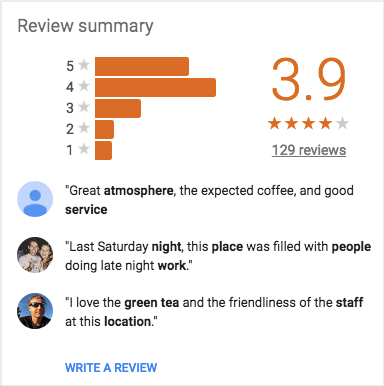
If you have compelling testimonials on other sites, you can use schema markup to surface non-Google reviews.
Schema is code on a page that describes what the page means; adding it improves how the page is represented in search.
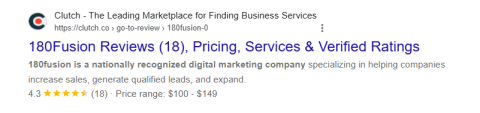
Use review schema and a star rating can appear below your listing, improving the chance Google shows those reviews and lifting click-through.
Clearly showing an accurate name, address, and phone number — your NAP — is crucial for local search. Display it often, preferably in the footer of every page.
Use schema markup here too. For a local business in Los Angeles, for example, LocalBusiness schema includes the street address, region, postal code, and country.
This structured data helps Google pick out the information and show it to potential customers.
Be consistent with the information you share. Consistency helps Google display the most accurate information for your customers and anyone searching for “services near me.”
If you display an incorrect address on a local directory, you risk confusing Google. However, this is a common issue and can be cleaned up manually or with paid services.
The caveat with paid services is that if you unsubscribe, listings can revert. A local-listing scan tool can audit the web to confirm your listings match. The goal is simple: make every mention of your business online as accurate and identical as possible.
Organizing events and marking them up with Event schema is another way to show up in local results. Active.com, for instance, uses schema to feature upcoming road races in a given location.
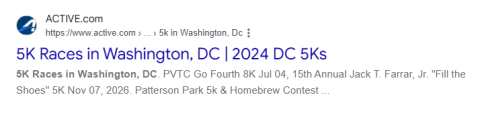
Marking up events builds credibility, widens your reach, and helps Google recommend your business for queries like "events near me."
Photos support location-based search — both on your GBP and on your site. Upload original, high-quality images of your premises, team, and work rather than stock photos.
A modern clarification on the old "put your location in every file name and tag" advice: you don't need to force the literal phrase "near me" anywhere, and stuffing it can hurt you. Google reads "near me" as a proximity signal, not a keyword to match. Instead, use real place names — your city, neighborhood, and ZIP — in image file names, alt text, and the surrounding page copy. LocalBusiness and ImageObject schema (with a location attribute) is a cleaner, more durable signal than EXIF geotagging.
"Near me" searches are overwhelmingly mobile, so your site has to perform on a phone. Google completed its move to mobile-first indexing in October 2023, meaning it predominantly uses the mobile version of your site for indexing and ranking. Prioritize fast load times (aim for under three seconds), thumb-friendly tap targets, click-to-call buttons, and a responsive layout.
Backlinks that include your city or region in the anchor text are a recognized "near me" ranking signal. A link that points to you as, say, "Advantage Dental in Kalamazoo, Michigan" tells Google both that you're credible and where you're located. Google analyzes these links to gauge authority, much as it does for general search — so earning quality local links (from community organizations, local media, and relevant partners) can move the needle more than many businesses expect. Focus on quality and relevance over raw quantity.
Any business with a physical site can benefit from "near me" visibility, but multi-location businesses gain the most. If you have multiple locations, build a separate, unique page for each.
Each location page should include:
Service-area businesses (plumbers, electricians, mobile services) that don't show a public address face a twist: Google still uses your registered address for distance, but you lack a visible storefront to confirm location. Compensate with detailed service-area pages for each city and neighborhood you cover, accurate directory citations, and reviews that mention specific areas by name.
Local discovery no longer happens only in the blue links and the Map Pack. People now ask AI Overviews, ChatGPT, and Gemini for nearby recommendations, and those engines assemble answers from the same signals — your Business Profile, reviews, citations, and clearly structured website content.
To be the business an AI names:
Standard rank tracking misses "near me" performance because results change with the searcher's location. Two better approaches:
Re-check the fundamentals quarterly; "near me" rankings are dynamic, and competitors catch up.
Proximity is the one factor you can't control — but relevance and prominence are largely in your hands. The actions that move "near me" rankings are:
As "near me" behavior keeps growing — and spreads into AI answers — these efforts are becoming fundamental for any local business that wants to be found and chosen.
Generally no. Google reads "near me" as a proximity signal, not a phrase to match, so forcing it on-page can look spammy. Use specific city, neighborhood, and ZIP names instead. The exception is a blog post about "near me" as a topic — like this one.
It varies. In dense urban areas it may be 1–3 miles; for rural areas or specialized services it can stretch much further. Google adjusts the radius based on population density, how many relevant businesses exist nearby, and how specific the query is.
Most businesses see initial movement within three to six months of consistent work; competitive markets can take longer. It depends on your current online presence, competition, and how aggressively you optimize.
Yes. Mobile uses precise GPS location; desktop typically uses less-precise IP geolocation. Since "near me" searches are overwhelmingly mobile, optimize for mobile first.
Brad Keys is the Director of Sales & Strategy at 180fusion and assists in creating ROI-focused solutions for enterprise clients. With over a decade of digital experience, Brad has seen the changing landscape and enjoys all things organic and paid with clients at all different stages and aspects of their campaign.
See full profile