
Micro SaaS: How Solo Developers Build Profitable Products
Solo developers now make up 35% of startups. Discover how micro SaaS lets individuals build and launch profitable products without a big team.
Updated February 16, 2026

Software should make companies more efficient. But it can also be more expensive than many companies expect. Maintaining software typically accounts for 60% of a program's lifecycle costs. With such concerns, your solutions may start to feel like they create more problems than they solve.
To keep your software reliable and secure, you’ll need the right care plan. In fact, developers usually spend 40% of their time on software maintenance. But what does that look like in practice?
There are three key goals for any software maintenance plan:
Looking for a Software Development agency?
Compare our list of top Software Development companies near you
This guide takes a closer look at each, with step-by-step instructions for defining goals, establishing maintenance schedules, and more. Follow it to create a living document that helps your team use software more efficiently, avoid costly downtime, and move closer to key compliance goals.
Looking for a service provider to help you build or maintain your software? Connect with an industry-leading software development company on Clutch.
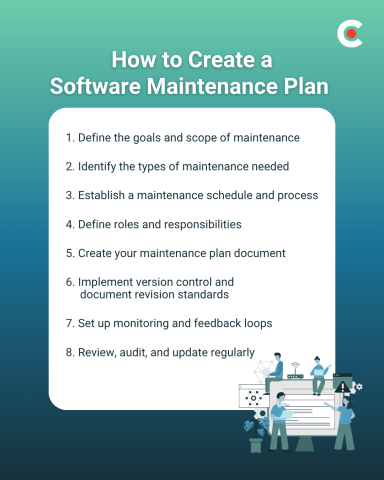
Begin by clarifying your objectives. What type of software are you maintaining? What factors matter most? Emphasize uptime, overall functionality, security, or the user experience to keep employees happy, depending on your specific business objectives.
For example, if customer retention is a concern, focusing on continuous uptime is a smart move. If you're trying to minimize risk from third-party dependencies, security updates may be your most important area of focus.
Other factors to explore include integrations, APIs, infrastructure, and hosting. For example, with software that relies on multiple APIs, you need to have a plan for version changes and downtime on the other end. If you host on a cloud provider, you have to decide whether to perform infrastructure maintenance yourself or rely on managed services.
Ask these questions as well:
You don’t have to answer all these immediately. But keep them in mind, as they’ll inform the decisions you make as you develop your plan.
Next, consider what types of maintenance your software requires:
These four categories often overlap in practice. But it’s helpful to differentiate while designing your maintenance plan. You also need to decide which types of issues you'll be handling internally and which you will outsource.
Avoiding such issues can save you more than you might expect. Studies show that the average cost of downtime for large organizations can be over $9,000 per minute. Even if your business doesn't lose that much from unexpected downtime, the total costs could still extend into the thousands or tens of thousands.
At this point, you should know the goals and scope of your software maintenance plan. Now you’re ready to create a schedule and process for carrying them out.
The first step is to decide on the cadence for weekly, monthly, and quarterly tasks. For example, you might complete security patches monthly, performance audits quarterly, and infrastructure reviews annually.
As part of that process, document each phase of the workflows you’re creating. That typically means writing out:
A variety of tools can help simplify these workflows. Tracking systems like Jira, ClickUp, and GitHub Projects are among the most widely used. They give your IT team a single source of truth to refer back to whenever questions arise or new problems emerge.
Now you’re ready to establish ownership over the tasks you’ve created. By defining the scope of each role, your employees will know exactly what’s expected of them. For example:
These may all be internal roles for your business, or you may want to outsource some. Either way, lay out the role expectations clearly while creating your software maintenance plan.
You’ve done a lot of work to get to this point. The next step is compiling everything into a single document so that stakeholders have something to refer back to whenever they need answers.
Your written plan should feature the following 10 points:
Together, these elements form a single source of software maintenance truth that you can direct employees and stakeholders to as questions arise.
Once you have clear documentation outlining your overall software maintenance process, the next step is ensuring that any changes made according to the document are traceable. This lets you see how your maintenance evolves over time, trace issues back to the source, and find solutions to tough problems more quickly.
Version control systems like Git make this easy. They help your team track who made what changes when. If any updates cause performance issues, you’ll easily be able to roll back to the previous version instead of troubleshooting blindly.
It’s also important to establish documentation standards. For example, you’ll want a detailed change log to describe updates, fixes, and configuration adjustments as they happen. That could mean creating an internal wiki or knowledge base to help new team members get up to speed.
Good documentation also supports a variety of compliance objectives. Auditors and clients often want to see proof of testing, monitoring, and security patches. By implementing strict standards, you’ll find it much easier to deliver these when requested.
Monitoring and feedback loops give you ongoing visibility into how your processes perform in real-time. You can use tools like Datadog and New Relic to track uptime, latency, error rates, and user activity automatically. These platforms also issue alerts, so your team gets a notification before minor issues escalate into downtime.
Next, create processes for user feedback loops. Employees, customers, and beta testers should have a simple, organized way to report issues and suggest improvements. With a structured system, it's straightforward to analyze and respond to meaningful requests as they come up.
Finally, complete a post-maintenance review for each major change you make. Evaluate key performance metrics and error reports to verify that the updates you make are producing their intended results. This helps you refine your processes with every new release.
When you integrate monitoring and feedback, maintenance becomes a proactive cycle. You’ll have an easier time detecting issues early and can use real-world data to guide your company’s continuous improvement.
Even the best maintenance plans can become ineffective if left unchecked for too long. Schedule annual or semi-annual audits of your plan to verify that it’s still functioning as you expected when you created it.
This becomes more crucial as technology evolves, and you need to adapt to new frameworks or third-party tools. For example, about 30% of CIOs report that over 20% of their technical budget allocated for new products ends up being diverted to resolving technical debt issues.
You might also have new compliance standards to meet when pursuing certifications such as SOC 2 or ISO 27001. These can impact the scope of your maintenance strategy and your update scheduling, among other elements of the plan.
The key here is to treat your maintenance plan as a living document. Teams should feel empowered to suggest improvements, share feedback, and refine the document as your needs change over time, which they almost certainly will.
Proactive software maintenance has become increasingly important as businesses today rely on more and more tech. But not all maintenance strategies are equal. Creating a well-defined plan and a living document to track updates will minimize your surprises and maximize your software investment. It’ll also make your systems more reliable and increase user trust.
The key takeaway for companies is that successful maintenance strategies don’t merely fix issues as they arise. They plan for continuous improvement, connect maintenance to real business goals, and help companies become more efficient through increased uptime and ongoing updates.