The Missing Layer in AI Agent Governance
Controlling what AI agents can access isn’t enough. Learn why decision authority is the missing layer in AI agent governance and who stays accountable for...
Updated September 10, 2026

A 2025 DORA survey reveals near-universal adoption of AI in software engineering, with 90% of respondents using it in their daily work. The appeal is clear: AI can increase task-completion productivity by 60% in certain industries.
But can AI become a universal helper for software engineering? And how should your team organize AI-assisted software development lifecycle (SDLC)?
In this article, we explore the best practices for AI SDLC, explore key challenges, and ways to ensure the quality of AI outputs.
Looking for a Artificial Intelligence agency?
Compare our list of top Artificial Intelligence companies near you
An AI-powered SDLC is an approach where artificial intelligence is used at every stage of software development. Each workflow remains under human oversight, and critical decisions, such as task assignment, output validation, and in-depth planning, are made by humans. AI is primarily responsible for automating routine, repetitive tasks and providing informed suggestions that support human decision-making.
Below are some of our internal metrics that show how using AI in the SDLC can accelerate software delivery.
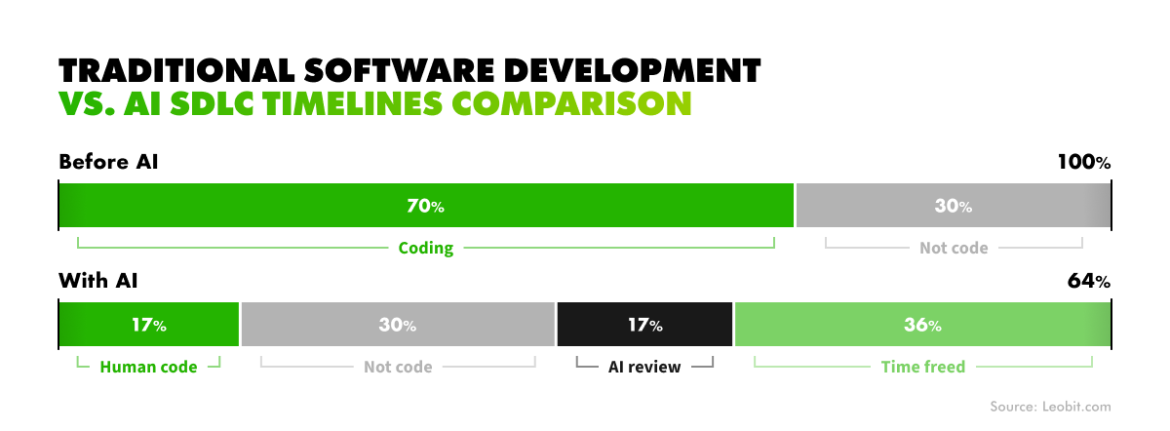
With such impressive numbers, AI rapidly becomes a regular part of software development. For instance, 90% of development team members say that it is integral to their work, and 80% report higher productivity as a result of its usage.
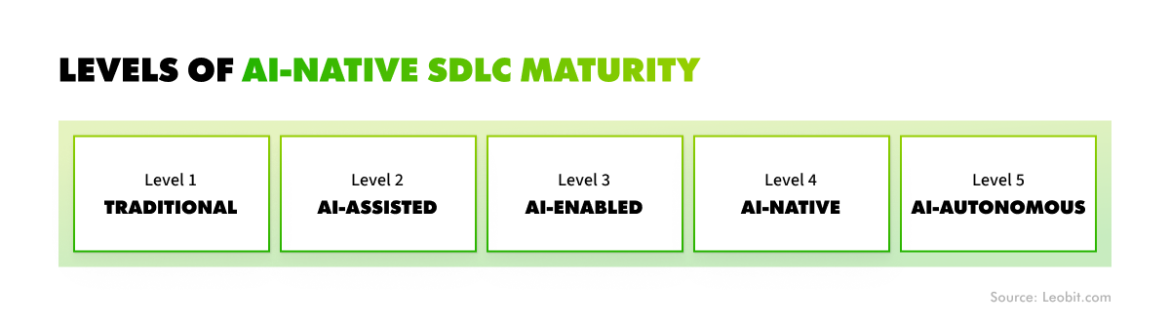
It’s important to note that there are different levels of AI adoption in the SDLC. We at Leobit distinguish the following five levels of AI-native SDLC maturity.
One approach to AI-assisted SDLC deserves a mention: vibe coding. It prioritizes speed, intuition, and continuous iteration over rigid planning. Developers start with an idea, translate it into working code fast, and refine it in real time based on feedback and testing rather than a predefined spec. It works well for short-term work, such as building prototypes, disposable internal tooling, or spikes. However, in our experience, it doesn’t scale. Code built this way accumulates unmanageable complexity fast, making it a poor fit for solutions with a production lifespan.
That's where a structured, process-based AI-native approach to SDLC takes over. Let's look at the different stages of the AI-native SDLC — the highest level realistically achievable today.
AI helps business analysts collect project requirements and uncover insights by leveraging its capabilities to source, analyze, and summarize data. As the Model Context Protocol (MCP) sees wider adoption, linking AI to large, distributed databases is becoming easier, enabling the collection of the information needed at the start of a project. In fact, this protocol can significantly accelerate the collection of unstructured data. Our team used its capabilities to build an AI-powered database querying assistant that can use natural language inputs to retrieve data from the PostgreSQL database within days, rather than spending weeks writing custom, non-standardized connections.
AI can also help business analysts identify and avoid common issues, such as conflicting requirements, before they lead to rework several sprints later.
AI's analytical capabilities help solutions architects model different approaches to system design before running them in production. For instance, AI can estimate scalability limits, infrastructure cost, and maintenance overhead for each candidate architecture. This approach helps solutions architects and tech leads understand the pros and cons of using a specific technology early. Whether choosing between a monolith and microservices or between .NET and Java for the back end, AI's analytical capabilities can support more informed architectural and technology decisions.
Other ways to use AI at this stage include:
Overall, AI helps teams get a clearer picture of the system and the roadmap to its implementation before starting its actual development.
UI/UX designers use AI to generate wireframes, mockups, moodboards, and other design concepts from written requirements. They can also use AI to generate simple drafts, allowing them to review a potential design before investing time and effort in full-scale preparation.
AI tools also support usability checks by flagging accessibility issues, inconsistent design patterns, and other problems before a design reaches a developer. In some cases, AI can accelerate the design-to-production process by turning wireframes and sketches into a working front-end code.
Writing new code is the most common use of AI in the SDLC, with 71% of software development team members using it. With their powerful code-generation capabilities, AI tools like GitHub Copilot or Claude Code can handle boilerplate and repetitive code with minimal human oversight.
This is a certain way to reduce software developers' effort and allow them to channel it towards more complex tasks. Such a property also accelerates coding, reducing overall time to market.
With its ability to generate test cases, Artificial Intelligence significantly transforms QA workflows. In fact, AI-powered test generation achieves 92.5% accuracy while optimizing 80% of test cases without reducing coverage.
AI models can also analyze code and software to identify bugs, edge cases, performance regressions, and other issues.
Software development teams can use AI for deploying solutions. AI can make a release smoother by predicting its blast radius, flagging risky changes, and recommending the most fitting rollout strategies. Models can also continuously monitor production systems, detecting anomalies before they escalate into incidents. AI can also correlate logs and metrics across services during an incident, cutting the time it takes to find the root cause.
Code once considered too risky to touch — lacking tests, documentation, or institutional knowledge — can now be safely refactored, migrated between frameworks, and covered with tests using AI. This approach helps teams keep legacy systems going or modernize them. In our experience, this is one of the highest-ROI applications of AI in software engineering because it helps teams resolve technical debt effectively.
These are just the most common AI use cases in software development; the range of other applications is far broader. For example, project managers can use AI suggestions to schedule meetings or shape critical estimates, and even sales teams can rely on models to summarize and structure early client requirements.
The most important thing here is that none of these workflows is handled by AI independently. Even advanced agentic AI systems with autonomous reasoning and proactive capabilities have a limited scope of tasks they can handle, and these tasks also require human coordination and validation.
Overall, artificial intelligence has its limitations, and so does AI SDLC. In the next chapter, we'll discuss some common AI challenges and pitfalls.
Introducing AI across the SDLC rarely produces outright failure. More often, it stalls under the weight of everyday friction. Problems can accumulate as the project evolves, typically enhanced by issues with AI governance and observability.
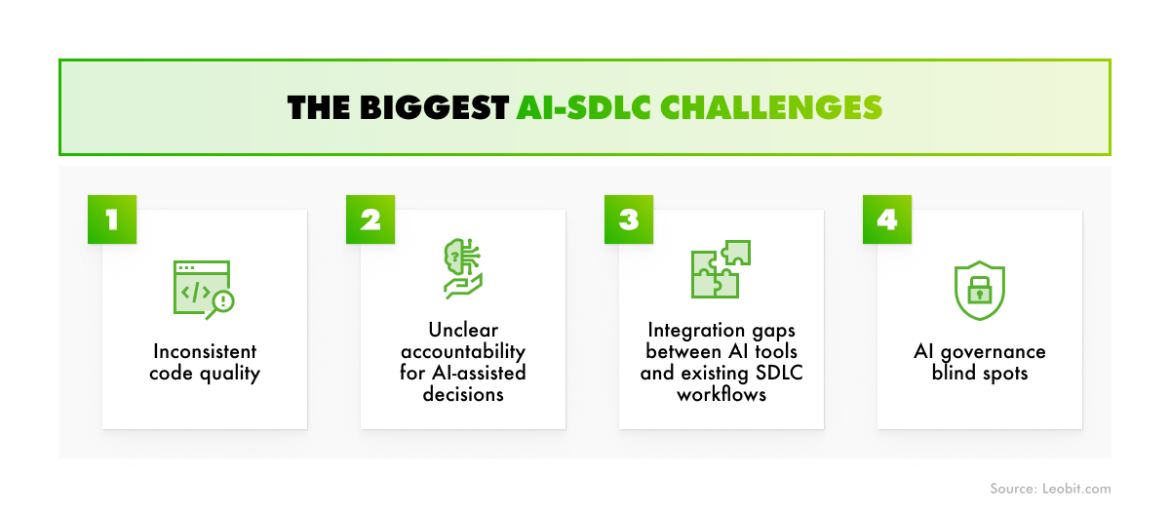
Based on our experience, four issues come up more than any others.
AI code can vary based on the quality of prompts, model choice, the tool's understanding of the context, and mere model hallucinations. In fact, CodeRabbit's State of AI vs. Human Code Generation Report reveals that AI code has 1.7x as many issues as human-generated code.
This inconsistency in AI outputs doesn't mean AI is a poor fit for coding. What it does mean is that rigorous, systematic code review becomes a vital safeguard that catches what inconsistent output alone cannot prevent.
When a bug traces back to AI-generated code, or there are issues with any other outputs, whether analytical or test cases, teams may lack a clear answer to who owns the fix or how the failure should be logged. Sometimes, tracing the logic of poor AI outputs is also challenging. There may be plenty of reasons, such as a bad prompt, a model limitation, a hallucination, or a failure by a human specialist to review the output.
Avoiding this requires defining clear ownership rules before rolling out AI across the SDLC. This is largely a matter of AI governance. The key is establishing a solid monitoring strategy to trace AI-driven decisions back to their source.
Most AI tools were built to plug into a single workflow or stage. Meanwhile, an AI-powered SDLC requires them to work within a pipeline that can cover multiple stages. As a result, once AI generates an output, such as an analytical report, an architecture suggestion, a code snippet, or a test case, a gap can open between that output and its validation against toolchain standards. Teams end up integrating AI tools into workflows that weren't designed for them, which creates blind spots across the lifecycle.
Closing this gap means planning AI integration into the pipeline from the outset. Engineering teams should design the CI/CD pipeline and toolchain with AI in mind from the start, so that every AI-generated output passes through the same validation gates as manually produced work. Governance and monitoring then keep that consistency intact across every workflow in the AI-driven SDLC.
AI governance itself is a major challenge, and solving it is fundamental to establishing a successful AI SDLC. In particular, 15% of high AI maturity companies state that governing AI use is one of the biggest obstacles to successful AI adoption.
The problem typically includes the following:
Without this in place, security and compliance risks, as well as software quality issues, can quietly build over time.
To close these and other AI governance gaps, start with a written AI usage policy. It should name the approved tools for each workflow, set clear data-handling rules, assign ownership of AI workflows, and define monitoring and traceability practices to track the source of each model output.
In addition to AI governance and observability frameworks, which may be specific to different projects, there are also general rules to ensure the most reliable and effective use of artificial intelligence throughout the SDLC.
These practices help our specialists ensure solid output quality while optimizing token usage, which is an increasingly important concern given that 50% of companies miss their AI cost forecasts.
The most important aspects of a software development team’s checklistare presented below.
Assign roles, and layer evaluations for complex problems. Give the model a persona (e.g., senior .NET engineer). For harder problems, run evaluations from two personas (e.g., an engineer and a product manager) and have the model synthesize the results.
These aren't the only practices that improve AI's performance across the SDLC, but they're the essentials, tried and proven across our multiple AI SDLC projects.
With its ability to accelerate routine tasks and support decision-making in more complex ones, AI has become an integral part of the modern SDLC.
However, even with established validation cycles, issues may occur due to the AI's inconsistency, lack of accountability in its usage, integration gaps, and governance blind spots. To address these problems, define a robust AI observability and governance strategy in advance and consistently follow best AI usage practices.
With the right approach, AI-driven SDLC won't turn your solution into a mess. Instead, it will deliver real value, turning numbers like a 60% boost in task speed without sacrificing quality into reality.