7 Tips For Designing Web Forms
Clutch surveyed 502 web users about what they actually want from form design. Here are 7 data-backed UX principles that reduce abandonment and improve...
Updated October 9, 2026

Website maintenance is the key to customer retention. Website users appreciate when websites are fast and reliable. Use these 7 tips to identify potential website problems and address them before they affect your business.
Business success requires website design and maintenance. As your website adds pages, images, and other media, its functionality may suffer without proper care.
You are responsible for checking issues such as broken links, technical issues, website bugs, security issues, and load speed. Unresolved issues can frustrate visitors and make it harder for them to use your website.
Looking for a Web Design agency?
Compare our list of top Web Design companies near you
You can solve these website challenges with these 7 website maintenance tips.
Page loading speed is one measure of your website’s functionality.
Slow pages can frustrate visitors and make it harder for them to access your products or services.
Use Google’s Core Web Vitals guidance to assess loading speed, interactivity, and visual stability. If you suspect your load speed is in trouble, tools like GTmetrix, shown below, can provide performance reports for your website.
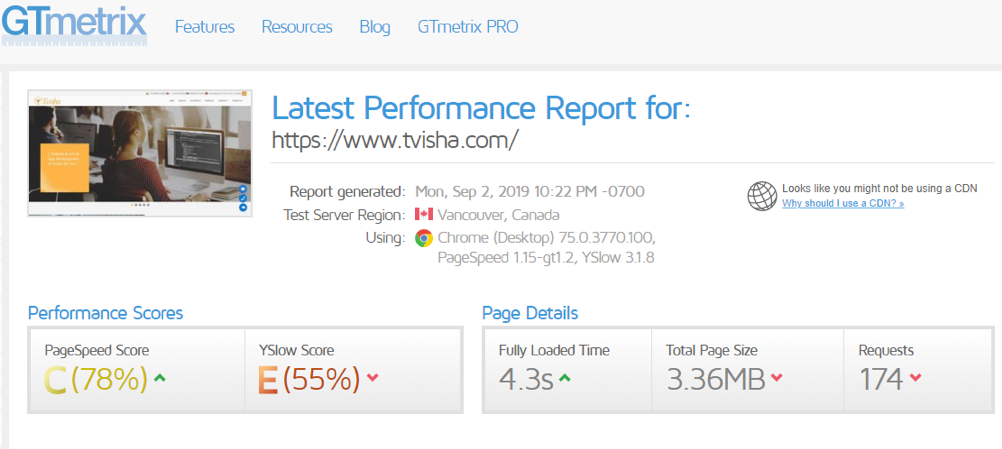
GTmetrix’s dashboard will give your website an overall page score and show you how long it takes for your website to load fully. The website in this example took 4.3 seconds to load.
The faster your website speed, the faster your customers will be able to make purchasing decisions about your products or services.
If your website loads slowly, review its performance data and visitor behavior to understand whether speed may be affecting the experience.
Regular SEO audits can help identify issues that affect your website’s visibility on search engine results pages (SERPs).
A regular search engine optimization audit helps you to:
Neil Patel’s SEO audit resource is shown below. It provides a snapshot of SEO health, including technical issues, on-page optimization, organic traffic, and backlink information.
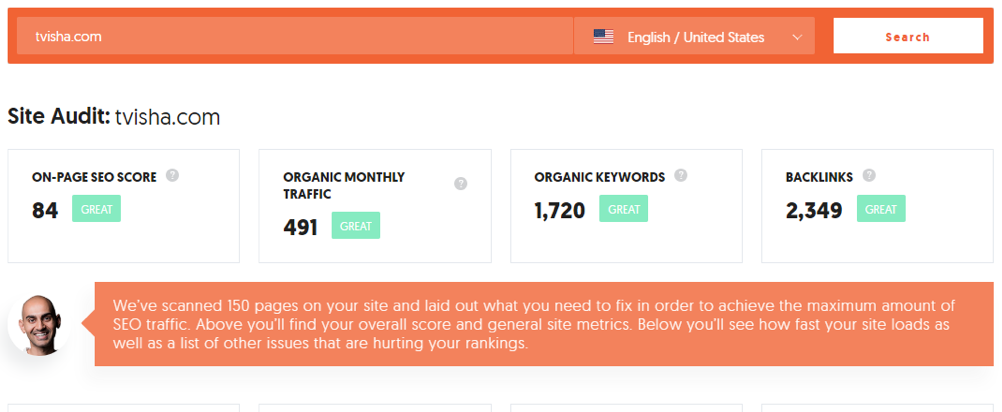
The audit’s results will help you understand issues on your website that need to be fixed. SEO consultants can also help businesses identify next steps after performing an audit.
Along with an SEO audit, businesses should stay connected with audience preferences, emerging trends, and algorithm updates. Use audit findings to prioritize improvements; an audit alone cannot guarantee rankings or sales.
Review the copyright information on your site and check that any contracts or terms presented to customers are current. If your services or data practices change, ask the appropriate legal reviewer to check related website language.
Website content should be kept current so visitors can find accurate information about your business. This content can include:
Accurate, useful content helps visitors find the information they need. If you display a publication or update date, make sure it accurately reflects the content.
Make sure that images are placed properly in the desired design on the page. In the case of e-commerce websites, update discounts, deals, coupons, and special offers when they change or expire.
You should also update contact information, terms and conditions, current copyright information of your website, and disclaimers regularly.
Relevant, high-quality images can support the page’s content and user experience. Always prioritize the quality of work over quantity.
Make sure that your call-to-action (CTA) buttons work correctly so visitors can complete the actions you intend them to take.
Similarly, if you are an e-commerce business, links to your shopping carts and payment gateways should be error-free.
Create a clear way for customers and website visitors to comment, offer suggestions, or report problems with your website’s functionality.
Customer feedback can help you learn what visitors value and identify website issues. Review comments for recurring problems and respond where appropriate.
People have come to expect more personalized customer experiences. Now is a good time to adjust your company’s strategies to your current and potential customers’ preferences.
Many people browse on mobile phones, so check that your website is mobile-responsive.
You should regularly monitor whether your website is compatible with current versions of browsers such as Firefox and Chrome, and check that the site works well on mobile devices.
Regular website maintenance is important for businesses of every size and industry. It can help keep a website functional and build trust with customers.
Make sure that your website is functional and accessible to customers. Follow these tips to maintain your website and support a positive customer experience.
Davu Siva is an enthusiastic SEO blogger. He is digitally savvy and loves to learn new things about the world of digital technology. He loves challenges come in his way. He prefers to share useful information such as SEO, WordPress, Social Media, Paid Advertising, Local Marketing and etc. His provided knowledge helps the business people, app developers, designers, and bloggers to stay ahead in the digital competition.
See full profile