![How to Create a Budget for BI & Analytics Services [With Template]](https://img.shgstatic.com/clutch-static-prod/image/resize/715x400/s3fs-public/article/f07e9d6bd89e7f70df9c94301acdd847.png)
How to Create a Budget for BI & Analytics Services [With Template]
Use our custom template for your business intelligence and analytics needs.
Updated February 24, 2026

Modern consumers generate an extensive and continuous stream of data as they move between apps, websites, and connected devices. Each interaction, whether they're browsing Instagram or connecting to a public Wi-Fi network, creates traceable data points. In many cases, this information can be monitored, analyzed, and, if not properly secured, exploited by malicious actors.
You're not helpless, though. Practicing good security hygiene will help you protect your information, finances, and identity. It's all about creating small habits that keep your devices and data safe.
To learn more about how people protect their data (or don't), Clutch surveyed 413 consumers about their security hygiene. Based on these findings and expert advice, here are our top tips to improve your digital defenses.
Looking for a IT Services agency?
Compare our list of top IT Services companies near you
Looking to enhance your company’s cybersecurity? Search for verified client reviews on Clutch.
Security hygiene is a set of behaviors and preventative measures that help keep your data private and safe. Like your personal hygiene routine, it's an ongoing process, not a one-and-done fix. For example, you might use a password manager for every account instead of jotting your details down on a sticky note.
Poor security hygiene leaves you vulnerable to data leaks and hacks. Let's say you use “rockclimber123” as the password for all your accounts. One day, a mobile game you forgot you downloaded has a data breach, and the hacker steals your password. They use this stolen data to log into your online bank account. Goodbye, savings. With good security hygiene, the hacker gets blocked because every account has unique passwords and other protections.
People often assume that hackers only target wealthy or chronically online users. In reality, anyone can fall victim to a data breach or cybersecurity attack. A 2025 Identity Theft Resource Center survey found that 80% of consumers received a data breach notice in the last year, and 88% of them experienced at least one negative effect from it.
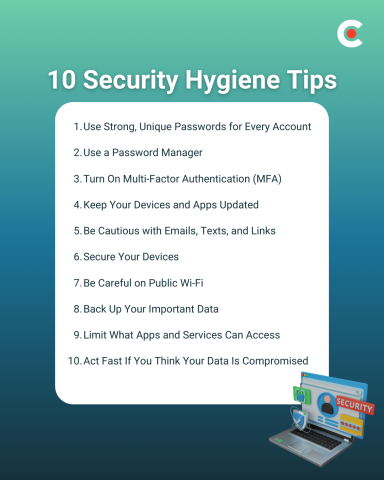
Security hygiene can't prevent every incident, but it makes you a much harder target and limits the damage if something does happen. Follow these 10 best practices to boost your online defenses.
It's tempting to reuse passwords, especially if you have accounts scattered across many different platforms, but you should resist the urge. If you repeat passwords, a single data breach could give hackers access to all the other accounts that use it.
Every time you create an account, come up with a new strong password with:
Avoid common words or anything related to your personal life. “i29WKx*wjaQi3Br1” is much more secure than “MyGoaTSteve1,” especially if you frequently post about Steve the goat on social media.
“Strong passwords and multi-factor authentication stop most basic attacks,” says Mike Murphy, CEO of IT Goat. Hackers want quick wins, so they're more likely to move on to another target if you lock down your accounts with secure passwords.
Most websites send password reset links to your inbox, so take extra care with your email password. If a hacker can get inside this gateway account, they can reset passwords for all the other accounts you've linked to. They may also search for personal information, like a photo of your driver's license that you emailed to HR.
The human brain excels at recognizing and memorizing patterns, even if you're not consciously aware you're learning. However, remembering complex passwords is much harder. Now multiply that by dozens of accounts, and it's practically impossible to retain everything.
Stay organized by using a password manager to save your credentials. This software generates random passwords and stores them for you, so you don't have to memorize anything. Many password managers also work across devices.
Clutch found that 72% of consumers claim to use strong or unique passwords, but only 40% use a password manager. That shows many people still have a gap in their security hygiene. Using this tool is much safer and more convenient than handling everything yourself.
Like any technology, password managers aren't foolproof. For example, in 2025, hackers stole data from LastPass after the company used weak security measures. Keep your credentials top secret by choosing a reputable password manager with a strong track record.
Multi-factor authentication (MFA) requires users to provide two or more forms of identity every time they log in. For example, your bank app may ask for a password and a biometric scan of your fingerprint.
This multi-layered security stops most takeovers because hackers usually only have access to one form of verification. Let's say someone correctly guesses the password to your email account, but they don't have your cell phone. If the platform asks them to verify their identity with a code from a text message, they're out of luck.
According to the Clutch survey, 65% of consumers use two-factor or multi-factor authentication. Start by securing accounts with sensitive personal information or financial data, such as your email and investing app.
It may seem like companies only update software when it's time to add new features, but that's not the case. Many updates also include security patches that seal off vulnerabilities that hackers could use to break in. If you click “maybe later” every time you get an update notification, you won't have the latest protections.
Despite these benefits, Clutch found that only 43% of consumers regularly update their apps and software. Enable automatic updates so you don't have to do anything to keep your technology safe.
Scammers often trick people into sharing confidential information or downloading malware. For example, they might impersonate your boss and email you to ask for “forgotten” bank details.
Look out for common red flags, such as:
Before you click a sketchy link or respond to an email, reach out to the company or person through an official channel. In the above scenario, you could call your boss to ask if they actually sent the email.
Your personal and work devices are a goldmine of data. If a thief steals one and manages to log into it, they could get access to your messages, password manager, documents, and more.
Stay two steps ahead by protecting your devices with lock screens. Set up a PIN or biometrics, such as a fingerprint scan. That way, no one else can log in, even if they swipe the physical device.
If your laptop or phone goes missing, don't panic. Many devices allow you to track their location and, in the worst-case scenario, erase all the data. If you put an iPhone in Lost Mode, for instance, the screen automatically locks. You should also contact law enforcement if you think your device has been stolen.
You may not think twice before connecting to your favorite coffee shop's open Wi-Fi network. However, these networks often have weak security defenses, which could let nearby hackers intercept your data.
Clutch found that only 39% of consumers avoid public Wi-Fi for sensitive activity. If you decide to connect, avoid activities that involve personal data, such as online shopping. You could also use a VPN to create a secure, encrypted tunnel for your connection.
Hackers aren't the only threat to your online security. A software glitch or a spilled glass of water could wipe out irreplaceable data. Give yourself peace of mind by backing up valuable files, such as vacation photos and sensitive work documents.
Cloud storage platforms like Google Drive are convenient and accessible from any device, with one caveat: You need an internet connection. For complete control, consider a physical device like a USB stick.
Don't automatically assume that apps and services care about your best interest. Take the time to review the permissions to make sure you're not sharing unnecessary data.
“For apps and services, I always think in terms of necessity and trust,” advises Evan Kirstel, B2B TechFluencer and TV host at TECH IMPACT. “Does this app really need access to my contacts, location, camera, or mic to work? I review permissions once in a while, delete apps I don’t use, and try to limit how much data I share in the first place. Less exposure usually means less risk.”
Only allow apps to access relevant data. You should also clean up old or unused accounts, which may still use your information long after you stop using them.
Even after you step up your security hygiene, things can still go wrong. Here are a few signs your account may have been hacked:
Take immediate action by changing your password and contacting the platform for assistance. Freezing any connected credit cards can also help limit the financial damage.
You don't need a degree in cybersecurity to practice great security hygiene. Focus on building small, consistent habits that protect your data all the time.
Not sure where to start? Check your smartphone's apps for pending updates and install them. Once everything's up-to-date, double-check all your passwords to make sure they're unique and strong.