Mobile Apps vs. Web Apps vs. Websites: What Does Your Business Need?
Should you build a mobile app, web app, or website? Learn the key differences, costs, and use cases to choose the right platform for your product and users.
Updated January 6, 2026

In recent years, hybrid and remote work has become the norm. As a result, your employees spend more time working on the go and mobile apps let them collaborate and keep your operations moving.
However, off-the-shelf options don't always fit neatly into business workflows. Maybe your team has to create awkward workarounds to share video files or bounce between three different apps to finish a complicated task. Or they're constantly re-entering data because your tools don't sync, wasting time. These seemingly minor inconveniences can have a huge impact on productivity and morale.
Clutch surveyed 500 full-time employees to learn how they're using mobile apps in the workplace. We found that 86% of companies use an off-the-shelf mobile app, such as Microsoft Power Apps and Salesforce AppExchange. However, 26% of those apps have been customized to fit specific business needs, and 23% of respondents use at least one fully custom app for work. These trends point to the growing need for more personalized apps that help teams get more done — whether they're fully custom, pre-built, or somewhere in between.
Looking for a Mobile App Development agency?
Compare our list of top Mobile App Development companies near you
If you want to build a mobile app for your business, you may be wondering if you should try an off-the-shelf solution or invest in custom app development. The first option offers speed and convenience, while the second lets you build bespoke features and workflows. Like every decision about technology, it comes down to your goals and needs.
Like most mobile users, you probably rely on a few popular business apps, such as HubSpot and QuickBooks. However, your company may also need something custom-designed specifically for your workflows. Here's the difference.
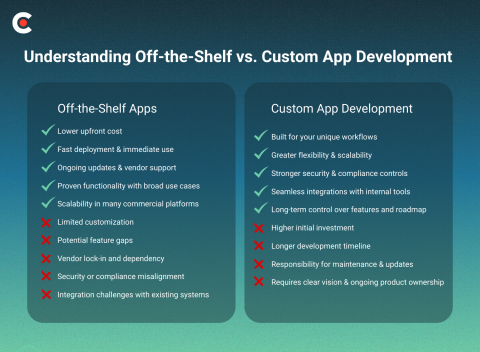
Companies develop off-the-shelf apps for the general market. These pre-built apps are designed for common business uses and come ready to use as soon as you download them. They include popular tools such as Microsoft Dynamics 365 Commerce and Salesforce.
Most off-the-shelf apps come with basic features. For example, Shopify includes everything you need to list and sell products online, from product pages and checkout to payment processing and order management. As your business grows, you can extend that core functionality by adding apps for marketing, shipping, subscriptions, or analytics—without having to build custom software from scratch.
Some apps also integrate with other popular software. For instance, you might connect Salesforce with MailChimp to use customer data for your email campaigns or link to Jira so you have all the information you need for projects in one place.
Custom app development involves building an app from scratch to fit a company's workflows, goals, and requirements. Businesses often choose this route when they have complex operations or need an extra-secure app. A hospital, for instance, might use a custom app to store patient data instead of relying on a pre-built (and potentially hackable) solution.
Creating a custom app gives you complete control over the features and user experience. Concerned about cybersecurity? You can add the latest protections. Have an employee who needs a special interface for accessibility? No problem. You can also make sure your app integrates with the rest of your tech stack right off the bat, rather than trying to combine a hodgepodge of off-the-shelf tools.
Learn more about how to build a custom mobile app in Clutch’s ‘App Development Checklist.’
The majority (86%) of businesses use at least one off-the-shelf app, according to Clutch data. Here are a few reasons to consider using these tools.
Off-the-shelf apps are typically much more affordable than custom options. Some tools are completely free, while others have paid subscriptions. But you won't have to hire a developer or pay for hosting.
Setting up a pre-built app often only takes a few minutes or hours, depending on the software. Once it's installed on your device, you can start using it right away.
Reputable developers keep improving their apps. They may patch a security flaw one month, then launch a new feature the next. If you have questions or run into a bug, you can reach out to them for help.
Popular off-the-shelf apps have been tested by thousands or millions of people, so you can trust that they work. They're also adaptable for many different situations and industries. For instance, HubSpot lets you plan marketing campaigns and build landing pages to capture leads.
Pre-built apps, especially paid ones, are often designed to scale as your company grows. That means you don't need to look for new solutions every time you go on a hiring spree or add a new service.
While off-the-shelf apps work great in many situations, they aren't right for every business.
When you download a pre-built app, what you see is generally what you get. You may be able to add a few custom fields to a form or change the background from white to mint green, but you can't typically add your own features or even tweak the menu. That can be frustrating if you have a specific need or vision that the app doesn't fit.
Pre-built apps often specialize in one or two areas. Dropbox, for instance, is perfect for storing files, but you can only communicate with other users through comments. If you want to hop on a video call to chat about a report, you'll need to use another app.
Once you add an off-the-shelf app to your tech stack, you're subject to the whims of the vendor. They could remove your favorite feature overnight or radically change the user interface. They could even deactivate the entire app. Even if you're a major client, you get little input into these changes.
Third-party apps don't always comply with specific laws or use the latest cybersecurity protocols. Suppose your company sells products in the European Union, but you choose a payment processing app designed for American users. If the software doesn't follow the EU's General Data Protection Regulation (GDPR), you could get fined for not handling consumer data properly.
Even the most flexible apps don't mesh with every possible tool. If your software doesn't play nicely together, you may need to duplicate your efforts or try to create awkward workarounds.
If you can't find exactly what you're looking for in the app store, it may be worth building one yourself. Here are a few advantages of taking development into your own hands.
Custom app development lets you build all the functions you need for your own workflows. That's ideal for businesses with complicated or niche operations. You can design every feature to match your exact processes, integrate seamlessly with other systems, and create a unique user experience that off-the-shelf apps can’t provide. While it usually takes more time and investment, the result is a tool tailored precisely to your business needs, giving you full control over functionality, data, and scalability.
When you build your own app, you decide when and how it grows. You can add new features or even overhaul the entire platform as your business needs change. For example, if you want to start gathering productivity data, you could build that right into your app instead of downloading yet another pre-built tool.
Instead of relying on an outside developer's judgment, you have total control over your app's security protocols and compliance. That's a major perk for businesses that work with sensitive data or need to follow industry-specific cybersecurity laws, such as the Health Insurance Portability and Accountability Act (HIPAA).
You know the ins and outs of your tech stack, which makes it easy to prioritize compatibility as you develop your custom app. This is particularly helpful if you already have unique systems that don't integrate with off-the-shelf tools.
Custom development doesn't stop when you launch your shiny new app. You also get to control all of its future directions, from redesigning the interface to adding that nifty collaboration tool your team has been begging for. And you get to do it all on your timeline instead of waiting for a vendor to get around to it.
Of course, there are plenty of valid reasons not to jump into a custom app project — at least, not without a lot of careful planning. Here are a few obstacles you may run into.
Custom app development may not be budget-friendly. If you don't have an in-house software developer, you'll probably need to outsource your project to an expert. According to Clutch data, most app development agencies charge $25 to $49 per hour, with typical projects ranging from $10,000 to $49,999.
Labor isn't the only upfront expense. You may also need to pay for infrastructure like cloud hosting and databases. That adds up, especially for small businesses.
Building even the most basic custom app takes much longer than downloading an off-the-shelf one. Your team needs to handle everything from picking out the color palette to user testing and updates. That's why the average timeline for mobile app development is 11 months, Clutch data shows.
Looking for a quicker fix? You may need to settle for a pre-built app or patch together a few solutions while you develop your custom one. Maybe your team can get by with Dropbox and Zoom while you build an all-in-one collaboration app. Or you could use an off-the-shelf inventory app until your custom one is ready to go live.
The work isn't over when you launch your app. You'll also need to regularly maintain and update it. Otherwise, the software could quickly slow down or develop pesky bugs. Cybercriminals also constantly develop new attacks, so an app that's locked down tightly today could have glaring vulnerabilities next month. Constant vigilance is key.
Precision is critical in custom app development. Vague requests such as wanting an app to “perform data analysis” or “share product updates” are not sufficient. Successful development requires a clear and detailed vision, encompassing everything from essential functionality to finer elements like user interface design and loading screens. For those new to software development, this level of planning can feel daunting.
You should also be willing to continue taking ownership of your app indefinitely. That involves everything from updates to — eventually — total redesigns.
Designing a custom app is no small feat, but it's well worth it for some businesses. Consider this option when:
Ask your team for feedback, too. You may assume that an off-the-shelf app works fine, but maybe it's missing a feature that would help your employees. Or they might feel annoyed by the lack of customization. This sort of input can help you decide whether to commit to a custom app — and, if so, what you should include.
Learn more about how to hire a mobile app development team in Clutch’s ‘Mobile App Development Service Guide.’
So you've decided to put on your developer hat or outsource the project to a professional. Before you start dreaming about your app's appearance, focus on these practical questions:
Other key factors to consider include accessibility, training time, and integrations.
Your company probably already relies on at least a handful of off-the-shelf apps. These tools are affordable and convenient, but they require you to put a lot of trust in outside vendors. One unpatched security vulnerability or server outage could have a huge impact on your business.
Custom app development gives you complete control over every aspect of your technology, from the appearance to security measures and updates. But it's a much bigger commitment, both financially and time-wise. Consider this option if third-party apps don't meet your needs, or you're itching for more flexibility.
No matter which route you choose, make sure your apps use the latest security protocols. Your customers and employees are counting on you to keep their data safe, so give them peace of mind by making smart choices.