Mobile Apps vs. Web Apps vs. Websites: What Does Your Business Need?
Should you build a mobile app, web app, or website? Learn the key differences, costs, and use cases to choose the right platform for your product and users.
Updated December 18, 2025

Mobile apps have become the de facto communication and collaboration tools. Your employees fire off emails on their phones while they wait in the school pickup line and hop on Slack to reassure their coworkers that, yes, the client really does want that color. Even when they need to share sensitive data, they're probably uploading it to a platform like Dropbox.
The reliance on mobile apps makes it easier for employees to check tasks off the to-do list when they aren't in the office, but companies often overlook the importance of mobile app security.
When the office lives on your phone, everyday activities — like connecting to public Wi-Fi, sending data through apps, or even leaving a smartphone lying around — become cybersecurity risks.
Looking for a Mobile App Development agency?
Compare our list of top Mobile App Development companies near you
Mobile app security matters just as much as any other cybersecurity practice. Even tech-savvy employees need security training to use these tools responsibly. "Most importantly, security should be treated as a core architectural principle from the outset, not an afterthought," says Szymon Boniecki, co-CEO of Monterail.

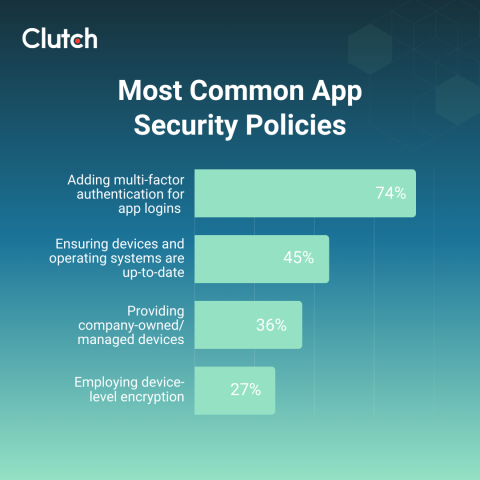
In a survey of 500 full-time workers, Clutch found that 82% of companies already have security protocols for employees who use mobile apps. The most common app security policies were:
Understanding these essential practices and the biggest mobile app security threats will help you protect your small business from data breaches and other incidents.
Almost three out of four (74%) businesses require multi-factor authentication for app logins. For example, the app may text employees a code or maybe they need to scan their fingerprint before signing in.
These checks can seem annoying, especially when you're in a rush. However, MFA is one of the most effective ways to prevent unauthorized access. Hackers can guess a password, especially if it's something weak like "HR2025." But they're less likely to steal a physical phone or copy someone's fingerprint.
Of course, you also don't want to make it too difficult for legitimate users to get online. These best practices for MFA will help you strike the right balance:
Teach employees about the importance of MFA, too. They're less likely to grumble about scanning their fingerprint when they understand that this step helps safeguard data.
It's always tempting to tap the "update later" button, especially when you're in the middle of something. However, 45% of businesses require employees to update their devices and operating systems regularly.
App developers often push updates to patch security risks and keep everything running smoothly. If hackers start using a new technique, for instance, a developer may release an update to block it. Updates also help prevent glitches and slow performance, which often happen when once-shiny apps get outdated.
Sure, you could save a few dollars by asking employees to use their own smartphones. After all, they're already carrying them around all day, right? But 36% of full-time workers have been given company-managed or -owned devices for good reason.
When your business provides the device, you get full control over the security setup. Do your employees refuse to use MFA on their personal phones? Pre-install it on company devices so they can't skip it. You also get centralized oversight over all your technology, which helps spot security risks quickly.
A bring-your-own-device system gives you less control over the hardware. You can still cut down on vulnerabilities with digital safeguards, though. Tools like remote wipe let you erase app data if an employee leaves your company or someone swipes their phone at a concert. Access controls and conditional access also prevent users — or hackers — from seeing data they shouldn't.
Encryption scrambles data into an undecipherable code that users can only read with a specific key, like a facial or fingerprint scan. According to Clutch data, 27% of businesses use device-level encryption to protect information stored on each employee's phone or tablet.
This security measure keeps data safe even if devices get stolen, lost, or compromised. For example, if someone pickpockets your financial manager, they could access your payroll data and even company credit cards once they unlock the phone. With encrypted apps, though, they can't decipher this data without the key.
Many mobile devices already have built-in encryption tools. Windows offers BitLocker, which can use a startup key, PIN, or password to grant access. Google and Apple devices have also had default encryption for more than a decade.
While modern mobile devices often come with built-in encryption tools, data can still get intercepted once it leaves the device.
Let's say you're working from a café and use a mobile app to send sensitive files over an unsecured public Wi-Fi network. Attackers could capture the data in transit. It's the digital equivalent of taking a bag of cash out of a safe and driving it around in a Honda Civic. On the road, it's not protected anymore.
Like a heavily armored truck, encrypting the data itself adds an extra layer of protection. iOS Keychain and Android Keystore use cryptographic keys to encrypt data before sending it and once it arrives. Even if thieves capture it, they can't decode it without those keys.
Secure communication protocols — such as HTTPS and TLS — also safeguard data as it travels over networks. These protocols use digital certificates to make sure that the sender and recipient are legitimate.
Cybercriminals are crafty. They're constantly looking for weaknesses to exploit, and artificial intelligence has given them a whole new toolkit to experiment with.
Penetration testing helps you beat hackers at their own game. It uses mock cyberattacks to spot vulnerabilities in your system, such as an unencrypted app or a naive employee who clicks phishing links. That way, you can fix them before real threats get in.
Run these tests frequently because cybercriminals definitely won't give up just because you thwarted them once.
Mobile app developers often use libraries, which are pre-written packages of code or frameworks created by other people. These shortcuts let them build apps faster instead of starting from scratch. However, this outside software can put your data at risk if the original developers don't maintain or fix security issues.
Before you decide to use a mobile app, take the time to read through its documentation to see which libraries it uses. Research these libraries on community forums, and check when they were last updated. If a library has a bad reputation or hasn't been updated since 2019, that's a huge red flag.
Like most small businesses, you probably don't have the budget for a 24/7 cybersecurity team. Mobile threat detection tools are an affordable alternative. They constantly monitor devices for suspicious activity and automatically respond to threats. If malware infects an employee's smartphone at 3 a.m., the software will contain it before you even wake up.
Mobile app security isn't a one-and-done kind of thing. Even after you protect your apps, keep researching the latest security risks at least once a quarter. Otherwise, intruders might sneak into a metaphorical backdoor you didn't even realize was there. Here are 10 risks to have on your radar right now.
Malware is harmful code that hackers hide inside other programs or files. When unsuspecting users download this "malicious software," it can steal confidential data or even spread to other devices like an infection. Some malware also hijacks systems, locking you out of your apps.
These incidents can be devastating for small businesses. If malware takes down your payment processing app, for instance, you could lose sales and damage your reputation.
A data leak happens when confidential information accidentally gets exposed or stolen. For example, an unsecure accounting app could allow hackers to steal your clients' bank account details. If your negligence causes the breach, you may need to reimburse clients or pay costly penalties. According to IBM, data breaches cost an average of $4.4 million, which is why many small businesses shutter after a major leak.
Many mobile apps use application programming interfaces (APIs) to share information with other tools. If your apps use legacy or unsecure APIs, these open doorways can let hackers access other parts of your system. Suppose your team uses a messaging app that uses an outdated API to communicate with your cloud file storage. Hackers can use that weak link to infiltrate the system. Goodbye, top-secret files.
If hackers gain access to an app's source code, they can edit it to create new vulnerabilities or make the app behave maliciously. That's bad news for small businesses, which may get caught off guard when a once-reliable app suddenly leaks data or spies on their activity.
A phishing attack uses fake communications to trick victims into disclosing information or installing malware. For example, a cybercriminal might pretend to be your CEO and message an employee: "Hey Kate! Can you send me the company credit card number? I'm at lunch with a client and forgot it." If you don't take the time to educate your team about cybersecurity, they could easily fall for these traps.
If you don't configure your app servers correctly, hackers can slip inside. For a small business, this sort of breach could lead to lost data or even downtime if the criminals disable critical apps.
Insufficient testing happens when small businesses don't thoroughly examine their systems for security gaps. Complacency opens the door for costly cyberattacks.
Unpatched software is an app with known security flaws that the developer hasn't fixed yet. They're easy pickings for cybercriminals, especially when word gets out about these weaknesses.
An unsecured network lets anyone access it without a password or encryption key. That public Wi-Fi network may be convenient for remote work, but it allows anyone in the vicinity to intercept your company's data.
Sometimes, outdated encryption tools scramble data ineffectively, so savvy hackers can still decode it. That means your company's client records and other sensitive data can fall into the hands of cybercriminals, despite your best intentions.
As more businesses work on the go, mobile app security has become an essential part of every cybersecurity protocol. Simple steps like encrypting data and using MFA can prevent expensive incidents.
Get started by reviewing your current mobile apps for outdated libraries and other security vulnerabilities. Then, hire a penetration testing expert to spot flaws that may otherwise go unnoticed. When it comes to mobile apps, a little prevention goes a long way.