Mobile Apps vs. Web Apps vs. Websites: What Does Your Business Need?
Should you build a mobile app, web app, or website? Learn the key differences, costs, and use cases to choose the right platform for your product and users.
Updated December 18, 2025

In every industry, business success hinges on effective organization and communication between team members. Even if you have the most talented employees and the most forward-thinking practices, the best work can't happen without top-notch project management.
Anything you can do to streamline processes and help your team work together more efficiently will significantly improve your business’s overall performance. For many businesses, a mobile app can simplify workflows and strengthen communication.
With more employees working remotely or collaborating across different locations, real-time communication has become essential. A mobile app for project management keeps everyone aligned with quick, seamless updates from anywhere. It also clarifies who’s responsible for what and when, ensuring the entire team stays on the same page.
Looking for a Mobile App Development agency?
Compare our list of top Mobile App Development companies near you
It’s no surprise that around 40% of workers use mobile apps for project management and organization, and you can expect that number to keep going up. The tricky part for managers is deciding which apps to implement in their workplaces. If you’re looking to streamline your workforce communication and collaboration, consider the most popular project management apps and strategies for how to choose the right one.
Today, nearly a quarter of the U.S. workforce works remotely. Even among those who work in an office, many people need to collaborate with colleagues in other locations to get their jobs done. Team members may even be working across different states and time zones. Having mobile-friendly workflows allows all of these employees to stay connected wherever they are without delays or communication breakdowns.
With mobile project management apps, employees maintain flexibility and on-the-go organization. Syncing across devices means they can easily switch from their desktop to their laptop to their mobile devices while keeping access to the most up-to-date versions of their files. They get real-time updates, are able to communicate quickly with team members, and can easily track tasks from start to finish.
With all the project management apps available, you should be able to find one just right for your team’s needs. These five are the most popular among full–time workers:
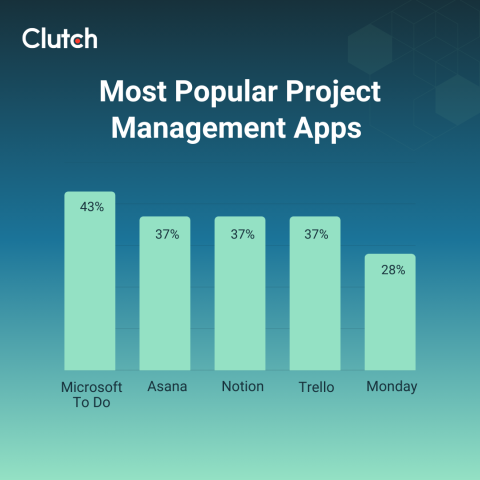
By reviewing the benefits that different apps offer, you can select the best one for your operations.
Think about which features are most important to you in a project management app, and use this app-by-app breakdown to find the right fit.
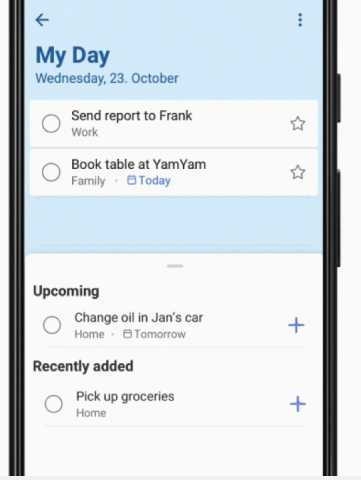
Microsoft To Do is the leading project management software among full-time professionals. It’s a simple, straightforward app for creating to-do lists with items you can easily check off as you complete them. The app also includes a smart daily planner with personalized suggestions for daily or weekly to-do lists.
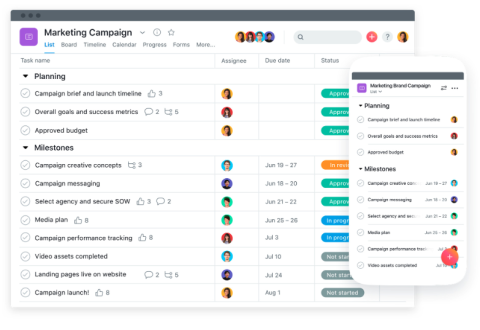
Asana is another popular project management tool that helps you create projects, assign tasks with deadlines within those projects, and track your team’s progress toward goals. It shines with convenient automation features that cut down on the need for constant back-and-forth emails with project updates.
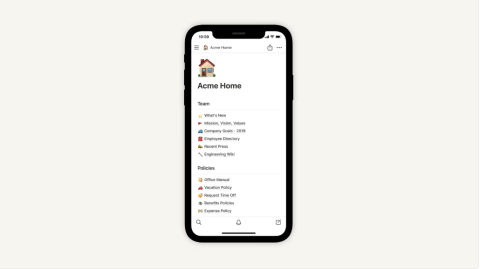
Notion isn’t just a project management tool, though many professionals use it that way. It’s an all-in-one workspace where you can create everything from simple to-do lists to complex project trackers. You can also use Notion as a database to centralize important documents, such as meeting notes, project details, and other company information.
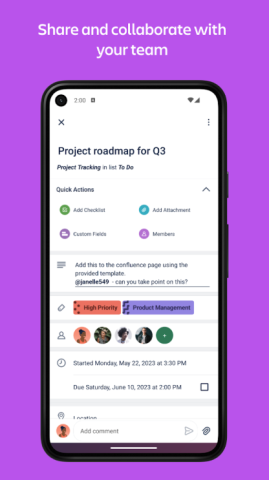
Trello is known for its Kanban-style interface that helps teams visually manage their work. The tool is like a digital whiteboard you organize with columns for different project stages (e.g., “To Do” and “In Progress”). Then you create cards for each task and move them through the columns as you progress.
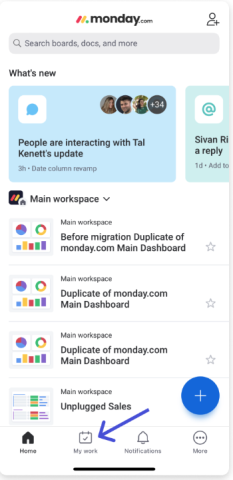
Monday.com is a comprehensive project management tool that lets teams create and assign tasks, set due dates, and track each task’s status. The workflows and views are highly customizable, with options such as Kanban boards, calendars, and tables to visualize project progress.
With so many great project management tools, you need a few deciding factors to help you compare your options and select the right one for your team. Consider these important points before moving ahead with a project management app.
Your team members will each have their own level of confidence and familiarity when it comes to new technology. Ideally, even the least tech-savvy team member will be able to adopt the project management app quickly so you don’t waste lots of time and money on training. Test out the tools, especially the mobile versions, to make sure they have intuitive interfaces. Look for user-friendly options.
In a business setting, one of the most important functions that project management software serves is facilitating communication. So pay close attention to the collaboration features each app offers. See how easy it is to message, tag, comment, and share boards or files. Easier communication means greater efficiency when working together on projects.
Certain project management apps may integrate with the tools your team already uses, such as Microsoft 365, Google Workspace, or Slack. These integrations save your team time, so check whether the app you’re considering pairs well with your existing software.
You’re choosing project management software not just for today but for the future, too. Make sure the app you select will still be effective even as your projects grow more complex. You don’t want to have to switch to a different tool later and go through this process again.
Look for project management tools that have the ability to adapt workflows, project views, and templates according to your team’s preferences. The more adaptable they are, the easier it will be to make the tools work well for your team.
The goal of implementing project management apps is to improve efficiency, and automation delivers exactly that. Look for apps that reduce manual work with triggers and rules to automatically move your projects forward.
Some project management tools are primarily designed for desktop use. Even if they also have mobile versions, they may be clunky to use or have other issues. Make sure the tool you choose offers strong functionality on both desktop and mobile.
Many of these tools are free to use individually but require paid subscriptions for teams interested in working collaboratively. For any project management app you’re considering, pay close attention to the subscription costs for different service tiers. Weigh these costs against competitors and the value the tools can provide for your team.
If you’ve noticed inefficiencies in your team’s workflows, implementing a mobile project management app may be the perfect solution. These apps make real-time communication and collaboration easier than ever, even for dispersed teams, leading to better efficiency and productivity.
Consider top options like monday.com, Asana, and Trello. The right app for your business will depend on your budget, the types of projects you run, and your team’s style. Test some options out so when you do select and implement a project management app, it’s the perfect fit.