In an era where a single friction point can send users straight to a competitor, understanding where and how to invest in UX design can make or break a digital product.
A thoughtful UX budget ensures every dollar adds up to smoother interactions, clearer flows, and happier users.
Many companies make updates based on internal assumptions rather than real user needs. However, UX design shapes the entire journey: how intuitive a feature feels, how easily someone can complete a task, and how satisfied they are when they’re done.
Looking for a User Experience agency?
Compare our list of top User Experience companies near you
By planning your UX spending before you launch a website, app, or internal tool, you’ll be better equipped to streamline processes, avoid costly redesigns, and prioritize what users truly need.
This article will walk you through the essential components of a successful UX design project, offering practical guidance to help you bring your product to life — on time and within budget.
What Goes Into a UX Budget?
On average, the cost of UX/UI design projects on Clutch is typically more than $10,000. This cost depends on complexity, platforms, and the scope of design work.
Many agencies charge between $25–$49 per hour, which means even small projects can add up quickly without a clear budget strategy. Projects involving multiple user flows, complex interactions, or mobile + web deliverables typically sit at the higher end of this range.
Creating a realistic UX budget requires businesses to understand the factors that go into a successful user experience design for any type of product.
The following practices are involved in the cost of a UX design project:
- Deliverables: UX design is involved in all types of projects, and the specific project your company is working on will be a huge factor in defining your overall budget. For example, an app design will have different elements than a web design.
- Discovery phase: The discovery phase can also vary depending on the type of UX project. In this phase, companies need to break down wireframes, any user research, testing, and more. Once these tasks are defined, your team will have a better idea of what you’re spending money on.
- Design phase: UX design work is completed during this phase, and the scale of the work significantly impacts costs. For example, suppose your UX designer is working on an MVP of a mobile app. In that case, they will need to factor in different screens and wireframes, usability testing, product design, and prototyping elements. A simple design will take less work and resources than a more intricate one.
- Amount of time: The estimated hours for your UX design project will also impact the overall budget. Each phase will take a different amount of time. Buffer time should also be accounted for in case of any hiccups or unforeseen challenges. Many UX designers are paid hourly, so the amount of time a project takes should be a main consideration when aligning your UX design project.
Most of these checkpoints will factor into your UX design project in some regard. However, not all design projects are the same, and most decisions will be dependent on the deliverable your team is producing.
Learn the real cost of UX design services to prepare for your next project.
How to Create a UX Budget for Your Project in 5 Steps
Building a budget for any design project involves considering resources, strict planning, aligning goals, and factoring in all production costs.
Businesses can create a solid UX budget by following these five steps:
1. Assess Your Current UX/UI Design
Before crafting your UX budget, it is imperative to assess where your company currently stands regarding design.
Suppose your team already has a well-designed website. In that case, your new mobile application should mirror the website’s capabilities, look, and feel to present a unified front to potential buyers.
If you’re a new small business, consider what competitors and others in your industry are experimenting with by browsing case studies and other online resources.
If you’re more established, review what worked and what didn’t with past UX research, tools, and design processes. This reflection will help streamline your next UX design project and inform your overall UX budget.
2. Define Any Design Problems
Why is your company looking to create or improve its UX design capabilities?
The motivation for any UX design project should be to fix a core design problem to improve user and customer experience. For example, your design problem could be to improve your website’s navigation and reduce your bounce rate.
Determining your core problem(s) will help your team fully center your budget around a common UX design goal. The level of clarity will ensure that all aspects of your budget are well-defined and documented.
3. Determine UX Project Goals
Outside of thinking about the problem your design will solve, it is also key to consider project goals.
What is the priority of crafting a well-designed website? Is it only user experience, or is your team looking to increase sales?
Depending on your specific project goal, different aspects of UX design might be factored into your budget. For instance, there might be more focus on usability testing than interaction design elements if your goal is to increase the number of site visitors rather than conversions.
Your project goals will primarily determine your UX budget, so ensure your team is thinking critically when selecting them.
4. Hire a UX Designer
While your team might have a general understanding of what looks good, they are likely only familiar with the basics of design.
Factor in hiring a UX design expert into your budget. After vetting different options, you will be able to include other specialized tasks within your UX budget, depending on what your chosen UX designer offers.
You can hire the following to assist with your UX design work:
- A UX design company that works with an hourly rate
- A freelance designer that specializes in all types of design work
- An in-house UX designer or design team
- Full-time or part-time UX designers
Each resource can provide a unique perspective, strong capabilities, and a different cost estimate. Before choosing, think critically about which resource will provide the most value to your organization with little impact on your budget and final cost.
Should you hire an in-house UX designer or a UX design agency? Think through your options with our guide.
5. Lay Down a Timeline
The timeline for a UX project varies based on scope, design complexity, and user testing needs. According to UX project reviews on Clutch, most projects average 10 months and cover research, iterative design, prototyping, testing, and refinements.
Estimating a timeline for your UX design project will greatly impact your budget. If your team has a tight deadline, the number of resources and manpower might increase.
Changes can occur, which will impact deliverable deadlines, but covering the bases in your UX budget will ensure transparency regarding due dates.
Download: FREE UX Budget Template
Time for the design work to begin!
Download this template to plan, track, and organize your UX budget with clarity. This worksheet helps you outline estimated costs, monitor quarterly spending, and track where funds are being allocated throughout the project.
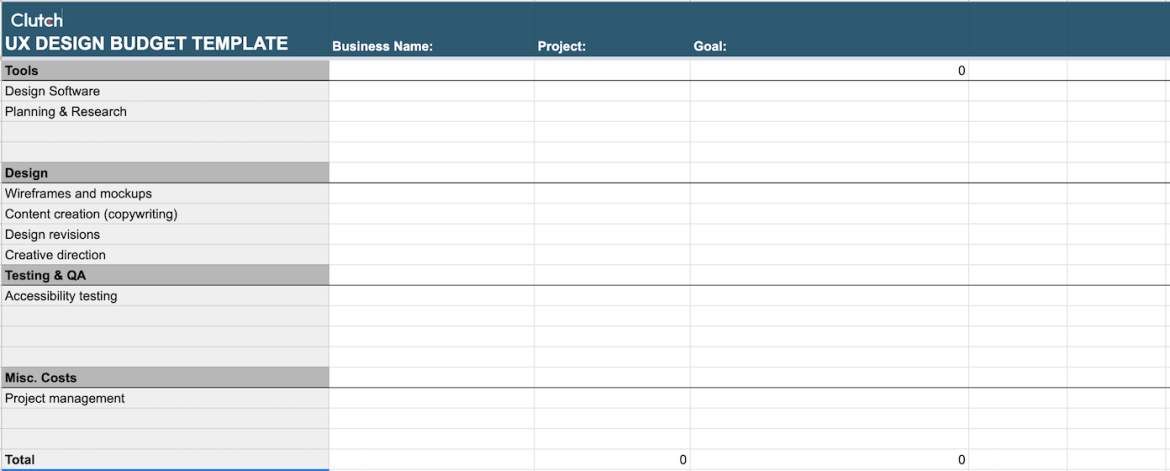
It includes line items for tools, design work, research, accessibility testing, project management, and more, so you can easily identify overages, reallocations, and upcoming needs before they become roadblocks.
Whether you’re managing multiple stakeholders or reporting progress to leadership, this template keeps everything transparent and easy to reference from start to finish.
Final Thoughts: Get UX Design Support for Your Digital Products
All digital products need substantial UX design to be successful.
When crafting a UX budget, all team members must be involved to discuss the key elements of the product, what their target audience wants to see, and the costs.
To build a complete UX budget, consider all elements of UX design, resources, competition, and more.
Plan your company’s UX budget today by using our template.
About the Author
Anna Peck
Content Marketing Manager at Clutch
Anna Peck is a content marketing manager at Clutch, where she crafts content on digital marketing, SEO, and public relations. Alongside editing and producing engaging B2B content, she plays a key role in Clutch's awards program and content initiatives. Originally joining Clutch on the reviews team, she now focuses on developing SEO-driven content strategies that deliver valuable insights to B2B buyers searching for the best service providers.
See full profile