Create a social media calendar that keeps your content organized and engaging, connects with your audience, and drives real results for your brand. This article covers how to build a social media calendar to keep your content organized and your strategy focused. You’ll find easy steps to plan posts, engage with your audience, and work toward your brand’s goals more effectively.
A well-constructed social media calendar saves time, makes content planning easier, and keeps your brand’s messaging consistent and effective. Social media calendars allow you to deliver content strategically and on a routine basis, boosting engagement and preventing the last-minute rush of content creation.
This guide will walk you through the process, from choosing the correct format for your team to planning interactive posts and using analytics to improve performance. A good social media calendar isn’t just a schedule — it’s a strategy. The right approach can help you strengthen connections with your audience and focus on creating meaningful, high-quality content.
Looking for a Social Media Marketing agency?
Compare our list of top Social Media Marketing companies near you
By planning and staying flexible, you’ll have more time to experiment with new ideas and fine-tune what works best for your brand. Whether you’re a small business or a large team, having a clear calendar can make a huge difference in managing your social media presence.
Team up with the leading social media marketing agencies on Clutch to help your brand thrive.
1. Pin Down Your Social Media Goals
Figure out what role your social media presence can have on your brand. Do you want to use it to spark attention, announce news related to your brand, generate more traffic to your website, or create more leads for your business? Use a realistic framework that will help you see results at a steady and consistent rate.
For example, instead of aiming for more engagement, set a goal of increasing engagement by 15% over the next three months.
These defined targets give you direction and make it easier to evaluate progress. Review your goals regularly—monthly is ideal—and tweak your strategy if something isn’t yielding results. A strong foundation starts with knowing exactly where you want to go.
2. Start with Audience-Centered Content Research
Great content resonates because it reflects what your audience values. Spend time understanding who your followers are and what they want. Look at the comments on your posts, run quick polls, and analyze which types of content they engage with the most.
Tailoring your content to their interests lets you speak directly to your audience’s needs. Choose one trending topic that your audience seems to engage with the most and dedicate a series of posts to it. This can be different every month.
3. Plan a Variety of Content
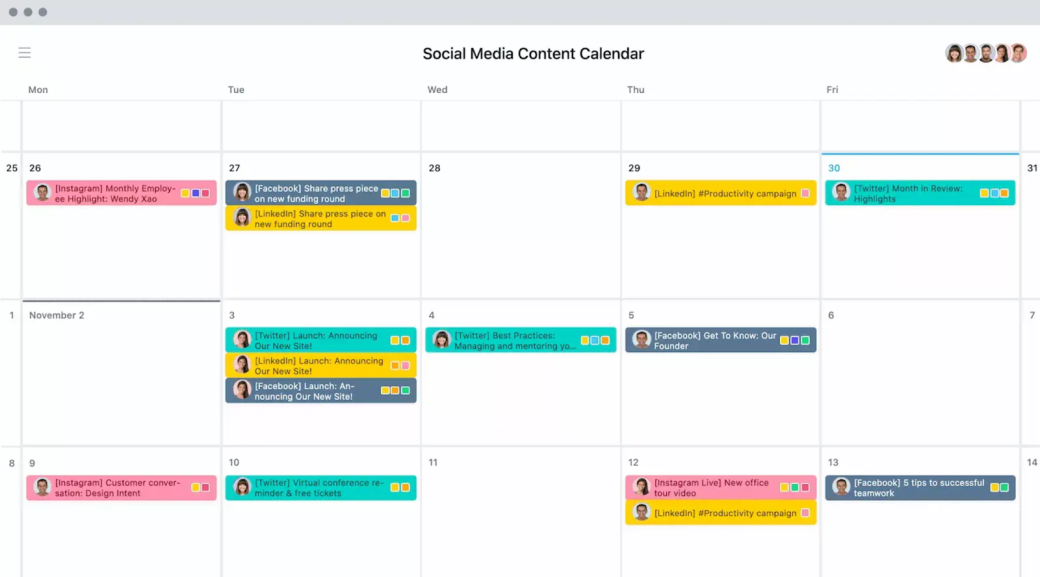
A successful social media strategy includes different types of content to keep things exciting. Avoid posting the same thing repeatedly by creating a balanced mix. A good starting point is 30% educational posts, 20% entertaining content, 20% product highlights, 20% community-focused material, and 10% on-the-spot updates. Color code the different types of content in your calendar.
Test what works and what doesn’t. If your audience loves educational content more than creative content, increase your educational posts. This approach keeps your messaging diverse and authentic and ensures your social media presence aligns with what customers want instead of being overly sales-driven.
Source: Asana
A social media calendar helps you plan diverse content by incorporating specific types of posts into your schedule. Color coding, as used in Asana, makes it simple to organize the media types, like using yellow for LinkedIn content.
4. Decide on Posting Routine by Platform
Consistency is more important than volume in social media, so aim for a frequency you can maintain. Each platform has its optimal posting rhythm:
Start with a manageable posting schedule. Quality and regularity matter more than frequency if you're a small team. You can adjust and increase based on what works best as you grow.
5. Choose a Format That Fits Your Budget
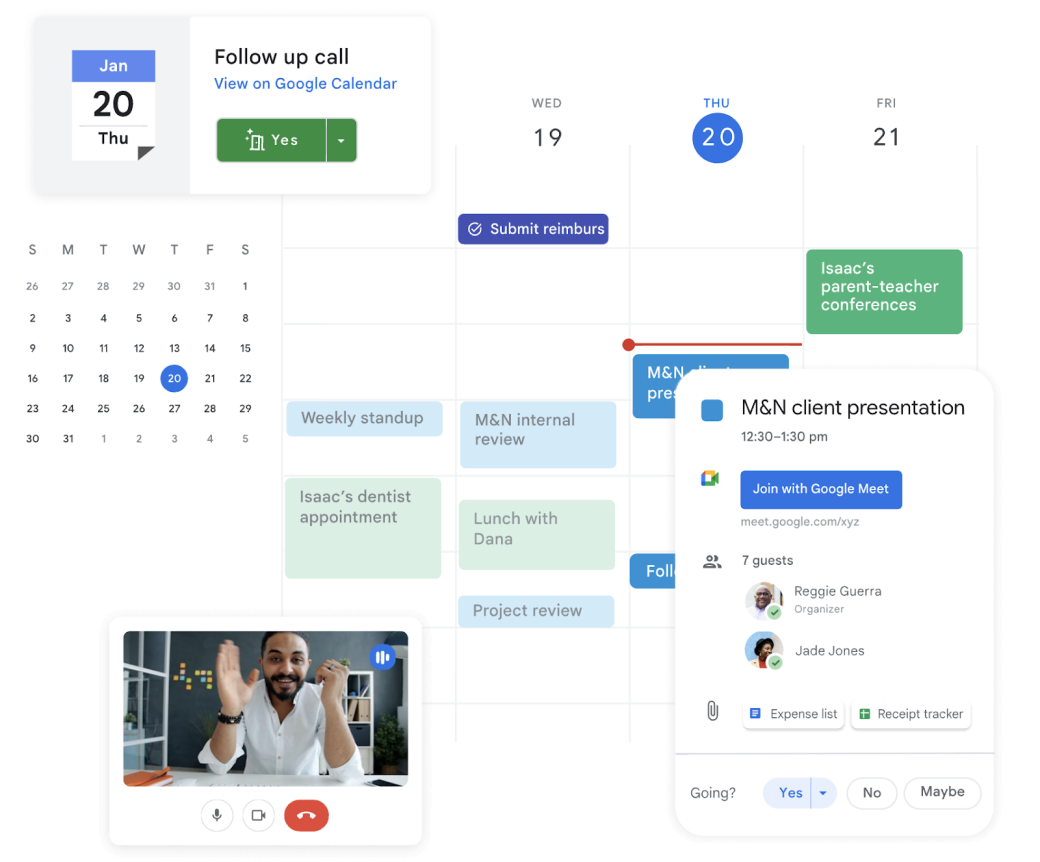
Budget matters because social media tools vary widely in cost and features. Free tools like Google Sheets, Google Calendar, and Trello work well for small teams, offering essential scheduling and color coding without extra fees.
For larger teams with more complex needs, paid options like HubSpot or Sprout Social provide advanced analytics, automated scheduling, and multi-platform management, which streamline workflows and support high-volume posting.
Source: Google Calendar
Small teams can start with Google Sheets or Google Calendar for basic scheduling, while agencies might use Sprout Social for its in-depth analytics.
6. Keep Your Content Consistent and Fun
Your social media should be a good mix of regular posts your audience can expect and exciting moments that surprise your audience. Add weekly or monthly themes like “Motivation Monday” or “Throwback Thursday” that followers can begin to recognize. These are easy to plan and keep your feed consistent.
Then, mix in more prominent posts for special events like a new product launch, a Q&A, or something trending that your audience can engage with, like a challenge or trending TikTok. These posts grab attention and keep your content fresh and modern.
- Plan out monthly high-impact posts, like news or Q&As.
- Create a regular weekly or bi-weekly “feature” post to build consistency.
By having regular staples and fun surprises, your feed stays interesting without needing to constantly develop new ideas. This formula allows for a balance on your social media that is engaging and exciting.
Additional Reading: “6 B2B Social Media Trends for 2025”
7. Design Templates for Different Media Formats
Incorporate varying templates and formats to keep your posts new and versatile. This will prevent your brand from coming off as repetitive, which leads viewers to get bored. Instead of focusing solely on images and photos, experiment with different types of media:
- Carousel Posts: Use several slides to share a story or explain something step-by-step.
- Short Videos: Create a branded video intro and outro that can be added to all your videos to enhance recognition.
- Infographics: Create eye-catching infographics that are ideal for educational posts.
Having these templates prepared, you can quickly create diverse content formats, keeping your feed varied and effective.
8. Leverage Analytics to Shape Your Calendar
Analytics show you where to put your energy when creating content. At the end of each month, look at your stats, evaluate your likes and dislikes, evaluate your shares and comments, and read the feedback to see what is working and what is not.
Paying attention to like patterns is simple and the most effective way to leverage feedback. Maybe videos and reels get the most likes, or at certain times of the day, reach out to your audience more. Use this info to adjust your formats and schedule. What is getting more traffic indicates what you should post more. Checking your analytics regularly will help you stay on a steady track that guarantees results almost every time.
9. Reserve a Spot for User-Generated Content
User-generated content (UGC), like customer photos, reviews, or stories, brings an authentic connection to your social media. Dedicate a day each week or month to share posts from your followers, such as a great review or content where your product is being used.
Encourage participation by creating a movement or hashtag or asking customers to tag your account for a chance to be featured. Not only does this boost engagement, but it also helps you upload more content quickly. Incorporating users’ posts shows you value your fanbase and care about what they have to say; it also gives credit to loyal followers.
Read more here: “How to Implement a User-Generated Content Strategy to Capitalize on Social Media Trends”
10. Plan for Flexibility and Real-Time Adjustments
Flexibility is crucial to staying relevant and in tune to avoid the mistake of falling flat viewers. Leave room in your schedule for unplanned posts, such as responding to trending topics or sharing live updates that matter to your audience. Do this by dedicating time daily to research and making content that responds to new insights. Your posts should be able to react and adapt to the evolving world, so be open to new types of content.
Reserve at least one slot each week for spontaneous content. This approach allows you to adapt to real-time events and opportunities while keeping your identity fresh and in the know. Balancing structure with flexibility helps you stay connected and important; it also ensures your brand doesn’t die down or lose popularity.
11. Post a Monthly “Round-Up” or Recap
Posting a monthly recap is a great way to connect your audience to everything worth celebrating from the past month and thank your audience. It’s a chance to regain traffic to popular posts and repurpose them while highlighting significant milestones or updating new followers about your brand. Include these in your recap:
- Posts that got the most likes or comments
- Any updates, news, or achievements worth sharing
- A preview of what’s coming next, like events or new content
These recaps help your followers catch up on anything they missed and keep your social media consistent and engaging.
Simplify Achieving Your Goals with Social Media Calendars
A social media calendar is essential for growing your brand’s presence. It helps you stay on budget while creating content that converses with viewers and addresses their needs with focused media formats and UGC. A well-structured calendar ensures your approach aligns with your team’s workflow and budget.
Regularly reviewing your calendar using analytics and audience feedback keeps your strategy effective and adaptable. You can stay aligned with your audience’s preferences by identifying what works and making adjustments.
With an organized calendar, your team can focus on creating impactful content that builds connections, strengthens relationships, and drives growth for your brand.
About the Author
Arman Tale
Operations Director at Brand Vision Marketing
Arman Tale is the Operations Director at Brand Vision Marketing, a leading marketing and web development company. With over 10 years of experience in marketing, SEO, and design, Arman ensures each project achieves top-tier quality from start to finish, driving impactful results for every client.
See full profile