
Task Automation: How to Cut Repetitive Work
Task automation saves time, gets work done faster, and reduces errors. Learn how to automate repetitive tasks step-by-step and how to decide what to automate.
Updated May 28, 2026

Developers are leaning on automation to take over repetitive tasks, helping them become more productive and streamline workflows. But they still need to follow AI best practices to ensure quality implementation.
Software development is at a turning point. The industry that has helped build AI tools is now changing because of them.
In a recent survey of 800 software developers and engineers, Clutch found that developers are using AI regularly at various stages throughout the software development lifecycle, but particularly in coding-heavy stages. The same survey found 48% of respondents use AI during coding, followed by 36% during testing, and 36% during code review.
Looking for a Artificial Intelligence agency?
Compare our list of top Artificial Intelligence companies near you
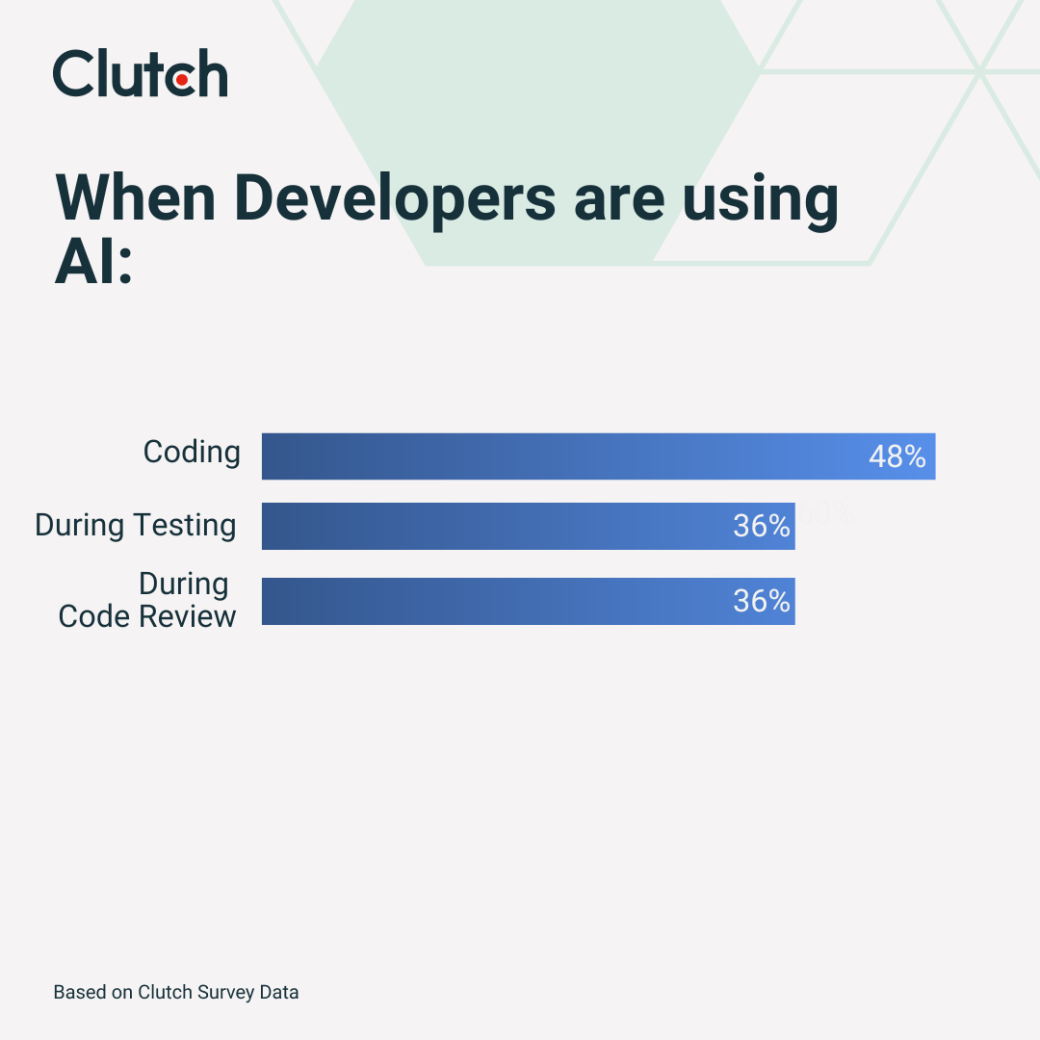
These phases require speed, consistency, repeatability, and the ability to detect patterns, making them prime targets for automation. Automating these processes can free up time and resources to focus on more strategic work while improving productivity and quality. Ultimately, AI can help speed up development, improve code quality, and reduce human error.
Development teams are learning how to use AI in software development where it will add the most value. Reviewing how and where organizations are applying generative AI to the SDLC may help executives better understand where to focus financial and human resources to develop in-house AI tooling or retrain software development teams.
“We’ve built an AI-augmented SDLC to keep pace with how modern software is built,” explains Andrew Kalyuzhnyy, CEO at 8allocate. “The way we work is pretty straightforward: AI handles the repetitive, time-consuming stuff: quick prototypes, code scaffolding, refactoring, writing tests, flagging issues in PRs, digging through large codebases. [W]hile people focus on the work that needs real judgment, like big architecture changes, tricky integrations, or security-critical decisions.”
This balanced approach allows teams to move faster without compromising on quality, leveraging the strengths of both AI and human expertise.
With 48% of software developers using AI for coding, it is the most common way AI is being integrated into development workflows. This is not a huge surprise, as generative AI is uniquely suited to automating common code patterns such as boilerplate code and providing inline help for syntax/language structure.
A growing ecosystem of tools is making this possible, each offering different strengths depending on the use case. Some of the most popular generative AI tools used by developers are:
These AI tools provide an immediate benefit by speeding up the development cycle. More experienced developers write less repetitive code and spend more time on higher-value tasks, while junior developers gain the most from generative AI assistance, as inline guidance speeds up their learning process and takes some of the workload off senior developers.
This generative AI advantage also comes with risks. Developers might build a dependence on generated code without truly understanding how it works. When issues arise in production — during debugging or maintenance, for example — developers may be unequipped to update the underlying code logic. There's also the risk that AI-generated code can have more subtle bugs or security vulnerabilities that can be difficult for less experienced developers to review.
Testing is emerging as another key area for AI adoption, with 36% of developers leveraging generative AI to improve speed, accuracy, and coverage in their testing workflows.
When used for testing, generative AI can output comprehensive test scenarios and identify edge cases. It can also help to make testing practices consistent across large codebases. Developers are using it to generate unit tests and integration tests, often by analyzing existing code to identify potential failure points. Generative AI is also used to create synthetic data for testing, allowing teams to simulate edge cases and real-world scenarios without relying on production data. Automated tools can also help identify gaps in test coverage, so new features are thoroughly validated.
AI testing tools can be helpful, but they have their limitations and usually require human assistance. AI-generated tests may hallucinate scenarios or assumptions that do not accurately reflect application behavior, miss complex business logic, or fail to cover real-world user scenarios. Additionally, certain testing domains, such as security testing, may require an understanding of potential threat vectors that the AI models may not fully comprehend. In such scenarios, human intervention is still necessary to validate the quality of the tests so they cover important business-critical scenarios.
The third largest area of adoption is code review, where 36% of developers use AI in the review process. Review tools are often AI-driven and can assist with identifying code smells and anti-patterns. Code scanning can detect security exposures and flag potential bugs more consistently than human reviewers.
Tools like Snyk AI and Qodo (formerly CodiumAI) are increasingly used for automated vulnerability scanning, helping teams identify issues such as insecure dependencies, SQL injection risks, and misconfigurations early in the development lifecycle.
Modern AI review tools automatically highlight problematic patterns and recommend performance optimizations before code reaches production. These tools can identify security concerns such as SQL injection vulnerabilities or authentication bypasses that may be missed by human reviewers. Additionally, AI can be used to enforce coding standards consistently across large development teams, while also supporting Intellectual Property Management by flagging licensing risks, tracking code provenance, and ensuring that AI-generated suggestions align with internal IP and compliance policies.
The business value is better quality code and reduced code review cycle time. AI can offload routine quality checks so human reviewers can focus on architectural decisions, business logic validation, high-level design strategy, and performance optimizations. With proper IP oversight in place, this approach improves both efficiency and code quality without increasing legal or compliance risk.
Businesses are rapidly adopting AI for use throughout development cycles. There are multiple business pressures and technological advancements behind this trend that executives should be aware of. The most immediate business driver is the need to speed up development.
As markets become more competitive, time-to-market is shrinking, and AI is directly countering that pressure by automating development work. “[We’ve] cut delivery times by 10–30% on most projects, and in some cases we’ve seen 2–5× faster results without giving up quality or security,” explains Kalyuzhnyy. Developers can now instantly generate boilerplate code and automatically write test suites with AI.

AI is used to offer smarter code suggestions beyond basic autocomplete features. AI can comprehend context and project architecture coding patterns to deliver relevant recommendations. This minimizes cognitive load and research time for implementing complex functionalities.
Junior developer support is another compelling use case with significant business value. Mentoring junior developers traditionally takes up a lot of senior developer time, leading to resource crunches. AI can serve as a 24/7 coding assistant that provides on-demand guidance and flattens the learning curve for new team members. The ability to scale this support is a huge advantage as organizations grow their teams.
Testing is another AI solution with the potential to break through bottlenecks in the release cycle. Quality assurance has always had a high number of pain points. AI solutions can generate more robust test scenarios in a fraction of the time. They can also identify critical edge cases that humans could miss, and test more consistently for highly complex programs.
Integrating AI into your development process requires a delicate balance. You must leverage the benefits of automation while still maintaining human oversight. Achieving success in this area requires a clear understanding of the capabilities and limitations of the current state of AI technology.
Security is a major concern when it comes to incorporating AI into your development workflows. AI-generated code can introduce security vulnerabilities that inexperienced developers may not catch during code reviews. In addition, many of these tools need access to your codebases. You risk inadvertently leaking sensitive information if you don't take the time to configure the tool correctly.
Heavy reliance on AI tools can also lead to knowledge gaps. If developers use AI to generate code without fully grasping the underlying logic, they might experience a decline in problem-solving skills. This issue arises when the AI makes incorrect suggestions or when complex debugging is needed.
A lack of understanding of AI-generated logic also poses maintenance issues. Code that is not well understood becomes harder to maintain, debug, or optimize. This can lead to technical debt, which can accumulate over time and create long-term operational inefficiencies, negating the short-term productivity benefits.
Leave humans in the loop, so AI tools augment human decision-making, not supplant it. Successful developers use AI as a force multiplier for human teams. Developers should fact-check AI output, understand generated code, determine problem-solving approaches, and confirm project goal alignment.
Effective AI integration patterns include:
By following these steps, you can integrate AI while maintaining quality and compliance.
Beyond generative AI, developers are using AI agents more frequently. Agentic AI refers to a new class of AI systems designed to act, not just assist. Unlike earlier developer tools that respond to a single prompt or suggestion, agentic AI models can plan, execute, and adapt across multi-step workflows with minimal human intervention.
Agentic tools autonomously handle multi-step tasks such as refactoring, debugging, and opening pull requests without constant human prompting.
These systems don’t just generate code snippets; they reason about goals, break them into tasks, choose the right tools, and carry work through to completion. In practice, that means understanding a codebase, making changes across files, running tests, identifying failures, and iterating until the objective is met.
Tools like Claude Code and Devin AI exemplify this shift. Instead of merely autocompleting a function or suggesting a line of code, they can autonomously refactor large sections of an application, debug failing builds, or open and update pull requests. They operate more like junior developers than typing assistants: reading documentation, tracing dependencies, executing commands, and adjusting their approach based on results.
Training developers to understand the capabilities and limitations of AI can set realistic expectations and encourage proper use. This training helps avoid both overuse and underuse. Rather than letting developers learn tools on their own, organizations should invest in training for all developers. This training should include instructions on how to use the AI tools and best practices for developers, such as how to avoid potential risks and how to optimize performance when using AI. Training helps avoid inconsistent or ad hoc use of AI, which can create security or quality risks. It's also important to establish guidelines for when and how to use AI.
Teams should have policies around approved AI tools, including how to choose appropriate code generation from AI, what code review processes to use for code generated by AI, and best practices for ethical use of AI in software development.
An increasing number of developers are using generative AI in software development for code writing, testing, and code reviews. However, in order to successfully incorporate AI into the development process, a carefully considered and strategic adoption is required. Organizations that carefully and judiciously apply AI, using it to augment human intelligence rather than replace it, will be able to increase speed and quality without sacrificing trust.