
Podcast SEO in 2027: How to Make Business Episodes Findable
Learn how transcripts, question-led titles, structured data, and guest links help business podcasts get found on YouTube, Apple Podcasts, and Google.
Updated March 16, 2026

Getting content from a new client can be a huge pain for web and graphic designers. Here’s how to implement a seamless content-gathering process that gets you the information you need on time with minimal revisions.
The content collection process is a huge roadblock for many digital agencies, especially when it comes to websites. Sometimes projects are delayed by months waiting for the content you need to develop a website.
Simplifying the process for clients reduces friction and helps you get what you need on time.
Looking for a Content Marketing agency?
Compare our list of top Content Marketing companies near you
In this post, I’ll discuss:
Looking for a content marketing agency? Check out our directory of top agencies.
Content gathering is the process of collecting all the materials needed to create or update a digital experience or marketing initiative. This typically includes written copy, images, videos, documents, brand assets, and other supporting materials required for a website, marketing campaign, or broader content projects.
The goal is to ensure that every piece of content needed for launch is identified, requested, and organized before it moves into design, development, or publication.
In many projects, content gathering is one of the earliest and most critical phases of the workflow. It often takes place during web redesigns, rebranding initiatives, product launches, or major marketing campaigns. Teams use this stage to determine what content already exists, what needs to be created or updated, and who is responsible for providing it. By clarifying these needs early, teams can align stakeholders and prevent confusion later in the process.
Effective content gathering helps keep projects on schedule and ensures that design and development teams have the materials they need when they need them. When this step is rushed or poorly organized, it can lead to missing assignments, last-minute revisions, and delays in launch timelines.
A structured content gathering process helps reduce these risks by creating clear expectations, timelines, and ownership for every piece of content required.
Start by reviewing all existing content to determine what can be reused, updated, or removed. A content audit helps teams understand what assets already exist and identify gaps that need to be filled before the project moves forward.
Provide stakeholders with structured questionnaires or content templates to guide what information they should submit. This reduces confusion, standardizes submissions, and helps ensure content is collected in a consistent and usable format.
Stakeholder interviews can uncover important insights that may not surface through forms alone. These conversations help clarify messaging, priorities, and expectations while ensuring the content reflects the organization’s goals.
Establish clear deadlines for content submissions and define who is responsible for reviewing and approving materials. A structured approval process prevents bottlenecks and keeps the project moving forward efficiently.
Your clients are busy. It’s hard for them to find the time and patience to provide the content, even though you need it to do the work they’re paying you for.
Creating website content is time-consuming and difficult. So, of course, clients will put the task off, even if it’s in their own interests to do it quickly.
Email is the standard tool businesses use to communicate. Everyone has an email address and knows how to use it, so it makes sense to start with this medium.
However, collecting information by email can cause a lot of problems.
Corporate email users receive over 100 emails per day. Add time-consuming content emails to that, and they’ll likely just be ignored.
These worst problems, though, are the long email threads that build over time. They are difficult to sort through, and important details get lost.
When content elements are missed, you might end up creating a final product that doesn’t fit client expectations. Or worse, you might insist they didn’t provide those details in the first place, potentially sabotaging your relationship with the client.
In one example, a client sent a large email with content and included a small detail right at the end that changed the entire project. It was missed and cost the agency several days of time.
Then there are attachments. The free-form nature of email means people can attach whatever they want, no matter if it’s too large, too small, or just the wrong image.
Email may be the standard communication channel for online businesses, but it’s a risky option when client satisfaction is on the line.
Most clients don’t know exactly what’s needed. They have never created a website before, or they’re unsure about what content elements to include. You’ll know this problem exists when the content that does come back is vague or incomplete.
This creates serious challenges for designers. Projects grind to a halt, and it’s impossible to get any work done. Delays in projects also mean delays in getting paid.
On the other side, clients can get frustrated at the slow pace things are moving, even though we’re waiting on them.
Here are a few valuable strategies you can use to easily get content from your clients.
Your clients aren’t trying to put off sending content. They’re simply busy and forget. In order to keep things moving smoothly, you need to systematically remind them to provide the right information.
A great recommendation is “time blocking” – setting aside an hour each week to check in with clients and remind them of what you need from them next. You can also use this time to provide project updates to give the client peace of mind.
We’ll also get into some automated email options below.
If there are multiple ways to provide content, things can get messy.
The most common is a combination of email, documents, and file uploads. This complicates the process for clients. It also wastes your time collating the content and making sure you have everything you need. Some agencies have an entire person dedicated to this process.
When you use a central content repository or a “single source of truth,” your clients know where they need to go to submit content, and it saves your agency countless hours of management.
Clients need guidance. If you provide them with clear instructions from the beginning, they’re much more likely to follow through and provide information quickly.
Create a standard for exactly what kind of content you need and in what format, and show it right at the point where they are providing content.
Other examples include copywriting instructions on how to write a good headline or call-to-action (CTA).
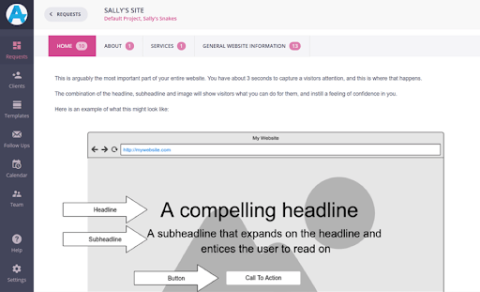
Images like this can clarify questions and streamline the process for your clients.
Provide visual references such as wireframes or mockups - like the above screenshot. Clients can’t visualize the final website as well as you can.
Show clients an example of what the content might look like in practice, and it’s much easier for them.
Taking it to the next level, you can even create videos that walk clients through the process. Making personalized videos takes only a couple of minutes with a tool like Loom. Those couple of minutes will save you hours later.
You need to show clients what you need from them.
As with most aspects of an online business, tools and technologies can help you reach out to clients, gather content, and streamline your processes.
Many teams rely on shared drives, content management systems, and project management platforms to collect and organize materials in one central location.
Content briefs, intake forms, and standardized submission templates also make it easier for stakeholders to provide the information and assets needed while keeping everything organized and easy to track.
Below are a few recommended tools:
Reminding clients is both time-consuming and a pain to do. If you automate your follow-up emails, you’ll never have to think about it.
When sending an email to request content, you can set up a series of spaced-out email follow-ups. If clients respond to your email, the follow-ups will automatically cancel.
There are lots of tools that can do this for you, such as FollowUpThen, Boomerang, and Followup.cc.
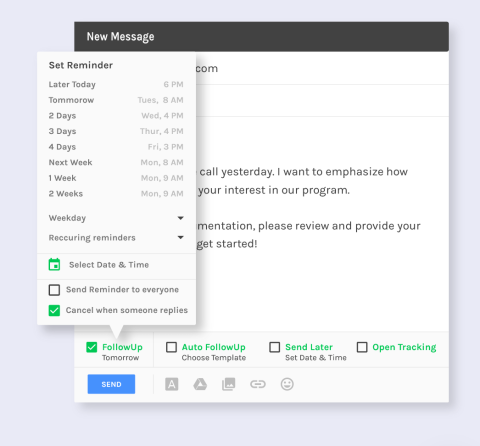
These tools will ensure you’re automatically following up with clients within a certain period of time – saving you time and effort to remember on your own.
Web forms are a great way to ensure you get all the information you need from a client the first time.
Create custom fields in your web forms that ask clients to fill in important website information you need, such as headers, services, “About Us” text, etc.
Web forms have a rigid structure, which is both good and bad.
The good thing is that they force users to provide exactly the information you’re asking for, nothing more, nothing less. The bad thing is that there’s no flexibility if your clients want to provide additional information or explanation beyond what you’re asking for.
Google Docs is an alternative to web forms that offers more flexibility.
Like with your web forms, create sections that your clients can fill in with website content. Break things down so they don’t skip over important details, such as headings, subheadings, and calls to action.
Unlike web forms, clients can also fill out additional information if they want. This flexibility can pose a problem if clients get a bit too creative and start asking questions or adding instructions for you within their content.
Another benefit of Google Docs is that it lets you communicate with your clients through comments and suggestions. It also tracks version history so you can go back when needed.
For every problem in the digital world today, there’s a tool. Content Snare is designed specifically to help get content from clients.
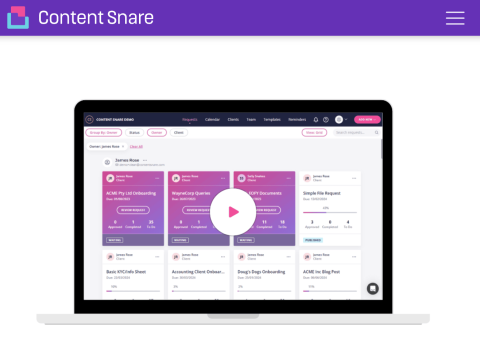
This tool:
As a result, Content Snare is a simple and efficient way to communicate with clients and gather content.
If you’ve collected content from clients before, you’ll know that it’s a bottleneck that can grind projects to a halt. Creating a simple process for clients helps them provide content on time and in the right format with fewer revisions.
The key points of this post come from working with many agencies to improve their content collection process with Content Snare. The most successful agencies in this area:
It’s human nature to delay difficult tasks, so the easier you can make it for clients, the more likely it is to get your content back when you need it.
 James Rose is a co-founder of Content Snare and hosts the Agency Highway podcast. He has a passion for helping web designers and digital agencies do less work, get better clients and reduce their stress levels. This developed after several years of stressing too much in his agency.
James Rose is a co-founder of Content Snare and hosts the Agency Highway podcast. He has a passion for helping web designers and digital agencies do less work, get better clients and reduce their stress levels. This developed after several years of stressing too much in his agency.
See full profile