
Website ROI: How to Measure, Calculate, and Improve Your Return
Website ROI measures the value your site generates relative to what you spend. Learn how to calculate it, track the right KPIs, and improve your return.
Updated November 26, 2025

AI is driving up web traffic from bots, causing bandwidth strain for many small websites. This article will dive into what adjustments web developers can make to maintain their UX and prevent high hosting bills.
AI training bots, search engine crawlers, and content scrapers now make up a meaningful share of crawl requests hitting websites. Reports already show that automated bots are rivaling or overtaking human traffic. In fact, Imperva’s 2025 analysis cites that 51% of all web traffic in 2024 came from bots, with AI accelerating the trend.
That surge in automated traffic affects the cost of operation, as well as the user experience (UX), of your site. And it’s not hypothetical. In a recent Clutch survey, 42% of small businesses reported performance or website bandwidth strain from bot traffic in the last 12 months. Alleviating the strain requires a layered approach that filters obvious bot traffic, rate-limits aggressive crawlers, and serves cached responses on heavy endpoints, so real users aren’t competing with scrapers and AI crawlers for finite resources.
In this article, we'll discuss how web devs can combine preventative controls with protective enforcement to preserve site performance, protect compute and egress spend, and maintain a smooth experience for real users. Let's get started.
The strain comes from many kinds of automated traffic. Understanding the main types of bots and their impact helps focus the fixes.
Not all bots are bad, and lumping them together creates blind spots. Let’s break down the four main types of bots:
All these automated bots together create a messy traffic mix on your website.
For small sites, heavy bot traffic turns into real costs and slow pages.
To tackle this, a few media organizations had publicly blocked AI crawlers after seeing a sustained load without benefit. For instance, The New York Times, CNN, and ABC disallowed GPTBot in 2023, which put a spotlight on the cost/benefit calculation at scale. If large publishers with hefty CDNs take that stance, it’s no surprise smaller teams get caught off guard when aggressive crawling starts to look like a low-grade DDoS.
Bandwidth strain starts with resource consumption. Repeated, concurrent fetches of the same heavy endpoints create needless egress and CPU churn. These types of fetches include:
Add that up with recursive link-following, and you’re shipping gigabytes of duplicate bytes while the website bandwidth meter climbs up.
The next visible effect is performance bottlenecks. When bots own the queue, latency rises for everyone else. Slow page loads raise bounce rates and suppress conversion. Even if you’re tuned for throughput, head-of-line blocking from unthrottled crawls will show up in p95–p99 metrics first, then in user complaints.
There’s a financial impact, as well. Cloud egress and CDN fees scale linearly with bytes you don’t actually need to serve. Teams may report unpleasant surprises when scrapers loop on JSON APIs or download full-resolution assets that were never meant for automated retrieval. Bots already represent more than half of the total traffic, and without intervention, that bandwidth load will push infrastructure spending up.
Finally comes the opportunity cost. When the bandwidth is saturated, your legitimate sessions lose capacity, search bots that do matter get throttled, and the team spends time firefighting these issues rather than shipping meaningful products.
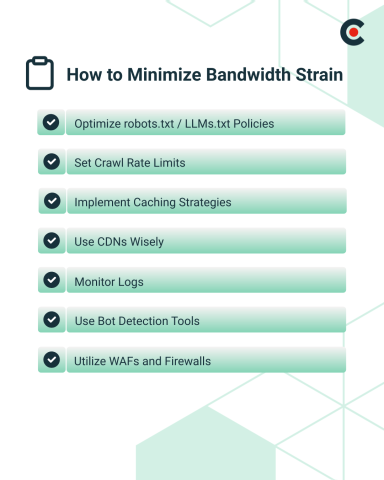
Countermeasures work best in layers. It's best to start with clear signals, then back them with rate limits, smart caching, and layered detection. The goal isn’t to ban all automation; it’s about channeling useful bots and throttling the rest so that user experience isn't negatively impacted.
Robots.txt remains a basic control for reputable crawlers. Define allow and disallow rules for GPTBot and Claude agents so crawl behavior matches your policy.
As mentioned earlier, OpenAI clearly documents how to allow or block GPTBot in robots.txt. For such cases, devs often start with a scoped allowlist for directories that make sense for discovery, and disallow the rest.
Beyond robots, LLMs.txt has emerged as a proposed standard to guide AI crawlers with more nuance, such as describing what’s useful, preferred formats, or rate guidance. While not a standard and not universally honored, it’s gaining momentum across developer communities and CMS ecosystems. For now, you can treat it as advisory. Treat robots.txt as guidance for good bots, but don't rely on it as an enforcement tool to stop abusive traffic.
Operationally, here are a few practical points to consider:
Pair policy with server-side controls. Some agents ignore directives, so plan for enforcement beyond signals. DataDome’s 2025 Global Bot Security Report, for instance, argues that static directives alone won’t deter modern AI-driven bots.
Not every bot respects Crawl-delay, and Google ignores it, too. This is expected because enforcement belongs at your edge. To enforce your crawl policy, devs can rate-limit by IP, AS (Autonomous System), or user-agent group, and return 429s with a Retry-After header when thresholds trip. CDNs and edge platforms make this implementation straightforward:
However, it's advisable to keep rate policies distinct from DDoS modes so you can tune limits for sustained, polite-looking crawls that still drain website bandwidth.
Caching is one of the most affordable performance and bandwidth control measures when you design for it.
Here are three practical moves to reduce origin hits from bot traffic:
Even 1 to 5 seconds of TTL (Time to Live) on read-heavy endpoints turns hundreds of near-simultaneous requests into a single origin call.
A CDN only helps if it actually serves the traffic. Here's how to push more responses to the edge:
Most CDNs also let you classify traffic and set per-class policy, which is useful when grouping known training crawlers, scrapers, and legitimate search bots. If a bot is cooperative, you can serve from a dedicated, highly cached path. If it’s aggressive, apply lower limits or block at the edge outright.
Brands that deployed commercial bot solutions at the CDN/WAF layer report both performance gains and lower transfer. For example, HUMAN’s ZALORA case study shows an approximately 30% reduction in hosting and bandwidth costs after filtering out automated sessions.
You already have the data: edge logs, WAF logs, and CDN analytics. Direct them to a time-series store and build quick looks for:
Cloudflare Radar’s new AI bot insights are useful as a benchmark for what classes of AI crawlers show up by industry. You can compare your mix to what they report.
Homegrown filters help, but they won’t catch sophisticated automation that spoofs browsers and farms residential IPs. That's where commercial offerings become useful. They add multi-signal detection, such as behavioral analysis, browser and device fingerprinting, IP reputation, ASN weighting, and JS instrumentation. Here are a few common options to choose from:
Many bots now mimic human patterns or ignore static directives entirely, so combining detection with enforcement beats policy-only approaches.
This is where you stop bot traffic that refuses to play nice.
When an agent repeatedly ignores robots.txt or LLMs.txt, move up the stack: 403 at the edge, then country or ASN blocks if needed.
For instance, some reports highlight that ClaudeBot continues to crawl despite robots.txt restrictions. Given the risk of noncompliance, build your defenses on controls you can enforce.
So, how do you stop bot traffic? Here are the key best practices to protect website bandwidth and performance without cutting off discovery or partners:
You can treat best practices as a base review item. But as bot traffic evolves, so should your defenses.
Bot traffic is a structural component of the web now. However, not all bot traffic is bad. For instance, Google, ChatGPT, and Perplexity’s search crawler may bring referral traffic and citations, while other scrapers may be pure bandwidth cost.
As a result, the solution can't be a single "block all" switch. Instead, it should be a practical mix of signals, controls, caching, and enforcement that keeps UX fast and makes bots cheap to serve. For dev teams, that layered approach protects performance, reins in egress, and reserves capacity for the sessions that move the business forward.
Your policies should reflect that trade, and your tech stack should enforce it.