
Mobile Apps vs. Web Apps vs. Websites: What Does Your Business Need?
Should you build a mobile app, web app, or website? Learn the key differences, costs, and use cases to choose the right platform for your product and users.
Updated April 1, 2026

Companies across all industries are using augmented reality (AR) to make their mobile apps more engaging. It layers digital elements onto the physical world, allowing users to "interact" with them through their phone.
AR has proven itself across a wide range of business applications, from product visualization and interactive learning to navigation, training, and beyond. Furniture shoppers, for instance, can preview how a couch looks in their living room before committing to a purchase. Beyond retail, AR enhances navigation, supports hands-on exploration, and creates more immersive entertainment experiences.
This guide highlights the benefits of adding AR to your mobile app, how it works, costs, and potential challenges. It's everything you need to know to decide if it’s a worthwhile investment for your business.
Looking for a Mobile App Development agency?
Compare our list of top Mobile App Development companies near you
Search for industry-leading AR/VR development companies on Clutch.
While integrating AR into an app requires a more significant investment, the payoff for both user experience and business outcomes can make it well worthwhile. Here are a few reasons why businesses invest in this technology.
AR transforms passive browsing into active, hands-on experiences that stick with users long after they've closed the app. When an experience feels novel and genuinely useful — like virtually placing furniture in a room or trying on a pair of glasses — users are more likely to share it with others, effectively turning your app into its own word-of-mouth marketing channel.

With 900 million active users, Snapchat is one of the most successful AR apps. Users can overlay their faces with AR "Lenses" and filters. Give yourself adorable dog ears or distort your face to look like Squidward. It's fun and silly, keeping millions of users hooked.
If you frequently order online, you've probably ended up with a few too-small shirts or furniture that doesn't quite mesh with your aesthetic. That's because product photos don't always translate to real life. With AR, customers can see how products will actually look on their bodies or in their homes.

The Zenni app is an excellent example. It lets users "try on" glasses before ordering. If you can't decide between round or square frames, AR will settle the debate in seconds.
As well as placing items in context, AR can give shoppers an interactive preview of a product from all sides and angles. This is especially valuable for high-consideration purchases, where a customer may hesitate without a deeper sense of the product's size, texture, or detail. Sometimes a life-sized model is exactly what a customer needs to commit.
In a crowded app marketplace, AR features give companies a tangible way to stand out. Most apps offer the same core functionality and the experience can feel largely interchangeable from one brand to the next.
AR breaks that pattern by offering something users can't get elsewhere, whether it's virtually trying on a product, exploring a 3D model, or interacting with a brand in a way that feels genuinely new. That distinctiveness is hard to replicate and difficult for competitors to quickly copy, giving early adopters a meaningful edge.
AR features are often associated with gaming, but catching Pikachu isn't their only application. Companies are using this technology in many creative and practical ways.
It's not always feasible for shoppers to see products in person or in their own homes before buying them. AR apps fill the gap by providing interactive product demos and visualizations.
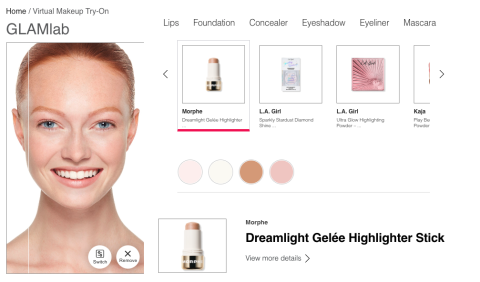
Ulta Beauty's GLAMlab tool lets users try on different cosmetics virtually. Meanwhile, a furniture company could develop an AR app that allows shoppers to experiment with different living room arrangements. This can lead to fewer returns and more satisfied customers.
There are some things you can't do inside a conventional classroom. Maybe you have limited resources, or there are ethical concerns. AR offers accessible, safe alternatives.
Use this technology to build interactive learning and 3D models. For example, veterinary students could explore a digital version of a dog heart instead of dissecting a real one.
Many organizations also use AR to develop guided training simulations. In many nursing schools, AR enables students to practice procedures and learn how to use medical equipment, such as ventilators. Nursing students can repeat the exercises as many times as they'd like without jeopardizing real patients.
AR games encourage users to interact with their surroundings in creative ways.
In the summer of 2016, it felt like practically everyone was playing Pokémon GO. Over 225 million people downloaded the mobile app in the first quarter. Part of the appeal was the game's augmented reality (AR) features. You could hold up your phone camera and see Snorlax standing in your kitchen or take selfies with Squirtle. Fans loved it.
Location-based games like this require players to travel to different places to complete tasks. This type of storytelling can be much more interactive than sitting on your couch with a console.
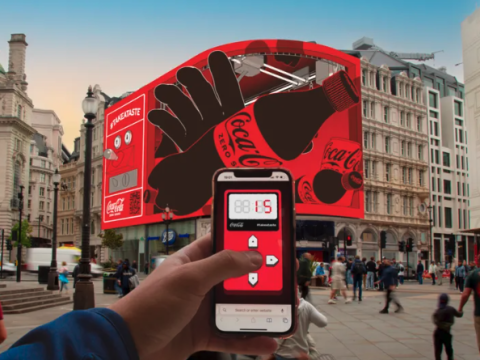
Some businesses offer collectible digital items. In 2023, Coca-Cola launched an interactive AR giveaway called #TakeATasteNow. Participants used AR to collect digital Coca-Cola bottles from screens on city streets, which they could redeem at Tesco stores for the real thing. This interactive element turned the campaign into an engaging scavenger hunt.
AR way-finding apps help with getting around airports, malls, and cities. Instead of wandering through a terminal looking for a gate or a particular shop, people can follow digital signs and arrows right to their destination.
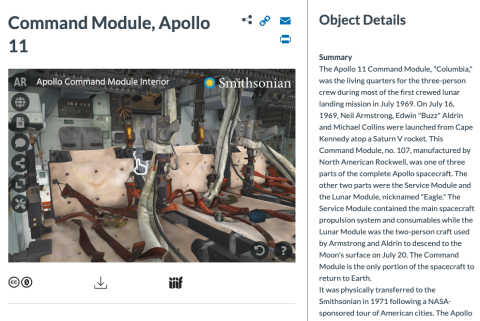
Tourism is another popular application. Serving as portable guides, digital overlays teach users about landmarks and attractions. At the Smithsonian Museum, visitors can learn about dinosaur fossils, statues, and even Amelia Earhart's flight suit through AR.
When real estate buyers can't tour a property in person, AR walkthroughs can help them get a sense of the layout and dimensions. This technology also makes it easy to visualize renovations and interior designs.
Augmented reality apps use a smartphone's built-in sensors to understand the user's environment. These sensors include:
Some devices also have Light Detection and Ranging (LiDAR) sensors, which use laser light to calculate distance.
AR apps use computer vision to analyze camera data. They combine this information with readings from the accelerometer and gyroscope to understand the surrounding environment. For instance, in Pokémon GO, if the game detects that you're at the beach, water Pokémon may spawn nearby.
These tools also use motion and orientation data to accurately render 3D objects in real time. That's how an AR cosmetics app can apply virtual lipstick to the user's lips, not their forehead or the wall behind them.
You don't need to code AR features from scratch. Use these resources to speed up the development process and launch your app faster.
Apple ARKit 6 is a framework for developing AR experiences on iOS. It uses LiDAR to understand scenes and accurately place AR objects. Other features include motion tracking and people occlusion, which let digital content realistically appear in front of and behind real people as they walk by.
On Android, developers can use Google ARCore to create AR experiences. It employs three core capabilities:
These tools allow users to place digital objects around the environment and view them from different angles.
Your customers probably own a mix of iOS and Android devices. Instead of building separate AR apps for each system, consider using a cross-platform tool. This lets you create a single app that works across devices.
Here are a few options:
These tools have extensive documentation to get you up to speed quickly.
AR development has a moderate learning curve, but it's doable with the right tools. Follow these steps to build the perfect AR features.
Sure, AR looks impressive, but aesthetics shouldn't be your only motivator. Take the time to identify what problems this technology will solve for your users.
If you sell products, AR could help customers visualize what you're offering. Other goals could include improving usability or engagement.
Before you start coding, sketch out user flows. These flowcharts map out each step that users would take as they interact with your AR features. It will likely include environment detection, which is the foundation for AR experiences. You may also add steps for object placement and user instructions.
AR experiences don't materialize from thin air. You'll need high-quality 3D models of the objects you plan to overlay in the real world. Add more depth with animations and textures, such as fabric for T-shirts.
Survey your customers to figure out which platforms they use. You might assume they're loyal iOS users, but maybe 75% actually own Android devices. If you build an Apple app, you'll miss out on a huge portion of your audience.
Consider your technical needs, too. For example, if you're interested in adding virtual reality later, choose an XR framework like Unreal Engine that supports both technologies.
An AR feature may work perfectly in your office in broad daylight. However, that doesn't guarantee it will function on a busy city street or in low lighting. Test it in different spaces and environmental conditions to make sure everything works as expected. That will help you catch glitches and other issues before you go live.
AR features often use a lot of resources, especially if you add fancy animations or high-res visuals. If you're not careful, your app might slow down or even crash. Optimize rendering and asset sizes to help your app load more smoothly.
Augmented reality is an investment, but it may not cost as much as you assume. Based on Clutch data, here's a realistic breakdown of what you can expect to pay to add this technology to your app.
Estimated cost: $10,000 to $30,000
Some apps only include simple filters or overlays. These features don't take much time to code but can improve engagement.
Estimated cost: $30,000 to $100,000
Interactive product visualizations and educational tools require more time and money. They often involve more advanced features, such as object placement and environment detection.
Estimated cost: $100,000+
The most sophisticated AR apps often support complex gaming and real-time environment mapping. Some may even include multiplayer AR, which allows multiple people to interact with digital objects in the same space. These high-tech features typically have premium price tags and longer development timelines.
Every AR project has different technical requirements, so pricing varies widely. These factors affect how much your desired features will cost:
Say Company A wants to create an app that lets customers try on sweaters virtually. Meanwhile, Company B plans to develop an interactive store where people can view hundreds of products. Company A's digital overlays will likely cost much less than building a full interactive environment.
Of course, cost isn't everything. If Company B's app boosts sales, it could recoup its development expenses within a year or two. In that scenario, it may make sense to splurge on more sophisticated AR features.
As you start tinkering with AR tools, it's easy to get swept up in the technical details. However, don't forget about your ultimate goal: improving your user experience. These tips will help you develop truly valuable features.
Your customers are likely seasoned smartphone users, but they may not be familiar with augmented reality. Avoid cluttering your app with confusing or unnecessary features. It should be easy to understand how to turn on the AR features and interact with the content.
Not sure if your app is intuitive enough? Test it with as many different users as possible, and watch closely to see where they get stuck.
Build brief tutorials or prompts into your app to help users learn how to use AR tools quickly. This could be as simple as highlighting a few key buttons and encouraging people to interact with them.
Your audience won't always use your app in ideal conditions. Make sure your AR features work in different lighting conditions and environments. A digital overlay may work as intended in bright lighting but fail to recognize faces in a dark room. Tweak your tools until they're reliable in a variety of settings.
Immersion is a key benefit of AR, but the spell will break if your app is slow or glitchy. Keep your audience engaged with fast loading times and smooth rendering.
The novelty of AR can wear off quickly, especially if you overload your app with features. Focus on tools that provide real value. For instance, retail customers may appreciate product visualizations but care less about a silly overlay of a cute puppy.
Like any technology, augmented reality comes with a few potential pitfalls.
While most smartphones have basic cameras, they may not support advanced AR features. That means some users might not be able to access your fancier tools.
Consider offering alternative ways for them to gain the same information. If they can't visualize new flooring in their living room, they should at least be able to look at 2D product photos.
Unlike traditional app development, augmented reality requires specialized skills in 3D modeling and spatial computing. If your team doesn't have time to gain these abilities, you'll need to outsource your project.
Rendering 3D environments can drain users' batteries faster and affect device performance. That may irritate some people or limit how long they can engage with your app.
Augmented reality was invented in 1968, but it only went mainstream in the last two decades. As artificial intelligence and spatial computing continue to advance, AR tools will be able to interact with the real world in more complex ways. The growing popularity of smart glasses and other wearable devices also makes AR gaming and other applications more immersive.
New AR apps may soon support:
Additionally, AR will likely impact mobile performance less as hardware improves. As a result, it will likely become a standard feature in many apps.
Augmented reality is the next phase of mobile app development. This immersive technology turns ordinary digital experiences into exciting interactions. Companies are already using it for everything from games to navigation assistance and product demos.
You don't need to start building complex 3D models immediately. Start small by identifying one problem that you can solve with basic AR features. Maybe your customers would love an AR map that helps them find products in your store or an interactive demo for your best-selling products. As this technology improves, more apps are sure to find essential implementations.