Lead Quality vs. Lead Quantity: Why B2B Teams Are Rethinking Their Funnel in 2026
Bigger buying committees and tighter budgets are forcing B2B teams to rethink lead quality vs. quantity. Here's how top teams rebalance the tradeoff in 2026.
Updated November 20, 2025

With the rise of multichannel buying behavior, the dominance of marketplaces, and the increasing competition for product placements on Google, driving revenue through SEO is more crucial for ecommerce websites than ever before.
The title of this blog may suggest that we’ll teach you eight new ways to boost your ecommerce website traffic, but that won’t be the case.
The best “tricks” you can use are fundamental technical industry standards, which are even more important for ecommerce sites than most other types.
Looking for a Digital Marketing agency?
Compare our list of top Digital Marketing companies near you
SEO professionals everywhere, including many online retailers, mistakenly use the mantra “website build first, SEO second.”
This system of prioritization results in a website that favors a slick design over a solid technical SEO foundation.
Best practices of great design, user experience (UX), and conversion rate optimization (CRO) are essential to apply in order to achieve higher ecommerce conversion rates.
Conversely, neglecting basic SEO principles negatively impacts website performance in the long term.
Even if you’re already using keywords correctly and following the rules for meta titles and descriptions on your site, using these often-underrated strategies will boost your ecommerce SEO to the next level.
Start your ecommerce SEO by finding keywords that match what buyers are really searching for, and think about their intent. Search intent describes the reason behind a query — whether someone is just looking for information, comparing options, or ready to buy. Focus on transactional keywords, which are the words people use when they’re ready to buy, like “winter jacket with hood” or “running shoes for women.” Because they capture shoppers further down the sales funnel, they can deliver higher conversion rates than broad, informational terms.
As a quick filter, prioritize long-tail transactional phrases (brand/model/size/color/“for [use]”) and, where feasible, target terms with ~1,000** monthly searches in your primary market; for niche catalogs, lower-volume keywords with clear buying intent are still worth pursuing.**
One of the simplest ways to find good keyword ideas is by mining Amazon autocomplete. Typing into Amazon’s search bar and seeing what autocomplete suggestions come up allows you to capture exact phrasing and add common questions to on-page FAQs for your category and product pages.
Looking at competitor keywords can help improve your keyword list. Tools like Semrush and Ahrefs let you see which keywords your competitors are ranking with. This helps you find keywords they’re using that you might be missing. Targeting these less competitive keywords strengthens visibility and captures shoppers who are closer to purchase.
For example, Semrush reports that Casio fails to rank in the top three for more than 15,000 branded searches in the US, meaning competitors often capture that traffic instead. On the flip side, brands that secure ownership of their core and long-tail terms build stronger visibility and can even reduce ad spend — Nike ranks first for “Nike running shoes,” eliminating the need to bid on its own brand terms.
Once you have your keywords, validate your choices using free tools like Google Keyword Planner or Google Search Console to check how popular they are and how you’re ranking. Try testing different long-tail keywords on your product pages to see what works best. Keeping your keywords relevant and focused will help more shoppers find your store and make purchases.
Search engines use a site’s structure to better understand site content and the relationships between pages on the site.
The two most common types of website structures are “deep” and “flat.”
Flat site structures let users easily find and navigate key pages in just a few clicks. Web crawlers can derive more context from flat sites, which significantly improves rankings.
On the other hand, deep sites create a long path that a user or search engine must go through to access certain content.
Deep structures not only adversely impact UX, but also take longer for search engines to find content on your site which impedes ranking potential.
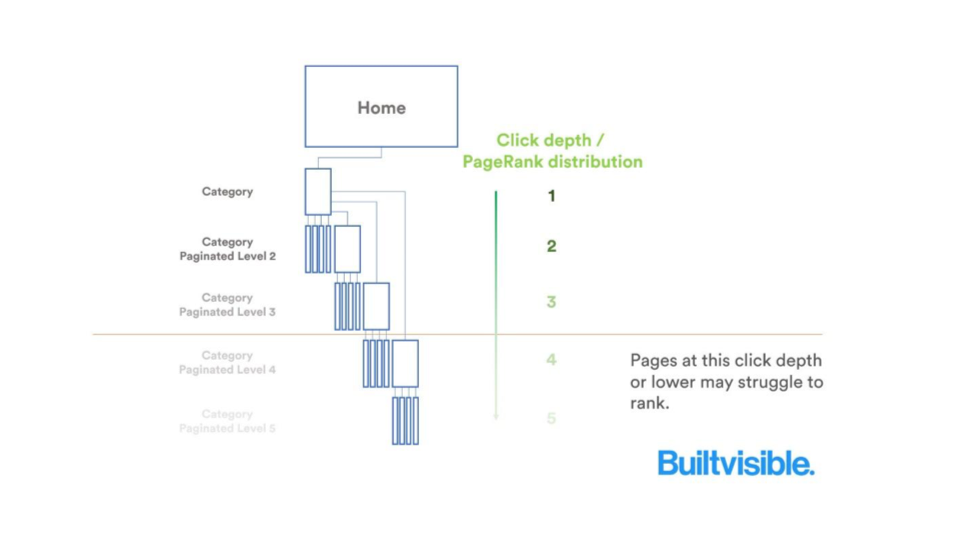
Start flattening your site structure by logically breaking down web pages. Sort your products into core categories, then work your way down into subcategories from there.
Ideally, it should take users no more than three clicks to access any page on your website.
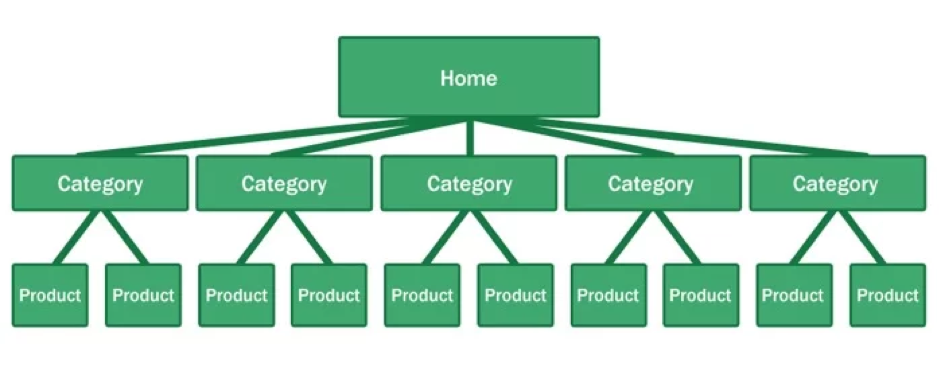 Using this methodology, businesses can more easily understand the value of investing in site structure.
Ecommerce sites tend to have a lot of pages. Without strategic internal linking, users and search engines will alike have difficulty navigating your site. Internal links are essential for SEO.
By helping search engines identify your most important pages and recognize content themes easily and efficiently, internal linking makes web pages rank higher in Google’s index.
Internal linking allows you to spread link equity, namely ranking power.
Crafting a strategy for internal linking structure shows search engines how pages relate to one another and demonstrates the value and relevance of your content.
Here are two of the simplest ways to boost internal link value on your website:
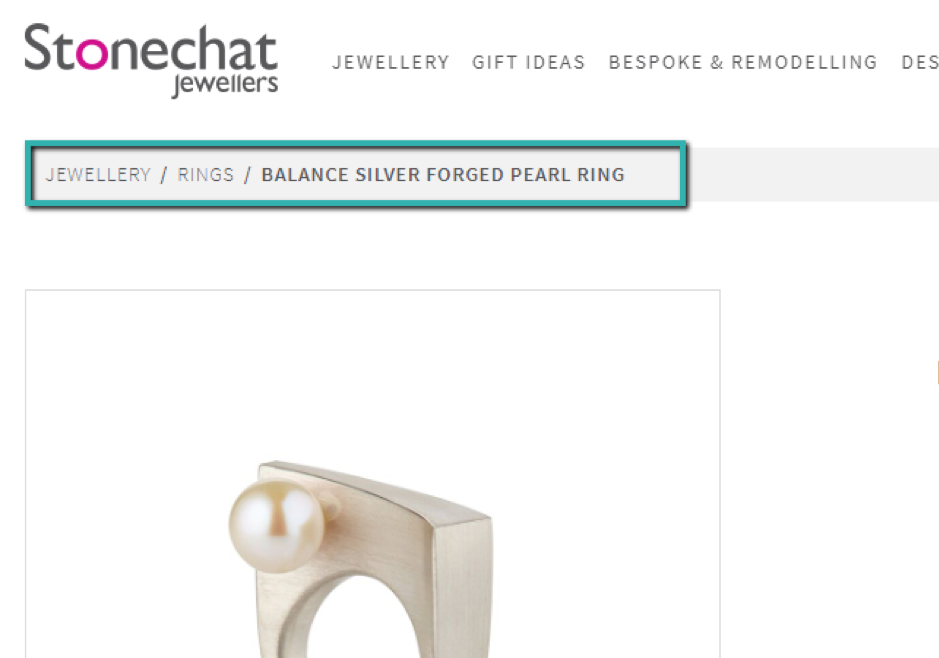
Breadcrumbs: Breadcrumbs are “navigational aids that leave a trail where people were active on your site and allow people to retrace their steps from the pages they viewed.”
Using this method is one of the most effective ways to optimize internal linking on ecommerce sites.
It provides most of your important pages with internal link equity without requiring in-depth development work.
On its website, Stonechat Jewellers exemplifies how to use breadcrumbs to help users and search engines navigate through its product catalog.
Footer links: While footer links may not carry as much weight as links on important pages, they still help to dramatically boost internal linking to key pages.
The image below offers a great example from Sports Direct of efficient footer link usage:
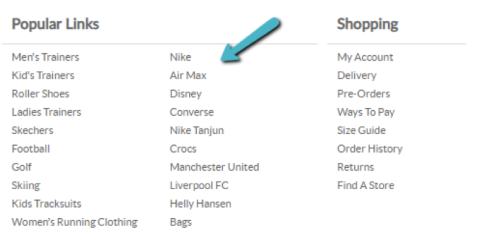
Think about it. If your website has 4,000 pages that include a footer with a link, each one those footer pages will receive some internal link value from 4,000 pages.
Use this technique to send a clear signal to Google that those pages are important and relevant for searchers.
Product search queries tend to be more specific than B2B search terms, depending on the stage of the buying journey a customer is in.
It’s harder to rank for broad keywords, so why wouldn’t our product page structure reflect this?
Creating optimized category pages makes it easier for users to find what they need.
Furthermore, this also helps you build a flattened site architecture.
A logical category hierarchy should take a broad-to-specific silo approach to attract users to your site through search engines based on the specificity of their queries.
Creating highly targeted product category pages by breaking down products into granular categories is a proven way to increase traffic for a broader range of long-tail and high intent search terms.
Targeting the right keywords is crucial. Undertake granular keyword research to optimize for searcher intent.
My jewelry site poses a topical example. Our store includes a wide range of offerings that match the search term “white gold rings.”
Rather than keeping all my white gold rings under one URL with the other gold and silver rings, I structure the URL breakdown like this:
https://www.mysite.com/jewellery
https://www.mysite.com/jewellery/rings
https://www.mysite.com/jewellery/rings/white-gold-rings
Our friends at Stonechat Jewellers again demonstrate this strategy quite well. Stonechat’s page for all “Rings” ranks pretty well for general searches, but less high for specific gemstone search terms such as “tanzanite rings.”
Since breaking down the ring category and creating a URL which contains all tanzanite rings, the brand’s website now ranks number one on google.ie for this highly specific search term.
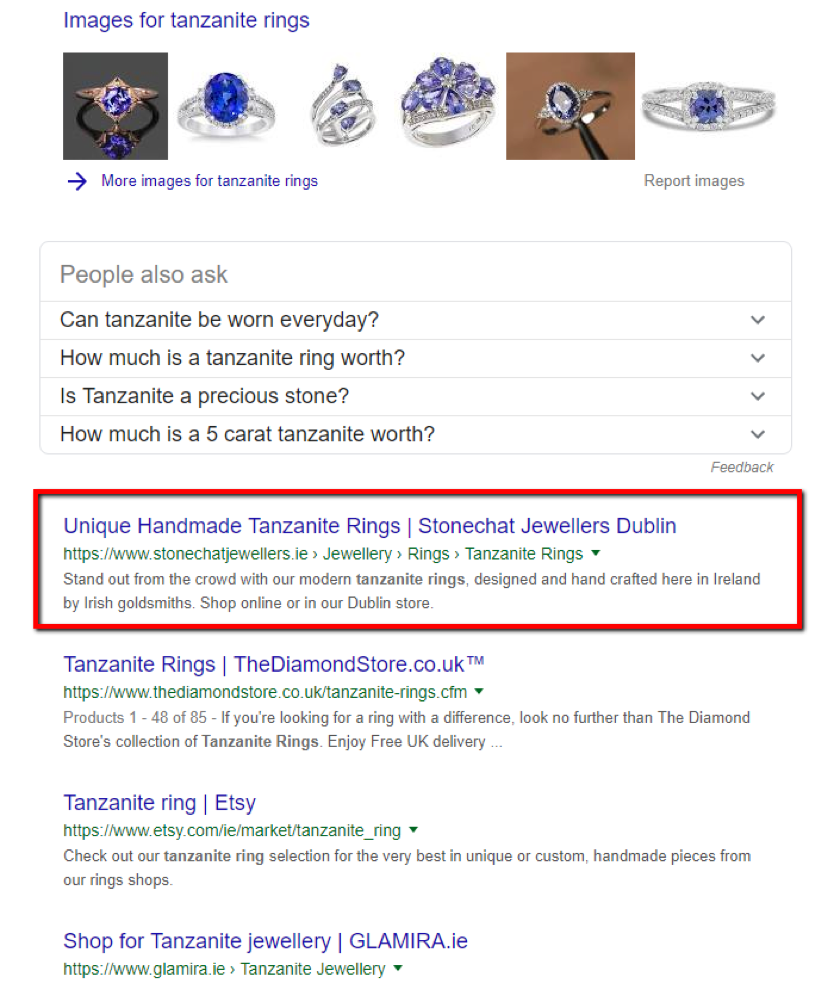
About 140 searches per month in Ireland may seem like a minor figure, but it will drive significant qualified traffic for a small business such as Stonechat Jewellers.
Cannibalization refers to multiple pages on one website competing for the same or similar keywords.
Internal pages that compete with one another for rankings cause confusion for search engines.
Making meta-data and content as unique as possible is essential, especially for your primary revenue driving pages. While it’s nearly impossible to eradicate all cannibalization, always be aware of and track this phenomenon.
Here’s an example below from DID Electrical, where we can see two product pages competing for the same keyword on Google:
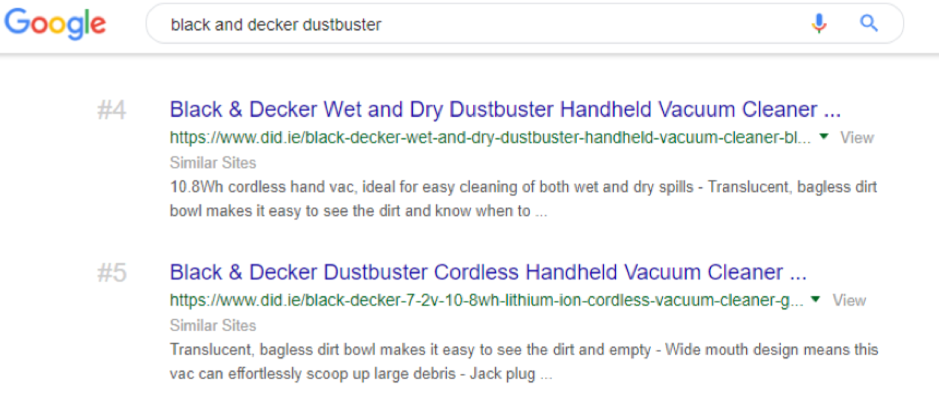
In some cases, keyword cannibalization may not present an issue.
If you find that less important pages are ranking above your high-value pages in Google, however, keyword cannibalization might be causing a massive drain on your revenue from organic search.
Here’s a quick process to preempt keyword cannibalization:
Optimize your website so you are not wasting resources on pages that are irrelevant to organic search or diverting traffic from the correct page. To do this, you can use the Link Explorer tool in Ahrefs’ Site Audit.
Technical SEO problems can quietly harm your online store’s rankings if you don’t fix them. To keep your site healthy, pay attention to things like page speed, how well your site works on phones, and unwanted pages showing up in search results. Below are three important areas to monitor and fix.
Core Web Vitals are a set of measurements that show how quickly your pages load and how smooth they feel to visitors. Google uses these to decide which sites to show first. If your site loads slowly or jumps around while loading, frustrated shoppers will leave before buying, increasing bounce rates. Fixing these issues can help more visitors stay and shop. Some common fixes are making images smaller, cutting down on unused code, and using tools that store parts of your site so it loads faster. Test your pages regularly to catch problems early.
Aim for the “good” thresholds in field data: LCP ≤ 2.5s, INP ≤ 200ms, and CLS ≤ 0.1 at the 75th percentile. Track progress in CrUX/PageSpeed Insights and fix regressions quickly.
Google primarily evaluates the mobile version of your site. Even if many visitors come from desktop computers, your mobile site must have the same content, smooth navigation, and fast load times to perform well in search. Mobile accounts for nearly 60% of global web traffic, so optimizing for smaller screens is important.
A responsive design is the best foundation, since it adapts content across devices. Beyond that, pay attention to these technical factors that Google looks for:
Missing content, clunky navigation, or slow mobile pages can hurt visibility. Use a responsive design that works on all devices and test your site with Google's Lighthouse tool to find any issues, aiming for a score of 90 or above.
Index bloat is a common SEO challenge. It occurs when a search engine indexes pages that should not be indexed, which happens most often for ecommerce sites.
Tools like filter widgets allow users to look for products based on different attributes.
Allowing search engines to crawl these pages minimizes exposure to important revenue-driving pages.
If a search engine has to waste time crawling piles of filter widgets or tag URLs which provide no value for the user, rankings will ultimately decrease.
Unnecessary crawling also wastes crawl budget, which is a particularly important issue for larger sites.
Check if your site has this issue by looking at your Google Search Console and clicking on “Index Status.” If you see sudden spikes in the chart, this could indicate bloat.
Performing a quick site, advanced operator search in Google lets you see if unnecessary URLs are being indexed immediately.
Type site:mysite.com into the Google search bar to restrict your search to indexed URLs on your platform.
Look through the results pages to identify any glaring URLs which shouldn’t be indexed.
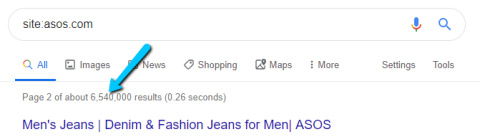
In the example below from Asos, we can clearly see some product search URLs which shouldn’t be crawled and indexed by Google.
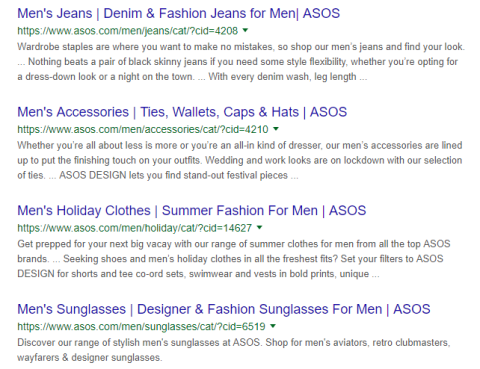
Fix index bloat by preventing search engines from crawling specific pages.
Most importantly, make sure to filter and tag URLs by asking your developer to add certain parameters in your website’s robots.txt file.
Google Shopping helps your products show up with pictures and prices in Google searches. This makes it easy for shoppers to find and buy your products. To use it well, you need to set up your Google Merchant Center account and keep your product info current and accurate.
Create a Google Merchant Center account and connect it to your website via Google Search Console. This is where you upload product details for Google to show. Link it to Google Ads if you want to run paid Shopping ads.
Your product feed is a list of products with names, prices, descriptions, and images. To perform well in Google Shopping, the feed needs to be accurate, up to date, and optimized for search visibility.
Key elements to focus on include:
Optimized product feeds not only improve visibility in Shopping but also increase click-through and conversion rates by making sure that shoppers see complete, trustworthy information.
Google needs certain info like barcodes, brand names, prices, and stock status. Missing or wrong details can cause items to be disapproved or limit impressions. Make sure your feed has everything Google asks for.
Shopping ads show product photos, prices, and store names. Search ads are just text. While Search ads are ideal for broad brand visibility, Shopping ads get more attention and clicks because they show products visually.
Google needs certain info like barcodes, brand names, prices, and stock status. Missing or wrong details can cause items to be disapproved or limit impressions. Make sure your feed has everything Google asks for.
Content marketing fuels ecommerce SEO by building authority and attracting qualified traffic. Writing product guides positions your store as an expert resource, answers questions customers often have, and helps attract people who are ready to buy. Also, encouraging user-generated content such as reviews, testimonials, and customer photos adds fresh, keyword-rich content while boosting credibility with both shoppers and search engines.
Much like customer-generated content, digital PR looks like sharing your stories, promotions, or new products with other industry blogs, publications or news sites. When these outlets link back to your store, they create high-quality backlinks that signal trust to search engines. These links also strengthen your site’s domain authority, which can boost rankings across your entire store, not just the linked pages.
Prioritize link-earning formats: a Backlinko/BuzzSumo study of 912M posts found “Why/What” articles and infographics received 25.8% more referring-domain links than how-to posts and videos — build data-rich explainers and comparisons, then pitch them via digital PR.
Lastly, creating content around holidays or special seasons, like gift guides or sale events, can bring extra visitors at the right times, especially when paired with solid PR. This kind of timely content captures seasonal search interest and converts high-intent traffic during peak shopping windows.
The strategies outlined above might not look like your average “SEO hacks,” but each step is a foundational element of strategy for any ecommerce website.
Without ascribing to these best practices, your site will struggle to perform to its full potential.
After researching your website to find ways to improve any of these SEO elements, prioritize steps based on which requires the least amount of effort, working up to the most time-consuming tasks.
As you work, lean on the tools that fit each job:
Finally, measure what matters—enable GA4 Enhanced Ecommerce, pull a simple Looker Studio dashboard combining GA4 and GSC, and annotate major site or feed changes so you can tie wins to specific releases.
Need help? Check out our top-rated SEO companies and services.
Lorna is an experienced SEO professional, having worked across a broad range of marketing sectors. Now part of the SEO team at Wolfgang Digital, she specialises in driving organic search visibility for some of Ireland's largest B2C and B2C websites.
See full profile