
How to Measure SEO Success When Traffic Declines
Organic traffic is down, but is your SEO failing? Learn which metrics show real SEO success when AI Overviews and zero-click searches are reducing clicks.
Updated June 19, 2026

Breaking down the relationship between crawling and indexing, we explore how technical issues like server errors, noindex tags, and JavaScript rendering can prevent even the greatest content from appearing in search results.
The automated bots called “spiders” or “crawlers” help search engines navigate the web to discover new content and revisit known pages to check for updates. New pages are added to the queue for evaluation, and only after a strict review are stored, aka indexed, in the search engine’s database.
Looking for a SEO agency?
Compare our list of top SEO companies near you
When the spiders begin crawling, they follow through every link and page, trying to identify structural and technical signals denoting issues.
In short: If a page can’t be crawled, it can’t be indexed.
Crawlability refers to the ability of search engine bots to access, navigate, and explore the pages on your website without running into technical barriers. Roadblocks like broken links, incorrect directives, or inaccessible pages may result in skipping some portions of your site.
That said, pages that are not crawled won’t appear in the search results, no matter how great and unique the content is.
Crawlability issues can stem from many different sources, some obvious, others deeply technical. That’s why routine audits are essential. From server-level blocks to broken internal links, identifying what’s preventing search engine bots from accessing your pages is the first step toward resolving it.
Crawlability problems often begin at the infrastructure level, before bots even reach your content. Misconfigured servers, DNS issues, or overly strict firewall settings can quietly block crawlers.
While occasional 404 errors (Not Found) are expected, a pattern of broken pages, unnecessary redirects, or misconfigured links can slow crawlers down and cost you visibility.
Broken Links and 4xx Errors: 4xx errors like 404s waste crawl budget and signal poor maintenance, especially soft 404s, where a page returns a 200 status but shows “not found” content.
Redirect Chains and Loops: Redirect chains and loops also cause friction. Long paths (e.g., A → B → C) force bots to make extra requests and may lead to dropped crawls.
Keep redirects clean and internal links updated to avoid these crawl roadblocks.
How to Audit
Regularly auditing and fixing these issues helps preserve your crawl budget, improve user experience, and maintain your site’s search engine visibility.
A strong internal architecture not only helps users navigate your content but also efficiently guides crawlers through it. Even if your page is technically sound, crawlers cannot review it if they cannot find a clear path to it. This becomes especially important when scaling content with approaches like programmatic SEO, where large volumes of similar pages rely on consistent linking structures to be discovered and indexed properly.
Log file analysis gives you a behind-the-scenes look at how search engine bots interact with your website. Unlike crawl tools that simulate bots, log files show what actually happened, what URLs were crawled, when, how often, and by which bots.
Why It Matters
Even a brief log review can uncover hidden crawl inefficiencies that no site audit tool will catch.
Crawl budget refers to the number of pages search engines are willing to crawl on your site within a given timeframe. While it’s rarely an issue for small sites, larger websites with thousands or millions of URLs must manage it wisely.
It’s also very important for new websites.
What to Prioritize
Quick Fixes: Use noindex, canonical tags, or robots.txt to block, de-emphasize duplicate or thin content. And regularly audit your crawl stats to make sure bots are spending time where it matters most.
Your robots.txt file tells search engine bots which pages or directories they should or shouldn’t crawl. However, one wrong directive can unintentionally block critical sections of your site.
Common Issues
Best Practices
A well-optimized robots.txt ensures search engines can access and prioritize your most valuable content while avoiding accidental restrictions that could harm your visibility.
An XML sitemap acts as a roadmap for search engines, highlighting the pages you want crawled and indexed. But if it’s outdated or misconfigured, it can do more harm than good.
What to Watch For
How to Audit
Keeping your XML sitemap accurate and up to date ensures search engines can efficiently discover and index your most valuable content without confusion or wasted crawl effort.
Once a bot crawls a page, it checks whether the page is allowed to be indexed, and later, the algorithm determines whether it’s worth indexing. Signals like meta tags (noindex), canonical URLs, and robots.txt directives can prevent indexing by design. Simultaneously, even index-eligible pages may be excluded from the search results due to low-quality content or duplicates.
So, indexability is the ability of a crawled page to be added to and shown in a search engine’s search results.
Even if a page is crawlable, it might not end up in Google’s index. Indexability issues often include configuration errors, duplicate content signals, or low-quality pages. Here’s how to catch and fix them.
The noindex directive tells bots not to include a page in search results. While it’s useful for pages like thank-you screens, it’s easy to apply by mistake.
How issues arise:
Always review your noindex usage carefully—misplaced directives can quietly remove high-value pages from search results and hurt your organic visibility.
Canonical tags help prevent duplicate content issues by signaling a page's “preferred” version. But when misused, they can unintentionally deindex useful content.
Common mistakes:
Properly implemented canonical tags consolidate ranking signals and preserve crawl efficiency, while mistakes can lead to loss of traffic and indexing issues.
Occasionally, Google may skip it due to accessibility or content quality issues. Some red flags include:
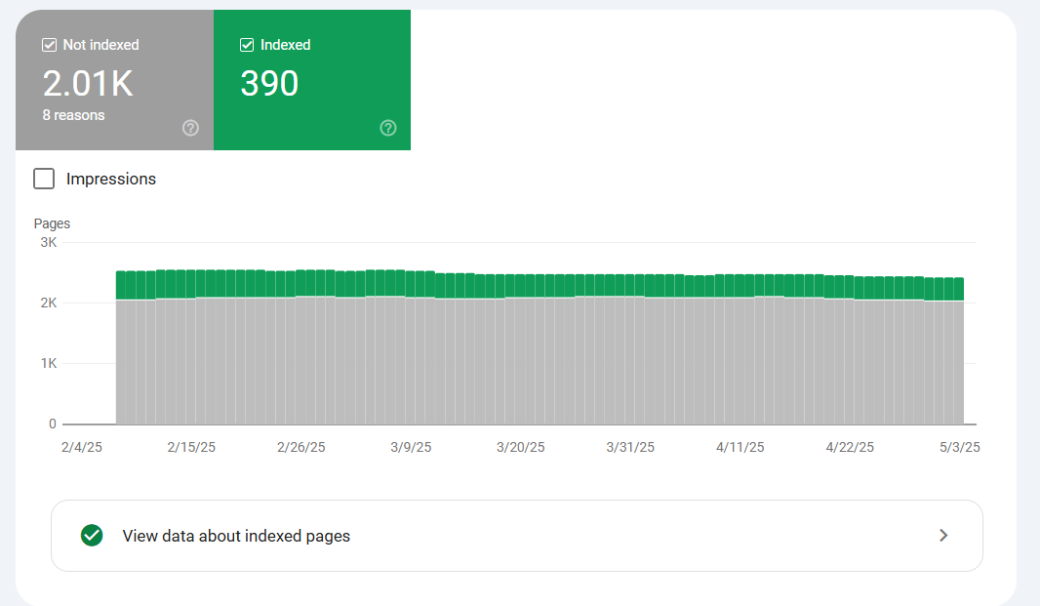
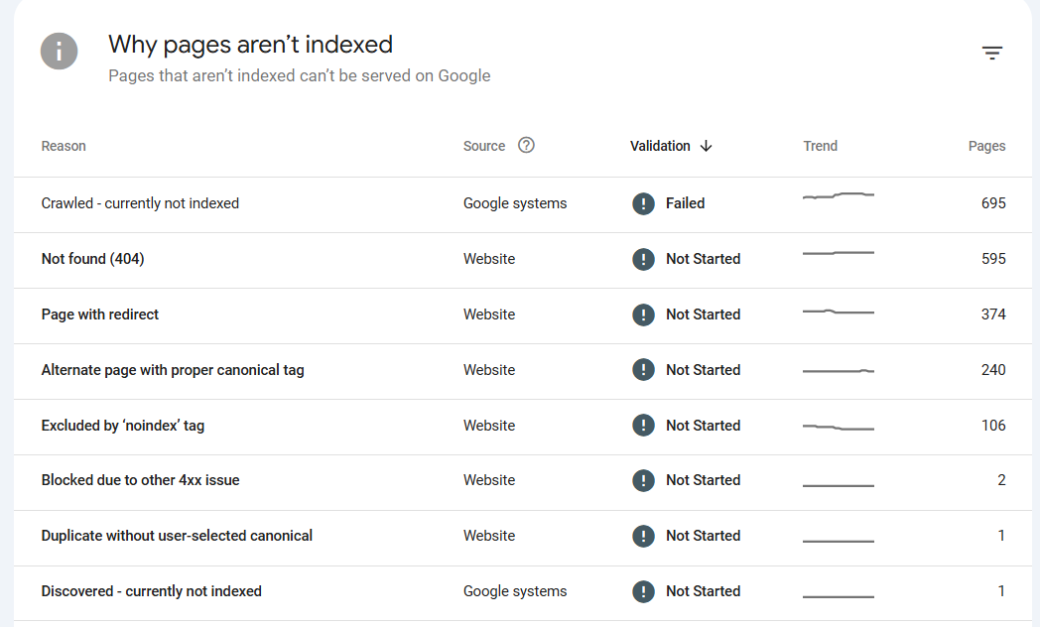
Audit Tip: Use Google Search Console’s “Pages” report to filter non-indexed URLs and review reasons like “Duplicate, submitted URL not selected as canonical” or “Crawled – currently not indexed.”
Sitemaps guide bots to your most important content, but they only help if they’re accurate.
Audit checklist:
A clean sitemap reinforces indexing intent and improves crawl efficiency by guiding search engines toward fresh, valuable, and accessible content.
Use this quick checklist during audits to spot the usual suspects:
Addressing these issues promptly ensures your valuable pages remain visible in search results and accessible to both users and crawlers.
JavaScript-powered websites offer dynamic user experiences, but they also introduce challenges for search engine bots. If key content is rendered viaJavaScript and not handled correctly, it may be missed during crawling and indexing.
Googlebot renders JavaScript in two steps: crawling raw HTML first, then rendering scripts. If key content or links appear only after rendering, they may be missed or delayed in indexing.
Some of the best practices for JavaScript SEO include:
Ensuring your website is both crawlable and indexable is foundational to organic growth. With regular audits and a few strategic fixes, you can clear the path for search engines and your audience to find the content that matters most.
Crawlability and indexability are the cornerstones of any successful SEO strategy. Without them, even the most valuable content can go unseen. By routinely auditing your site for technical roadblocks—like misused directives, broken links, or poor internal architecture—you ensure that search engines can find, understand, and rank your pages effectively.
Whether you're managing a large-scale website or fine-tuning a lean content hub, staying proactive with these checks not only preserves visibility but strengthens long-term search performance.