
Why Salesforce Staff Augmentation Is Becoming a Strategic Choice
Salesforce staff augmentation is no longer a stop-gap. Learn why more businesses now use external specialists to access expertise, move faster, and scale...
Updated January 3, 2025

How do you take advantage of a remote state file in the Terraform environment? We invite you to read our article in which we reveal the secrets of a developer's kitchen.
Terraform helps developers build and change infrastructure safely and efficiently.
It works with Amazon Web Services (AWS) as an AWS Partner Network Advanced Technology Partner and helps businesses “create, update, and version [their] Amazon Web Services infrastructure.”
Looking for a IT Services agency?
Compare our list of top IT Services companies near you
In this article, you will learn:
Without a proper configuration, Terraform stores the state of an implemented infrastructure in a file it creates when launching an apply operation, namely terraform.tfstate in the project's root directory.
However, a local file is not the best idea, especially when we carry out Terraform operations from different computers or if each member of the team working together on the project wants to take advantage of these operations.
Of course, it can be assumed that the version control system will be used, and the changes are going to be entered into the repository. However, neither is this safe nor does it provide protection against initiating changes at the same time by two different people or, worse, taking advantage of an outdated status file.
Most often, this problem is solved by using the so-called backend, meaning maintaining the state in a remote storage, access to which is available to all team members and controlled when using Terraform.
This article presents an implementation with the use of Amazon Web Services, meaning the S3 storage and the DynamoDB database.
This means that a bucket(s) in the S3 store is used to store the file(s), which is going to eliminate a situation in which various team members possess an outdated state of Terraform.
In turn, access to this state is controlled by a proper object (lock) in the DynamoDB table. Each attempt to operate on an infrastructure managed by Terraform is going to "take over" the lock, which will prevent others from starting operations at the same time.
Hostersi believes the principle DevOps would not be DevOps if it did not automate the operation of creating resources needed for the above-described operation.
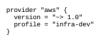
Because, in this case, the service provider is AWS, we run the provider with basic options (the profile constitutes the profile name specified in the AWS configuration credentials):
The bucket in S3, in which the Terraform state files will be placed, should meet the following conditions:
The code below provides a KMS key used for encryption and the bucket itself:
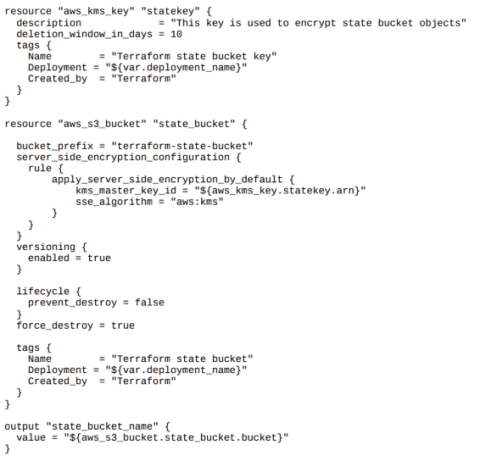
In the above code, the option to set a prefix (Bucket_prefix) was used instead of a bucket name; in this case, the name will be completed with a generated numeric identifier, facilitating the creation of a unique bucket.
This is a recommended option due to the fact that the names in S3 are globally unique in the scale of the entire S3, not a single account.
The configuration is additionally accompanied by the line force_destroy = true – This technical facilitation will allow the Terraform to destroy operation to remove the bucket if any files are in it. At the end of the code, it was ensured that the bucket name will be exported.
A DynamoDB table including a lock is set up quite similarly, although:
The above recommendations will be implemented using the code:
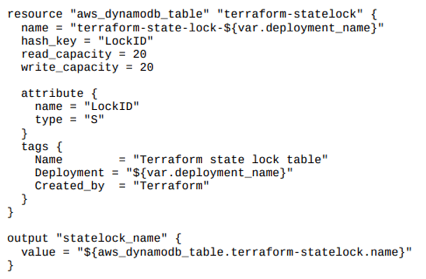
The above code contains references to the deployment_name variable, in order to maintain the naming convention and allow a situation in which one account is used by many environments (although we recommend opening separate accounts in this case!).
Just like before, we make sure that the lock name will be exported.
Backend is set up initially using a local status file. Although it is possible to transfer the above-executed state also to the backend, HashiCorp, the company that created Terraform, proposes that the basic backend infrastructure should be saved simply in the repository under version control.
This is due to the fact that very rarely will there be a need to change precisely this infrastructure component (rather only for destruction), and separation from the actual project is quite advised.
For the environment, or a component already intended to take advantage of the backend, we complement the configuration with data from the implemented infrastructure:
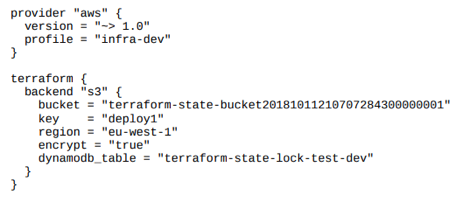
The presented code requires a few comments:
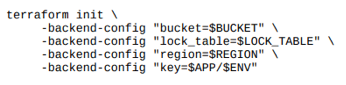
The only way for automation is to use the Terraform init operation with parameters that can be set in the startup script, as in the example above.
Using a remote backend allows us to achieve additional benefits.
Thanks to this, it is possible to divide the implemented infrastructure into separate components, each of which possesses its own state in a separate key and at the same time can take advantage of the information contained in the status files of other components, if they use the same backend. This method is called remote_state.
Therefore, we define separately the component responsible for the implementation (and maintenance) of the network infrastructure (VPC network, subnetworks, routing routes, gateway, etc.) and separately the component responsible for domain configuration (in the case of AWS - Route53) or virtual machines (similarly - EC2).
The structure that allows the implementation of such a task is a data source named terraform_remote_state. The data source is not a resource per se, meaning that defining it will not create a resource, but it is going to result in an attempt to download data concerning one, if it exists.
Terraform_remote_state, as the name suggests, downloads data from a different Terraform state file (which were defined as outputs).
The situation is best illustrated by the following (somewhat idealized) example:
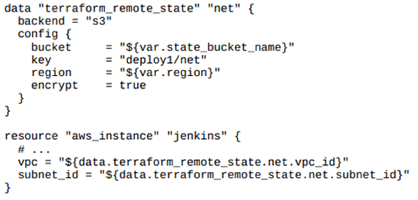
In the presented example, the data source (data) named "net" allows us to download data from the deploy1/net key, in which a VPC network was created along with a subnetwork, and the vpc_id as well assubnet_id were provided as output.
Then, in the current environment, an EC2 machine is created in the network, which ID is downloaded precisely from terraform_remote_state.
With the help of the presented code, one can automate setting up elements necessary for the functioning of a backend, meaning a remote storage on the infrastructure status file managed by Terraform.
Thanks to this:
Happy Terraforming!
Maciej Rostański, DevOps Engineer at Hostersi, AWS Certified Solutions Architect and Cisco Certified Academy Instructor. Doctor of computer science, long-time lecturer at the WSB Academy in Poland. Author and co-author of scientific and technical monographs, such as "Internet in the Information Society" or "Data processing systems". Expert at the National Centre for Research and Development in the field of projects related to IT infrastructure. Supporter of EaaC - Everything as a Code.
See full profile