
Why Hiring Fast Is Costing You More: The Case for Pre-Vetted Remote Talent
Speed-to-hire may feel like a competitive advantage, but replacement costs, productivity gaps, and re-hiring cycles show up on the balance sheet. Here's why...
Updated February 13, 2026

Monitoring employees' productivity is a key to success for any company. However, there is some debate about whether or not it's ethical or effective to use computer software to measure productivity. Understand the pros and cons of employee monitoring to learn how to implement management strategies for your team.
Imagine the case of a young worker at a medium-sized company: Laura started her sales job shortly before the COVID-19 pandemic closed her office and employees started working remotely.
Since then, Laura has hit some, but not all, of her goals. She is usually alert and attentive during Zoom meetings, but her colleagues sometimes can’t reach her over Slack or email for stretches in the workday.
Looking for a Human Resources agency?
Compare our list of top Human Resources companies near you
Should her employer start tracking her computer activity?
Things have changed since the pandemic's peak, as more roles are becoming fully remote or hybrid. However, many companies may be asking this question about employee monitoring as they implement these policies.
In 2025, monitoring has reached an all-time high, but is that a good thing? Businesses must carefully consider the pros and cons of employee monitoring software before implementing any policies.
In particular, companies must remember that employees are usually unaccustomed to being monitored and may react negatively if they don’t understand how being monitored will help their company.
Conversely, businesses should remember that staff monitoring can give employees the opportunity to demonstrate their hard work and productivity and that younger workers are far less likely to be concerned about employers having access to their personal information.
By weighing the advantages and disadvantages of employee monitoring software, companies can determine the best way to track workplace productivity for their business.
Looking for some additional support? Connect with a trusted HR company on Clutch.
Employee monitoring is used by businesses to keep track of productivity, detect data breaches, and optimize workflows. Through computer monitoring and workplace monitoring, managers are able to identify the root cause of certain issues and address them head-on.
Performance monitoring works by systematically tracking how work gets done. When done well, it shifts performance conversations from guesswork to facts, helping individuals and teams understand what’s working, where time is being lost, and which behaviors drive the best outcomes.
This visibility improves productivity by identifying bottlenecks and distractions, strengthens accountability by aligning expectations with measurable results, and leads to better outcomes by enabling timely coaching, smarter resource allocation, and continuous improvement.
Now we will go into the pros and cons of employee monitoring:
| Pros | Cons |
|
|
While many companies are starting to focus on employee monitoring, there is some debate over whether or not using computer monitoring to keep track of employee performance is ethical.
Even though some companies report improved performance after implementing employee monitoring software, they risk violating employee privacy and lowering morale.
Employee monitoring can negatively affect employee morale, so companies must provide workers strong reasoning for using tracking software.
Companies have good reason to dread unmotivated, disengaged, unhappy employees. An unhappy worker is less likely to participate in company social events and more likely to leave the business before developing professionally.
Experts say that introducing employee tracking software can erode employees’ trust in their company.
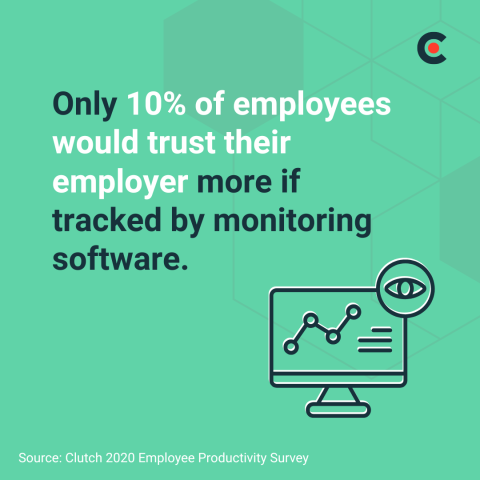
In 2020, only 10% of employees said that they would have more trust in their company if monitoring software was used to track their work.
In 2024, 35% of employees at companies with remote work policies say they would trust companies less if they were to track their online activity.
Dave Morley is the general manager of Rockstar Recruiting, a recruiting firm specializing in placing skilled tradespeople such as millwrights, mechanics, and HVAC technicians.
He previously worked in human relations at a different company. That business introduced employee monitoring software without telling employees. When employees found out, company morale dropped significantly.
“[Employee monitoring] would have been much better received had management informed employees that their work was going to be monitored and given them reasons why,” Morley said.
Instead, employees became skeptical, and Morley started hearing workers make the same joke: ‘“Big Brother’ was watching over our work.”
‘“Big Brother’ was watching over our work.”
Eventually, a number of employees, including Morley, lost trust in their company’s ownership and left the business.
Glen Wilde, chief executive and founder of Diet to Success, a nutrition and life coach agency, explained why this occurred — employees are productive if they feel:
Employee monitoring software challenges each of these worker needs because it signals to employees that their company does not trust them to spend their time wisely.
Wilde says businesses must also be clear with employees that monitoring software is not a way to collect passwords or learn about a worker’s personal life.
Businesses must consider the risk of damaging employee trust and morale when using employee monitoring software. And if companies do monitor their employees, they should not do it secretly.
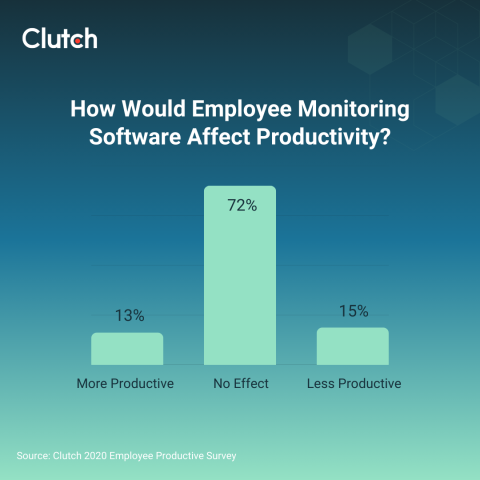
In 2020, close to three-quarters of employees (72%) said that employee monitoring software would have no effect on their productivity, while15% of employees believed they would be less productive if their work was tracked through monitoring software.
In fact, staff monitoring can provide employees the opportunity to demonstrate their productivity and ability to function independently.
Irene Van der Werf, Head of People at Omnipresent, agrees that companies must provide their employees with flexibility in order for them to be their most productive.
“Some managers believe in monitoring and tracking remote employees every working hour to improve productivity. However, micromanaging often has the opposite effect,” she says. “Flexibility in how employees work is also key to a productive team.”
Every employee may have a different workflow and, at the end of the day, an employee’s performance is more important than how they spend their time, “We prefer and encourage to measure performance by outcomes rather than how busy an employee seems,” Van der Werf says.
Rather than using employee monitoring software to oversee every second of an employee’s workday, Van der Werf suggests that companies track deliverables, saying, “Track progress using remote team management tools; these give you a broader insight into your employee’s ongoing projects without monitoring their every move.”
Employee monitoring has become increasingly common as organizations seek better visibility into productivity, security, and workflow efficiency, but not all monitoring is the same. Ethical, performance-focused monitoring is designed to measure work patterns, outcomes, and process efficiency, using aggregated data to support coaching, workload balance, and continuous improvement.
In contrast, surveillance-based monitoring emphasizes constant observation, such as keystroke logging, screen recording, or covert tracking, can erode trust and negatively affect morale.
The key distinction lies between intent and transparency: ethical monitoring is outcome-driven and openly communicated, which surveillance prioritizes control and oversight, often at the expense of employee autonomy and engagement.
Legal and privacy considerations play a central role in determining how employee monitoring can be implemented. Laws vary by country and region, but most jurisdictions require employers to have a legitimate business purpose for monitoring and to limit data collection to what is necessary.
Sam Maley, IT operations manager at Bailey & Associates, an IT consultancy, says that managers usually do not have the time to closely track all employees. For young, inexperienced workers, direct monitoring software may make sense.
Additionally, younger workers are less concerned than other generations about computer monitoring. In 2020, only 22% of 18 to 34 year-old employees were concerned about their employers having access to personal information and activity from their work computer.

Meanwhile, 31% of employees between 35 and 54 years old were concerned by their employer having access to their personal information, and 25% of employees 55 years old and up shared that sentiment.
Monitoring software such as Activtrak provides managers periodic screenshots of their employees’ computer activity.
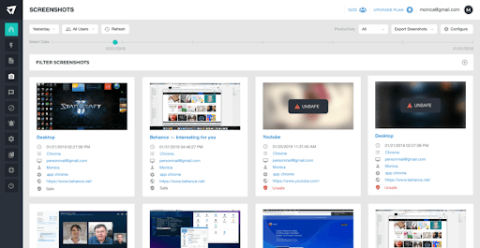
These screenshots are a simple way to determine how long employees are staying on specific internet pages.
Productivity reports are a more statistically-driven way to measure employee activity.
Managers receive reports on keystrokes, page views, and general data insights about work behavior.
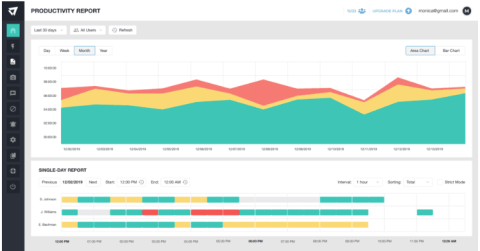
Mostly, productivity reports give managers the ability to break down an employee’s workday: How do they spend their mornings? What is taking too long? Are there strange or inappropriately long gaps between actual work activities?
Maley says that once managers can answer these questions about their direct reports, they do not need to rely on monitoring software. Instead, employees can learn to self-sufficiently track their time and tasks using a project management tool such as Jira.
Overall, Maley suggests that companies use employee monitoring to make sure new workers adjust well to their workload. Workers, meanwhile, can view being monitored as an opportunity to demonstrate their competence and earn greater autonomy.
In addition to providing insight into how employees spend their time online, computer monitoring software can block harmful websites and apps, which can reduce security risks.
Often, these programs can record screens as well, providing insight into what may have caused any issues after an incident occurs. This can help IT professionals identify a cybersecurity threat, resolve it quickly, and reduce losses.
Anastasios Gkouletsos, a Cyber Security Manager at Omnipresent, explains that while he doesn’t support using monitoring software to manage employees, he still uses it for this reason, “Personally, I am against monitoring employees to track productivity. At Omnipresent, our cyber security team partially monitors employees to ensure data protection and compliance with privacy regulators like GDPR - but never productivity.”
To Gkouletsos’ point, even businesses that aren’t worried about employee performance can use employee monitoring to improve their team’s security and communicate best practices.
Since the shift to hybrid and remote work, more and more employers are looking for more creative ways to monitor employee performance.
Leaders are asking themselves, “How do I keep track of my employees’ work on a regular basis in a remote environment?”
Successfully monitoring employees starts with establishing a routine with consistent check-ins and robust project management tools.
Employee monitoring software allows tracking the staff's activity on their work computers.
Special services collect, store and analyze data about the visited websites, search queries, running applications and external storage devices used during the workday.
These services also control the user's activity on social networks, outgoing emails and chats in various messengers.
Clever Control, for example, allows monitoring up to 16 employees' computers on one screen. So, the manager can easily see who is doing his or her best at work and who is misusing the company resources.
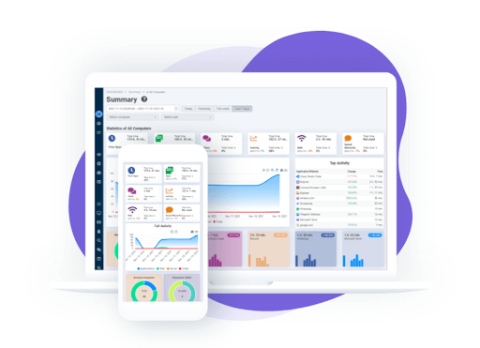
The manager needs only to look through screenshots and study reports saved on the cloud service in the form of convenient charts and graphs.
Modern software turns a usual computer into an efficient tool of online monitoring. It helps managers:
In 2020, roughly half of employees (49%) said their company did not use employee monitoring software to track their work.
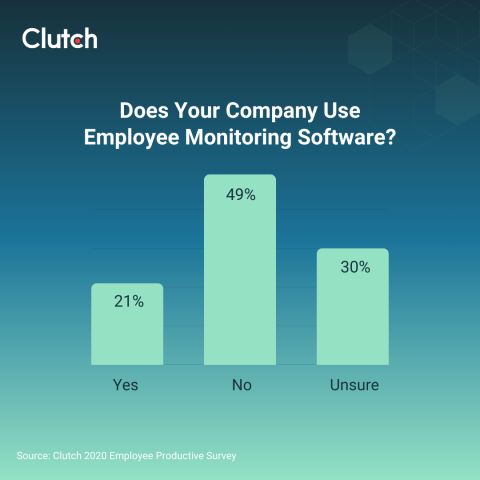
HR experts say that companies are unlikely to use employee tracking software if they believe that employees can perform without it.
“My entire team is remote, and I do not use employee monitoring software to track their work,” said Grey Idol, co-founder of PayrollFunding, a payroll staffing company. “I honestly don’t mind how many cat videos they watch during the day as long as they can deliver when it counts. I hire adults, not children, and I trust them to manage their time properly.”
"I hire adults, not children, and I trust them to manage their time properly."
Idol’s attitude is likely shared by many managers: Give employees the time, space, and resources to get the job done, and many will execute.
Still, an increase in the number of employees working remotely may incentivize businesses to keep close tabs on their employees’ progress.
Rather than using computer monitoring software, companies can get a better understanding of their employee’s workload and productivity using task management software.
These programs that monitor employees' productivity during the day and allow employees to track their own progress against goals.
Here are 6 task management platforms available to companies:
Think about which platform works best for your team’s workflows.
Selective control allows managers to monitor employees without making staff feel like they are being watched constantly.
It is conducted in a natural work environment at random, allowing the employer to see the employee's strong and weak points and check not only the workflow but also its "unpolished" intermediate result.
However, despite its evident advantages, selective control has some considerable drawbacks.
Sometimes, instead of keeping the staff sharp, it creates a stressful environment and even demotivates employees.
Some of them believe that such a form of monitoring is subjective and looks more like the manager's attempt to find faults and criticize the staff.
Setting recurring planning and goals-oriented one-on-one meetings can go a long way in making sure employees are keeping up with workloads. Depending on the need, you can schedule these calls daily, weekly, monthly, or any other cadence both parties deem appropriate.
Some employers cannot imagine a typical workflow without regular planning and meetings. This is a proven way for managers to assess the results of previous tasks and to set new goals.
Employees accept new assignments and prioritize them according to the deadline.
Planning work processes with consideration of work hours required to complete them allows the staff to improve their time management skills and personal efficiency.
Before the meeting, employees usually prepare reports which management can use to understand a particular employee's workday structure and what tasks take most of his or her time.
This information helps management better understand the distribution of labor in the office and helps avoid both slacking and work-overloads.
As companies get used to hybrid and remote work, many are struggling to find the best way to monitor employee performance and manage tasks.
While some managers rely entirely on computer monitoring software to monitor employee performance, other methods, such as using task management software and improving communication may be more effective.
Therefore, it is important to find a balance in choosing a method that will maintain trust and create a system that motivates employees to be respectful of company time.
Additional Reading:
Mary is the editor and writer for Clever Control blog. She specializes in techniques of employee performance assessment and productivity improvement.
See full profile