
How App Companies Can Build Trust with Customers
Learn how app companies can build customer trust through better privacy practices, transparent communication, and stronger security to improve retention and...
Updated December 9, 2025

App testing is a lengthy process, but an app must be thoroughly tested before launch to prevent user problems. Follow these 8 tips when testing your app.
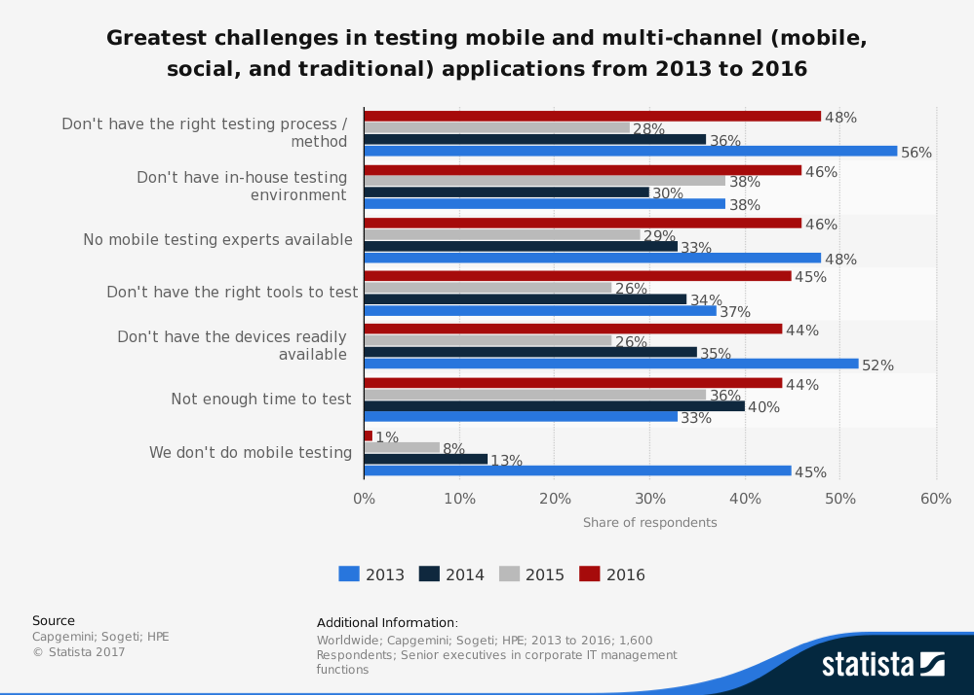
I recently stumbled across an interesting statistic: The biggest challenge of testing an app that companies faced in 2016 was not having the right process or method to test the app, a figure that nearly doubled from 2015.
Looking for a Mobile App Development agency?
Compare our list of top Mobile App Development companies near you
Within one year, the number of companies that did not have the right process for app testing increased by 20%.
Nearly half of app testers don’t know the right method. As a result, I spoke with developers at Applify, a leading app development firm in the UK. From our conversation, here are 8 factors to keep in mind when testing a mobile app, whether in-house or with an app testing firm.
If you’re going to test a mobile app without properly knowing the platform’s UI/UX (user interface/user experience) guidelines, there’s a chance that you’ll make mistakes and miss out on some important features.
Android and iOS apps look similar, but the UI/UX for both are very different.
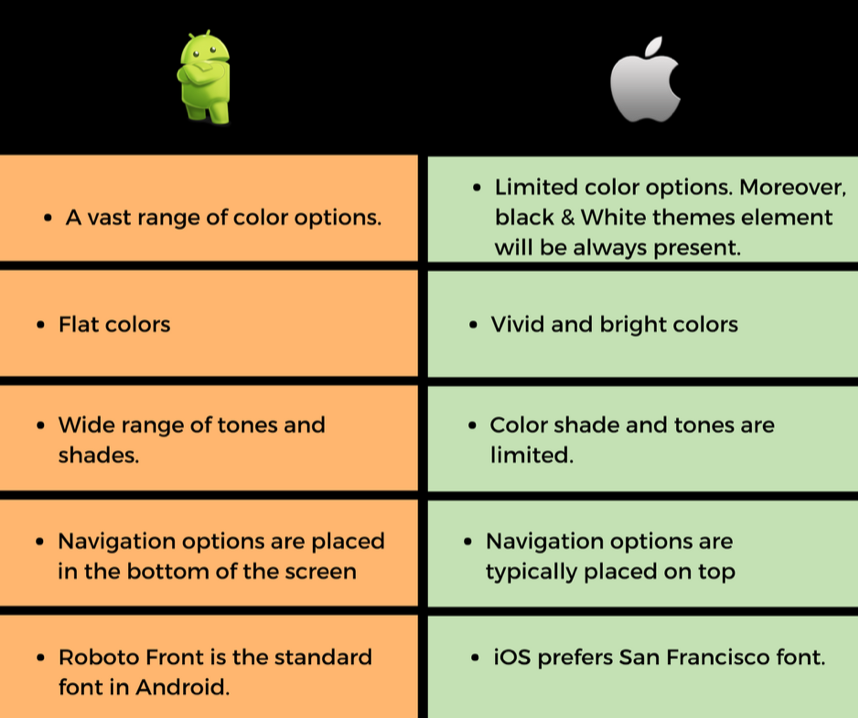
For example, on Android, there is a vast range of color options with flat colors. For Apple, there are limited color options but vivid and bright colors. Each platform prefers a different font (Roboto for Android; San Francisco for Apple), and the navigation options are in different locations (bottom of the screen for Android; top for Apple).
It is essential to carefully read the UI/UX guidelines of the platform you’re going to use for your app, which will help you avoid costly mistakes in the future.
You can’t test every single feature in the app due to limited time.
Figure out which features are the most important, such as user interface, theme, colors, functionality, and security, and test them carefully.
For this, you can follow a systematic approach, such as context-driven testing, a testing methodology in which the app is tested in real-time scenarios. This will save you time and give you the best possible results.
Users are not always going to use your app in a closed room; they may use it when traveling, out with friends, or exercising.
You should test your app in an environment where consumers will realistically use it, analyzing how it works in different conditions and the impact of network change.
For example, you can’t tell whether your pedometer app is effective unless you actually use it and test it walking around to see if it’s accurately counting your number of steps. Another example is payment apps; you can test their efficiency only if you go to a store and make a payment.
Testing your app in real-time conditions will help you identify and fix many in-app issues.
Most organizations use automation testing, a testing methodology that uses tools that identify and fix bugs. Usually, this method is considered effective, as it minimizes human effort. However, you can’t completely rely on it.
Some parts of mobile app testing require manual efforts. For example, no software will tell whether the app is sufficient in terms of user experience; you need a human to test that.
Automated testing on apps isn’t easy because every app differs in application program interfaces (APIs), networks, sensors, and backend systems.
Additionally, automating testing that works in all conditions is expensive and requires a lot of effort and an experienced staff.
There’s a problem developers often face during Android app testing. Compared to iOS app testing, where the number of devices is limited to just Apple products, the number of Android devices is significantly high: As of 2015, there were 24,000 Android devices worldwide, a number that has likely grown.
Of course, testing the app on each device to ensure that it works well is not possible because doing so will take too much time. You should however, test the app on multiple devices that your target audience uses.
Before approving an app, you should test it on more than one smartphone. The hardware and software combinations on each device are different. You can’t decide whether an app is bug-free just by testing it on a single device.
Try to test your app on devices that your target audience uses. For example, the user experience may be different on a small and large screen. Also, different devices, such as a Samsung Galaxy S8 and Google Pixel smartphone, may offer a different experience for the same app. Given this, testing an app on multiple devices is important.
It is also important to test upgraded versions of your app as well, as new issues may arise.
Testing a mobile app for security is important because if you don’t, the security and privacy of customers will be at stake. If your app isn’t secure, people will be able to hack into it and steal users’ crucial details.
Various techniques for security testing include vulnerability scanning, password cracking, virus detecting, and network scanning.

For example, in vulnerability scanning, we identify features of an app that are more prone to hacker attacks and then try to fix them. After that, we re-test the vulnerability of an app by attempting to break the password of it. If we can’t break in, we proceed onto advanced security-testing phases like virus detection, file integrity checking, and network scanning.
This testing ensures that your app is secure.
As we mentioned earlier, a large number of devices are involved in mobile app testing. Purchasing them all isn’t feasible, so many view device emulators as an alternative that save a company money.
Emulators are software that perform the same function as a device. They are less expensive and sometimes even free. Therefore, they can save company from the cost of purchasing a real device.
Although using emulators has its benefits, it’s wise to not be completely dependent on them because an emulator is a software and may have bugs. Testing your app only on them will put it at unnecessary risk.
Frequent crashes during app testing are normal because your app has bugs that might be stopping it from behaving properly. App crashes post-launch are dreaded because you’re supposed to have completely tested the app and resolved all bugs. Because of this, users might get annoyed and end up deleting the app.
So, it is recommended to prepare a report that demands to resolve them.
Preparing a proper report of bugs is as important as testing the mobile app because if you aren’t thorough with it, the bugs will go unnoticed and cause further issues.
Be careful and don’t skip anything while preparing the bug report. An issue, no matter how big or small, matters. If not resolved, it will only cause problems for you, and your users, later.
If a glitch goes unnoticed during testing, after a while, users are likely to start complaining, and a small flaw could become a big problem.
While creating a mobile app, development companies have only one goal in mind: to make a full-featured app users love. Sometimes, due to this, they get distracted and end up making the app too complex.
During mobile app testing, make sure that your app is not stuffed with many features. It will only ruin the user experience. Keep it simple and cut the clutter, and include only the necessary features.
For example, if you create a pedometer app, you may want to add extra features, such as workout tracking. However, your users downloaded your app to track their steps, not to track a workout. Filling your app with too many extra features may confuse users to the point of deletion.
Every app development company should test its apps. It’s a lengthy process, but an app that’s tested thoroughly before its launch prevents user problems.
So, keep these factors in mind while you test an app. Eventually, it will lead to good results.
Neeraj Sharma is an avid reader and writer with an undying passion for making people aware of the latest tech with his blogs. He has written a myriad of articles related to tech, apps, games, social media, and entrepreneurship. At present, Neeraj is contributing articles on applify.co.
See full profile