10 Actionable Link Building Tactics to Build Brand Authority & Legitimacy
Discover 10 actionable link building tactics to boost brand authority and rankings. Learn how quality backlinks build lasting trust in the AI search era.
Updated June 19, 2026

Google crawls webpages to determine the site's content, structure, and link profile, from there it’ll determine the relevance that a website holds for any given search term. As such, ensuring that your website is optimized for search intent, content quality, backlinks, and more can result in higher rankings, traffic, and conversions.
Ranking at the top of Google matters. According to Backlinko, the first organic result gets 27.6% of all clicks, the second gets 15.8%, and the third gets 11%.
Unlike PPC (pay-per-click) ads, which are paid-for positions purchased by companies on Google Ads, organic results are considered the most relevant and valuable results for a user’s search query.
Looking for a SEO agency?
Compare our list of top SEO companies near you
As a result, organic results are considered more trustworthy and get more clicks than PPC ads. Companies can earn a higher return on their digital marketing efforts by investing in SEO.
In fact, moving up just one position can increase a webpage’s click-through rate by 30%. Understanding how Google ranks content can help companies improve their SEO strategies and their rankings. Here’s what you need to know to rank on the first page of Google:
Want to land on page one? Start by understanding how Google ranks search results, how to improve your chances of showing up, and what to do if you need to remove a page.
Looking for an SEO partner? Check out our shortlist of top SEO agencies around the world.
When you run a search on Google, it’s not scanning the entirety of the internet in real time. Instead, you’re looking through an enormous index: an organized, constantly updated collection of web pages that Google has already crawled and stored. Behind the scenes, automated programs called crawlers visit sites, scan their content, and sort it into Google’s index. That’s the foundation for how search results appear.
Ranking happens after that. Google uses a set of algorithms to decide which pages in the index are most helpful for each query. These systems evaluate a long list of factors, from the wording on the page to how fast it loads. They also consider whether other trusted sites link to it. In the next few sections, we’ll look at how indexing works, what the algorithm pays attention to, and what you can do to help your content rank higher.
In order to determine the purpose of a website, Google sends out bots (a.k.a spiders). These follow hyperlinks to journey through the web and ‘crawl’ (read) each page they come across. The information that these spiders look to obtain consists of page titles, headings, text content, images, load speed, structured data, and more.
Google then takes this information and categorizes each page in a process called indexing. When you enter a query into Google, you’re not actively searching through the entire World Wide Web. You’re searching Google’s Index.
Google’s index database has an entry for every word seen on every webpage that they index. It’s essentially an enormous super-library full of billions of pages worth of information, and that information needs to be organized so that results can be found as quickly as possible.
As of July 2025, Google’s indexing capabilities have expanded. Public content on Instagram and Facebook – including posts, photos, and videos – can now appear in standard search results. If your business shares content through a public social profile, those posts may show up when users search for related terms on Google. This is a major shift for marketers and small business owners, giving them a new way to drive traffic and visibility beyond their website.
To take advantage of this change, make sure your social content follows basic SEO best practices. Write clear, keyword-rich captions, use location tags, and add alt text where possible. Treat your social posts as searchable content, not just quick updates.
There are millions of web pages available for any given search query, so Google has to prioritize these sites in order of relevance and value, specific to each individual query. This is called ranking, and Google has a whole arsenal of algorithms dedicated to working out which web pages should rank for which search terms.
These algorithms consider a multitude of factors – the search term used, the content & functionality of the site, and the web page’s authority. A site’s authority is determined by a number of factors, including the perceived value of the site’s content and the number of sites that link back to the site as a reputable source of information.
In the eyes of Google, reputable sites tend to link back to other relevant, reputable sites. So, if for example, a BBC article linked back to your site as a source of further information on a topic, it would be a good signal to Google that your site was also authoritative on the subject matter.
Additional Reading, ‘How Search algorithms work.’
Once Google adds a page to its index, it doesn’t stop there. The algorithm has to figure out how that page compares to everything else out there. To do that, it looks at a mix of technical and content-related signals.
Here are the top nine Google ranking factors to consider:
Google’s top priority is figuring out what someone’s actually trying to find. Are they asking a question, looking for a product, or just browsing? Pages that line up with the real goal behind the search tend to do better.
This comes down to how well your content fits the topic. It’s not just about including the right keywords—it’s about answering the question clearly and thoroughly, using the kind of language your audience expects.
Pages that offer something original and helpful stand out. Google favors sites that show real knowledge or experience with the subject. This is where E-E-A-T comes in — a framework introduced in Google’s Search Quality Evaluator Guidelines. It stands for Experience, Expertise, Authoritativeness, and Trustworthiness, and it's used by human reviewers to assess content quality. While it’s not a direct ranking factor, it reflects the kinds of signals Google’s algorithms look for when determining which pages to prioritize.
Links from other sites still carry weight. Google looks at the number of backlinks, but it more heavily weighs the quality, diversity, and relevance. A handful of links from high-authority, contextually relevant domains is better than dozens from random sites. A diverse mix of backlinks (pointing to different parts of your site) signal a more robust and authoritative web presence, which can also help.
If your site is hard to use, people leave. Google pays attention to that. A clean layout, easy navigation, and mobile-friendly design make a difference.
Pages should be organized in a way that makes sense—for people and for search engines. Clear menus, headings, and internal links help Google crawl your site and understand how the pieces fit together.
Slow pages frustrate users, especially on mobile. Google takes that seriously. Page load time refers to the time it takes for a web page to fully appear on screen after a user requests it. Google considers anything under three seconds a best practice. In fact, the average load time for a first-page Google result is just 1.65 seconds. Sites that load quickly tend to rank higher, all else being equal.
Basic SEO elements still matter. Things like titles, meta descriptions, headers, and image alt text help explain what your content is about. They also make it easier for Google to match your page to relevant searches.
Secure sites are the standard now. If your site doesn’t use HTTPS, Google may rank it lower—and visitors might see a warning in their browser.
Getting to the top of Google’s search results is about making your content stand out as useful, trustworthy, and easy to understand, so you can help people find what they are looking for. Google ranks pages based on what works best for real people, so improving your spot in search is often about improving the experience on your website. Here are some ways to do that:
Once companies have identified the keywords they would like to rank for, they can optimize the content on their website to target their keywords.
This means including keywords in the:
Adding keywords in these spots helps Google understand what your page is about. You don’t need to repeat a keyword over and over - that’s called ‘keyword stuffing’ and can do more harm to your rankings. Focus on writing clearly, using terms your audience would expect. Google’s gotten better at understanding context.
This makes it easy for Google’s crawlers to identify what each page is about and index it.
For some companies, it makes sense to develop an on-site content strategy that targets these keywords. For example, creating and maintaining a blog can be very helpful for your SEO.
Every page that is published provides new content for Google to index, making it more likely to be promoted and drive traffic to a site.
Consequently, companies should post on their website consistently while targeting keywords in order to improve their rankings.
Additional reading, ‘4 Steps to Identify Target Keywords for Small Businesses.’
Key factors in this determination are value and relevance. Google needs to take into account the underlying intent of the searcher and then be able to return the correct result for their query.
Now, Google knows that not all sites fit the same purpose. For example, “freshness” will be a bigger factor to consider when a user searches for Lotto results or the latest stock updates, and less of a factor when looking at “how to” articles and thesaurus entries.
Websites with more “value” or “relevance” for a given search term will be ranked higher on the search engine results pages (SERPs) so that Google’s users are always getting the most appropriate information.
With the information retrieved by the bots, Google’s algorithms then assess the data from the site to determine whether the information provided is an appropriate answer for the query submitted to the search engine.
Content is one of the most fundamental factors used to calculate the relevance of a page to a query. Take the result below for a “world’s heaviest apple” search:
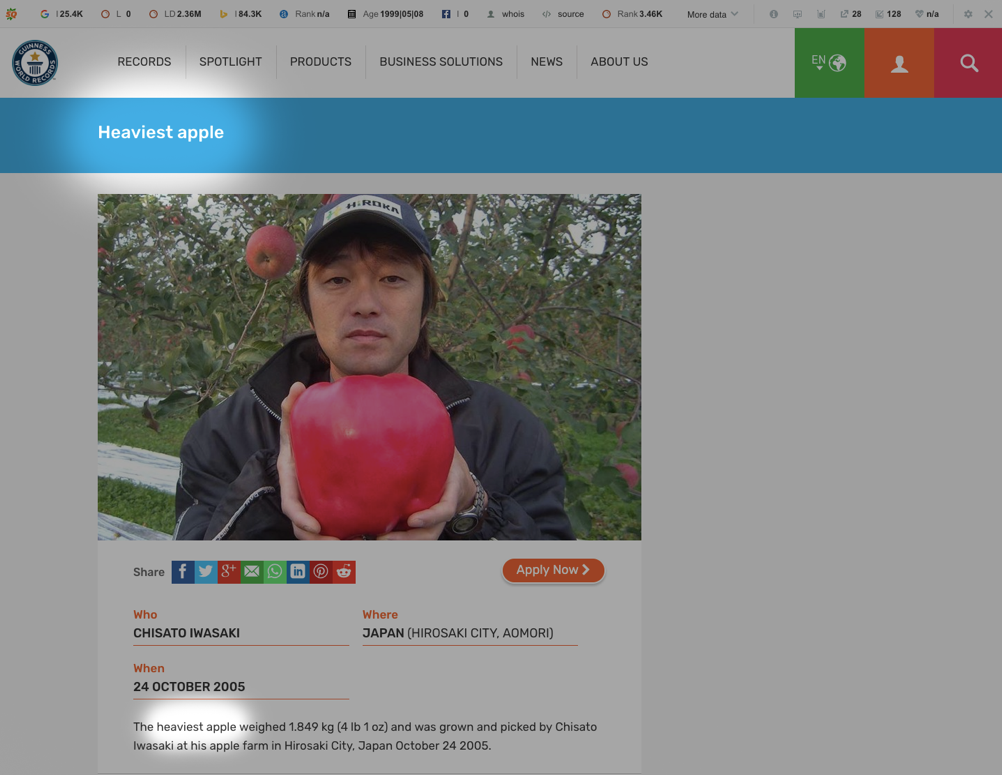
Like in the image above, a webpage’s content is determined to be relevant to apple-related searches if, on a basic level, it likely includes the keyword “apple.” Of course, Google has spent years developing algorithms and systems to hone in on the relevance of a page. Results for “how to make an apple crumble” would be different for “world’s heaviest apple” (which weighs 1.849 kg by the way).
Google’s search results have come a long way in the last decade or so. The SERPs no longer consist solely of 10 blue links with three paid ads at the top of the page. Google has developed new features in the SERPs to make it easier and quicker than ever to find the information you’re looking for.
Google’s synonym search means that it can match users to articles that might be targeting a similar keyword or key term, even if they’re using slightly different phrasing. For example, “how to change a fuse” will also display results for “how to replace a fuse”, like in the images below.
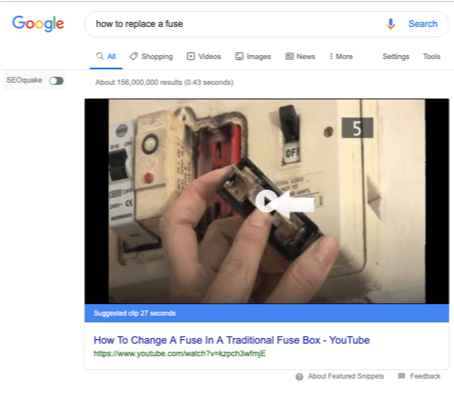

Though the searches are worded differently for the searches above, the intent is similar, so the top results will likely overlap.
Additionally, Google will assess the best results format to offer depending upon the search term and the intent behind it. “How to replace a fuse” draws results for an explainer video, followed by suggestions for other “how to” videos that may also be appropriate for the query. Google’s BERT systems and RankBrain helped shift search from simple keyword matching to understanding the meaning and intent behind queries — a shift that shapes how results are ranked today.
Soon after the video is the “people also ask” answer accordion. Google often also shows results for searches that other users made following the original search, all in the quest to make finding the correct information as easy as possible.
Google’s search result formats are split into five different categories outside of the traditional list of blue links. These features aim to surface information quickly and efficiently based on user intent. Key SERP features include:
Know these results formats to truly understand Google searches.
Powered by the knowledge graph, knowledge panels appear for well-known public figures, companies, and historical topics. These appear on the right-hand side of the desktop search results page and display key facts—such as birth and death dates, affiliations, and notable achievements—without requiring users to click a link.
For example, if you were to Google Marie Curie, the knowledge graph would display the information below:
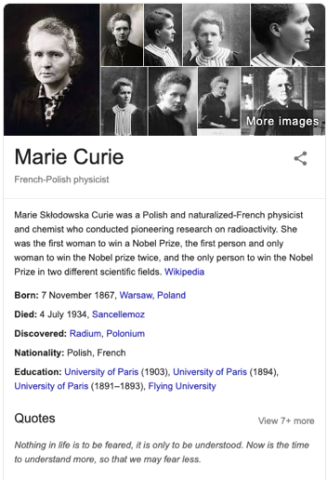
Along with Marie Curie’s date of birth, death, and notable discoveries, users can read a quick summary of relevant information Google compiled, without having to click a link.
These expandable sections display related questions that other users commonly search. Clicking on a question reveals a short answer pulled from a relevant web page. This feature helps users explore related topics without leaving the results page.
The “Directions and Traffic” feature was a simple but effective addition to the search engine. The feature takes your location and intent into account to provide the most useful result possible.
When Googling “Bermondsey, London” Google assumes you’re not looking for information on pot-holes in Bermondsey, otherwise you would have searched something like “pot-hole updates Bermondsey”. Instead, the search engine assumes that you’re looking to get there, or find its geographical location and so provides users with a handy, clickable and movable map, as below:
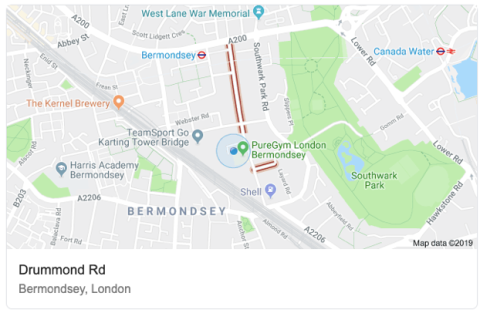
Along with the detailed map in the image, it might also display directions and timings for various modes of transport, whether that be by train, car, bike or by foot to further help you.
Direct results are those provided directly in the search results, but do not link through to an alternate resource. Google has access to information (e.g weather information) to provide direct answers to users. For example in the image below, by searching “weather forecast” I was provided with the weather forecast for London.
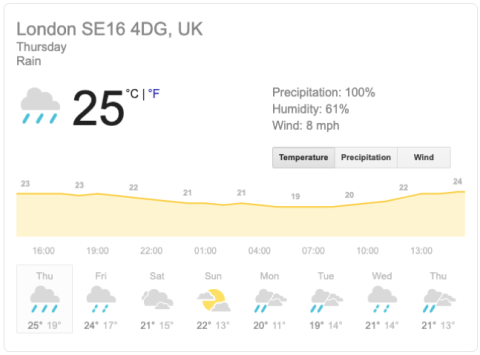
Clearly, this snippet above also takes into account the user’s location data as well, as it showed me the information relevant right down to the post code.
Ah, the humble featured snippet— another update of convenience from Google. Featured snippets are portions of information drawn from highly ranked websites that Google perceives to be the most direct answer to your query. They include a few sentences of information, a link to the source site for further information and the page title.
Unlike direct results, which are generated directly from Google (or licensed information), featured snippets are scraped and directly attributable to other websites. Here’s an example of a featured snippet outlining how to go about embracing a zero-waste lifestyle.
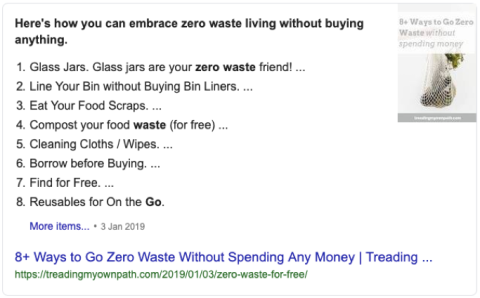
The snippet above features the relevant information from the article (a list) and the source is directly attributed in the link at the bottom, making it easy for users to read the content entirely.
For visual or timely searches, Google may show horizontal carousels of images, YouTube videos, or news headlines. These packs are especially common for how-to queries, entertainment topics, or trending news.
No, these aren’t lists of the world’s richest people. Rich lists are an at-a-glance answer to queries that have more than one answer using information from the same data set as the Knowledge Graph.
To clarify, if you were to Google “female scientists” like we did below, the search engine will provide you with a list of famous female scientists. The same goes for searches along the lines of “Famous 80’s bands” and… “the world’s richest people."
The list features the top results for the given search, but is compiled in an easy to read (and scroll) way. The same goes for searches along the lines of “Famous 80’s bands” and “the world’s richest people”.
AI Overviews are generated responses powered by Google’s Gemini model, introduced in 2024. These summaries appear at the top of some search results, providing quick, synthesized answers to more complex questions using information pulled from multiple high-ranking sources.
Unlike featured snippets, which quote a single page, AI Overviews draw from various indexed sources and are designed to help users get answers faster, without clicking.
Websites don’t directly “rank” for AI Overviews, but they can be referenced in the summaries if they provide highly relevant, well-structured content that aligns with search intent. Good SEO fundamentals like quality backlinks, original content, and clear page structure still influence whether your page is cited in AI-generated summaries.
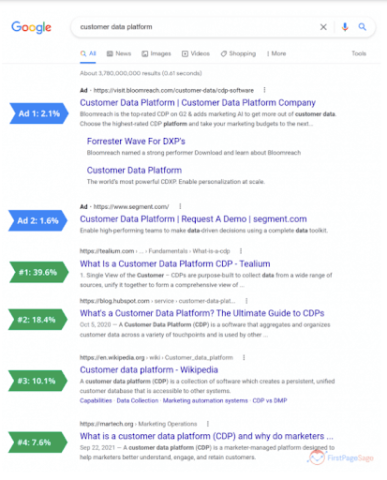
Organic results are probably what you’re most familiar with and engage with the most as a user. They’re found underneath paid results and usually under other SERP features such as people also ask questions.
Even though they’re located below other SERP features, recent data has shown that organic search results ranking on the first results page have higher click-through rates than paid ads.
Source: Smartinsights
However, the click-through rate decreases the lower a page ranks, impacting traffic.
To rank highly, companies need to understand how Google works and invest in search engine optimization strategies.
How Google ranks pages changes periodically. One day, your blog post may be ranking on the first results page, but a week later it could fall to the second page.
This could happen for a variety of reasons. Maybe a competitor targeted the same keyword or released new data, helping them earn the top spot. Google’s algorithm also changes fairly regularly, which can have
Small shifts in how a page ranks can impact traffic, so it’s imperative that companies keep track of their content so they can adjust as needed.
There are several tools that can help companies monitor the keywords they rank for and what position they’re in, including Google Search Console, Ahrefs, and Moz Pro.
To learn more about how to use these tools to track keyword rankings, read ‘7 Best Rank Tracking Software to Check Google Keyword Rankings.’
While ranking on the top page of Google is a great way to attract traffic, some pages aren’t meant to be seen by the public.
If you have a large website, you can improve your site’s performance by directing Google’s crawlers to only the most important pages on your site. This prevents Google from indexing duplicate content and less important pages that can have a negative impact in your rankings on Google Search.
Whether you have a page that holds sensitive data or the page simply doesn’t need to be indexed, here’s how to control what you share with Google:
If you’re looking to remove personal data from Google search results, check out Google’s resources here.
So, after reading this article you should have a better understanding of how the results on the first page of Google got placed there. You can be rest assured it’s not all sleight of hand and sorcery. It’s simply a matter of Google displaying what it perceives to be the most relevant and useful results for each search term.
As discussed, Google takes into account a wide variety of data sets to determine the best results. On the searcher side, this might be location or the underlying intent behind a query, whereas on the webpage side it might be relevance of content, mobile usability or authority.
Don’t expect it to stop here. Search engines are continually growing in complexity and, with the growing use of voice search, the evolution of search will continue.
Additional Reading
Bethany is a marketer, writer and public speaker for Yellowball, a digital marketing agency. She lives and breathes all things “search marketing” and when she’s not busy absorbing the world of SEO, she can be found dog-spotting in the beautiful parks of London.
See full profile