How App Companies Can Build Trust with Customers
Learn how app companies can build customer trust through better privacy practices, transparent communication, and stronger security to improve retention and...
Updated March 16, 2026

Building a B2B app used to take a year or more. Today, AI tools help teams validate ideas faster and ship working products much sooner.
Software development has changed fast over the past few years. AI tools now support teams across the entire product cycle. They help analyze information, speed up design work, and assist developers during coding. For B2B teams, this shift creates a new opportunity to build products faster without expanding the engineering team.
Building a B2B app usually requires a 12-month runway and a full engineering department.
Looking for a Mobile App Development agency?
Compare our list of top Mobile App Development companies near you
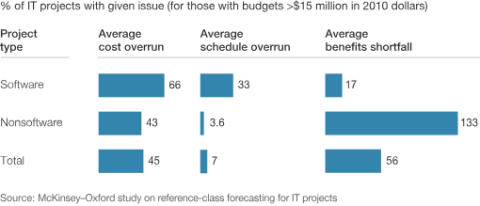
According to McKinsey's research on software project performance, the average enterprise software project ran over budget 45% of the time and over schedule 7% of the time.
But now? You could pull it up in a few months, and even as fast as weeks, depending on the complexity of what you’re building. Thanks to AI.
Of course, while AI can do a ton of things, knowing how to use it is what matters.
In this article, we’ll walk you through how your B2B brand can apply AI at each stage of app development, which tools are worth using at each point, and where human judgment still needs to take the lead.
AI-assisted app development does not mean handing your product roadmap to a chatbot.
It means removing the repetitive, low-judgment work from each stage of the build cycle so your team can spend more time on decisions that actually require product thinking.
According to GitHub's research on developer productivity, developers using AI coding assistants completed tasks 55% faster than those working without them. Over a six-month product build, that kind of compression means shipping a real product where a prototype used to exist.
By 2028, Gartner also projects that 75% of enterprise software engineers will use AI coding assistants as a standard part of their workflow.
The generative AI market for software development grew from $53.4 billion in 2024 to $66.77 billion in 2025, according to Grand View Research.

The reason for the growth and adoption is that development teams are shipping faster, detecting bugs earlier, and making UX decisions driven by behavioral data rather than internal debate.
A B2B brand spending 14 months on a traditional build cycle is competing against a team that shipped a working version in seven, ran it with real users, and is already on its second iteration.
This creates a wider gap every quarter, and it has less to do with budget than with whether AI has been wired into the process at all.
Picking up an AI tool at one stage and letting it handle the entire app development process often causes more chaos than not.
Of course, if you’re building a lite app, that works. But it leaves most of the value on the table.
And if you’re building something that provides real value to your team or other brands, it’s likely not going to make the cut.
So, instead of giving it all out to AI, here’s what to do.
This is where you conduct competitor analysis, buyer research, and feature prioritization, identifying which problems are actually worth solving versus which ones just feel urgent.
Tools like Perplexity, ChatGPT, and Consensus fit here and can synthesize existing research, surface patterns from competitor reviews, and help a product team pressure-test assumptions that would otherwise take weeks of manual analysis.
For best results, give AI a tight brief about your target buyer, their current workflow, and the friction point you are trying to eliminate.
Traditionally, you’d need numerous design team meetings, team discussions, and back-and-forths to get stakeholders to sign off on a B2B app prototype. Now, things are changing.
Figma's AI features can auto-generate layouts, suggest component variations, and prototype multi-step user flows, so a designer doesn't have to build every screen by hand.
Uizard takes rough sketches or written descriptions and converts them into interactive wireframes you can actually click through. Other alternatives, like UXpilot, only need a text prompt from you to design a fully ready user experience and interface template.
Each platform helps you visualize how your idea will look in production more quickly, rather than waiting weeks to detect a blocker. For B2B apps where user flows involve complex permission structures and role-based access, this matters more than it does in consumer products.
This is where the time savings are most measurable and most documented. GitHub Copilot and Cursor work as AI pair programmers, handling the boilerplate that consumes a disproportionate share of developer hours on API endpoints, CRUD functions, test scaffolding, and code documentation.
The 55% speed improvement from GitHub's own research reflects exactly these kinds of tasks, which is also where most of the real hours go in a build cycle.
There is a secondary benefit that rarely gets discussed. When a new engineer joins a project mid-build, or when an agency team takes over a partially completed system, AI coding tools help them navigate an unfamiliar codebase significantly faster.
That onboarding friction has historically been one of the harder costs to quantify and one of the easier ones to ignore until it becomes a delay.
QA is where timelines die. A manual testing cycle that has to restart every time a feature causes recurring delays and delays your app deployment.
AI-powered testing tools like Mabl and Testim automatically generate and run test cases, catch regressions as they happen, and surface anomalies that manual testers miss under sprint pressure.
Google's 2024 DORA Report found that teams using AI-enhanced continuous integration and delivery pipelines reduced their mean recovery time to under 1 hour, with the top performers recovering from incidents in under 30 minutes.
For B2B apps where downtime directly costs customers, the reliability gap between AI-assisted and traditional QA is a real competitive variable you need to leverage.
Getting to launch is the first milestone. What happens in the 90 days after usually determines if the app gains traction or gets delayed.
Teams scale onboarding, customer support, and operational workflows during this stage. Many rely on AI-driven monitoring tools, workflow automation systems, internal dashboards, and a virtual assistant agency to keep operations running smoothly.
Beyond these operational supports, post-launch AI tools serve two distinct roles.
On the monitoring side, tools like Datadog and Amplitude surface behavioral anomalies, show you where users are actually dropping off, and flag infrastructure problems before they affect enough users to show up in support tickets.
On the iteration side, AI-driven analytics help your product team prioritize features based on what users are actually doing rather than what stakeholders assume they would do.
AI also significantly cuts production time for campaign assets. For instance, your team can easily set up an email sequence to reach more customers and onboard new users through Klaviyo or HubSpot in roughly the time it used to take to write a single sequence from scratch.
These AI tools speed up each stage of app development. They reduce repetitive work and let teams focus on higher-value tasks.
| Stage | Recommended AI Tools |
| Ideation | Perplexity, ChatGPT, Consensus |
| UX Design | Figma AI, Uizard, Galileo AI |
| Development | GitHub Copilot, Cursor, Tabnine |
| Testing | Mabl, Testim, Sauce Labs |
| Analytics | Amplitude, Mixpanel, Datadog |
Each tool set works best in its stage. Knowing their limits helps teams use AI effectively.
If you want to use AI effectively, you need to know what you are building and why before you prompt anything. The AI simply handles the execution.
If you reverse the sequence and ask AI to define the direction, the result is usually a faster path to something no one actually wanted.
So, here are a few things to consider:
AI is changing how we code, build, and deploy. You see it on several vibe-coding platforms like Lovable and Emergent. But if you want to build an app that fits into your B2B needs, not just some calculator, you need to treat AI as an assistant, not your primary brain.
The best place to start is wherever your current build process loses the most time. Pick that stage, introduce one AI tool that makes it easy, and measure what changes over a sprint. Then, gradually scale into other stages for a smooth build.