
How App Companies Can Build Trust with Customers
Learn how app companies can build customer trust through better privacy practices, transparent communication, and stronger security to improve retention and...
Updated May 29, 2026

We all know how stressful deploying a development project to production can be. Factors like time constraints and pressure can lead developers to overlook errors without considering how they could impact real users when the product goes live.
Updated July 29, 2022
Based on our experience developing software for 10 years at SoftwareMill, we’ve come up with a list of hassle-free ways to help developers get production-ready.
Looking for a Mobile App Development agency?
Compare our list of top Mobile App Development companies near you
Browse software development firms on our trusted directory of service providers.
Before deploying an app to production, make sure it’s working properly beyond just on your machine. Take the time to test your app in a staging environment before progressing further to ensure it functions as intended.
A staging environment is “a complete copy of the production environment (hardware and software), independent and similar in terms of location and database load.” There are a variety of different types, each with a specific purpose. Consider whether a quality assurance (QA) or user acceptance testing [UAT] space best fits the needs of your development project.
In terms of caliber, testing environments range in functionality, dependencies, and capabilities. Development “sandbox” environments come highly recommended.
The figure below shows how a sandbox works within a technical staging environment.
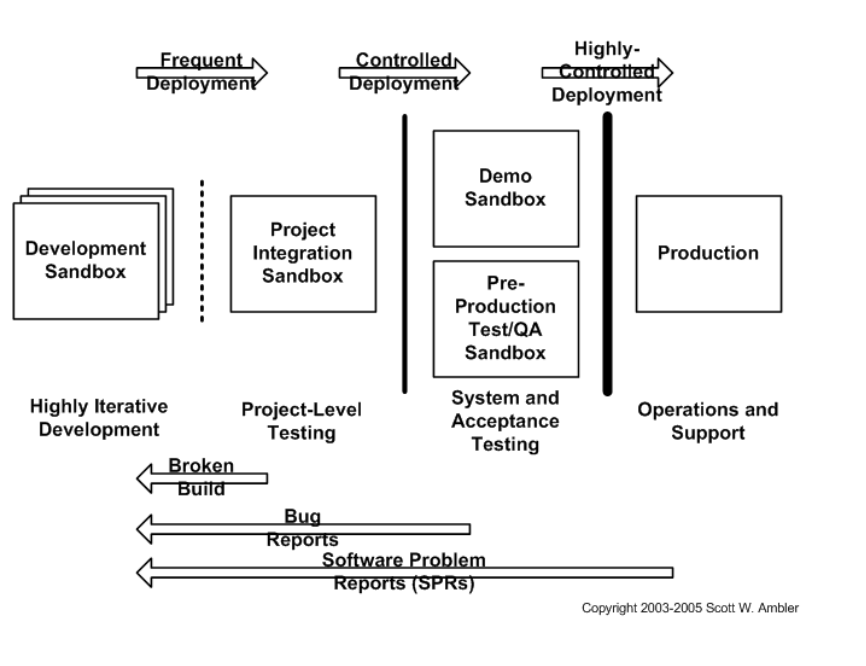
Full-copy sandbox versions offer an environment that’s as similar to the one you’ll use in production as possible.
Learn the lifecycle of a mobile application by reading this article from Clutch.
Once you set up the staging environment, run a full scope of automated functional tests to verify that the application and any new features work correctly. Developers run these tests to assess whether or not applications function correctly in relation to users and to the rest of the system.
Some examples of automated functional tests include:
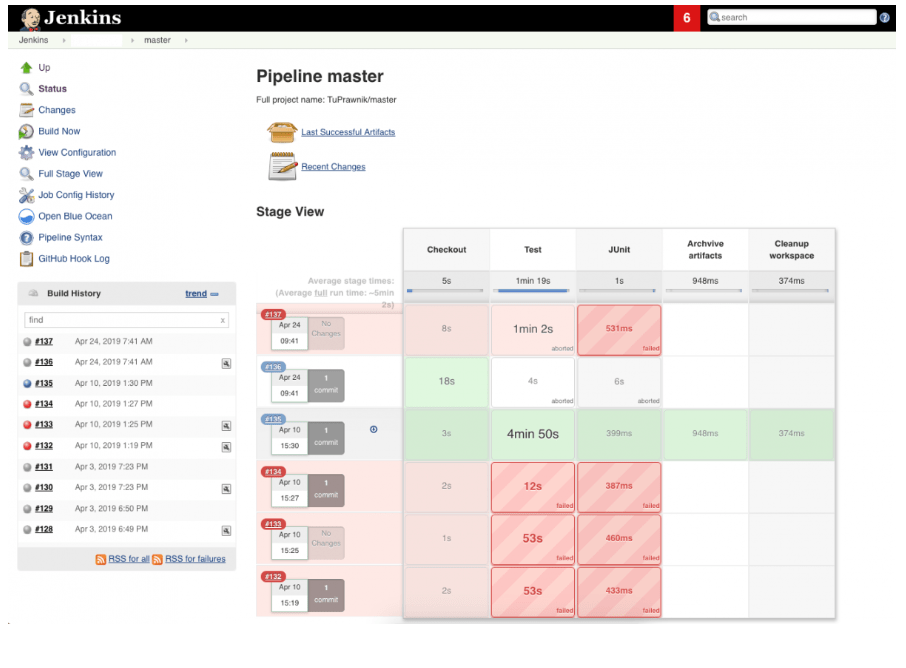
This screenshot of Jenkins above is from an open-source automation tool written in Java. It shows automation testing of one of our projects at SoftwareMill.
If there are still some bugs in the code, now is the right time to detect them and get every error fixed.
QA testing can make rollout seamless for development team members by lessening their future workload and assisting with the continuous deployment of their new products.
Monitoring the app’s performance is the next step to ensuring you’ll be able to quickly isolate any problems that might come up or prevent potential downtime.
Make sure to collect the following types of data:
Collect, store, and analyze these metrics. Configure alerts to send an email to your team informing them of errors so they’re always aware of the system outages when they occur and can quickly communicate with users accordingly.
As monitoring has recently evolved into observability, consider these factors well in advance while designing the code. “Observability as a code” assumes that monitoring is baked directly in your code and accounts for not only logs but also traces and metrics.
“Observability as a code” could be based on a range of monitoring tools and dashboards. It gives you highly granular insights into the behavior of systems along with rich context, perfect for debugging purposes.
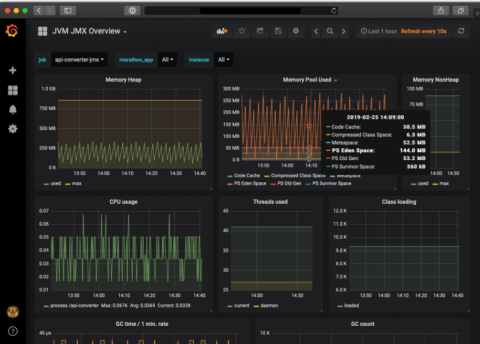
This screenshot of the metrics monitoring tool Grafana shows current basic data about a Java application, including memory usage, CPU usage, code changes, and number of Threads created (own materials.)
During one of our projects, the sensitivity of data in the app posed a challenge to our team. The business we worked with didn’t perceive the logs we created as valuable or worth verifying.
The logs we had collected, stored and analyzed weren’t examined and verified from the business perspective. They worked fine from the development standpoint but lacked value on the business side, which is a common misunderstanding. Our client didn’t grasp the significance of what the documented changes in the system reflected.
We learned a hard lesson when we experienced an outage just after the release. Nobody knew what happened to the system or, even worse, what its current status was. Since the logs only held meaning for the developers and the team couldn’t link them to real data, it took many long hours of debugging to fix.
Our Main Takeaway:
Logs should have equally demanding business requirements as the code itself. They should be easy to read from a technical and business perspective, even when the system deals with sensitive data.
Interested in machine learning for your business? Consult our list of specialists.
Before rolling out the new version of the software to the entire user base, launch the change to a small subset of users. This deployment strategy can provide you with quick answers before launching to a broad audience.
Named after the mining practice of using birds of the same name to detect poisonous gasses that could impact workers, a canary release to a limited subset “detects potential bugs and disruption without affecting every other system running.”
The limited group for a limited launch could be any group of trusted users, such as your beta testers or other operations teams within your organization. Using this technique reduces risk compared to introducing a new software version in full production.
You’ve been working on the new software version for months. Everything has been thoroughly tested, monitored, and works in the staging environment… so everything should go smoothly, right?
What if it doesn’t, though, and a major failure crashes the whole app? In this circumstance, have a process in place to revoke all the changes immediately. Read more about rolling the changes back to the last working version in this article.
Prevent issues in real-time by having a methodology in place to pause release.
For critical failures, a rollback is a quick but only temporary fix in the deployment pipeline. You should always be able to react to critical errors in just minutes, or at most, within hours. Time the release far away from off periods like long weekends so staff will be on duty to make fixes if needed.
Major fixes usually require more workforce and a few dedicated days to debug and resolve. Truthfully, no matter how well prepared you are for production, failures can always occur.
Watch a great presentation about resilience patterns from Devoxx Antwerpen by Uwe Friedrichsen to learn more.
Ensure your team members have a channel to communicate about your continuous delivery and more.
Identify the parties your product release will affect the most and how you plan to communicate with them. If the system is actively on fire, you won’t have the time to figure out the support email address or the name of the developer responsible for resolving issues.
Agree on the dedicated communication channels with a client and end-users in advance. Keep everyone in the loop about what went wrong, the temporary solution, and when you expect to have it solved.
We named this lesson our “Exercise for Emergency Response.” Similar to the joint efforts of different emergency service units during a rescue operation, it’s important to have a crystal-clear plan to address urgent situations in development.
During the event that prompted us to put a process in place, we realized there was no evident party responsible for making the changes we needed on the client’s side. Our process dictates how to proceed to optimize our reaction times. We’ve practiced it several times so that everyone knows what to do.
Each person we communicated with only knew part of the system, so they couldn’t address the full impact of the failure. As a result, no one escalated the issue. We spent way too much time gathering the necessary information.
Once the CTO got involved, he acknowledged the issue and got the main architect and all the product owners on-premises in a room. Together, we were able to solve the problem.
What We Ultimately Learned:
It’s critical to have a detailed rescue plan prepared in advance. Involve your client in the preparation to make each party aware of the risks and assign specific ownership so everyone knows what next steps to take in the case of an outage. This also lets both parties know about the compatibility of each person’s workflow and methodology.
Like most developers, we wish that every production deployment could be effortless.
Since it’s impossible to optimize for every potential pitfall, make the most out of all the effort you invested in the development process by strategically prioritizing your focus.
Devoting extra time at the end of the production process to the key considerations we’ve laid out can make or break your next app release.
Additional Reading:
Aleksandra Puchta Górska is a Marketing Manager at SoftwareMill, a consulting and custom software development company. She is passionate about remote work and its impact on company culture.
See full profile