Lead Quality vs. Lead Quantity: Why B2B Teams Are Rethinking Their Funnel in 2026
Bigger buying committees and tighter budgets are forcing B2B teams to rethink lead quality vs. quantity. Here's how top teams rebalance the tradeoff in 2026.
Updated February 19, 2026

When someone searches for a video on YouTube, you want them to find your content first. Use these 10 steps to improve your YouTube videos' ranking in search.
YouTube is a powerful player in the social media industry.
Making a high-quality video takes a lot of work, but maximizing your video for high rankings does not. There are proven, targeted search engine optimization tactics to grow the number of views and the popularity of your YouTube channel.
Looking for a Digital Marketing agency?
Compare our list of top Digital Marketing companies near you
Searching for certain keywords on YouTube yields countless other results. How do you better the chances of your videos ranking high in those results?
Looking to hire a YouTube PPC agency? Take a look at our directory.
SEO usually refers to optimizing your website to improve search engine rankings, such as Google, Bing, and Yahoo! Similarly, YouTube SEO is the process of improving your video content and optimizing it so it becomes more visible on YouTube. This can help your video content reach more users.
Similar to search engines, YouTube uses search algorithms to help users find videos that match their search queries. The algorithm considers factors such as:
By using these indicators effectively, you can improve your video's ranking on YouTube and get your brand in front of more users.
These 10 tips will give you the insight to maintain or improve your YouTube video rankings:
You can use this article to learn how to complete the steps necessary to improve your YouTube rankings on search.
One way to rank on YouTube is to appear as a suggested video.
The best way to make your video show up as a suggested video is to use the same tags as a current suggested video in your category.
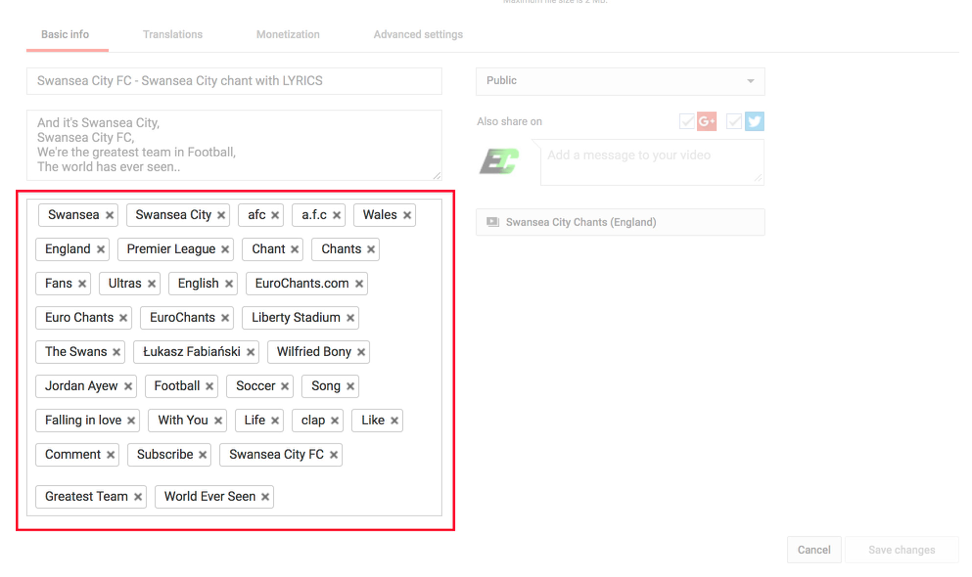
YouTube uses tags to know the content of the video. So, if you use the same tags as a popular video in a category you’re targeting, YouTube will see that your topic is similar to the popular video and give it importance.
A tool like vidIQ can help you with video tags.
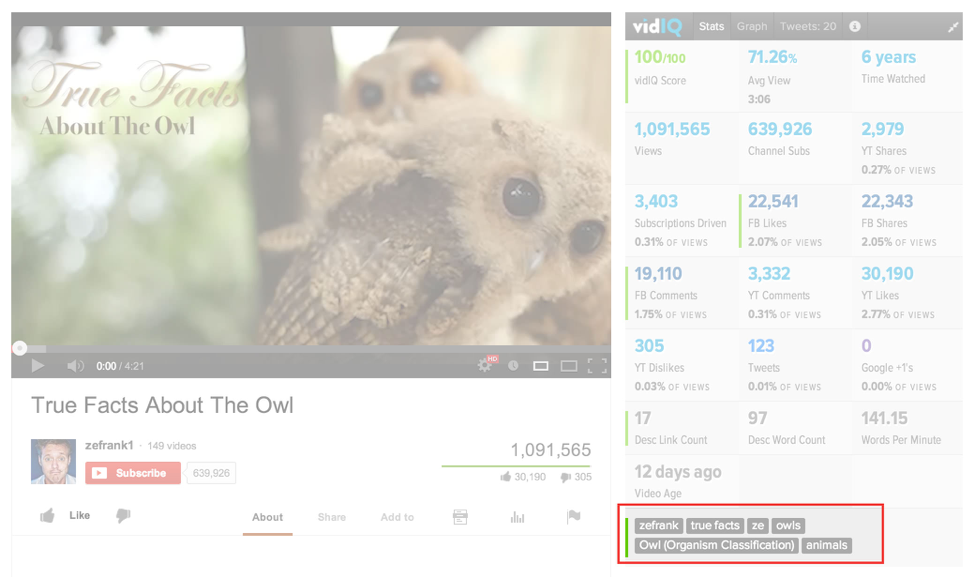
Tools like vidIQ can easily help you find the keywords of popular YouTube videos.
Using the appropriate tags can attract your target audience online.
However, YouTube’s recommendation system relies far more on viewer behavior than metadata alone. Signals such as watch time, audience retention, click-through rate, and engagement tell YouTube whether viewers enjoy your content once it is shown.
If your video consistently keeps viewers watching and encourages them to continue watching other videos, YouTube is more likely to surface it as a suggested video alongside popular content.
Video similarity also plays a major role in recommendations. Beyond tags, YouTube analyzes titles, descriptions, thumbnails, spoken words, and viewing patterns to determine which videos are most likely to interest the same audience. Creating videos that match the format, pacing, and intent of top-performing videos in your niche increases the chances that YouTube will recommend your content next to them.
The second strategy is to use the TAB (targeted, alternative, broad) formula for video tags.
Because of keyword stuffing and spamming, tags are not as important as they used to be. However, they still play a key role in YouTube rankings.
The purpose of tags is to help YouTube understand the content of your video.
Rather than using a bunch of different tags, try a small number of highly specific tags.
YouTube weighs the first tag the heaviest, so your first tag should always be your targeted keywords, such as “World’s Fastest Sports Cars.”
The next step is to create two or three tags that are simply the alternatives to the main keyword such as “Sports Cars” and “World’s Fastest Cars.”
To find these alternative tags, search your main keyword on YouTube. The final one or two tags should be broad and tied to the overall topic or industry, such as “World’s Fastest Car Manufacturers.”
Similar to how your company appears in SERPS with keywords, you can replicate the same with YouTube.
To improve YouTube ranking, companies should always use their target keyword in your video title.
YouTube weighs words that appear at the beginning of the title more heavily.
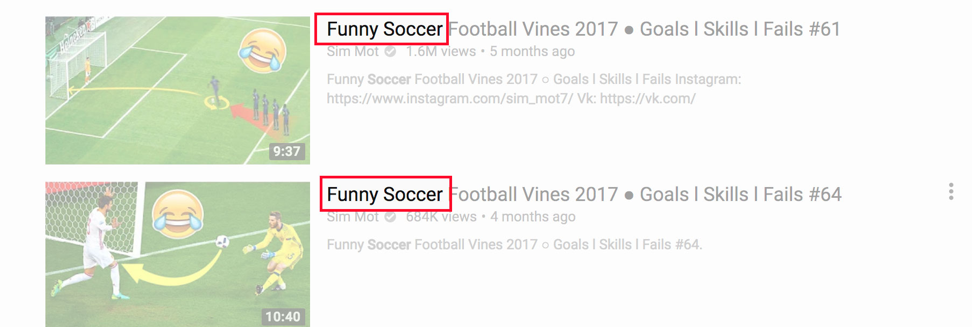
Rather than writing “Top Funny Soccer Goals Ever Scored,” you would write “Funny Soccer Moments: Top Goals Ever Scored.” Here, your keyword is “funny soccer,” and it makes the keywords frontloaded.
Using descriptive keywords will add more eyes (and clicks) to your company's YouTube video.
Equally important is choosing the right keywords in the first place. YouTube keyword research should be based on actual search behavior within the platform, not just traditional Google SEO tools. Reviewing YouTube’s autocomplete suggestions, analyzing “People also watched” videos, and studying the titles and descriptions of top-ranking competitors can reveal high-intent phrases users are actively searching for. These insights help ensure your video aligns with real demand rather than assumed interest.
Companies should also balance search volume with intent and competition. Broad keywords may attract more searches, but they are often highly competitive and vague. More specific, long-tail keywords (for example, “funny soccer training fails” instead of “soccer highlights”) tend to rank faster and attract viewers who are more likely to watch longer and engage. This combination of relevance, clarity, and intent ultimately strengthens YouTube SEO performance.
Longer the better when it comes to YouTube ranking.
Long descriptions help rank videos better on YouTube than short descriptions because they give YouTube a sense of what your content is about.
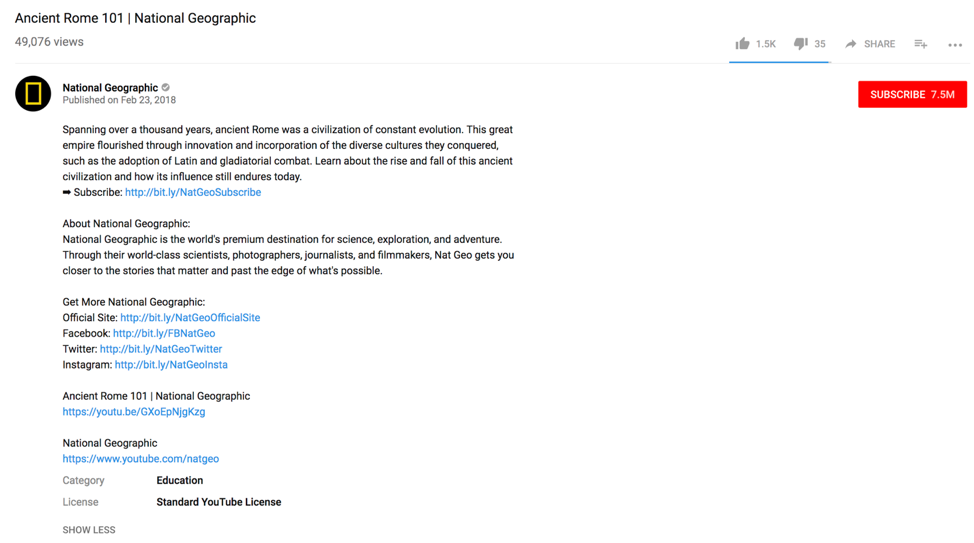
You should write about the video's content without revealing too much, so 100-200 words is optimal.
This means that someone will read the description and still want to watch your video to find out what happens.
Make sure all information is relevant so it doesn't negatively impact YouTube ranking.
In SEO, longer videos tend to outrank shorter ones. In fact, the average length of a video on the first page of YouTube search results is 8-9 minutes, according to a study done in 2025.
Longer videos naturally rack up more watch time. The ideal video is between 7 and 15 minutes long.
Make sure the content grabs the right amount of attention to avoid users from not finishing your clip.
A straightforward way to rank your videos is to create and leverage many engagement signals, such as shares, likes, comments, and subscriptions.
Taking the time to engage with the video usually means people enjoy your video.
Tests by Backlinko show that the most important engagement signal is comments.
How do you get a lot of people to comment on your video?
Backlinko found, through extensive testing, that the most effective approach is to include a specific call to action.
Rather than saying “Leave a comment,” ask viewers to leave a comment talking about a certain topic on the video, such as “What is your advice?” and “What do you suggest?“
These prompts can boost engagement and brand awareness while improving YouTube rank.
If your video gets a lot of clicks, you should experience a YouTube ranking bump.
To get more clicks, you should use effective thumbnails.

Designing with strategy can help you get more clicks. Make sure to use video colors that are different than YouTube colors to make your video stand out.
Additional Reading: 'How Your Website Can Use Colors That Increase Sales'
Within the bright thumbnails, you should use big, bold text. These can get more click-through than thumbnails without any text because the viewer can easily understand what the video is about, especially when the video gets linked on a different site that does not have the YouTube title.
You should not write more than 39 characters of text because your title will get cut off on Google’s search results. For context, Google only allows 50 to 60 characters.
It is important to think smart about how your content is presented on YouTube to benefit ranking.
YouTube titles with additional details in brackets or parentheses can increase click-through by 38 percent.
You can add extra information in a few short words rather than having a lengthy title.
As you can see in the example below, the music video has "official video" in parentheses to add more credibility to the video.
This is better than having a long title like "Harry Styles Official Video for As It Was" because that is harder for potential viewers to read.
Keep the title short and to the point – that will improve ranking.
Everyone has videos that do better than others. There are many reasons behind this, but one detail you can find is where the peak of your engagement is.
To do this, go to Google Analytics, and click on the Audience Retention report. This provides a report of where the attention begins to drop off.
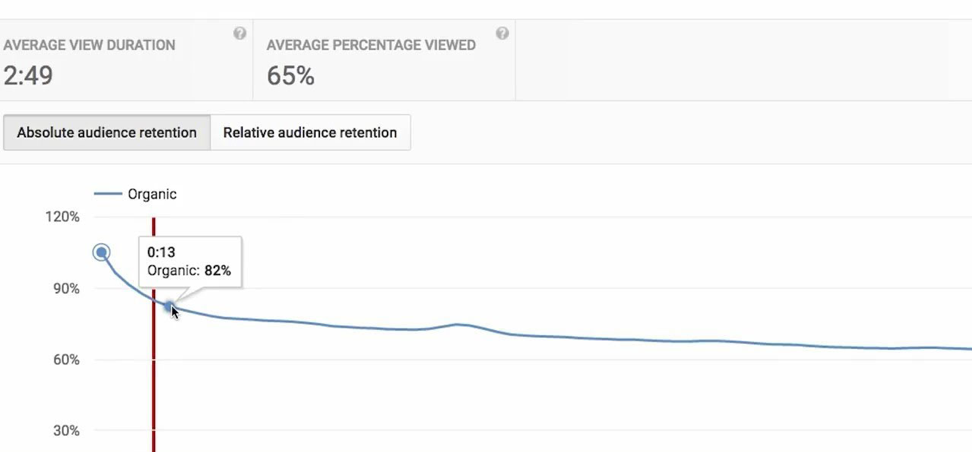
This typically happens after something funny or an interesting graphic or change of camera angle. User attention drops off after this point because a pivotal moment has occurred in the video.
To keep viewer attention after the pivotal moment, make sure to keep your content attention-grabbing – and don’t go too long without another pivotal moment.
The final note is to include the year in your title. This also increases clicks and viewership.
People want to know they are watching a current video, especially if it is a tutorial, and adding the year in parentheses in the title helps with that.
This will add to the freshness of your video content, helping it rank better on YouTube than similar videos.
Does your company want to know how to improve your YouTube rank?
These tips should give you a great start to improving your YouTube channel and increasing traffic, engagement, and rankings.
Even if you have completed some of these strategies in the past, YouTube constantly updates how it ranks and scores videos. Your team should be always thinking about the technical and content factors that boost video SEO like subtitles, video length, and more.
It is always important to keep video content engaging, so use these strategies to improve your overall business strategy online.
A YouTube PPC management company might be the right choice for your business – explore your choices here.
Check out Clutch on YouTube!
Emin Sinanyan is social media strategist at Mellbe. In his free time, he enjoys writing tutorial, strategy-based articles like this one to help others. He also enjoys reading books, swimming, and drawing.
See full profile