10 Actionable Link Building Tactics to Build Brand Authority & Legitimacy
Discover 10 actionable link building tactics to boost brand authority and rankings. Learn how quality backlinks build lasting trust in the AI search era.
Updated February 16, 2026

Ranking high in search engine results used to be a game of numbers. Then, the numbers were not enough anymore – deep, trustworthy & well-structured content started to play a significant role in boosting brand visibility in the search results. And although content still serves as a foundation for effective SEO, there is also a whole list of factors – including UX, site speed and structure, crawlability – that have a tremendous impact on how websites and e-stores rank in search results.
In this article, we explore how technical aspects of website implementation may affect brand visibility in both traditional and AI-powered search.
In its early days, SEO was largely about keyword density, meta tags, and backlink volume. If you had the right keywords in the right places and enough inbound links, you could rank – regardless of actual content quality or user experience.
Looking for a SEO agency?
Compare our list of top SEO companies near you
As Google’s algorithm matured, it started prioritizing relevance, authority, and user intent. Updates like Panda, Penguin, and Hummingbird penalized thin content, manipulative link schemes, and keyword stuffing. This started the era of “content is king,” where quality, originality, and value became central to ranking.
But in recent years, SEO has significantly re-evolved. Search is now experience-driven, not just content-driven. Google evaluates how users interact with your site: Are they satisfied? Do they bounce? Does the site load instantly? Is it accessible to everyone on every device? Answers to all these questions matter as much as quality content.
Every cursor’s move tells Google something about the website, and with the rise of Core Web Vitals, performance metrics (like LCP, CLS, or INP) have become real ranking factors.
Google uses those performance metrics while crawling and indexing your website. Their main goal is to measure how swiftly various page elements respond to different user actions. And the rule of thumb is: the faster the response times, the better for the user and thus for your Google rankings.
LCP measures how long it takes for the largest visual elements, such as big images or blocks of text, to appear on the screen when the page is first opened. The goal is to have this happen within 2.5 seconds so users don't have to wait too long to see meaningful content. Keeping the metric on the right level ensures the page feels like it is loading quickly and does not leave users staring at a blank screen.
INP measures how quickly the page responds when you first try to interact with it – like clicking a button or a link. The site should respond in 200 milliseconds or less to feel snappy and responsive. It stops user frustration by making sure the site reacts quickly when you try to use it.
CLS shows how much the page layout moves around unexpectedly during loading. For example, if a button suddenly shifts and you end up clicking the wrong thing, that’s a bad experience. A good score means the page stays visually stable as it loads, with a score less than 0.1.

It’s worth keeping in mind, though, that the Core Web Vitals work in tandem with other ranking factors like content relevance and authority. Content remains a foundation,
which means great Core Web Vitals alone won't guarantee top ranking if the content is not relevant.
On the other hand, even the greatest content of a poorly designed and implemented website may be invisible to users due to low ranking caused by poor results in the Core Web Vitals test. Therefore, keeping good scores for these metrics helps your website pass the test and outperform competitors who fall short on these important signals.
To check the Core Web Vitals scores for your website, you can use several free and reliable tools that measure and report these important user experience metrics:
What can cause poor Core Web Vitals? – that’s the question you need to ask yourself, or your web dev team, when you see the Core Web Vitals need improvement. From our team's experience, there are several common problems that usually need to be addressed by web developers and site editors.
When the server takes too long to start sending data, it delays the main content loading and affects LCP. This can be due to poor hosting, server location, or misconfigurations.
Excessive JavaScript and CSS files slow down page rendering and responsiveness. Large or unoptimized scripts can block the main thread, causing delays in interaction metrics like INP or FID.
Large image files increase load time significantly, hurting LCP. Images need to be compressed and optimized.
Multiple requests for scripts, styles, and media increase loading time. Combining files and reducing requests may help.
Unexpected movements of page elements during loading, such as ads or dynamically loaded content without reserved space, cause poor CLS scores.
External widgets, ads, analytics, or social plugins can slow page performance and block the main thread.
Non-responsive designs and heavy assets can cause long load times and interaction delays on mobile devices.
Having an excessively large Document Object Model (DOM) with many elements can reduce site responsiveness and increase page processing time.
Poorly written code has its consequences for SEO. Unused CSS, excessive JavaScript, and redundant scripts are something your web dev team should deal with if you aim at a complete SEO optimization process. Keeping the code clean post website launch can pose a challenge, but an experienced team can take the living website over and diagnose areas to fix.
Having analyzed the platform, the dev team should offer their expertise to minimize code bloat and find the balance between SSR (Server-Side Rendering) and CSR (Client-Side Rendering). A major part of the analysis includes whether the current suite of plugins does its job well for the overall site security and performance or if it should be curated to leave only those plugins that bridge SEO-critical functionality (like structured data or sitemaps) and high functionality.
If you aim at a long-term SEO optimization process, it’s crucial to choose a CMS that will help you optimize the site and its content easily, because, as we can see, the list of factors affecting SEO changes dynamically over time.
We’ve seen several cases where clients weren’t aware that the wrong stack can generate costs that are hard to control in the long term. These costs don’t appear in billing or licensing fees. Instead, they surface later: in maintenance, requests from teams to simplify content handling, and in future-proofing, where a CMS must adapt to changing trends and offer access to a broad talent pool of engineers.
It is crucial to think through the structure of links, the organization of sections, and the flow of communication from the very beginning. Preparing this at an early stage allows you to avoid problems later – such as mass redirects, manual link verification, or chaos caused by accidental changes to content.
Keep in mind that you’re not building the site once and for all. Instead, think of it as a growing and evolving organism that requires your constant attention – not only in terms of adding new content and optimizing the already added, but also in terms of tech health. Running regular audits of the site performance metrics, structure as well as keeping the CMS with all the plugins up to date, will allow you to avoid problems that may harm your SEO rankings and overall brand visibility.
Close cooperation between development, UX, and content teams is essential because the content team is accustomed to CMS features that facilitate editing and adding content. When developers and UX designers fail to take these needs into account, problems start: training needs to be caught up on, migrating old articles becomes more difficult, and everyone struggles with chaos due to differing visions and standards. Effective collaboration from the very beginning helps to avoid such difficulties.
According to data from SimilarWeb, over 68% of global internet traffic now comes from mobile devices (source). In its UX-centric approach, Google shifted to mobile-first indexing. This means its algorithm primarily uses the mobile version of your website to index and rank content in search results. Because Google’s algorithms emphasize user experience, a poor mobile experience can lead to lower rankings regardless of how good your desktop site is.
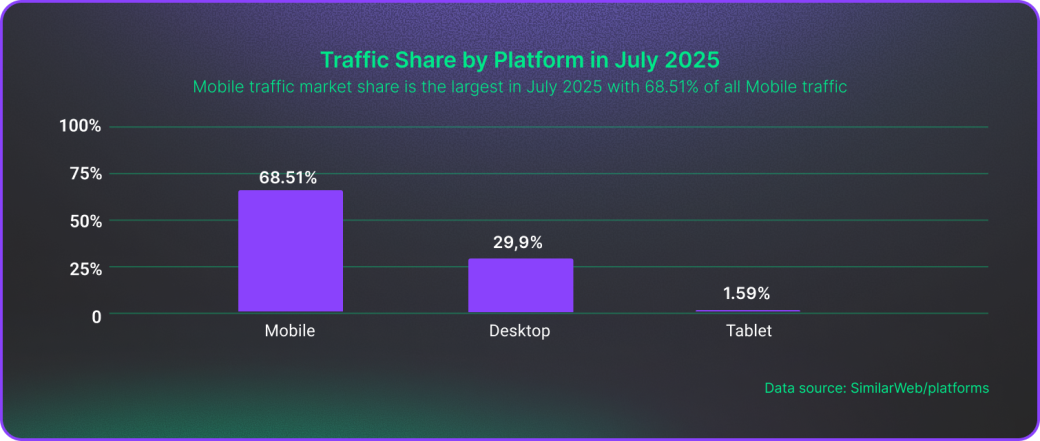
In consequence, if you skip your site’s mobile version in your SEO strategy, or drop part of the content when compared with the desktop version, your rankings may suffer.
That’s why we highly recommend a mobile-first approach to website design and development to our customers, keeping in mind their site's SEO performance at all times. In practice, this translates to designing the site for smaller screens and then scaling up for desktop, and having all content, images, and interactive elements work flawlessly on mobile.
To make sure your site is mobile-friendly, you should monitor:
Optimize for fast mobile page speeds, responsive layouts, and touch-friendly navigation as well as regularly test mobile usability using tools like Google's Mobile-Friendly Test and PageSpeed Insights.
The meaning of “ranking” in search results has changed a lot since Google introduced machine learning and AI-powered overviews. Google now often provides answers to users’ queries above the list of high-ranking pages, which leads to the rising number of zero-click results.
To make your brand visible in the AI-generated responses (not only in Google’s, but also in ChatGPT, Perplexity, Claude and others), you need to take care of the good practices that assist with website optimization.
Website owners too often think of their websites in the here and now. They expect their product to work immediately and to meet ongoing business goals right away. Yet only a fraction of entrepreneurs plan for website evolution, including ongoing support, updates, and scaling.
For many companies, a website is the center of business. As their business grows, their site must adapt to that progress. Choosing the right tech stack – one that will not bring limitations - and an experienced team of developers who anticipate your business future, helps avoid bottlenecks and, ultimately, the costs they incur.
The evolution of SEO is the perfect example of how quickly the web environment can change and call for website owners’ flexibility. In 2025, they need to treat content in the broadest terms and drive their efforts more toward a holistic digital experience – fast, secure, accessible, trustworthy, and structured – than just advocating for “writing better articles”. Content is vital – but not enough on its own anymore.
What we need is a holistic approach where valuable content is paired with regular website infrastructure audits and page performance tests. Taken together, this makes content tied to the overall website experience and guarantees top ranking optimization.
When choosing a web development partner, make sure you pick one that understands these nuances and will support the technical, UX & security aspects that impact your website’s positioning.