![How to Create a Corporate Training Budget [With Template]](https://img.shgstatic.com/clutch-static-prod/image/resize/715x400/s3fs-public/article/f8cb0a8fb8e36a14ff257e02ce8b9475.jpg)
How to Create a Corporate Training Budget [With Template]
Create a budget for corporate training services using our free template.
Updated December 6, 2024

Before investing in a tool and onboarding our teams, we need to take a step back and carefully consider some key criteria that will help us determine whether that tool will actually serve our team as we pursue our overarching business objectives.
Tools like project scheduling software, time tracking apps, and bug tracking programs are useful, but they are only a means to an end. They're only as useful as the systems and culture we have in place for using them.
How do I know this? I have over 15 years in both strategic thinking and tactical implementation from a career at top digital agencies including FCV, Dare, Wunderman, DLKW Lowe and DDB. I’m also a Certified Scrum Master and PRINCE2 Practitioner.
Looking for a BPO agency?
Compare our list of top BPO companies near you
I’ve written extensively about the best apps for communication, productivity, and requirements management. I understand how tools can help. However, my years of digital project management experience has taught me time and time again that it’s not what tools you have—it’s how you use them.
It's common for people working in digital-oriented jobs to use at least a dozen tools. These may include tools for:
But instead of blindly rolling out another tool, consider these three common scenarios business consultants often encounter where it's probably better to hold back and give some attention to your already existing tools and processes.
No matter how intuitive the tool you plan to implement, you can’t expect your team and their various projects and data to jump ship and embrace the new path forward without some guidance.
For example, you may have a smattering of files, programs, and systems that need to be incorporated into whatever new “tool” you have your eye on.
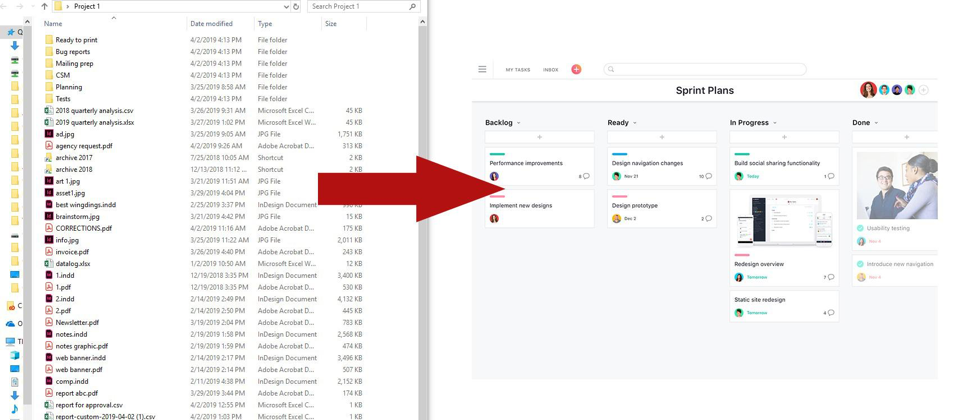
Block off several hours in your calendar and make sure you have a concrete plan for consolidating and granting access to all of the files that you'll import into your new system.
You will need to know how to move everything from your old system to your new one and you need a roadmap for how all of that is going to happen. Your roadmap will help break everything down into more manageable steps.
Some questions you can ask yourself include:
You need hard dates and deadlines for your tool implementation roadmap to be successful.
You’ll also need backup dates and deadlines for when something inevitably goes wrong along the way.
Your roadmap should be your compass. If your roadmap isn’t comprehensive enough that a new employee can look it over and run with it, then you are probably not ready to take action.
A new tool introduction without a solid foundation is doomed to fail before it begins.
If you don’t make time to communicate with your team, tool implementation may fail.
Communication is a key component of success in all areas of project management—but the importance of clear and dedicated communication cannot be understated when it comes to navigating any sort of change.
Ask yourself:
Your team needs to hear from you if you are bringing any new component into their daily work life and they need to hear from you regularly.
Set aside time for planning, training, Q&A, and feedback sessions for your teams to communicate and get onboarded.
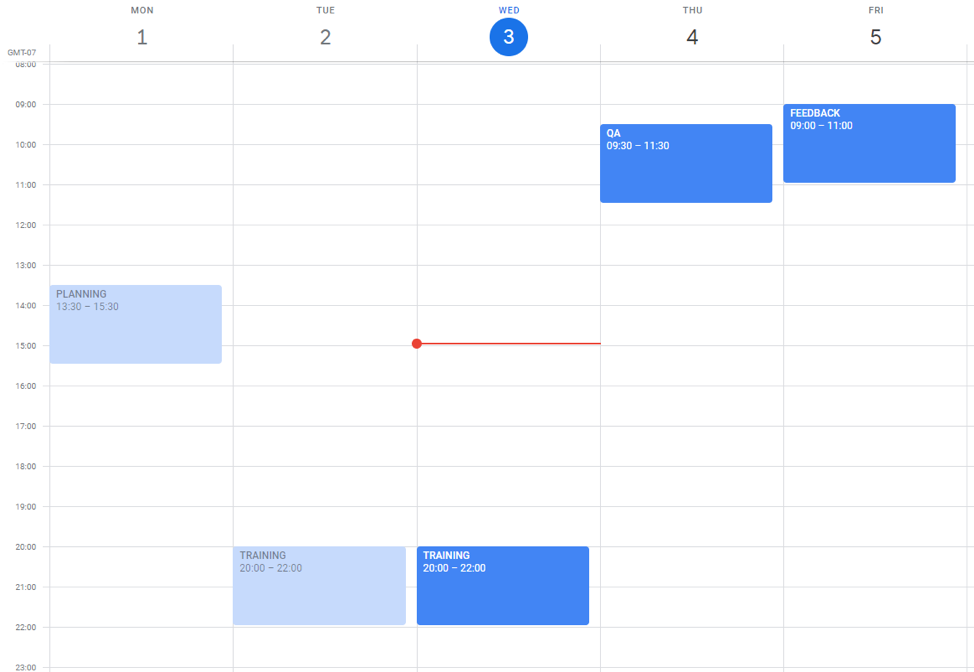
Carve out plenty of time to communicate:
You need to keep everyone in the loop and make space for ongoing input from your team.
If you can’t or won’t do this, then parading out a new tool just won’t work. This can be particularly tricky if you have distributed teams that cannot gather in one place to meet easily.
If you don’t have the time, space, or energy for dedicated communication, then scrap the new tool and focus on something more manageable.
Technology changes so rapidly that it’s not hard to get swept up in the latest and “trendiest” project management tools. Maybe you tried something new and it was a bust with your team, collecting dust in everyone’s bookmark bar, log-in keys long forgotten.
You might be convinced that you can revive it, or another tool like it, but consider this: If no one was using it then, why would they use a different-but-similar one now?
Don’t fall into the trap of spending money on “better” or more “functional” tools when the number of features was never the primary issue.
Often, companies will jump on the bandwagon of whatever new “tool” is generating buzz in your industry, even if you have tried and failed at introducing similar tools in the past. Learn to diagnose the root of the problem: Is it the tool or the team causing setbacks?
If you are missing deadlines with your current project management software, a new tool isn’t going to change the mindsets and habits that are causing these delays. You need to address the underlying problems, not cover up the symptoms of a dysfunctional team.
Similarly, don’t replace a tool with one that is better reviewed by other customers when your own team’s needs should be your ultimate compass.
A thousand five-star reviews should not override your team’s unique and specific needs. If they are happy with whatever they are currently using (or not using), don’t force change based on a popularity contest.
A new toolset might reinvigorate your project, or it might quickly turn into desktop or browser clutter.
Introducing a new tool without planning and forethought is like putting a band-aid on a broken arm — Sure, it’s “easy” and maybe you’re pointed in the right direction (sort of) but it’s not going to fix any underlying workflow issues (or broken bones).
Before you roll out another new tool, make sure you:
After considering all of the above, you might realize how your team functions is what's causing problems.
Tools are handy — but having an innately high-functioning, well-trained, confident and cooperative team is even handier.
I’m Ben Aston, a digital project manager and founder of The Digital Project Manager, one of the fastest growing online resources for digital project managers. I've been in the industry for 15 years at top digital agencies including Dare, Wunderman, Lowe and DDB. I’ve delivered everything from video virals to CMS, flash games, banner ads, eCRM and eCommerce sites across automotive, utility, FMCG, and consumer electronics brands.
See full profile