
How App Companies Can Build Trust with Customers
Learn how app companies can build customer trust through better privacy practices, transparent communication, and stronger security to improve retention and...
Updated May 29, 2026

The software development lifecycle (SDLC) is the process companies use to structure how software is planned, built, and maintained. Defining the right model at the start matters because it influences cost, timing, and how closely the final product matches business requirements. No single model works best for every project. A team working under strict regulations will need a different approach than a startup testing new features week by week. This article outlines widely used SDLC models, with guidance on when to apply each one and what trade-offs to expect.
SDLC is the structured process teams use to plan, build, test, and deploy software. It gives projects structure and makes outcomes easier to predict. By following the lifecycle phases listed below, teams can reduce risks, manage costs, and deliver more predictable outcomes. Different SDLC models—like Waterfall, Agile, or DevOps—apply the same phases in different ways, and the best fit depends on a project’s size, complexity, and goals.
The SDLC lifecycle is divided into these phases: planning, design, development, testing, deployment, and maintenance. Each step helps reduce risk — from setting clear requirements at the start to checking quality before release and keeping systems up to date after launch. Together, the phases keep work on schedule and aligned with business goals.
Looking for a Mobile App Development agency?
Compare our list of top Mobile App Development companies near you
What differs between models is how much time is spent on each phase and whether the steps happen in sequence or in cycles.
There’s no single model that works for every project, but knowing the main options helps you pick the right fit. Below we break down 10 of the most widely used SDLC models — Waterfall, Iterative/Incremental, Spiral, V-Shaped, Prototyping, RAD, RUP, Agile (including Scrum, Kanban, Lean), Hybrid, and DevOps — with guidance on when each makes sense, what trade-offs to expect, and how they impact risk, cost, and delivery.
Waterfall is one of the oldest approaches to software development. Work moves in order: requirements, design, development, testing, and then maintenance. Each stage is finished before the next begins, so the process is straightforward and easy to follow.
This model is often used where planning and documentation matter most. The trade-off is that once a phase is complete, it’s difficult to go back and make changes. Because of these limits, Waterfall is less common today as more teams adopt agile frameworks.
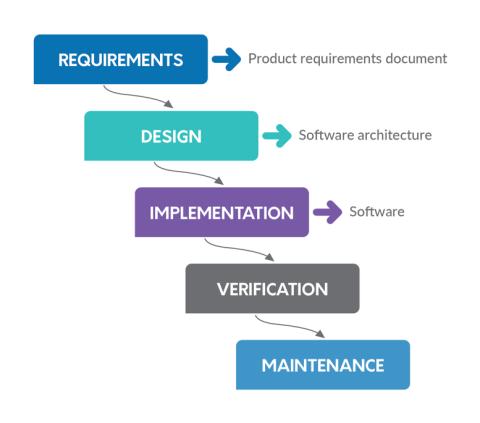
Waterfall is best for projects with fixed requirements, strict compliance rules, or sensitive data. It also suits teams that need clear timelines and deliverables before work starts.
The main advantage is predictability: costs and schedules are easier to estimate when the steps are locked in advance. The downside is a lack of flexibility — if problems appear late in testing, they can be expensive and time-consuming to fix.
Instead of building the whole product at once, this model delivers it in stages. Each cycle produces a working version, even if basic, that’s tested and improved upon before moving forward. Over time, the software grows through these small steps until the final system takes shape.
Teams often use project tools like Jira or Azure DevOps to track work in each cycle. A common metric here is deployment frequency, since the goal is to ship updates on a regular basis rather than waiting for a single release.
The big draw is that users and stakeholders see progress early. If feedback shows a feature needs to change, the next cycle can adjust instead of forcing a full rework later. That steady delivery reduces risk but also requires discipline to keep the project on track.
A good fit for projects with evolving requirements, such as software shaped by user testing or market feedback. It works well when the product can be rolled out in phases (like SaaS platforms or mobile apps) and when teams want to reduce upfront risk by validating features as they go. It’s also suited for long-term projects where stakeholder input is critical at multiple stages.
The model’s strength is adaptability, allowing teams to pivot quickly, test ideas in real-world conditions, and deliver value early. It also reduces the risk of building features that miss the mark. On the downside, managing scope can be challenging, costs may rise if iterations drag on, and without strong project management, teams risk slipping into endless revisions without hitting final milestones.
The Spiral model combines iterative development with the structured stages of the Waterfall approach. Work is done in cycles, or “spirals,” with each loop including planning, risk analysis, building, and testing. After each loop, the project is reviewed, and the next spiral begins with new or refined requirements.
The focus on risk analysis sets this model apart. Each cycle forces the team to ask what could go wrong, test assumptions, and adjust plans before moving further. That makes the Spiral model especially detailed, though it also adds time and management complexity.
This model is most useful for large or high-risk projects where mistakes would be expensive. It’s often chosen for long-term initiatives, government work, or systems like healthcare that demand strict compliance and sensitive data. It’s also effective when requirements are unclear at the start but risks must be carefully managed along the way.
The key advantage is strong risk control and early detection of problems. It also allows flexibility to adapt as requirements evolve. The primary disadvantage is complexity — cycles can be resource-intensive, require specialized risk expertise, and slow delivery compared to leaner models.
The V-Shaped model is an evolution of Waterfall that puts a stronger focus on testing. For every stage of development on the left side of the “V,” there’s a matching stage of verification and validation on the right. For example, requirements are paired with acceptance testing, and detailed design is paired with system testing.
This structure creates a clear map between what is planned and how it will be tested. It emphasizes quality and ensures that defects are caught at the right point in the process.
This model is best for projects with well-defined, stable requirements where changes are unlikely. It’s often chosen in industries like aerospace, healthcare, defense, and automotive, where compliance, safety, and reliability are more important than speed. It’s also useful for projects that demand rigorous documentation and traceability.
The biggest advantage is strong quality assurance. Defects are identified early, and every requirement is tied to a clear test, which improves reliability. The disadvantage is limited flexibility — if needs change midway, the structure of the model makes it hard to adapt.
With the Prototyping model, teams build a simple version of the software early on. The working draft is not the finished product, but it gives users and stakeholders something they can see and test. This early draft helps uncover missing requirements or design flaws before too much time is invested.
The prototype is then revised based on feedback. Each round gets the team closer to what users actually want, but it can also mean extra work if changes keep piling up.
This model is a good fit when requirements are unclear or likely to change. It works well for new products, user interfaces, or any project where early feedback will shape the outcome. It’s especially effective for new products, user interfaces, or customer-facing systems where visual design and usability strongly influence success.
The strength of this approach is quick feedback and better user alignment, reducing the risk of building the wrong solution. The drawback is that multiple revisions can add cost and delay if the process isn’t managed carefully.
Rapid Application Development (RAD) focuses on speed. Instead of long planning cycles, teams create components quickly, often using reusable parts and automated tools. The goal is to get a working product into users’ hands as fast as possible.
Prototypes and user feedback play a big role here. Teams release early versions, collect input, and then refine the product in short cycles. This keeps progress visible but also demands that stakeholders stay engaged throughout the process.
RAD makes sense when time-to-market matters more than detailed documentation. It’s often used for smaller projects like internal tools or early-stage products, where it’s okay to improve the system after it goes live instead of writing heavy documentation up front.
The clear benefit is speed — teams can produce usable results in weeks instead of months. Flexibility is another plus, since changes can be added along the way. The trade-off is that speed can lead to gaps in testing or design, so the final product may need extra work after release.
The Rational Unified Process (RUP) is a structured framework created by IBM. It divides development into four phases: inception, elaboration, construction, and transition. Each phase has clear goals and deliverables, with progress reviewed before the team moves forward.
Unlike strict Waterfall, RUP allows some iteration within each phase, but it still relies heavily on documentation and defined roles. It’s often supported by tooling that tracks requirements, design artifacts, and testing results, which makes it appealing to large organizations.
Because of this structure, RUP is seen as a middle ground — more flexible than Waterfall but more disciplined than Agile.
RUP is usually chosen for enterprise-scale projects that need detailed records, high accountability, and clear checkpoints. It’s a strong fit in regulated industries or any environment where compliance and documentation are just as important as the finished product.
The main advantage is discipline and traceability: teams know what to deliver at each stage, and progress is easier to audit. The disadvantage is overhead — the process can feel heavy, and the pace is slower compared to more adaptive models.
Agile isn’t a single process but an approach that breaks projects into small, repeatable cycles. Teams build something usable, test it, and then improve on it in the next round. Work happens in short bursts instead of one long push to the finish, which makes it easier to change direction when priorities shift.
Each cycle gives stakeholders a chance to review progress and weigh in before more time or budget is spent. Scrum, Kanban, and Lean are three popular frameworks that put Agile principles into practice.
Agile makes sense for projects where requirements aren’t fully known at the start. It’s useful when features need to be released often and adjusted quickly based on user response.
Agile’s biggest strength is flexibility — teams can adapt as they go and get value into production sooner. The challenge is that planning becomes less predictable, so costs and timelines can shift more than with fixed models.
Scrum is an Agile framework that organizes work into short sprints, usually two to four weeks. At the start of each sprint, the team agrees on what they can realistically deliver. Roles like Product Owner and Scrum Master are part of the setup, but what really makes it work are the planning sessions, daily stand-ups, and end-of-sprint reviews that keep everyone aligned.
In many teams, Scrum goes hand in hand with continuous integration. Tools such as GitHub Actions or Jenkins let code be tested and deployed during the sprint, which keeps the product closer to something that can be released at any point.
Scrum is useful when projects need frequent testing and tight feedback loops. It suits teams that can commit to the sprint cycle and meet often to adjust course. Without that regular involvement, the framework tends to lose its benefits.
Scrum makes progress visible and gives teams a chance to pivot quickly. The trade-off is that the process itself takes time. Planning, check-ins, and reviews can become a burden if goals aren’t clear, and instead of helping speed things up, the structure can slow them down.
Kanban is built around making the flow of work visible. Teams use a board with columns — often “To Do,” “In Progress,” and “Done” — and move tasks across as they’re completed. Whether the board is a wall of sticky notes or a tool like Jira, the purpose is the same: keep priorities clear and highlight where work is slowing down.
Unlike Scrum, there are no fixed sprints. Work is delivered as soon as it’s ready, and progress is often measured by how long tasks take to move from start to finish. That makes Kanban well suited to continuous work streams rather than projects with a single release date.
The following example board from workflow visualization company Kanban Tool shows what a Kanban interface looks like:
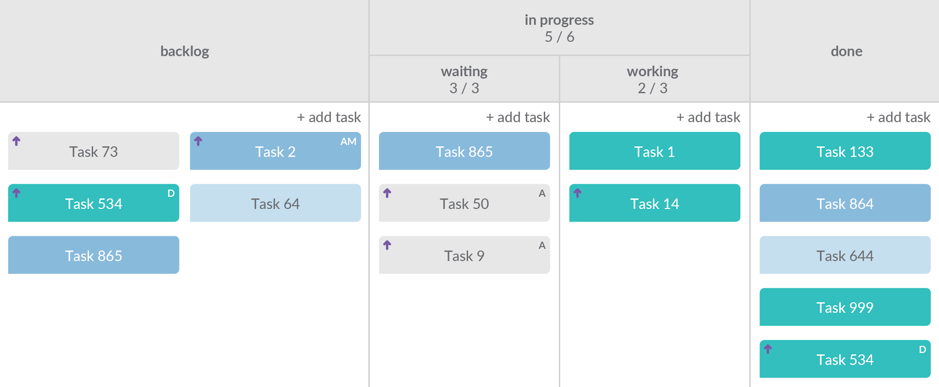
Kanban really shines when work comes in a steady stream, such as support tickets, product fixes, or ongoing updates. The board’s ability to show priorities and bottlenecks at a glance helps smaller teams stay on top of changing priorities without sprint planning.
Kanban makes it clear what’s being worked on and what’s done, which helps teams react quickly. What it doesn’t do well is forecasting. If stakeholders need firm delivery dates or long-term schedules, the board alone won’t provide them.
The aim of this approach is to improve projects three times quicker than other models by focusing on the elements that add the most value. By focusing on the essentials, developers can take the time to perfect each feature to a high standard. This methodology is ideal for projects with a limited budget and a lesser workflow.
Teams may use tools like value-stream mapping to see where time is wasted and where the process can be tightened.
This approach can move projects faster, but it depends heavily on judgment. Teams have to know which features are essential and which can wait — which is not always easy to agree on.
As precision is at the forefront of this model, documentation needs to be detailed, as developers need a deep understanding of the requirements.
Only the most highly skilled developers can implement lean development, as the approach requires expert knowledge and experience.
Lean works well for projects with tight budgets, resource constraints, or product overhauls where speed and efficiency are critical. It works best if the team can move quickly and make choices without a lot of extra steps.
Lean can save time and money by avoiding work that doesn’t add value. The risk is that important details may get skipped if the team lacks experience or misjudges what should be cut.
Cloud storage provider Dropbox is a good example of a company that used lean software development to take its project from a Minimal Viable Product to a company with more than 500 million users.
The company first launched in 2007 with a simple 3-minute video, narrated by the company’s founder, Drew Houston. The video is still available on YouTube today:
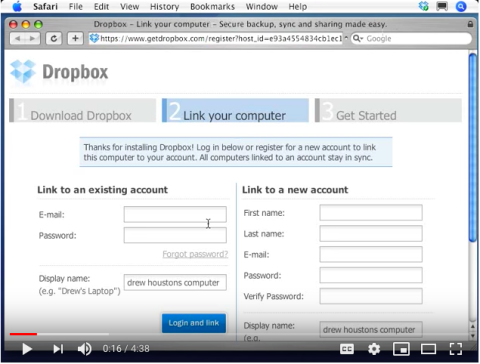
Since its launch, Dropbox has used lean software development to enable collaboration, integration with Microsoft Office, and the creation of Dropbox for Business.
The Hybrid model pulls from both Waterfall and Agile. Teams often lean on Waterfall for the upfront pieces — setting requirements, design work, or documentation — because that structure keeps everyone aligned. Once development starts, Agile practices like sprints or regular reviews are added so the team can adjust and deliver faster.
How the mix looks in practice varies. Some projects stay closer to Waterfall with just a few Agile checkpoints, while others flip the balance and use Waterfall mainly for initial planning. The point is to match the method to the project instead of forcing one approach from start to finish.
Hybrid is well suited for projects that need both structure and adaptability. It works when organizations must meet compliance or procurement rules but also want flexibility to respond to stakeholder feedback.
A hybrid approach gives teams room to plan while still leaving space to adapt as the project moves forward. The challenge is that blending two systems isn’t always smooth — if responsibilities aren’t clear, the extra coordination can slow things down.
Here are a couple of recent examples where Wholegrain Digital, a web design and development firm, used a hybrid approach for WordPress development projects.
Opportunity/Challenge: The National Health Service (NHS) needed a new website to match a rebrand. The work had to be finished in a short window and under a set budget. The team used Waterfall steps to pin down requirements and sign-off points, but added Agile practices so designers, developers, and the client could work together in real time. The site launched on schedule and met the new branding goals.
Key Takeaway: Combining the structure of waterfall and the speed and collaboration of agile made it easy to complete the project within the strict time and budget constraints of the NHS’s contract.
Development and Operations (DevOps) is best-suited to products where the delivery team is open to collaboration. DevOps works particularly well where the culture surrounding the project is open to sharing and working together.
The aim of this methodology is to ensure that the project is carried out as efficiently as possible with minimal problems.
Automated testing catches issues early, telemetry tracks performance in real time, and continuous deployment tools such as Jenkins or GitHub Actions push changes into production quickly. The result is a cycle where new features and fixes can be delivered with less disruption.
DevOps is a strong option for organizations that value collaboration across teams and need rapid, ongoing releases. It works best in cultures where development and IT are willing to share responsibility for outcomes.
The main advantage is efficiency — faster releases, quicker feedback, and fewer delays from handoffs. The challenge is cultural. Adopting DevOps often requires teams to change how they work together, and without that shift, the automation and tools won’t deliver their full benefit.
No single model works for every project. The right choice depends on scope, how stable requirements are, and the level of risk you’re willing to take on. Projects with strict compliance needs often lean on Waterfall or V-Shaped models for their step-by-step phases and checkpoints, while Spiral adds formal risk reviews to support high-stakes or long-term initiatives.
When requirements are likely to change, flexible models work better. Iterative and Incremental deliver in stages so teams can adjust along the way. Prototyping and RAD move quickly, putting an early version in front of users instead of waiting months for feedback. RUP slows things down but provides the structure and documentation large organizations expect.
Agile isn’t one model but a family. Scrum is about sprints and testing, Kanban keeps tasks flowing on a board, and Lean pushes teams to cut waste and focus on what matters most. Hybrid brings together upfront planning with room to adapt, while DevOps links development and operations so updates can roll out steadily through automation.
After weighing the models, the focus turns to who will actually deliver. Some companies rely on in-house staff, others extend their team with extra talent, and many choose to outsource the entire project. Clutch supports that decision by publishing verified reviews and provider data, giving businesses a clearer view of which partners have the track record to handle the work.
Once you’ve settled on a model, the next choice is how the work gets done. Budget, available talent, and timing all play a role.
Each SDLC model has its strengths, but choosing the right one is only part of the equation. Success also depends on the team implementing it. Clutch gives decision-makers access to verified client feedback and provider data, making it easier to see which partners have the skills and track record to match your needs. That evidence helps companies move forward with more confidence.
Spiral and V-Shaped models are commonly used when risk management is a priority. Spiral builds in checkpoints for risk analysis at every cycle, which helps catch problems early in complex, long-running projects. V-Shaped links each development step to a matching test stage, giving teams a predictable way to validate quality as the work moves forward.
Waterfall is easier to estimate under a fixed bid, since scope and deliverables are defined up front. Agile models provide more flexibility but make costs harder to pin down, as scope can shift during development. Teams working under tight budgets need to decide if predictability or adaptability is the higher priority.
It’s possible to transition, but it usually works best in phases. For example, a team might start with Waterfall for requirements and design, then shift to Agile sprints for development. Modern tooling like Jira, Azure DevOps, or GitHub Actions supports hybrid setups by handling both documentation-heavy and iterative workflows.
Some models are more demanding than others. Scrum, for example, requires cross-functional teams that can stay engaged daily, while Kanban can run smoothly with smaller groups handling steady tasks. Enterprise frameworks like RUP work best with larger, specialized teams. Companies without all the needed expertise often add an extended team to fill gaps.
Delivery options shape what’s realistic in terms of scope and timeline.. In-house teams offer the most control but may be limited by available skills. Extended teams add capacity without replacing internal staff, which works well for Agile or Hybrid projects. Outsourced development can speed delivery and cut costs but requires clear agreements up front to keep projects aligned with the chosen model.
 Nacho is Co-founder and Chief Executive Officer at BairesDev. Responsible for defining and implementing long and short-term plans, ensuring the successful management of the company, and setting future strategy aimed at positioning BairesDev as the #1 Technology Services company in the region.
He holds a Bachelor’s degree in Systems Engineering as well as a Master of Business Administration and is fluent in English, Spanish, Italian, and Portuguese. A native of Argentina, he now calls San Francisco home. Nacho is the author of "IT Outsourcing to Latin America", an Amazon-exclusive book that analyzes the Software Development market in Latam. He is also a Forbes Technology Council member and a thought leader in the Software Outsourcing industry.
Nacho is Co-founder and Chief Executive Officer at BairesDev. Responsible for defining and implementing long and short-term plans, ensuring the successful management of the company and setting future strategy aimed at positioning BairesDev as the #1 Technology Services company in the region.
He holds a Bachelor’s degree in Systems Engineering as well as a Master of Business Administration and is fluent in English, Spanish, Italian, and Portuguese. A native of Argentina, he now calls San Francisco home. Nacho is the author of "IT Outsourcing to Latin America", an Amazon-exclusive book that analyzes the Software Development market in Latam. He is also a Forbes Technology Council member and a thought leader in the Software Outsourcing industry.
See full profile