10 Actionable Link Building Tactics to Build Brand Authority & Legitimacy
Discover 10 actionable link building tactics to boost brand authority and rankings. Learn how quality backlinks build lasting trust in the AI search era.
Updated June 22, 2026

Websites that lack meta tags are missing out on a key opportunity to rank in search results. You can use this article to learn how to add tags to your website, plus the most important meta tags for SEO.
Meta tags are snippets of HTML in a page's < head> that describe your content to search engines and control how your pages appear in search and social results. They aren't visible on the page itself, and most aren't direct ranking factors — but the right ones improve click-through rates, guide how search engines crawl and index your site, and shape how both Google and AI engines represent your pages. This guide walks through the eight that matter most and how to use each one.
According to John Mueller, Search Advocate at Google, meta tags can affect how users see your site in the search results and whether they actually click through to it.
Meta tags matter, but not all of them are equally important. Below, I'll cover the ones to focus on.
Looking for a SEO agency?
Compare our list of top SEO companies near you
Meta tags are tags within the HTML code of your website that describe components of your page to search engines, so algorithms like Google's and Bing's can read what your site is about. Common examples include:
If you're not fluent in HTML, content management systems like WordPress offer SEO plugins that make adding and editing meta tags straightforward.
While most meta tags aren't themselves a ranking factor, high-quality meta tags are essential to effective digital marketing and technical SEO.
When your pages appear in search results, users read your meta title and meta description as the page title and summary, and decide whether to click based on them. Effective meta tags can increase click-through, reduce bounce rates by clarifying a page's purpose, support on-page SEO, and help manage duplicate content.
Looking for more ways to grow your business? Check out how other companies are using Netflix Advertising to grow theirs.
If you want to check the meta tags for any page, just right-click anywhere on the page and select “View Page Source.”
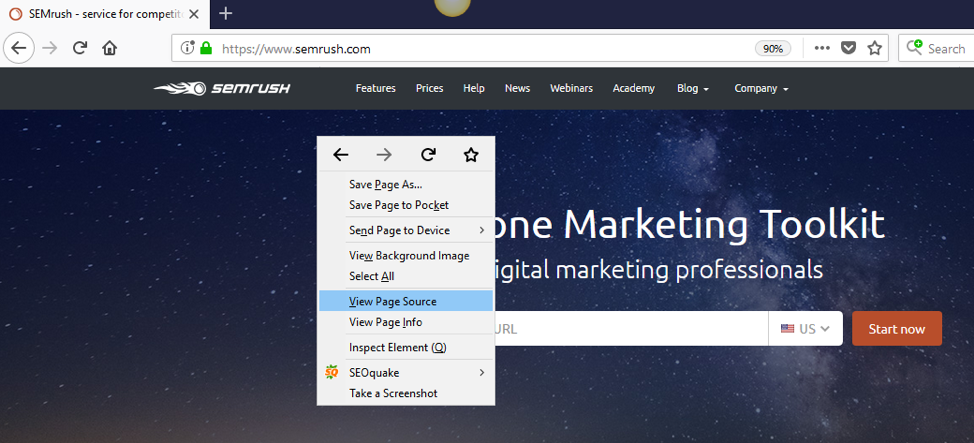
You can also use tools such as SEMrush (specifically the SEMrush Audit Tool) and Screaming Frog to check the meta tags on any site.
In this article, I'll walk you through the 8 most important meta tags for SEO:
The title tag specifies what your web page is about. It's important for SEO and visitors because it appears in the search engine results page (SERP) and in browser tabs, and it supports all major browsers. Always add it in the < head> section of your page.
Tips for writing a strong title tag:
One caveat: Google frequently rewrites title tags in the SERP — often using your H1 or on-page text — when it judges another version more useful. You can't force your exact title to show, so write a clear, accurate title and a strong H1 that align.
A meta description is an HTML element that sums up the content on your web page. Search engines typically show the meta description in search results below your title tag.
Code it like this:
< meta name="description" content="This is a sample meta description.">
Google doesn't use the meta description as a ranking signal, but it strongly affects click-through rate because it appears in results and tells users what your page offers. There's no fixed length — Google has changed how much it displays over time — but a practical target is about 150–160 characters on desktop and around 130 on mobile. Note that, as with titles, Google often rewrites the description shown in results to match the user's query, so the one you write isn't guaranteed to appear verbatim.
How to write a good meta description:
A canonical tag is an HTML link tag with the attribute “ rel=canonical."
It indicates that there are other versions of this webpage. By implementing the canonical tag in your code, your website tells search engines that this URL is the main page and that they shouldn’t index any other pages.
Use the following syntax to add a canonical tag:
< link rel="canonical" href="http://example.com/" />
Search engines can't "see" images, so alt text describes them — which helps both accessibility (screen readers) and SEO. Use it like this:
< img src="image.jpg" alt="descriptive text">
Tips for alt text:
The robots meta tag tells search engines to either index or non-index your web page.
The tag has four main values for the search engine crawlers:
Use the following syntax for your robots meta tag:
< meta name=”robots” content=”noindex, nofollow”> Means not to index or not to follow this webpage.
< meta name=”robots” content=”index, follow”> Means index and follow this webpage.
Place the robots meta tag in the < head> section of your webpage.
These tags make social media syncing easier.
Open graph meta tags promote integration between Facebook, LinkedIn, Google, and your website.
Here is a sample of how Open Graph tags look like in standard HTML:
< meta property="og:type" content="article" />
< meta property="og:title" content="TITLE OF YOUR POST OR PAGE" />
< meta property="og:description" content="DESCRIPTION OF PAGE CONTENT" />
< meta property="og:image" content="LINK TO THE IMAGE FILE" />
< meta property="og:url" content="PERMALINK" />
< meta property="og:site_name" content="SITE NAME" />
Twitter cards work in a similar way to Open Graph, except for Twitter.
Twitter will use these tags to enhance the display of your page when shared on their platform.
Here is a sample of How Twitter card look like in standard HTML:
< meta name="twitter:title" content="TITLE OF POST OR PAGE">
< meta name="twitter:description" content="DESCRIPTION OF PAGE CONTENT">
< meta name="twitter:image" content="LINK TO IMAGE">
< meta name="twitter:site" content="@USERNAME">
< meta name="twitter:creator" content="@USERNAME">
Header tags (H1–H6) signal information hierarchy on a page, with H1 the most important and H6 the least. Marking text as H1 tells search engines it's the most important heading on the page. Beyond SEO, a logical heading structure improves accessibility and helps both readers and machines parse your content. (Header tags appear in the page body, not the < head>, but they're a key part of on-page metadata.)
The responsive design meta tag — the viewport meta element — controls how a page scales and displays across devices. Find it in the < head> and add it like this:
< meta name="viewport" content="width=device-width, initial-scale=1.0">
One exception: don't add the viewport tag if your pages aren't actually responsive, as it can worsen the experience. Given that Google indexes the mobile version of your site first, a responsive, mobile-friendly layout is effectively a baseline requirement today.
Meta tags now do double duty. The same title and description that shape your Google snippet also influence how AI experiences — Google's AI Overviews, ChatGPT, and others — summarize and represent your page. Clear, accurate metadata makes it easier for these systems to understand and correctly characterize your content.
Two related pieces of metadata are worth adding to your checklist:
Structured data (schema markup). Not a meta tag, but it's the most direct way to tell search engines and AI what your content is (a product, article, FAQ, review), and it powers rich results. If you do nothing else "beyond" meta tags, add relevant schema.
Charset. The < meta charset="UTF-8"> tag ensures your characters render correctly across browsers and devices — small, but a genuine technical baseline.
The fundamentals haven't changed — clear titles, compelling descriptions, clean indexing signals — but in 2026 they serve two audiences at once: traditional search and AI answer engines.
Auditing your meta tags is a great start to improving on-page results. Used correctly, the eight tags above help you rank better and present your pages well in both search and social — and, increasingly, in AI answers. Think of meta tags as a way to give human users, search engines, and AI a clearer idea of what your pages are about. The more deliberately you use them, the more value you'll create.
Meta tags are snippets of HTML in a page's < head> section that describe the page to search engines and browsers. They aren't visible on the page itself but influence how it's crawled, indexed, and displayed in search and social results.
Yes — though most aren't direct ranking factors. Title tags and meta descriptions strongly affect click-through rates, robots tags control indexing, and clear metadata also helps AI engines represent your page accurately.
The title tag and meta description (for how you appear in results), the robots tag (for indexing control), the canonical tag (for duplicate content), and the viewport tag (for mobile). Open Graph and X card tags matter for social sharing.
No. Google has ignored the meta keywords tag since 2009, and overusing it can look spammy. Don't spend time on it.
Not always. Google frequently rewrites titles and descriptions in the SERP to better match a user's query, so write clear, accurate metadata but don't expect it to appear verbatim every time.